- A list making tool,
- That can show you websites in the list,
- And synchronize that preview with all your friends!
- Share the web browser with your friends
- Present a slideshow over the internet
- Control what is displayed on many computers from a single computer
- Post lists to lists for a "file directory"-esq experience
Go to : Shared Windows Tutorial
Got to : Shared Windows
Careful! It's fragile!
- Visual Studio or XCode (sign Xcode's license agreement!!!)
- nodejs
- npm install sqlite3
- npm install socket.io
- npm install jsdom
- npm install multiparty
- npm install http-get
- Open "sharedwindows/server/" in your command prompt.
- run "node server.js"
- The default port is 80 (http). To change that, use: "node server.js [http port]".
for example:
node server.js 8080
- Go into
database/and deletedb.sqlite. - Copy
dbClean.sqlite - name it
db.sqlite.
- JSDOM relies on contextify, which relies on node-gyp.
- Node-gyp needs Visual Studio or XCode installed.
- Hint for Windows: node-gyp
- Hints for XCode: Xcode->Preferences->Downloads and install component named "Command Line Tools". XCode may ask you to sign a liscense via the command line.
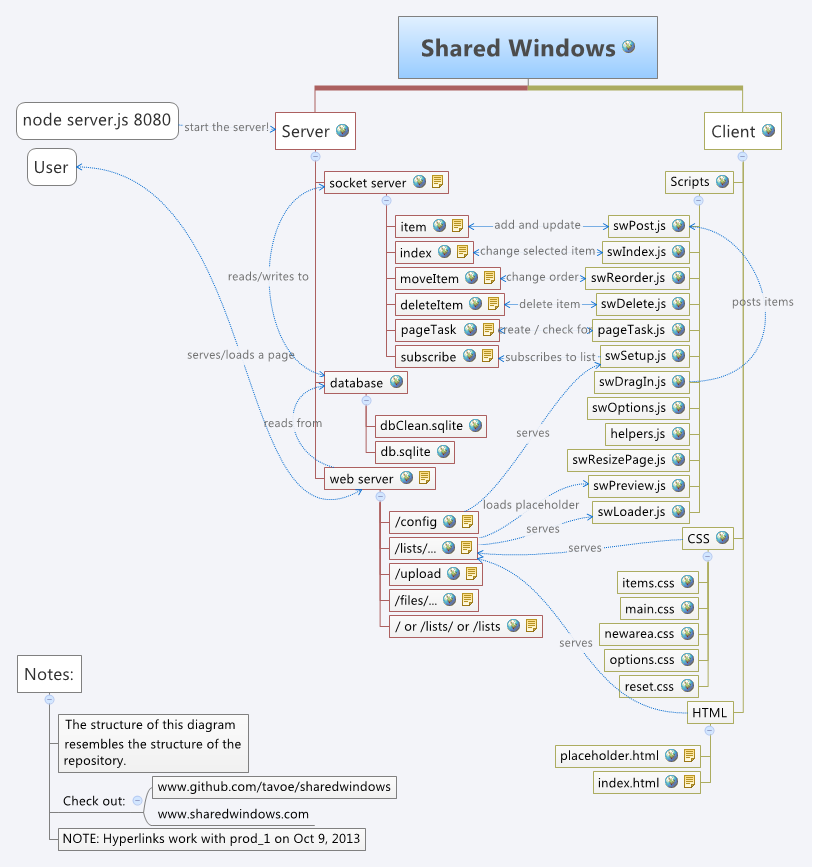
- This projects consists of a client and a server.
- Run the server as described above.
- It'll serve you a copy of the client on port 80.
The server code is in the folder labeled "server". The client is in "webClient". The server pulls from the "database/db.sqlite" often.
There are read-mes in the client and server folders.
Shared Windows.xmind is in notes. Get xmind, it's free.