 This is at https://bomonike.github.io/pid from code at https://github.com/bomonike/bomonike.github.io/blob/master/pid.md
To maintain a process variable such as ambiant temperature at a target Setpoint, a PLC controller activates a heater or cooler based on sensor readings, in a feedback control loop. Other variables include regulating pressure and flow rate.
VIDEO by realpars.com:
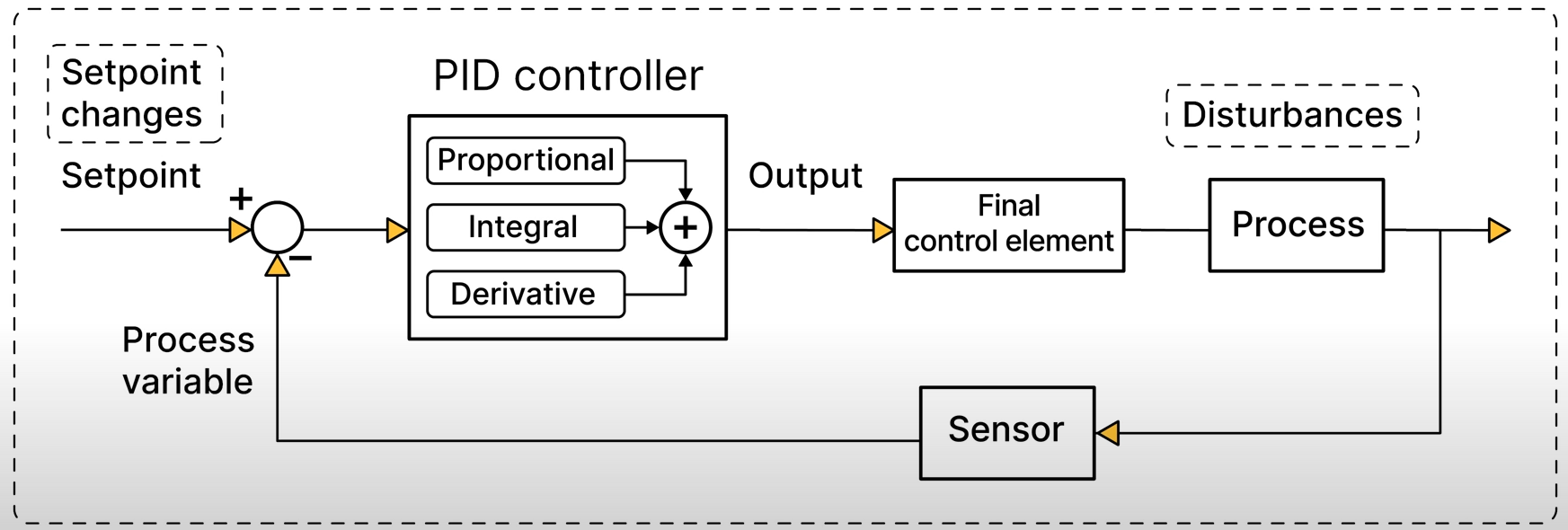
VIDEO: To dampen wild swings in actions and values, PLCs use the PID (Proportional Integral Derivative) approach to use keep the Setpoint Value (SV) at a desired temperature, pressure, battery or fuel level, etc. The difference between the SV and current observed PV (Process Variables) is the Error/Deviation. To keep that low, Control actions such changing the flow rate, varying voltage levels, etc. are applied to MV (Manipulated Variables) such as the position of values and voltage levels set.
- VIDEO:
- VIDEO
- https://blog.novus.com.br/basic-pid-control/?lang=en
- https://www.yokogawa.com/us/library/resources/media-publications/pid-tuning-improves-process-efficiency/
VIDEO: PID Control and Tuning by Rob Sink at Yokogawa 2016 covers the topic fully in 1 hour.
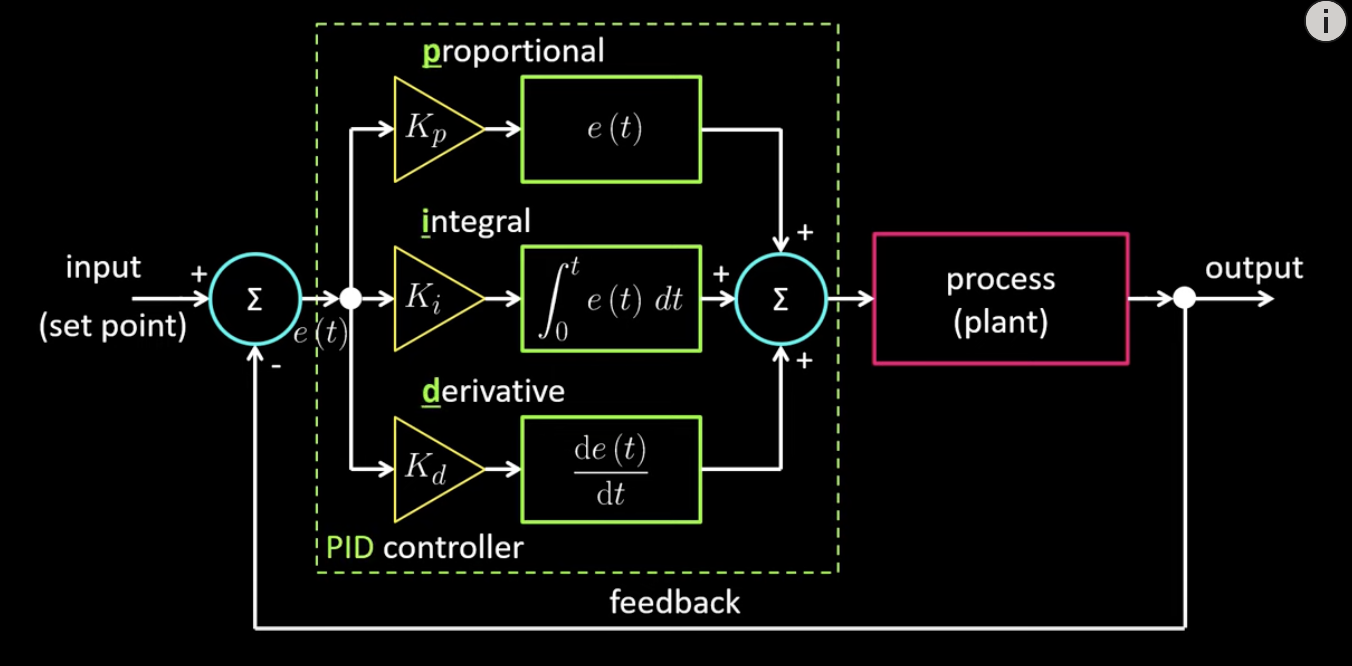
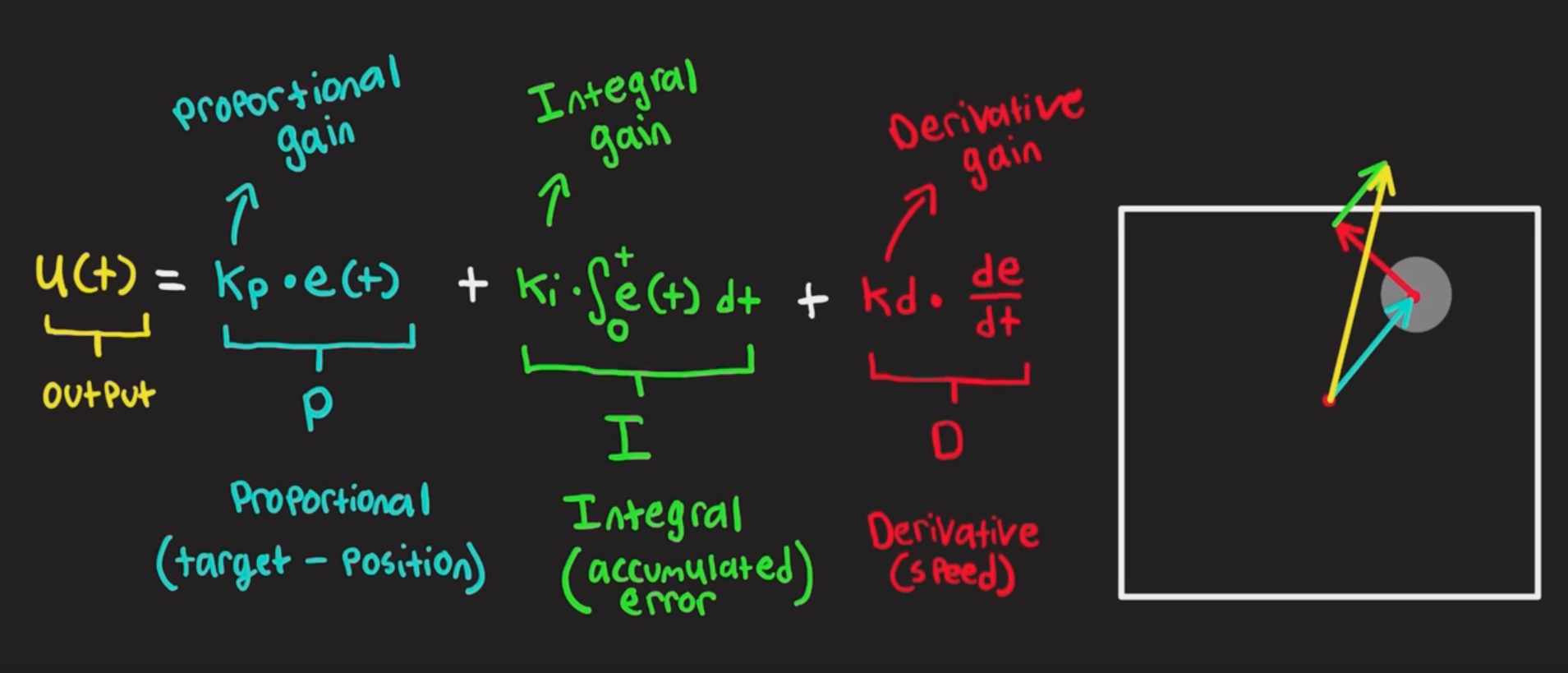
VIDEO: PID (Proportional Integral Derivative) controllers are tuned using three K Controller Gain settings to reduce errors with minimal oscillations:
-
Kp "Proportional" correction to errors increase in proportion to the magnitude of historical error between the current and the desired value.
-
Ki "Integral" correction counters small errors accumulated over time (with an integral meaning an area under the graph) require more intensive correction to keep exactly at the SV.
-
Kd "Derivative" correction dampens (slows) the speed (rate of error) to avoid oscillations in the future.
HANDS-ON: Manually adjust kp, ki, kd in real time on the PID simulator Excel sheet from https://www.engineers-excel.com/Apps/PID_Simulator/Description.htm
Alternately, use web pages at
- https://pidtuner.com/#/
- VIDEO: https://pidtuningireland.com/
- https://tools.softinery.com/PIDSIM/ and
- https://tech-uofm.info/pid/pid.html
- https://smartmfg.me.wisc.edu/pages/resources/PIDMotorPositionControl.html
- VIDEO of Manual PID Simulator from Microsoft Store
- https://instrumentationtools.com/pid-controller-simulator/
They're an improvement over the original https://grauonline.de/alexwww/ardumower/pid/pid.html provides a PID simulator you can adjust in real time by changing JavaScript code (ported in 2004 from the Arduino PID library and Arduino AutoTune Library with tests, as explained by Brett). Learnings: Auto tune.
- If it overshoots a lot and oscillates, either the integral gain (I) needs to be increased or all gains (P,I,D) should be reduced
- If it ramps up quickly to a value below target value and then slows down as it approaches target value? Try increasing the I constant.
- Too much overshoot? Increase D, decrease P.
- Response too damped? Increase P.
this video https://www.aaedmusa.com/projects/project-three-sng7y-gaslp
References about PID:
-
interval path of the past and derivative rate to predict future error with MATLAB code
-
https://www.youtube.com/watch?v=uXnDwojRb1g 7:07 Empirical PID gain tuning (Kevin Lynch) at Northwestern Robotics - modeling using MATLAB
-
Fuzzy Logic Control (FLC)
-
Model Predictive Control (MPC) works by using an algorithm based on a mathematical model to predict the behavior of process variables. VIDEO
-
Adaptive Control
-
Neural Network Control