Skip to content

Latest commit


History

History

README.md

Provisioning AWS Databricks E2

This template provides an example of a simple deployment of AWS Databricks E2 workspace.

Note
The following Terraform guide provides step-by-step instructions for this deployment.

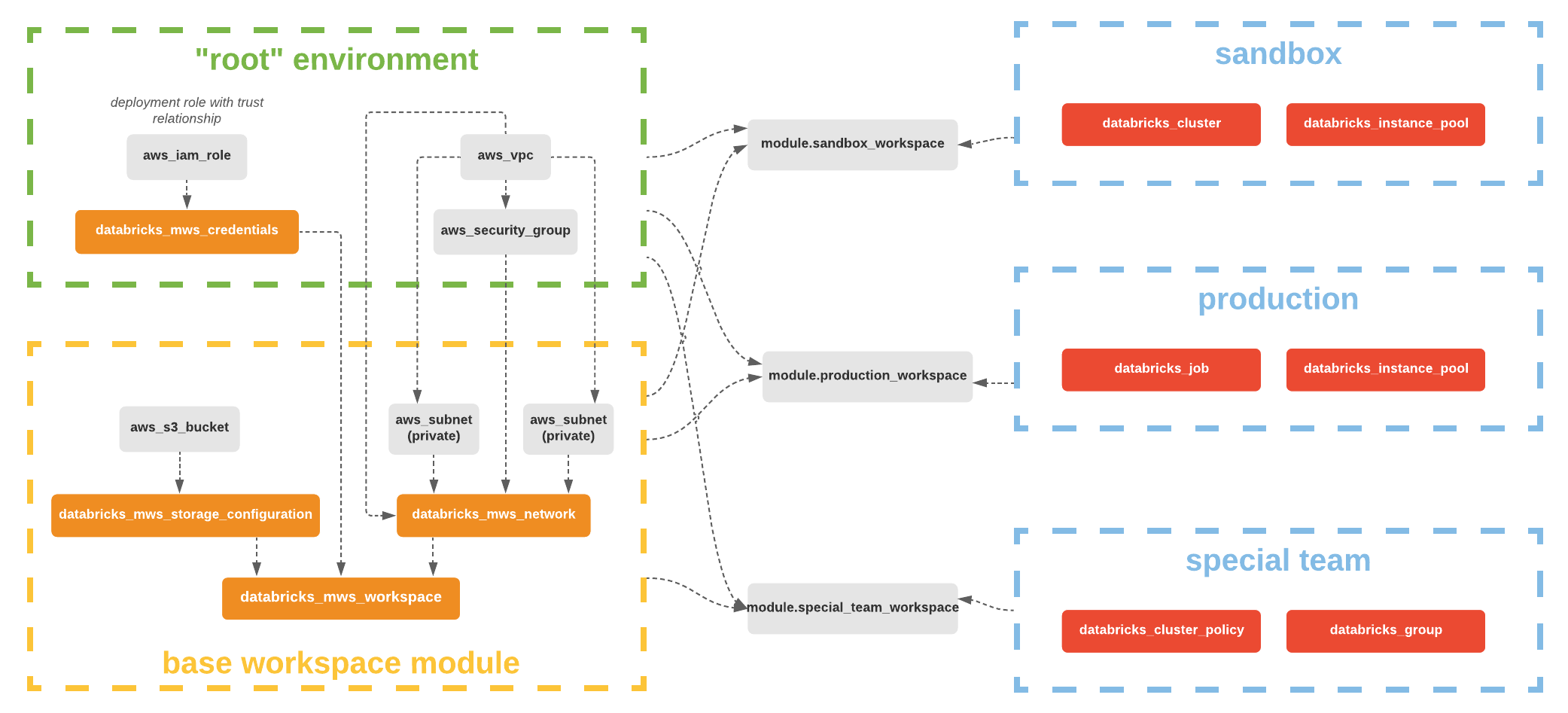
Overall Architecture

alt text

Resources to be created:

  • VPC and VPC endpoints
  • S3 Root bucket
  • Cross-account IAM role
  • Databricks E2 workspace

How to use

Note
You can customize this module by adding, deleting or updating the Azure resources to adapt the module to your requirements. A deployment example using this module can be found in examples/aws-workspace-basic

  1. Reference this module using one of the different module source types
  2. Add a variables.tf with the same content in variables.tf
  3. Add a terraform.tfvars file and provide values to each defined variable
  4. Configure the following environment variables:
    • TF_VAR_databricks_account_client_id, set to the value of application ID of your Databricks account-level service principal with admin permission.
    • TF_VAR_databricks_account_client_secret, set to the value of the client secret for your Databricks account-level service principal.
    • TF_VAR_databricks_account_id, set to the value of the ID of your Databricks account. You can find this value in the corner of your Databricks account console.
  5. Add a output.tf file.
  6. (Optional) Configure your remote backend
  7. Run terraform init to initialize terraform and get provider ready.
  8. Run terraform apply to create the resources.

Requirements

Name Version
aws >= 5.0
databricks >=1.13.0

Providers

Name Version
aws >= 5.0
databricks >=1.13.0
random n/a
time n/a

Modules

Name Source Version
vpc terraform-aws-modules/vpc/aws 5.7.0
vpc_endpoints terraform-aws-modules/vpc/aws//modules/vpc-endpoints 5.7.0

Resources

Name Type
aws_iam_role.cross_account_role resource
aws_iam_role_policy.this resource
aws_s3_bucket.root_storage_bucket resource
aws_s3_bucket_acl.acl resource
aws_s3_bucket_ownership_controls.state resource
aws_s3_bucket_policy.root_bucket_policy resource
aws_s3_bucket_public_access_block.root_storage_bucket resource
aws_s3_bucket_server_side_encryption_configuration.root_storage_bucket resource
aws_s3_bucket_versioning.versioning resource
databricks_mws_credentials.this resource
databricks_mws_networks.this resource
databricks_mws_storage_configurations.this resource
databricks_mws_workspaces.this resource
random_string.naming resource
time_sleep.wait resource
aws_availability_zones.available data source
databricks_aws_assume_role_policy.this data source
databricks_aws_bucket_policy.this data source
databricks_aws_crossaccount_policy.this data source

Inputs

Name Description Type Default Required
databricks_account_id Databricks Account ID string n/a yes
cidr_block n/a string "10.4.0.0/16" no
prefix Prefix for use in the generated names string "" no
region AWS region to deploy to string "eu-west-2" no
tags Optional tags to add to created resources map(string) {} no

Outputs

Name Description
databricks_host n/a
databricks_token n/a
workspace_id n/a