This workflow integrates the vLLM Production Stack into kdevops, providing automated deployment, testing, and benchmarking of large language models using Kubernetes, Helm, and the vLLM serving engine.
vLLM is a high-performance inference engine for large language models, optimized for throughput and memory efficiency on a single node. It provides:
- Fast inference with PagedAttention for efficient KV cache management
- Continuous batching for high throughput
- Optimized CUDA kernels for GPU acceleration
- OpenAI-compatible API server
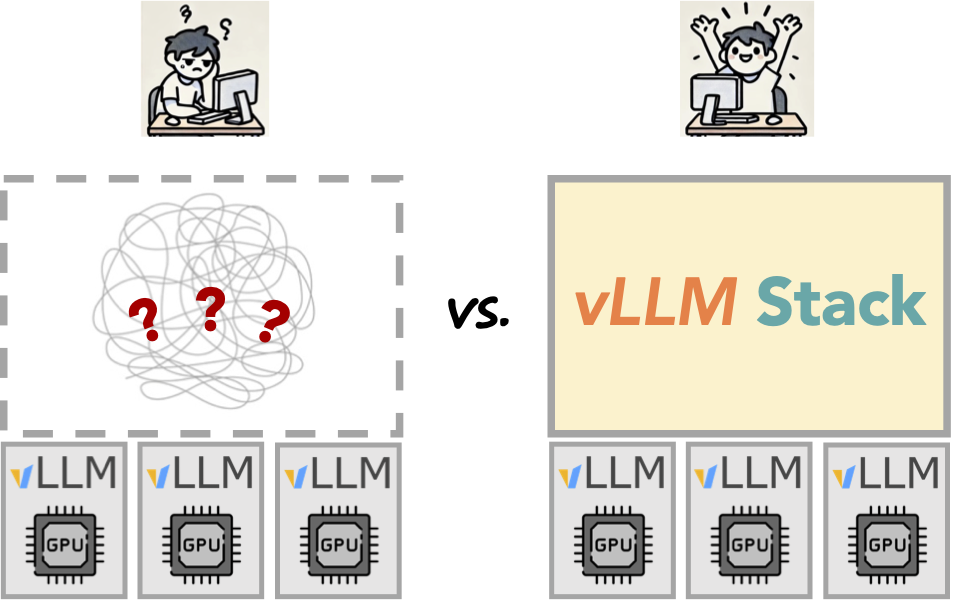
vLLM excels at single-node inference but requires additional infrastructure for production deployment at scale.
The vLLM Production Stack is the layer above vLLM that transforms it from a single-node engine into a cluster-wide serving system. It provides:
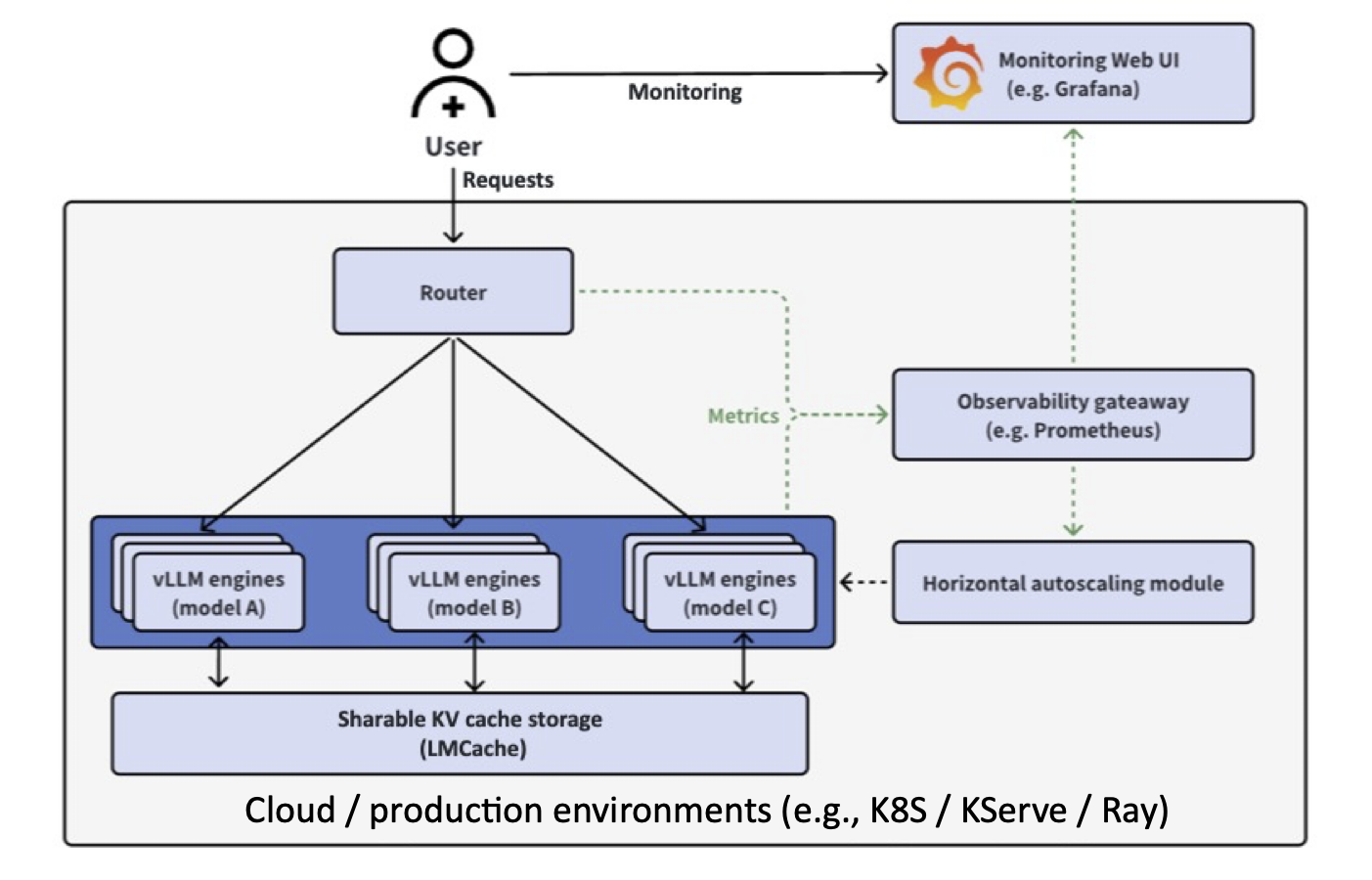
Key Components:
- Request Router: Intelligent request distribution with prefix-aware routing
- LMCache Integration: Distributed KV cache sharing across instances (3-10x faster TTFT)
- Observability: Unified Prometheus/Grafana monitoring
- Autoscaling: Cluster-wide horizontal pod autoscaling
- Fault Tolerance: Automated failover and recovery
Performance Improvements:
- 3-10x lower response delay through KV cache reuse
- 2-5x higher throughput with intelligent routing
- 10x better overall performance in multi-turn conversations and RAG scenarios
The kdevops vLLM workflow aims to enable easier use, bringup, and automation of testing for both vLLM and the vLLM Production Stack, with support for:
- Core API Testing: Validate OpenAI-compatible endpoints with CPU-only inference
- Routing Algorithm Testing: Test round-robin, session affinity, and prefix-aware routing
- Scaling Logic Testing: Verify multi-replica deployment and service discovery
- Integration Testing: Validate router ↔ engine communication without GPU requirements
Use Cases:
- CI/CD pipelines that don't have GPU access
- Development and testing on laptops and workstations
- Kernel developers testing infrastructure changes
- Quick validation of configuration changes
- Production Validation: Test actual GPU inference performance
- LMCache Testing: Validate distributed KV cache sharing with real workloads
- Autoscaling: Test HPA behavior under GPU load
- Performance Benchmarking: Measure TTFT, throughput, and cache hit rates
Use Cases:
- Performance regression testing
- GPU driver and kernel development
- Production deployment validation
- Benchmark comparison (A/B testing)
- One-Command Deployment:
make defconfig-vllm-production-stack-cpu && make && make bringup && make vllm - A/B Testing: Compare baseline vs development configurations automatically
- Mirror Support: Docker registry mirror via 9P for faster deployments
- Status Monitoring:
make vllm-status-simplifiedfor easy deployment tracking
- No GPU Required for Core Testing: Use
openeuler/vllm-cpufor CPU inference - Fast Iteration: Docker mirror caching reduces image pull times
- Clear Feedback: Emoji-rich status output with actionable next steps
- Quick Validation:
make vllm-quick-testfor rapid API smoke testing
Production Stack Components (with or without GPU):
- ✅ Request router deployment and configuration
- ✅ Service discovery and endpoint management
- ✅ Routing algorithms (round-robin, session affinity, prefix-aware)
- ✅ Multi-replica scaling and load balancing
- ✅ OpenAI API compatibility
- ✅ Helm chart deployment and configuration
- ✅ Kubernetes orchestration (Minikube or existing clusters)
vLLM Engine (CPU or GPU):
- ✅ Model loading and inference
- ✅ OpenAI-compatible API endpoints
- ✅ Resource allocation (CPU/Memory/GPU)
- ✅ Configuration validation (dtype, max-model-len, etc.)
Optional Features (typically GPU-only):
- 🔧 LMCache distributed KV cache sharing
- 🔧 GPU memory utilization optimization
- 🔧 Tensor parallelism
- 🔧 Autoscaling based on GPU metrics
The vLLM Production Stack workflow enables:
- 🚀 Scalable vLLM deployment from single instance to distributed setup
- 💻 Monitoring through Prometheus and Grafana dashboards
- 🧪 Testing without GPUs using CPU-optimized vLLM images
- 🔄 A/B testing support for comparing different configurations
- 🎯 Request routing with multiple algorithms (round-robin, session affinity, prefix-aware)
- 💾 Optional KV cache offloading with LMCache (GPU recommended)
- ⚡ Fast deployment with Docker registry mirror support
The production stack consists of:
- vLLM Serving Engines: Run different LLMs with GPU or CPU inference
- Request Router: Distributes requests across backends with intelligent routing
- Observability Stack: Prometheus + Grafana for metrics monitoring
- Kubernetes Orchestration: Using Minikube or existing clusters
- LMCache (optional): Distributed KV cache sharing for 3-10x performance improvements
Each engine pod exposes:
- Port 8000: OpenAI-compatible API (HTTP)
- Port 55555: ZMQ port for distributed inference coordination
- Port 9999: UCX port for RDMA/high-speed KV cache transfer
The router pod provides:
- Port 80: HTTP API endpoint (proxied to engines)
- Port 9000: LMCache coordination port for distributed cache management
When enabled (vllm_lmcache_enabled: true):
- LMCache Engine: Runs inside each vLLM pod, manages local KV cache
- Distributed Cache: Engines communicate via ZMQ (port 55555) and UCX (port 9999) for peer-to-peer KV cache sharing
- Router Coordination: Router uses port 9000 to coordinate which engine has cached KVs for a given prefix
- Cache Offloading: Can offload KV cache from GPU to CPU memory or disk when GPU memory is full
Workflow:
1. Client request → Router:80
2. Router checks LMCache:9000 for cache hit location
3. Router directs request to engine with matching prefix cache
4. Engines share KV cache via ZMQ/UCX if needed
5. Response returned through router
Note: LMCache is currently disabled in the default configuration (vllm_lmcache_enabled: False) but can be enabled via menuconfig for testing distributed KV cache scenarios.
# For standard deployment
make defconfig-vllm

# For quick testing with reduced resources
make defconfig-vllm-quick-testmake bringup# Deploy and run complete workflow
make vllm
# Or run individual components:
make vllm-deploy # Deploy stack to Kubernetes
make vllm-benchmark # Run performance benchmarks
make vllm-monitor # Display monitoring URLs
make vllm-results # View benchmark results
make vllm-teardown # Remove deploymentKey configuration parameters (set via make menuconfig):
VLLM_K8S_MINIKUBE: Use Minikube for local developmentVLLM_K8S_EXISTING: Use existing Kubernetes clusterVLLM_HELM_RELEASE_NAME: Helm release name (default: "vllm")VLLM_HELM_NAMESPACE: Kubernetes namespace (default: "vllm-system")
VLLM_MODEL_URL: HuggingFace model ID or local pathVLLM_MODEL_NAME: Model alias for API requestsVLLM_REPLICA_COUNT: Number of engine replicas
VLLM_REQUEST_CPU: CPU cores per replicaVLLM_REQUEST_MEMORY: Memory per replica (e.g., "16Gi")VLLM_REQUEST_GPU: GPUs per replicaVLLM_GPU_TYPE: Optional GPU type specification
VLLM_MAX_MODEL_LEN: Maximum sequence lengthVLLM_DTYPE: Model data type (auto, half, float16, bfloat16)VLLM_GPU_MEMORY_UTILIZATION: GPU memory fraction (0.0-1.0)VLLM_TENSOR_PARALLEL_SIZE: Tensor parallelism degree
VLLM_ENABLE_PREFIX_CACHING: Enable prefix cachingVLLM_ENABLE_CHUNKED_PREFILL: Enable chunked prefillVLLM_LMCACHE_ENABLED: Enable KV cache offloading
VLLM_ROUTER_ENABLED: Enable request routerVLLM_ROUTER_ROUND_ROBIN: Round-robin routingVLLM_ROUTER_SESSION_AFFINITY: Session-based routingVLLM_ROUTER_PREFIX_AWARE: Prefix-aware routing
VLLM_OBSERVABILITY_ENABLED: Enable Prometheus/GrafanaVLLM_GRAFANA_PORT: Grafana dashboard portVLLM_PROMETHEUS_PORT: Prometheus port
VLLM_BENCHMARK_ENABLED: Enable benchmarkingVLLM_BENCHMARK_DURATION: Test duration in secondsVLLM_BENCHMARK_CONCURRENT_USERS: Concurrent users to simulate
The workflow supports A/B testing for comparing different configurations:
- Enable baseline and dev nodes in configuration
- Deploy different configurations to each node group
- Run benchmarks and compare results
The workflow supports any HuggingFace model compatible with vLLM, including:
- facebook/opt-125m (default, lightweight for testing)
- meta-llama/Llama-2-7b-hf (requires HF token)
- mistralai/Mistral-7B-v0.1
- And many more...
When observability is enabled, access monitoring dashboards:
# Get dashboard URLs
make vllm-monitor

# For Minikube, use port forwarding:
kubectl port-forward -n vllm-system svc/vllm-grafana 3000:3000
kubectl port-forward -n vllm-system svc/vllm-prometheus 9090:9090
Dashboard metrics include:
- Available vLLM instances
- Request latency distribution
- Time-to-first-token (TTFT)
- Active/pending requests
- GPU KV cache usage and hit rates
- Insufficient Resources: Ensure nodes have adequate CPU/memory/GPU
- Model Download: Large models require time and bandwidth to download
- GPU Access: Verify GPU drivers and Kubernetes GPU plugin installation
- Port Conflicts: Check ports 8000, 3000, 9090 are available
# Check pod status
kubectl get pods -n vllm-system

# View pod logs
kubectl logs -n vllm-system <pod-name>

# Describe deployment
kubectl describe deployment -n vllm-system vllm

# Check Helm release
helm list -n vllm-systemvLLM v0.10.x and later versions use FlashInfer CUDA kernels for optimized attention computation on NVIDIA GPUs. FlashInfer requires NVIDIA GPUs with compute capability >= 8.0. Using older NVIDIA GPUs will result in runtime failures during inference.
Important: The compute capability requirements below apply only to NVIDIA CUDA GPUs. AMD GPUs use ROCm and have different compatibility requirements (see AMD GPU section below).
If you attempt to use an incompatible GPU, vLLM will fail during engine initialization with:
RuntimeError: TopPSamplingFromProbs failed with error code too many resources requested for launch
This error occurs when FlashInfer CUDA kernels try to allocate more GPU resources (registers, shared memory, thread blocks) than the GPU architecture can provide.
The following GPUs WILL NOT WORK with vLLM v0.10.x+ GPU inference:
| GPU Model | Compute Capability | Status |
|---|---|---|
| Tesla T4 | 7.5 | ❌ Incompatible |
| Tesla V100 | 7.0 | ❌ Incompatible |
| Tesla P100 | 6.0 | ❌ Incompatible |
| GTX 1080 Ti | 6.1 | ❌ Incompatible |
| GTX 1070 | 6.1 | ❌ Incompatible |
| Quadro P6000 | 6.1 | ❌ Incompatible |
The following GPUs WILL WORK with vLLM v0.10.x+ GPU inference:
| GPU Model | Compute Capability | Status |
|---|---|---|
| A100 | 8.0 | ✅ Compatible |
| A10G | 8.6 | ✅ Compatible |
| A30 | 8.0 | ✅ Compatible |
| H100 | 9.0 | ✅ Compatible |
| L40 | 8.9 | ✅ Compatible |
| RTX 3090 | 8.6 | ✅ Compatible |
| RTX 4090 | 8.9 | ✅ Compatible |
| RTX A6000 | 8.6 | ✅ Compatible |
If you have a GPU with compute capability < 8.0, you have several options:
Option 1: Use CPU Inference
make defconfig-vllm-production-stack-declared-hosts
# This uses CPU-optimized vLLM images (openeuler/vllm-cpu)
Option 2: Use Older vLLM Version
vLLM v0.6.x and earlier versions don't use FlashInfer and work with older GPUs. You can modify the defconfig to use an older engine image:
CONFIG_VLLM_ENGINE_IMAGE_TAG="v0.6.3"Note: Older versions lack production stack features and may have different API compatibility.
Option 3: Upgrade to Compatible GPU
For production GPU inference with vLLM v0.10.x+, upgrade to a GPU with compute capability >= 8.0 (see compatible GPUs table above).
FlashInfer implements fused CUDA kernels for attention computation that use advanced GPU features:
- Dynamic shared memory allocation: Requires larger shared memory per block
- Warp-level primitives: Uses newer warp shuffle and reduction operations
- Thread block size: Requires support for larger thread blocks
- Register file size: Needs more registers per thread than older architectures provide
GPUs with compute capability < 8.0 have architectural limitations in:
- Maximum shared memory per block (48KB on CC 7.x vs 164KB on CC 8.0)
- Register file size per SM
- Maximum thread blocks per SM
- Warp scheduling efficiency
When FlashInfer kernels launch on these older GPUs, the CUDA runtime returns too many resources requested for launch because the kernel configuration exceeds the hardware's architectural limits.
To check your NVIDIA GPU's compute capability:
# Using nvidia-smi
nvidia-smi --query-gpu=name,compute_cap --format=csv

# Using CUDA samples (if installed)
/usr/local/cuda/extras/demo_suite/deviceQuery
AMD GPUs use ROCm instead of CUDA and have different compatibility requirements than NVIDIA GPUs. vLLM supports AMD GPUs through ROCm 6.2+ with architecture-specific optimizations.
| GPU Model | Architecture | ROCm Support | Flash Attention | Notes |
|---|---|---|---|---|
| MI300X/MI300A | gfx942 (CDNA 3) | ✅ Excellent | ✅ Yes | Best AMD support, FP8 KV cache, vLLM V1 optimized |
| MI250X/MI250 | gfx90a (CDNA 2) | ✅ Full | ✅ Yes | Production ready, well tested |
| MI210 | gfx90a (CDNA 2) | ✅ Full | ✅ Yes | Production ready |
| W7900 | gfx1100 (RDNA 3) | ✅ Supported | ❌ No | Requires BUILD_FA=0 |
| RX 7900 XTX | gfx1100 (RDNA 3) | ✅ Supported | ❌ No | Requires BUILD_FA=0 |
| RX 7900 XT | gfx1100 (RDNA 3) | ✅ Supported | ❌ No | Requires BUILD_FA=0 |
- No Compute Capability: AMD uses GFX architecture versions (gfx90a, gfx942, gfx1100) instead of NVIDIA's compute capability numbering
- ROCm Instead of CUDA: Requires ROCm 6.2+ runtime and drivers
- Different Attention Kernels: Uses CK (Composable Kernel) Flash Attention instead of FlashInfer
- Architecture-Specific Builds: vLLM must be built with specific GFX targets (e.g.,
FX_GFX_ARCHS=gfx90a;gfx942)
The AMD Radeon Pro W7900 is fully supported but requires special configuration:
Requirements:
- ROCm 6.2 or later
- Flash Attention must be disabled during build
- Build command:
BUILD_FA=0 DOCKER_BUILDKIT=1 docker build ...
Why disable Flash Attention? The gfx1100 architecture (RDNA 3) used in W7900/RX 7900 series doesn't support CK Flash Attention kernels. vLLM will fall back to standard attention mechanisms, which still provide good performance for workstation inference workloads.
Performance Notes:
- W7900 has 48GB VRAM (excellent for large models)
- RDNA 3 architecture is optimized for graphics/workstation tasks
- For maximum LLM inference performance, MI300X (CDNA 3) is preferred
The AMD Instinct MI300X has the best vLLM support among AMD GPUs:
Advantages:
- ✅ vLLM V1 engine fully optimized for MI300X
- ✅ FP8 KV cache support (MI300+ exclusive)
- ✅ CK Flash Attention enabled by default
- ✅ 192GB HBM3 memory per GPU
- ✅ Extensively tested and documented by AMD ROCm team
Use Cases:
- Large-scale production LLM serving
- Multi-GPU distributed inference
- Models requiring >80GB VRAM (e.g., Llama-70B, Mixtral-8x22B)
For MI300X/MI250 (CDNA):
# Flash Attention enabled (default)
export FX_GFX_ARCHS="gfx90a;gfx942"
docker build -t vllm-rocm .
For W7900/RX 7900 (RDNA 3):
# Flash Attention must be disabled
export FX_GFX_ARCHS="gfx1100"
BUILD_FA=0 DOCKER_BUILDKIT=1 docker build -t vllm-rocm .To check your AMD GPU architecture:
# Using rocminfo
rocminfo | grep "Name:" | grep -E "gfx"

# Using rocm-smi
rocm-smi --showproductname

# Check ROCm version
cat /opt/rocm/.info/version
Expected output examples:
- MI300X:
gfx942(CDNA 3) - MI250:
gfx90a(CDNA 2) - W7900:
gfx1100(RDNA 3)
| Feature | NVIDIA (CUDA) | AMD (ROCm) |
|---|---|---|
| Compatibility Metric | Compute Capability (e.g., 8.0) | GFX Architecture (e.g., gfx942) |
| Minimum Requirement | CC >= 8.0 for FlashInfer | ROCm 6.2+, architecture-dependent |
| Attention Kernels | FlashInfer (CUDA) | CK Flash Attention (ROCm) |
| Best GPU for vLLM | H100, A100 | MI300X |
| Workstation GPU | RTX 4090 | W7900 (Flash Attn disabled) |
| Budget Option | Not compatible (need CC 8.0+) | W7900 (48GB VRAM) |
The vLLM workflow integrates with kdevops features:
- Uses standard kdevops node provisioning
- Supports terraform/libvirt backends
- Compatible with kernel development workflows
- Integrates with CI/CD pipelines
To modify or extend the vLLM workflow:
- Edit workflow configuration:
workflows/vllm/Kconfig - Modify Makefile targets:
workflows/vllm/Makefile - Update Ansible playbooks:
playbooks/vllm.yml - Add node generation rules:
playbooks/roles/gen_nodes/tasks/main.yml
- vLLM Production Stack Repository
- Production Stack Release Announcement - Explains the rationale and architecture
- vLLM Documentation
- Production Stack Documentation
- LMCache Documentation