What is GPUd? GPUd is designed to ensure GPU efficiency and reliability by actively monitoring GPUs and effectively managing AI/ML workloads.
(see Install GPUd for more and release page for latest versions)
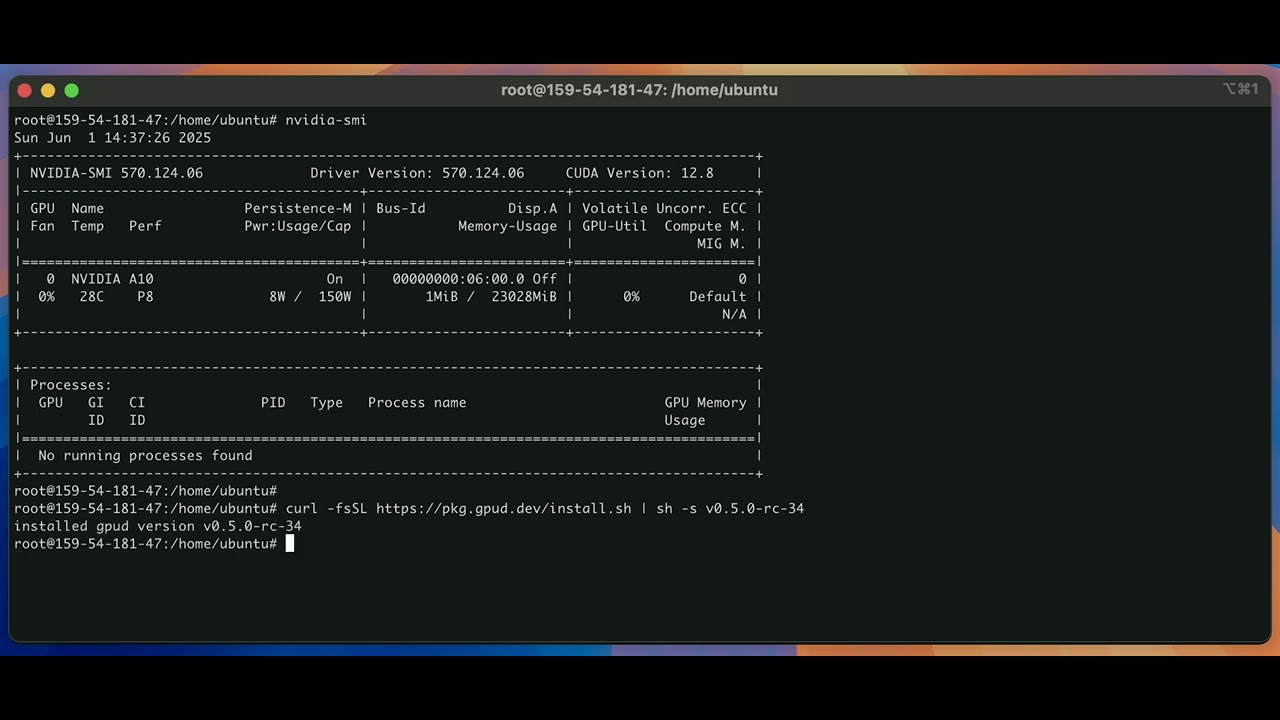
curl -fsSL https://pkg.gpud.dev/install.sh | sh -s v0.6.0

gpud --version
And run gpud scan to run simple one-time checks:
gpud scanDemo:
# stop the existing gpud server
sudo systemctl stop gpud.service

# remove old binary (if exists)
sudo rm -f /usr/sbin/gpud
sudo rm -f /usr/local/bin/gpud

curl -fsSL https://pkg.gpud.dev/install.sh | sh -s v0.6.0
which gpud

# (optional) if you already installed an old GPUd
# with the version before "v0.5.1-rc-34"
sudo cp /usr/local/bin/gpud /usr/sbin/gpud

# make sure the bin path is correct
sudo systemctl cat gpud

# restart gpud with the new version
sudo systemctl restart gpud
GPUd can run as a long-running server that runs periodic health checks.
You can start the GPUd as a systemd service:
# to enable and start gpud.service with default settings
gpud up

# to check the status of the running gpud.service
gpud status

# to stop the existing gpud.service
gpud down

# or run
# systemctl stop gpud
Or simply run as a process:
gpud runTo interact with GPUd API endpoints:
# healthiness of the GPUd process itself
curl -kL https://localhost:15132/healthz

# basic machine information
curl -kL https://localhost:15132/machine-info | jq | less

# list of health check states
curl -kL https://localhost:15132/v1/states | jq | less

# list of systemd events per GPUd component
# (e.g., xid)
curl -kL https://localhost:15132/v1/events | jq | less

# list of system metrics per GPUd component
# (e.g., GPU temperature)
curl -kL https://localhost:15132/v1/metrics | jq | less
Following defines the response types for the GPUd APIs above:
Demo:

Or use the client/v1 library to interact with GPUd in Go.
For testing purposes, let's inject some failures and make sure GPUd can immediately detect such events.
You can use the following GPUd commands and APIs to write a syslog message to the kernel:
# to write to the kernel
# using the "gpud inject-fault" command
gpud inject-fault \
--kernel-log-level KERN_EMERG \
--kernel-message "hello"

# to write to the kernel
# using the GPUd local "/inject-fault" API
# requires "gpud run" or "gpud up"
curl -kX POST https://localhost:15132/inject-fault \
-H "Content-Type: application/json" \
-d '{
    "kernel_message": {
        "priority": "KERN_DEBUG",
        "message": "Debug fault injection test"
    }
}'
For example, you simulate Xid errors in the kernel, as follows:
# to write to the kernel
# using the "gpud inject-fault" command
gpud inject-fault \
--kernel-log-level kern.err \
--kernel-message "NVRM: Xid (PCI:0000:04:00): 79, GPU has fallen off the bus"

# to write to the kernel
# using the GPUd local "/inject-fault" API
# requires "gpud run" or "gpud up"
curl -kX POST https://localhost:15132/inject-fault \
-H "Content-Type: application/json" \
-d '{
    "kernel_message": {
        "priority": "kern.warn",
        "message": "NVRM: Xid (PCI:0000:04:00): 74, pid=1234, name=python3, Channel 0x23, MMU Fault: ENGINE GRAPHICS GPCCLIENT_T1_0 faulted @ 0x7fc123456000. Fault is of type FAULT_PTE ACCESS_TYPE_VIRT_READ"
    }
}'
To check the messages have been sent to the kernel:
dmesg --decode --time-format=iso --nopager --buffer-size 163920To check if the Xid health checker successfully detects the error:
# the default "accelerator-nvidia-error-xid"
# checker should be "Unhealthy"
curl -kL https://localhost:15132/v1/states | jq | less
{
"component": "accelerator-nvidia-error-xid",
"states": [
{
"time": null,
"name": "error_xid",
"health": "Unhealthy",
"reason": "XID 74 (NVLINK Error) detected on PCI:0000:04:00",
"suggested_actions": {
"description": "",
"repair_actions": [
"REBOOT_SYSTEM"
]
}
}
]
}To check if the time-series event successfully recorded such injected faults:
# make sure to specify the startTime in unix timestamp
curl -kL https://localhost:15132/v1/events?startTime=1748787335 | jq | less
{
"component": "accelerator-nvidia-error-xid",
"startTime": "2025-06-01T14:15:35Z",
"endTime": "2025-06-01T17:14:30.690962187Z",
"events": [
{
"time": "2025-06-01T16:59:14Z",
"name": "error_xid",
"type": "Fatal",
"message": "XID 74(NVLINK Error) detected on PCI:0000:04:00"
},
{
"time": "2025-06-01T16:59:04Z",
"name": "error_xid",
"type": "Fatal",
"message": "XID 79(GPU has fallen off the bus) detected on PCI:0000:04:00"
}
]
}Demo:

(see GPUd plugins for more)
By default, GPUd runs the default built-in health checkers implemented in Go. Optionally, you can configure your own health check and its output parser, using GPUd plugins.
You can use the gpud custom-plugins command to dry-run your plugin specs, before running them in the GPUd server.
# to write a simple GPUd plugin spec file
cat << 'EOF' > /tmp/test-gpud-plugins.yaml
########################################
# demonstrates a plugin that installs python and runs a simple script using "uv run"
- plugin_name: install-python
  plugin_type: init # "init" plugin runs before "component" plugins
  run_mode: auto # set to "manual" to only trigger manually
  timeout: 1m

  health_state_plugin:
    steps:
      - name: Install Python
        run_bash_script:
          content_type: plaintext
          script: |
            if ! command -v /usr/sbin/uv &>/dev/null; then
              curl -LsSf https://astral.sh/uv/install.sh | UV_INSTALL_DIR=/usr/sbin sh
            fi

            if ! /usr/sbin/uv python --version &>/dev/null || [ -z "$(/usr/sbin/uv python --version 2>/dev/null)" ]; then
              echo "installing python 3.10"
              /usr/sbin/uv python install 3.10 --verbose
            else
              echo "skipped python install"
            fi

      - name: Test python script with uv
        run_bash_script:
          content_type: plaintext
          script: |
            cat > /tmp/hello.py << 'EOF'
            print("Hello, World!")
            EOF
            uv run /tmp/hello.py
            rm -f /tmp/hello.py
########################################

########################################
# demonstrates a plugin that fails with an exit code 1
# and ONLY run when explicitly triggered
- plugin_name: manual-exit-1
  plugin_type: component
  run_mode: "manual" # set to "manual" to only trigger manually
  timeout: 1m

  health_state_plugin:
    parser:
      json_paths:
        - query: $.description
          field: description

        - query: $.action
          field: action
          suggested_actions:
            # --- BEGIN ADAPTATION REQUIRED ---
            # use "REBOOT_SYSTEM" to trigger auto-reboot by the control plane
            # ignore if it's not connected to lepton/nvidia control plane
            XREBOOT_SYSTEM:
              regex: "(?i).*reboot.*"
            # --- END ADAPTATION REQUIRED ---

    steps:
      - name: Exit 1
        run_bash_script:
          content_type: plaintext
          script: |
            echo '{"description": "triggered to fail with exit code 1", "action": "reboot me"}'

            # --- BEGIN ADAPTATION REQUIRED ---
            # comment out to actually trigger the failure
            # exit 1
            # --- END ADAPTATION REQUIRED ---
########################################

########################################
# demonstrates a plugin that installs python and runs a simple script using "uv run"
# checks if there is any "Active" hw slowdown using "nvidia-smi"
- plugin_name: check-gpu-throttle
  plugin_type: component
  run_mode: auto # set to "manual" to only trigger manually
  timeout: 1m
  interval: 120m

  health_state_plugin:
    steps:
      - name: Run health check
        run_bash_script:
          content_type: plaintext
          script: |
            #!/bin/bash

            # do not mask errors
            set -o pipefail
            # treat unset variables as an error
            set -o nounset
            # exit script whenever it errs
            set -o errexit

            cat > /tmp/check-gpu-throttle.py << 'EOF'
            #!/usr/bin/env python3
            import subprocess
            import sys

            def check_gpu_errors():
                try:
                    cmd = ["nvidia-smi", "--query-gpu=pci.bus,clocks_event_reasons.hw_slowdown", "--format=csv,noheader"]
                    result = subprocess.run(cmd, capture_output=True, text=True, check=True)

                    # Check if any "Active" hw slowdown is present
                    for line in result.stdout.strip().split('\n'):
                        if line and line.strip():
                            parts = line.split(', ')
                            if len(parts) >= 2:
                                hw_slowdown = parts[1].strip()
                                if hw_slowdown != "Not Active" and hw_slowdown != "N/A":
                                    print(f"GPU hw slowdown detected: {line}")
                                    return False

                    # No errors found
                    print("No GPU throttle detected")
                    return True

                except subprocess.CalledProcessError as e:
                    print(f"Error running nvidia-smi: {e}")
                    print(f"stderr: {e.stderr}")
                    return False
                except Exception as e:
                    print(f"Unexpected error: {e}")
                    return False

            if __name__ == "__main__":
                if check_gpu_errors():
                    sys.exit(0)
                else:
                    sys.exit(1)
            EOF
            uv run /tmp/check-gpu-throttle.py
            rm -f /tmp/check-gpu-throttle.py
########################################
EOF
vi /tmp/test-gpud-plugins.yaml
# to validate the plugin spec file
gpud cs /tmp/test-gpud-plugins.yaml
# to execute the plugins in the spec file
gpud cs /tmp/test-gpud-plugins.yaml -rDemo:

You can run a list of GPUd plugins periodically, and query their results in the same local APIs.
# default spec file path is "/etc/default/gpud.plugins.yaml"
cat << 'EOF' > /etc/default/gpud.plugins.yaml
########################################
# demonstrates a plugin that installs python and runs a simple script using "uv run"
- plugin_name: install-python
  plugin_type: init # "init" plugin runs before "component" plugins
  run_mode: auto # set to "manual" to only trigger manually
  timeout: 1m

  health_state_plugin:
    steps:
      - name: Install Python
        run_bash_script:
          content_type: plaintext
          script: |
            if ! command -v /usr/sbin/uv &>/dev/null; then
              curl -LsSf https://astral.sh/uv/install.sh | UV_INSTALL_DIR=/usr/sbin sh
            fi

            if ! /usr/sbin/uv python --version &>/dev/null || [ -z "$(/usr/sbin/uv python --version 2>/dev/null)" ]; then
              echo "installing python 3.10"
              /usr/sbin/uv python install 3.10 --verbose
            else
              echo "skipped python install"
            fi

      - name: Test python script with uv
        run_bash_script:
          content_type: plaintext
          script: |
            cat > /tmp/hello.py << 'EOF'
            print("Hello, World!")
            EOF
            uv run /tmp/hello.py
            rm -f /tmp/hello.py
########################################

########################################
# demonstrates a plugin that fails with an exit code 1
# and ONLY run when explicitly triggered
- plugin_name: manual-exit-1
  plugin_type: component
  run_mode: "manual" # set to "manual" to only trigger manually
  timeout: 1m

  health_state_plugin:
    parser:
      json_paths:
        - query: $.description
          field: description

        - query: $.action
          field: action
          suggested_actions:
            # --- BEGIN ADAPTATION REQUIRED ---
            # use "REBOOT_SYSTEM" to trigger auto-reboot by the control plane
            # ignore if it's not connected to lepton/nvidia control plane
            XREBOOT_SYSTEM:
              regex: "(?i).*reboot.*"
            # --- END ADAPTATION REQUIRED ---

    steps:
      - name: Exit 1
        run_bash_script:
          content_type: plaintext
          script: |
            echo '{"description": "triggered to fail with exit code 1", "action": "reboot me"}'

            # --- BEGIN ADAPTATION REQUIRED ---
            # comment out to actually trigger the failure
            exit 1
            # --- END ADAPTATION REQUIRED ---
########################################

########################################
# demonstrates a plugin that installs python and runs a simple script using "uv run"
# checks if there is any "Active" hw slowdown using "nvidia-smi"
- plugin_name: check-gpu-throttle
  plugin_type: component
  run_mode: auto # set to "manual" to only trigger manually
  timeout: 1m
  interval: 120m

  health_state_plugin:
    steps:
      - name: Run health check
        run_bash_script:
          content_type: plaintext
          script: |
            #!/bin/bash

            # do not mask errors
            set -o pipefail
            # treat unset variables as an error
            set -o nounset
            # exit script whenever it errs
            set -o errexit

            cat > /tmp/check-gpu-throttle.py << 'EOF'
            #!/usr/bin/env python3
            import subprocess
            import sys

            def check_gpu_errors():
                try:
                    cmd = ["nvidia-smi", "--query-gpu=pci.bus,clocks_event_reasons.hw_slowdown", "--format=csv,noheader"]
                    result = subprocess.run(cmd, capture_output=True, text=True, check=True)

                    # Check if any "Active" hw slowdown is present
                    for line in result.stdout.strip().split('\n'):
                        if line and line.strip():
                            parts = line.split(', ')
                            if len(parts) >= 2:
                                hw_slowdown = parts[1].strip()
                                if hw_slowdown != "Not Active" and hw_slowdown != "N/A":
                                    print(f"GPU hw slowdown detected: {line}")
                                    return False

                    # No errors found
                    print("No GPU throttle detected")
                    return True

                except subprocess.CalledProcessError as e:
                    print(f"Error running nvidia-smi: {e}")
                    print(f"stderr: {e.stderr}")
                    return False
                except Exception as e:
                    print(f"Unexpected error: {e}")
                    return False

            if __name__ == "__main__":
                if check_gpu_errors():
                    sys.exit(0)
                else:
                    sys.exit(1)
            EOF
            uv run /tmp/check-gpu-throttle.py
            rm -f /tmp/check-gpu-throttle.py
########################################
EOF
vi /etc/default/gpud.plugins.yaml

gpud cs /etc/default/gpud.plugins.yaml
And start the GPUd server:
gpud runTo check the status of the health checks (including the plugins):
# list of health check states
# where you can see the health check results
# of the plugins
curl -kL https://localhost:15132/v1/states | jq | less

# to check only the results of a specific plugin
curl -s -kL https://localhost:15132/v1/states?components=manual-exit-1 | jq
To see the current plugin specs:
# to see the current plugin specs
curl -s -kL https://localhost:15132/v1/plugins | jq | less
Note that run_mode: manual plugins are NOT run, until explicitly triggered. To trigger such manual-mode plugins:
# /trigger-check calls any component checks
# including the plugins
curl -s -kL https://localhost:15132/v1/components/trigger-check?componentName=manual-exit-1 | jq
Demo:

Whether the health checker is a built-in or custom plugin, you can manually trigger multiple health checks by the matching tag names:
cat << 'EOF' > /etc/default/gpud.plugins.yaml
- plugin_name: echo-1
  plugin_type: component
  run_mode: "manual" # set to "manual" to only trigger manually
  timeout: 1m
  tags:
    - echo

  health_state_plugin:
    steps:
      - name: echo
        run_bash_script:
          content_type: plaintext
          script: |
            echo 1

- plugin_name: echo-2
  plugin_type: component
  run_mode: "manual" # set to "manual" to only trigger manually
  timeout: 1m
  tags:
    - echo

  health_state_plugin:
    steps:
      - name: echo
        run_bash_script:
          content_type: plaintext
          script: |
            echo 2

- plugin_name: echo-3
  plugin_type: component
  run_mode: "manual" # set to "manual" to only trigger manually
  timeout: 1m
  tags:
    - echo

  health_state_plugin:
    steps:
      - name: echo
        run_bash_script:
          content_type: plaintext
          script: |
            echo 3
EOF
vi /etc/default/gpud.plugins.yaml

gpud cs /etc/default/gpud.plugins.yaml
To trigger health checks by the tags:
curl -s -kL https://localhost:15132/v1/components/trigger-check?tagName=echo | jqDemo:

You can disable built-in GPUd health checkers, in case you only wish to run your own plugins:
cat << 'EOF' > /etc/default/gpud.plugins.yaml
- plugin_name: echo
  plugin_type: component
  run_mode: "manual" # set to "manual" to only trigger manually
  timeout: 1m

  health_state_plugin:
    steps:
      - name: echo
        run_bash_script:
          content_type: plaintext
          script: |
            echo
EOF
vi /etc/default/gpud.plugins.yaml
gpud cs /etc/default/gpud.plugins.yaml

# pass "gpud run --components" flag
# with a non-matching flag value
gpud run --components=none
To check the status of health checks:
curl -kL https://localhost:15132/v1/states | jq | lessYou will only see the plugin states, not others:
[
  {
    "component": "echo",
    "states": [
      {
        "time": "2025-06-01T18:17:13Z",
        "component": "echo",
        "component_type": "custom-plugin",
        "name": "check",
        "run_mode": "manual",
        "health": "Healthy",
        "reason": "no data yet"
      }
    ]
  }
]
Demo:
