Events are actions or occurrences that happen in the web page. For example, when you send a form. As simple as that.
- Types of events:
- User interface (load, unload, scroll),
- Focus and blur.
- Mouse (click, double-click, mouseover, mousemove, ...).
- Keyboard (input, keydown, keypress, keyup).
- Form (submit, change, input).
- Mutation, observers (appendChild(),replaceChild(), insertBefore() ...).
- CSS (transitionend, animationstart, animationend ...).
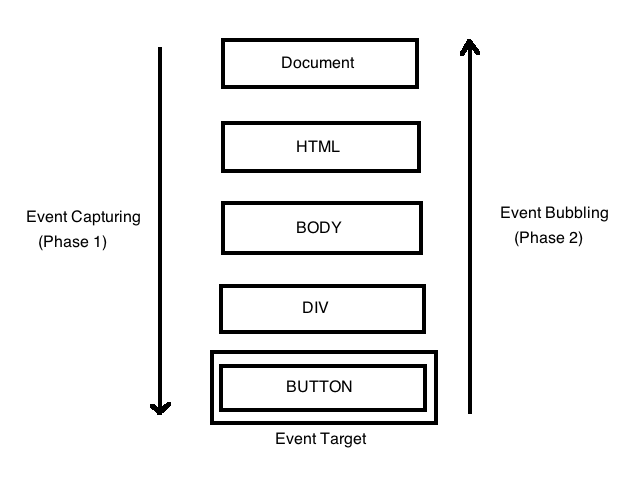
- Event bubbling and capturing are two ways of event propagation in the HTML DOM.
-
Bubbling: the event is first captured and handled by the innermost element and then propagated to outer elements.
-
Capturing: the event is first captured by the outermost element and propagated to the inner elements.
There is a third way:
- Target: the browser checks to see if the target property has an event handler for the click event registered on it, and runs it if so.
By Default useCapture is false. It means it is in the bubbling phase.
See the example Example 1 event-bubbling
   // index.html
   <div class="parent-bubbling">
       <button class="child-bubbling">Child bubbling</button>
   </div>

   <div class="parent-capturing">
       <button class="child-capturing">Child capturing</button>
   </div>

   // main.js
   // bubbling
   let parentBubbling = document.querySelector('.parent-bubbling');
   let childBubbling = document.querySelector('.child-bubbling');

   parentBubbling.addEventListener('click', () => console.log('parent clicked')); //bubbling
   childBubbling.addEventListener('click', () => console.log('child clicked'));

   // capturing
   let parentCapturing = document.querySelector('.parent-capturing');
   let childCapturing = document.querySelector('.child-capturing');

   parentCapturing.addEventListener('click', () => console.log('parent clicked'), true);
childCapturing.addEventListener('click', () => console.log('child clicked'),true);- If you want to stop the event bubbling, this can be achieved by the use of the event.stopPropagation() method (in the button).
<button class='child-bubbling' onclick='event.stopPropagation()'>
	Child bubbling
</button>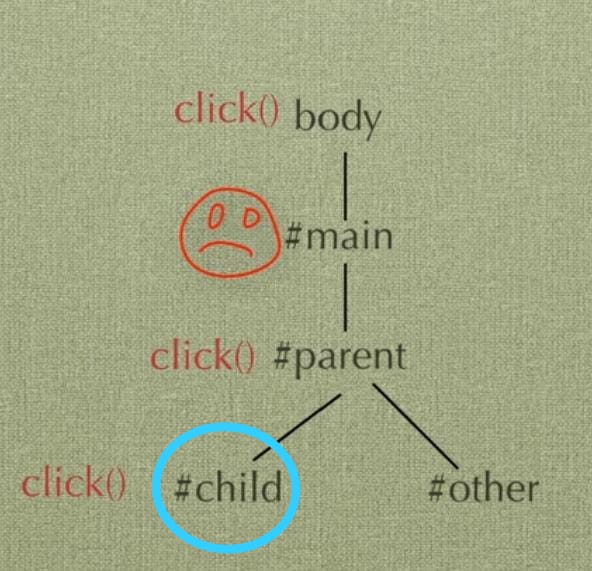
See the example Example 2 event-bubbling
<!-- index.html -->
<div>
	1
	<div>
		2
		<div>
			3
			<div>
				4
				<div>5</div>
			</div>
		</div>
	</div>
</div>
function log(msg) {
logElement.innerHTML += '<p class="result" >' + msg + '</p>';
}
function clearOutput() {
logElement.innerHTML = '';
}
function capture() {
log('capture: ' + this.firstChild.nodeValue); // get value of first child element
}
function bubble() {
log('bubble: ' + this.firstChild.nodeValue); // get value of first child element
}
let logElement = document.querySelector('.log'); // get log section
let divs = document.getElementsByTagName('div'); // get and save all the divs into an array
let clearButton = document.querySelector('.clear'); // get clear button
for (const div of divs) {
// div.addEventListener('click', capture, true); // add capture event
// div.addEventListener('click', bubble, false); // add bubble event
}
clearButton.addEventListener('click', clearOutput); // add event event (by default is false = bubble)- It depends... The difference is the order of the execution of the event handlers. You decide.
- Most of the time it will be fine to fire event handlers in the bubbling phase but it can also be necessary to fire them earlier.
- Event bubbling: inner to outer.
- Capturing bubbling: outer to inner.
<div class="button-bar">
	<button data-color="red">Red</button>
	<button data-color="yellow">Yellow</button>
	<button data-color="green">Green</button>
	<button data-color="purple">Purple</button>
</div>- Add an event for the parent element to update the container background color based on the dataset attribute.