Fast Tasks is a VS Code extension that provides quick access to your workspace tasks directly from the explorer view, with optimized performance and enhanced error handling.
- Open Visual Studio Code
- Press
Ctrl+Pto open the Quick Open dialog - Type
ext install batyan-soft.fast-tasksto find the extension - Click Install
Or install it from the Visual Studio Code Marketplace.
- Automatic task execution on click from the explorer view
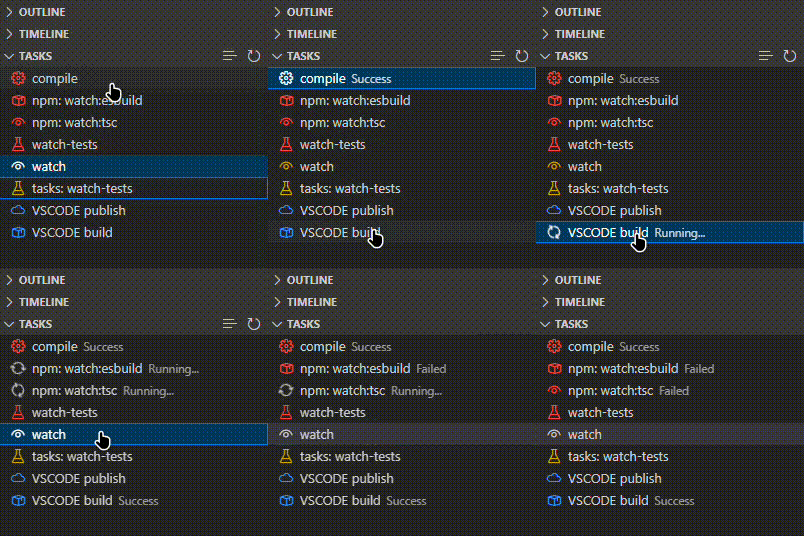
- Enhanced task view with color-coded icons
- Visual status updates for running, successful, or failed tasks (with exit codes)
- Rich task information display with error recovery
- Quick task refresh capability with caching
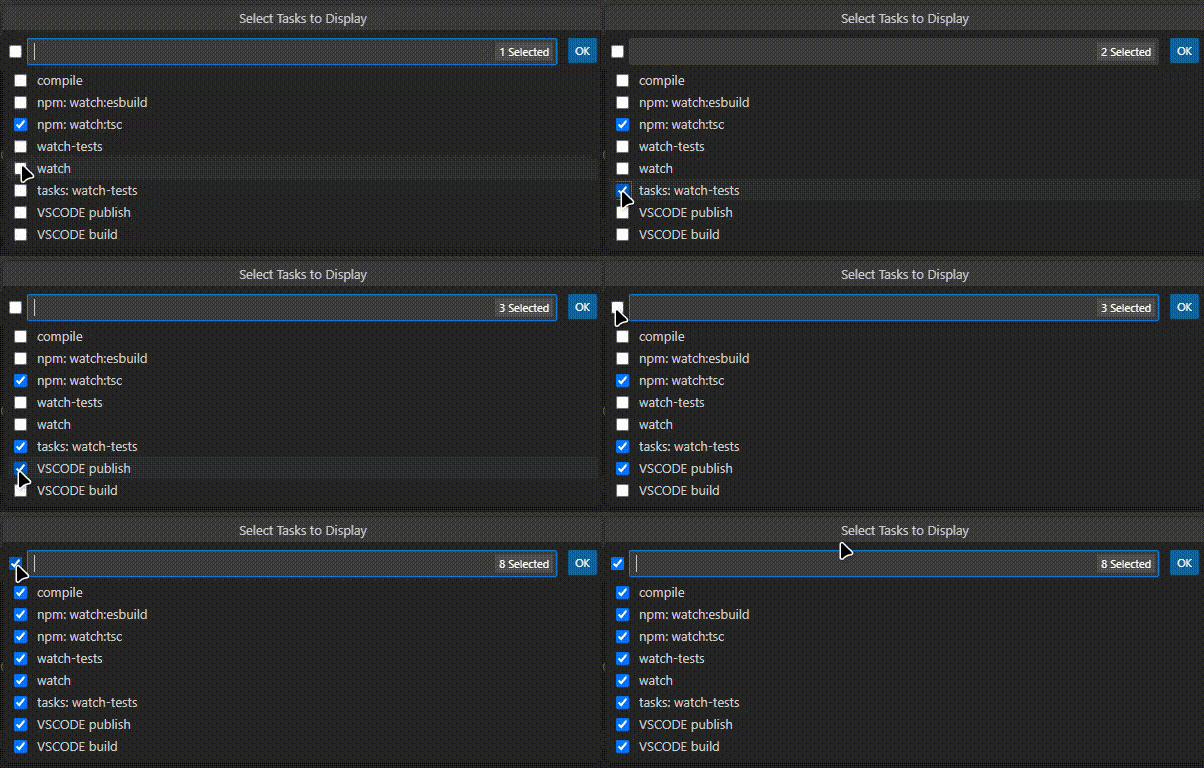
- Task filtering and selection
- Optimized performance with task caching
- Robust error handling and recovery
- Stop button for running tasks
- Edit icon button to quickly open task definition in tasks.json file
- Multi-root workspace support with optional grouping
- 🔴 NPM tasks
- 🔵 Shell tasks
- 🟣 TypeScript tasks
- 🟡 Other tasks (default)
- 📦 Build tasks
- 🧪 Test tasks
- 🚀 Launch tasks
- 🐛 Debug tasks
- 👁️ Watch tasks
- 🗑️ Clean tasks
- ☁️ Deploy tasks
▶️ Start tasks- ⏹️ Stop tasks
- ☁️ Publish tasks
- 🏃 Run tasks
- ⚙️ Other tasks (default)
You can now define custom icons for your tasks directly in your tasks.json file. These custom icons will take priority over the automatically assigned icons.
To use a custom icon, add an icon object to your task definition with an id and an optional color:
{
  "label": "build:project",
  "type": "shell",
  "command": "make build",
  "icon": {
    "id": "package", // Any valid Codicon ID
    "color": "charts.blue" // Optional: any valid ThemeColor ID
  },
  "group": "build"
}- The
idshould be a valid Codicon ID. - The
color(optional) should be a valid ThemeColor ID.
- Detailed task information on hover with error recovery
- Selected Task Highlighting
- Clean Interface
- Enhanced Status
- By default, when multiple workspace folders are open, tasks are grouped by workspace.
- You can switch to a single flat list via the setting:
Fast Tasks › Flat List. - In flat list mode (and only then), task labels include the workspace prefix:
Folder / Task. - When there is only one workspace folder, the view is always flat (no grouping).
- Task caching for faster updates
- Optimized icon and color lookups
- Efficient task status tracking
- Memory-efficient operation
- Task favorites/pinning functionality
- Task search and filtering capabilities
- Task execution history tracking
- Task dependencies visualization
- Locate the Tasks section in the Explorer view
- Click the selection button (list icon) to choose which tasks to display
- Select tasks you want to see in the view
- Click on any task to run it; the task will be highlighted while running
- View the task status as 'Running...', 'Success', or 'Failed (with exit code)'
- Use the refresh button to update the task list and clear task statuses
- Use inline action buttons that appear next to task names:
- Edit Task (pencil icon) - Click to open the tasks.json file at the exact location where the task is defined
- Stop Task (stop icon) - Available for running tasks to terminate execution
- Open Settings and search for "Fast Tasks: Flat List" to toggle the view:
- Off (default): tasks grouped by folders when multiple folders are open
- On: a single flat list of all tasks; labels show
Folder / Task
Hidden Tasks (tasks.json hide)
- By default, Fast Tasks hides tasks that have
"hide": trueintasks.json. - To show all tasks (ignore the
hideflag), enable the setting:Fast Tasks › Ignore Hide.
Ctrl+Shift+PorCmd+Shift+P(Mac) and type "Fast Tasks" to see all available commands- Use arrow keys to navigate through tasks
- Press
Enterto run a selected task - Press
Escto stop a running task
Fast Tasks supports tasks from multiple sources:
- Workspace folder tasks: Tasks defined in
.vscode/tasks.jsonortasks.jsonin workspace folders - Multi-root workspace tasks: Tasks defined in
.code-workspacefiles (both standardtasksproperty andsettings.tasksproperty) - User tasks: Global tasks defined in User
tasks.json(accessible via "Tasks: Open User Tasks" command)
All task sources support custom icons, the "Edit Task" feature, and the hide flag.
- Visual Studio Code version 1.80.0 or higher
- A workspace with defined tasks (in tasks.json, .code-workspace files, or User tasks.json)
Contributions are welcome! Please feel free to submit a Pull Request. For major changes, please open an issue first to discuss what you would like to change.
- Fork the repository
- Create your feature branch (
git checkout -b feature/AmazingFeature) - Commit your changes (
git commit -m 'Add some AmazingFeature') - Push to the branch (
git push origin feature/AmazingFeature) - Open a Pull Request
This project is licensed under the MIT License - see the LICENSE.md file for details.
Please report any issues on the GitHub issues page.
See CHANGELOG.md for detailed release notes.