Simple free PHP & JavaScript chatroom with flat file database
ChatX is an advanced and sophisticated iteration of the original ShoutBox script, initially introduced on Tutorialzine in 2015.
This script utilizes a flat file database and harnesses the power of Flywheel and RelativeTime PHP libraries to provide a seamless and efficient user experience. It is user-friendly, easy to install and modify, and compatible with nearly all hosting services.
The idea behind the development of ChatX was to create an easy-to-use compact chat widget with fully-customizable color schemes, capable of working on any web-site with the code installed.
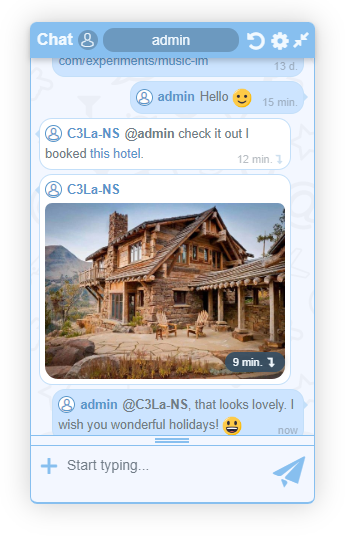
One of the key features of ChatX is its accessibility and convenience. The chat remains on the screen and is always within reach, even while navigating the website. It is easy to drag and resize the widget within the browser viewport, and it can be expanded or minimized to suit your needs. The chat also remembers its state, so you don't have to readjust it each time you use it.
Another benefit of ChatX is its ease of installation. There is no need for complex setups or MySQL or other databases. Just unzip the archive on your hosting and you're ready to go. The script is compatible with PHP 7.0+, making it suitable even for free web hosting services.
Despite its simplicity, ChatX offers all the main features of a regular chat. You can easily manage the chat's global functions without needing to understand JavaScript or PHP coding.
It's free, without any ads or distracting copyrights, and we continuously work to improve the user experience.
Flat file database
Long-polling for persistent connection
Easy installation
Modest. No need for a bunch of dependencies, does not load your hosting resources too much
Works well with many websites (including 3-rd party websites)
Compact and modern widget with draggable, and resizeable functionality
Languages: English / Russian
BB-tags: bold; italic; underlined; text color; images; links;
Media uploader (via imgur.com)
Authentication system
Moderation panel (shout management, user management, settings management, style customization)
Public and private mode
Push and sound notifications for new messages
ver 1.4.0
Close button that minifies chat
Stop Get query when minimized and restore on expand
New universal scrollbar
Pulsating indicator when in fast track mode
Open links in new window
Simpler code (in process of developing universal widget)
Updated Draggable.js library, now ChatX works with great variety of jQuery libraries
ver 1.5.0
a better way of loading CSS
Interface translation simplified
UI improvements
Moderation page
Updated icon while uploading image
Fixed when image was uploaded but not sent due to the empty name field
script.js --> core.js
Updated widget (simpler installation)
Beta Authentication (login & sign up)
Public & Private mode
New Settings.php file with easily customizable ChatX settings
Logged In users have a verification icon
Usergroups: users and moderators.
Updated Flywheel library (more developed database in perspective)
ver 1.6.0
Private mode no longer in beta
Passwords are hashed with PASSWORD_BCRYPT
Cookies secured
Json files no longer accessible directly
General security improvements
Complete userlist page
New page - Setups.php. Easy way to edit settings
ChatX now checks when it is outside viewpoint and restores its position
ver 1.7.0
Featherlight library allows viewing uploaded images in modal window
New prompt menu for bb-tags
Resize widget horizontally
Updates for moderator's panel with new options and settings
Changeable widget language (Rus/Eng)
Widget works better with various websites
General improvements and updates
ver 1.8.0
MyBB integration
Chat history
New settings options
Stability & performance improvements
ver 1.9.0
Shout management: multiple message selection
New settings in moderator's panel
ver 2.0.0
New messages at the bottom
Thumbnails for jpg and jpeg images
Updated UI when uploading images from external URLs
All images are hosted on Imgur.com
ver 2.1.0
Username styling
ver 2.2.0
Notification for the new messages when widget is minimized
Audio notifications for the new messages when user is logged in
Highlighted messages of its owner
Easier style customization with CSS vars
ver 2.3.0
Autorecognizing URLs (for users only)
New menu for link insertion
Ajax load paused whenever text selected in chat
Ajax load paused when multiple tabs with widget are active, staying alive in current tab
New widget styling page with Ace editor in moderator's panel
Refined styling tuning
Minimal mobile optimization
Hotkeys (Ctrl+B) for bold, (Ctrl+I) for italic, (Ctrl+U) for underlined formatting tags
Prompts on widget demo page
Option in settings to switch off demo page
Simple (dumb) push notifications for new messages in chat (for users only)
New sound notification variant for new messages in chat. New sound effect when message is sent
Switchable EmojiOne library option for Emoji in chat settings
Precise timestamp on hovering on relative time mark
Dynamic loading of chat history in widget itself
Optimization and improvements for Nginx
Redesign of minified chat tray
ver 2.4.0
Vanilla JS code (no jQuery)
JWT for loggin in. Persistent loggin session
No jQuery-ui. Mobile support for drag&drop and resize events
Full 3rd party websites support
Custom lightbox gallery with scaling up/down features
CTRL+V to upload an image from clipboard
Automatic check for ChatX updates in moderation panel
Preset widget color schemes
Enhanced MyBB.ru integration. Keeping profile passwords in the forum storage
Overall UI improvements for the widget and moderator's panel
Updated help page
Imgur application identificator (API) field in ChatX settings
ver 2.5.0
PHP 8.0+ support
Content editable input field for new messages
CTRL+ENTER for new lines
A static file for checking updates in chat
Visual indicator for characters left in input field
Empty bbtags no longer transformed into html
Login form is inserted in DOM when it is expected for it
Non-transparent .png files are shown in thumbnails
Thanks to Tutorialzine for the initial shoutbox script release and inspiration.
Thanks to Alex_63 for the implementation of the fast & slow track system.
Thanks to me for all the patience during the development :)
PHP 7.0+
HTTPS
CURL (for uploading images to imgur)
1) Unpack the archive in an arbitrary directory on your server and navigate to it;
2) ChatX works out-of-the-box on the demo page (INDEX.PHP). You will see a minified chat box in the bottom right corner of the screen.
If you plan to embed the chat on another URL within the same website or use it on a third-party website, you will need to complete further installation procedures:
a) Expand the widget;
b) Click on Gear icon → Login;
c) In the modal box, login as admin (the default password is admin);
d) Click on ChatX management link;
e) In the new tab follow the steps provided in the left sidebar.
If done ChatX should work correctly on any website.


