

A simple yet powerful text editor built using Python and Tkinter. This project was developed as part of a System Software course by a team of students. The text editor includes features like file handling, text formatting, find/replace functionality, and text-to-speech conversion.
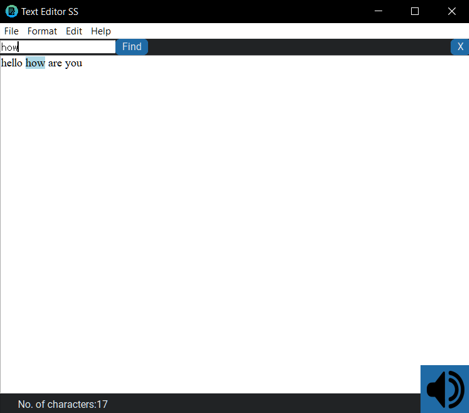
- File Operations: Create, open, save, and save-as text files.
- Text Formatting: Change font style and size.
- Find and Replace: Search for specific words and replace them.
- Text-to-Speech: Convert text content into speech using Google Text-to-Speech (gTTS).
- Character Count: Display the number of characters in the document.
- Customizable UI: Dark and light themes with a modern look using
customtkinter.
- Python 3.x
- Required Python libraries:
tkinter,gtts,Pillow,customtkinter
- Clone the repository:
git clone https://github.com/Combust10/SimpleTextEditor.git
cd SimpleTextEditor- Install the required libraries:
pip install -r requirements.txt
Run the text editor:- Run the text editor:
python text_editor.py-
File Menu:
- New: Create a new file.
- Open: Open an existing text file.
- Save: Save the current file.
- Save As: Save the file with a new name.
- Exit: Close the application.
-
Format Menu:
- Font Style: Change the font style (e.g., Times New Roman, Arial).
- Font Size: Adjust the font size (e.g., 8, 10, 12, 14).
-
Edit Menu:
- Find: Search for a specific word in the text.
- Find and Replace: Replace a specific word with another.
-
Text-to-Speech:
- Click the speaker icon at the bottom-right corner to convert the text into speech.
-
Character Count:
- The number of characters in the document is displayed at the bottom-left corner.
- Thanks to the
customtkinterlibrary for providing a modern UI.