Write an ATS-friendly resume in Markdown. Available for everyone, optimized for developers.
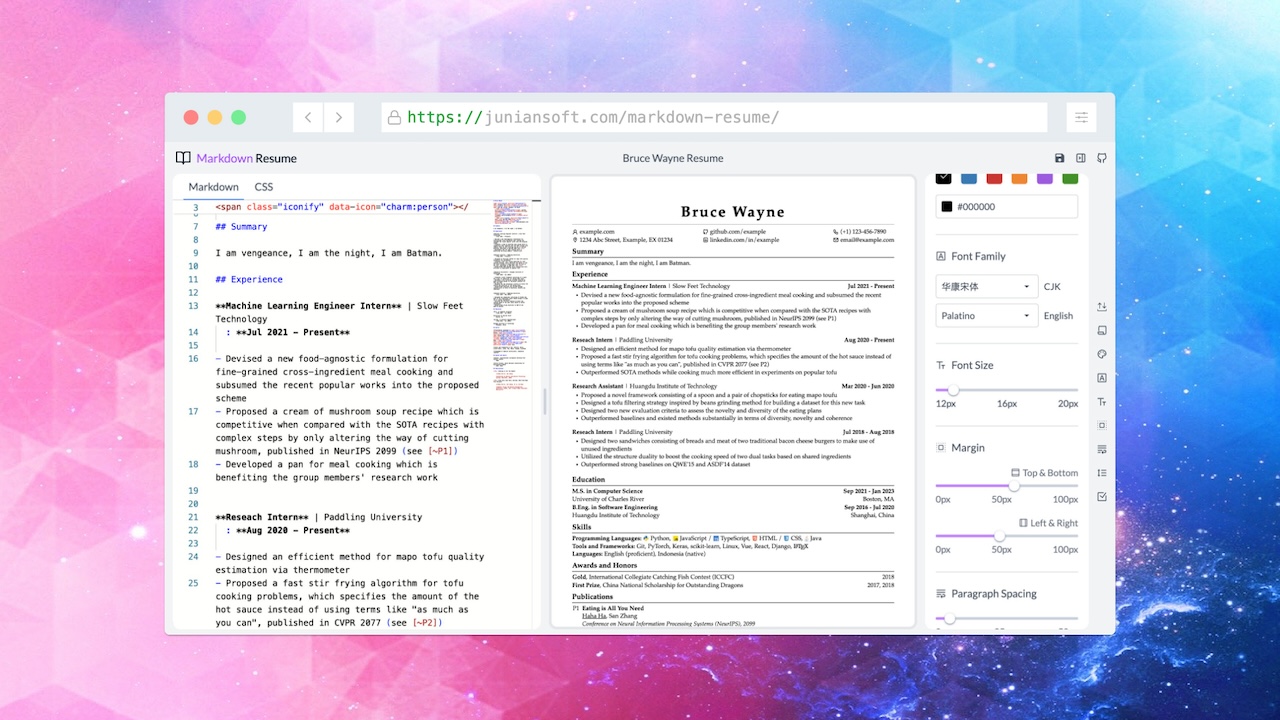
This repo is a fork of Oh My CV!, which is beautifully made — go check out their work.
Changes I made from the original:
- The default template is now as close as possible to CareerCup's resume template.
- The default color is all black.
- Uses web-safe fonts for easier and safer ATS parsing.
- Export as HTML and DOCX.
- And many more...
I'm passionate about helping anyone get a job, which is why I made this fork. Most of the modifications ensure your resume is readable by both ATS systems and humans, so you don’t have to worry about the design.
I can’t guarantee that using this will improve your job search success rate. But I hope it helps.
Highly recommend using Chromium-based browsers, e.g., Chrome or Microsoft Edge.
- Write your resume in Markdown and preview it in real time — smooth experience!
- Works offline (PWA)
- Export to A4 and US Letter PDFs
- Customize page margins, theme colors, line heights, fonts, etc.
- Pick any fonts from Google Fonts
- Add icons easily via Iconify (search icons on Icônes)
- TeX support (KaTeX)
- Cross-referencing (useful for academic CVs)
- Case correction (e.g.,
Github→GitHub) - Add line breaks (
\\[10px]) or start a new page (\newpage) like in LaTeX - Automatic page breaking
- Custom CSS support
- Manage multiple resumes
- Your data stays in your hands:
- Data is saved locally in your browser (see here for details)
- Open-source static website hosted on GitHub Pages, which does not (and cannot) collect your data
- No user tracking, no ads
- Dark mode
When running locally (pnpm dev or pnpm build && pnpm serve), you can load a Markdown file straight from disk into the editor — no copy-paste — by opening:
http://localhost:3000/markdown-resume/?import=/absolute/path/to/resume.md
The app reads the file via a local server route, creates a resume in browser storage, and opens it in the editor. The resume is named after its parent folder (or the company in a *_resume_<company>.md filename); add &name=Some%20Name to override. Re-importing with the same name overwrites that resume in place instead of creating a duplicate, so a generator can keep refreshing the same entry.
This is a local-only convenience: the static production build (GitHub Pages) has no server routes, so ?import= is a no-op there.
scripts/render-resume.mjs renders a Markdown resume in headless Chrome (using your installed Google Chrome via puppeteer-core — no browser download) and reports how many pages it occupies. It can also write a screenshot and a print-accurate PDF. This is what lets an agent fit a resume to one page by adjusting style knobs (and/or trimming content) in a loop.
pnpm render <resume.md> \
  --font-size 10 --line-height 1.15 \
  --margin-v 32 --margin-h 36 --para-space 3 --paper letter \
  --png /tmp/out.png --pdf /tmp/out.pdf
Prints JSON: { "pages": 1, "fits": true, "png": …, "pdf": …, "label": …, "styles": { … } }. It auto-starts the dev server if it isn't already running. Set CHROME_PATH to override the Chrome binary.
The exported PDF is given a macOS Finder tag (default name Resume PDF, default color orange) so generated resumes are easy to find and group in Finder — --label <color> (or none) and --label-name <str> to change it. Note: macOS controls tag colors centrally per tag name, so the requested color only sticks if that tag name isn't already registered with a different color; to force a color, set it once for the tag in Finder → Settings → Tags.
Built with Nuxt 3, powered by Vue 3, Vite, Zag, and UnoCSS.
Clone the repo and install dependencies:
pnpm installBuild the packages:
pnpm build:pkgTo enable font selection from Google Fonts, generate a Google Fonts Developer API Key. Then create a .env file inside the site folder and add:
NUXT_PUBLIC_GOOGLE_FONTS_KEY="YOUR_API_KEY"
Start developing / building the site:
pnpm dev
pnpm build- Original project: Renovamen/oh-my-cv
- billryan/resume
This project is licensed under the MIT license.
Made with ☕ by Junian.dev.