Budgeting that actually fits into your life.
Check it out now!
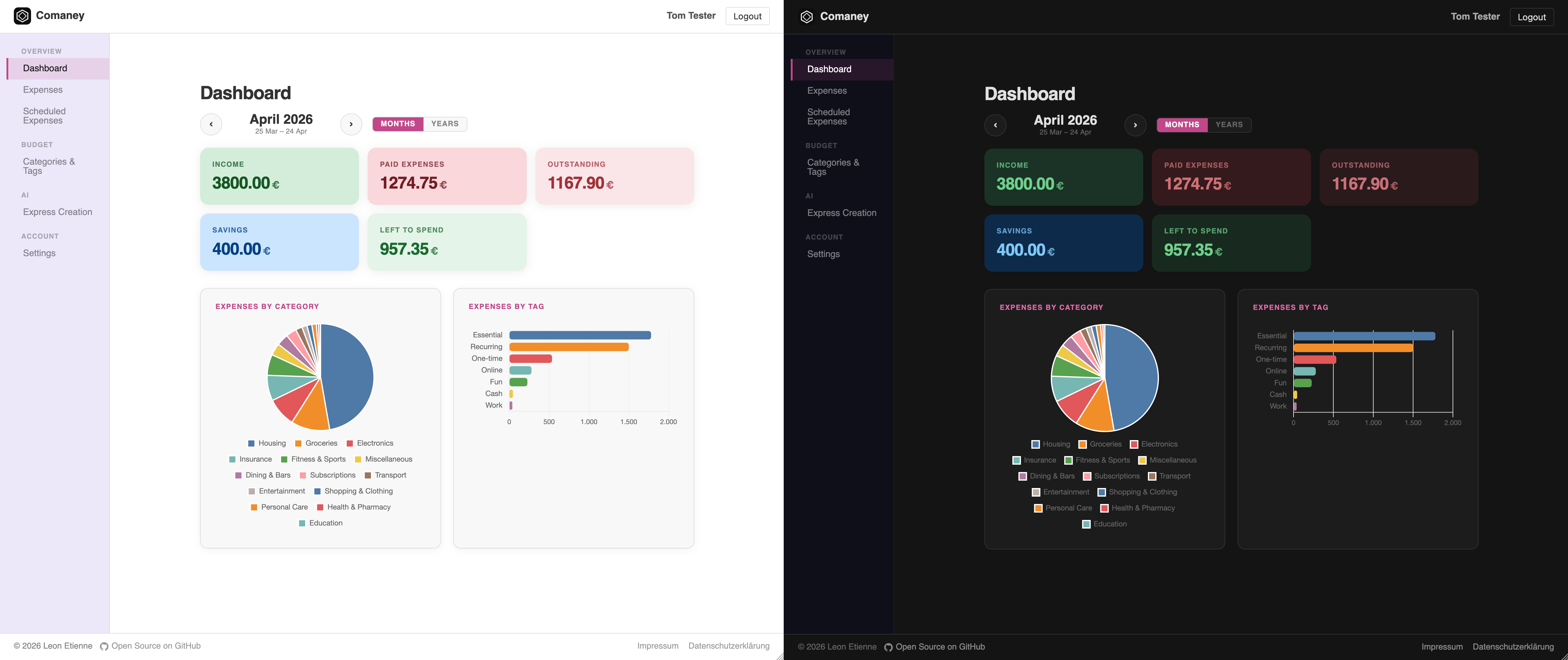
Every self-hostable budgeting app I tried either gave me too little to work with, or demanded so much setup and daily effort that I gave up within a week. So I built my own, with blackjack and hookers. Comaney's goal is simple: maximum financial insight for minimum effort.
Comaney is fully self-hostable 🏠. There's also a public instance if you just want to get started.
Comaney doesn't try to be everything. It focuses on answering the two questions that actually matter day-to-day:
Where is my money going? 🔍 How much do I have left to spend this month?
Comaney works on a clean month-to-month basis, each month starting at $0 before income. No baggage from previous months unless you want it. (You can aggregate across months too, more on that below.)
Everything you need to stay on top of your finances, nothing you don't.
The essentials:
- Expenses for spending, income, savings, and savings withdrawals
- Recurring expenses with custom schedules
- Reminders for outstanding payments and auto-settling them
- Tags and categories to group your expenses (categories are mutually exclusive, tags can overlap freely)
- Full CSV export
- REST API for complete control
- Custom currency names
- Two-Factor Authentication 🔒
- Light- and Dark mode
The good stuff:
- 📊 A dashboard packed with insights: total income, spending, outstanding payments, savings, and how much you have left to spend. View any of it per month or across entire years, with a pie chart for category distribution and a bar chart for tags. All clickable for even more details! Is that not enough? You can personalize the entire dashboard and even create your own custom cards! See below for more.
- 📅 Salary-cycle aware months. If you get paid on the 25th, your month can run from the 25th to the 24th, so it always kicks off with your income already in.
- 🤖 Zero-effort expense recognition powered by Claude. Snap a photo of your receipt or just describe what you bought and it books it for you. It's fast enough that I log my entire grocery haul on the walk back to my car. You can always review and adjust before saving. Bring your own API key, or use the built-in free tier on the public instance (limited by monthly request count). You can also define a custom pre-prompt to tailor it to your habits.
- 💰 Flexible end-of-month rollover: start fresh (recommended for most), move leftovers into savings automatically, or carry them over as extra spending room next month.
- 🔍 Advanced search filters for expenses. Get exactly the information you need!
Questions or feedback? Reach out through the contact form 💌
The expense list has a search bar that goes well beyond plain text. You can combine filters freely using the syntax below.
Typing anything without a prefix searches across title, payee, value, and note, all at once.
grocery run
| Filter | Matches |
|---|---|
type=expense |
Expenses (also: income, savings deposit, savings withdrawal, carry-over) |
settled=yes |
Settled expenses (yes / true / 1 → settled; no / false / 0 → unsettled) |
deactivated=yes |
Deactivated expenses (same truthy/falsy values as settled) |
cat=Haushalt |
Category contains "Haushalt" (substring, case-insensitive) |
cat=none |
Expenses with no category assigned |
tag=Kreditkarte |
Any tag contains "Kreditkarte" (substring, case-insensitive) |
tag=none |
Expenses with no tag assigned |
date>24/12/2025 |
Expenses after christmas 2025 |
value>100 |
Expenses over 100 (currency units) |
payee=Amazon |
Payee contains "Amazon" (substring, case-insensitive) |
Use double quotes for values that contain spaces:
cat="Fixed costs" tag="credit card" type="savings deposit"
value<100 value>=500 value=77.00 value==77.00
Operators: < <= > >= = ==
Filter by due date using date with any comparison operator:
date>31.12.2024        date<=12/31/2024
date>=01.01.2025       date==15.03.2025
Three date formats are supported, the delimiter identifies which:
dd.mm.yyyy(dot), day first, e.g.31.01.2025mm/dd/yyyy(slash), month first, e.g.01/31/2025yyyy-mm-dd(hyphen), ISO 8601, e.g.2025-01-31
The special value today resolves to the current date at query time:
date=today date<today date>=today
Prefix any term, filter, or group with ! to negate it:
# All expenses that are not rent
type=expense !rent

# All records that are not tagged "amazon"
!tag=amazonTerms separated by a space are AND-ed (all must match):
# All unsettled expenses that are less than 200
type=expense settled=no value<200

# All amazon-tagged expenses that are not tagged "gardening"
tag=amazon !tag=gardening
Use || for OR (either side may match):
# All income or savings withdrawals
type=income || type="savings withdrawal"
Use () to group before combining:
# Either all expenses that are settled, or income
(type=expense settled=yes) || type=income
You can negate groups too
# All expenses that dont fuzzy-match "fence", "oven" or "food".
type=expense !(fence || oven || food)

# This is identical to
type=expense !fence !oven !food| Query | Meaning |
|---|---|
settled=no value>500 |
Unsettled expenses over 500 |
date>=01.01.2025 |
Expenses due on or after 1 Jan 2025 |
date>01/01/2025 date<04/01/2025 |
Expenses due in Q1 2025 |
cat=Food payee=Rewe |
Categorised as Food and payee contains Rewe |
cat=none tag=none |
Expenses with neither a category nor any tag |
type=income || settled=yes |
All income or any settled expense |
type=expense !rent |
Expenses whose title/payee/note doesn't contain "rent" |
type=expense !(rent || payee=landlord) |
Expenses unrelated to rent |
tag="credit card" settled=no |
Unmatured credit-card expenses |
The dashboard is fully customizable. Each card is defined in YAML and can be created, edited, resized, and reordered directly in the UI.
type |
Description |
|---|---|
cell |
Single numeric value (sum, count, or custom Python) |
bar-chart |
Horizontal bar chart grouped by tag or category |
pie-chart |
Pie chart grouped by tag or category |
| Field | Required | Description |
|---|---|---|
type |
✓ | Card type: cell, bar-chart, or pie-chart |
method |
Only for cells | sum -> sums up expense values · total -> sums up expense values but treats income-like types as negatives · count -> counts expenses · custom -> compute it yourself in python |
flip_signs |
Multiply results by -1 | |
title |
✓ | Label shown in the card header |
query |
Search-filter string (same syntax as the expense search bar) to restrict which expenses are included | |
positioning.position |
Display order (1-based integer) | |
positioning.width |
Grid columns to span (1–12; default 2) | |
positioning.height |
Grid rows to span (default 1) |
| Field | Required | Description |
|---|---|---|
python |
when method: custom |
Python function body. return a number. Helpers available: query_sum(q), query_sum_abs(q), query_sum_gt0(q), query_sum_lt0(q), each accept the same query syntax as the search bar |
color |
CSS background colour applied in both light and dark mode | |
color_lightmode |
Overrides color in light mode |
|
color_darkmode |
Overrides color in dark mode |
|
link |
URL to navigate to when the cell is clicked (e.g. a pre-filtered expense list) | |
template |
Display template string. Defaults to $VALUE $CURRENCY_SYMBOL. Placeholders: $VALUE (formatted number), $CURRENCY_SYMBOL (user currency) |
| Field | Required | Description |
|---|---|---|
group |
✓ | categories or tags |
method |
custom not supported |
|
max_groups |
Limit to top-N groups (bar-chart only) | |
hide_groups |
YAML list of group names to exclude (case-insensitive) | |
link_template |
URL template navigated to when a segment is clicked. $GROUP_NAME is replaced with the URL-encoded group label; Uncategorized segments substitute none instead to help with searches |
# Monthly income total, click to see all income entries
type: cell
title: Income
query: type=income
method: sum
color: '#1a3326'
color_lightmode: '#bbf7d0'
link: /budget/expenses/?search=type%3Dincome
positioning:
  position: 1
  width: 2
  height: 1
# Disposable budget
type: cell
title: Left to spend
color: '#1a3326'
color_lightmode: '#a7f3d0'
# Sum up all expenses, but treat income as negative
method: total
# Flip sign to get a positive number
flip_signs: true
positioning:
height: 1
position: 5
width: 2# Custom python function (implements disposable budget too)
type: cell
title: Left to spend
method: custom
color: '#1a3326'
color_lightmode: '#a7f3d0'
python: |
return (
query_sum('type="income"') -
query_sum('type="expense"') -
query_sum('type="savings deposit"') +
query_sum('type="savings withdrawal"')
)
positioning:
position: 5
width: 4
height: 1
# Pie chart, click a slice to filter expenses by that category
type: pie-chart
title: Expenses by category
group: categories
link_template: /budget/expenses/?search=cat%3D$GROUP_NAME
positioning:
  position: 3
  width: 6
  height: 4
# Horizontal bar chart showing the tag distribution of shared expenses that also have the tag amazon
# E.g. "Tags for spendings on amazon"
type: bar-chart
title: Spendings on amazon
group: tags
query: tag=amazon
# 'total' handles product returns correctly
method: total
hide_groups:
- amazon
positioning:
position: 7
width: 6
height: 4A few intentional omissions. These aren't oversights, they add significant complexity without enough payoff, or have design issues that would compromise the simplicity Comaney is built around:
- Bank account integration
- File imports
- Multiple accounts per user
Self-hosting comaney is as easy as any other database-driven application. All it needs is a mariadb database. A minimal docker-compose could look like this:
services:
  web:
    image: leonetienne/comaney:latest
    restart: unless-stopped
    ports:
      - "80:8000"
    depends_on:
      - mariadb
    environment:
      # Gen with python -c "import secrets; print(secrets.token_hex(50))"
      DJANGO_SECRET_KEY: 647d117c611f<...>0bdcc4
      DB_HOST: mariadb
      DB_PORT: 3306
      DB_NAME: comaney
      DB_USER: comaney
      DB_PASSWORD: f773b7ff09263e8
      SITE_URL: http://localhost:80
      ALLOWED_HOSTS: localhost:80
      CSRF_TRUSTED_ORIGINS: localhost:80
      # Might want to disable again after setting up your account
      ENABLE_REGISTRATION: TRUE
      # This also disables email verification.
      # If you want notifications for outstanding payments, you need emailing.
      DISABLE_EMAILING: TRUE
      GUNICORN_WORKERS: 1

  mariadb:
    image: mariadb:lts
    restart: unless-stopped
    environment:
      MARIADB_DATABASE: comaney
      MARIADB_USER: comaney
      MARIADB_PASSWORD: f773b7ff09263e8
      MARIADB_ROOT_PASSWORD: changeme
    volumes:
      - mariadb_data:/var/lib/mysql

volumes:
mariadb_data:Comaney depends on cronjobs to handle its data correctly. If you are hosting comaney, you must install these cronjobs for the web container:
# Scrubs data (notifications, recurring expense instantiations, auto-settling)
*/5 * * * * python manage.py run_cron
# Once a month, reset all users ai trial budgets to 0
0 0 1 * * python manage.py reset_trial_budgets
Example setup:
# Please adjust your username
*/5 * * * * comaney docker-compose -f /home/comaney/configs/comaney_prod/docker-compose.yml exec -T web python manage.py run_cron

0 0 1 * * comaney docker-compose -f /home/comaney/configs/comaney_prod/docker-compose.yml exec -T web python manage.py reset_trial_budgetsIf you're the only user, you don't need to set a trial API key. Just add your own key in your account's user settings and you're good to go.
If you do set a trial key for other users and it runs out of budget, the AI trial feature will disable itself globally and needs to be re-enabled manually at /admin/ai-trial/ using a superuser account.
You can create a superuser with:
python manage.py createsuperuser
If Comaney is running in Docker, execute this inside the container:
docker exec -it <container_name> python manage.py createsuperuser
Comaney will refuse to launch if you do not provide a good mailing configuration or disable mailing alltogether. You can use mailpit.
EMAIL_HOST: mailpit
EMAIL_PORT: 1025
Emailing is a feature used for
- Accounts registering
- Accounts changing their email
- Admin notifications
- On user creation
- On the api trial key running out of funds
- On contact form submissions
- User notifications
- Outstanding expenses that require manual actions
- If something has been settled
The contact page is only enabled if the instance has new registrations enabled and has an admin notification email set.
To be able to host a public instance in germany, you need an imprint and a privacy policy. Both can be enabled by passing paths to markdown files with environment variables. This system is trivially expandable should more such legal pages be required.
| Variable | Default | Description |
|---|---|---|
DJANGO_SECRET_KEY |
, | Django secret key. Generate one with python -c "from django.core.management.utils import get_random_secret_key; print(get_random_secret_key())" |
DB_HOST |
db |
MySQL host |
DB_PORT |
3306 |
MySQL port |
DB_NAME |
comaney |
MySQL database name |
DB_USER |
comoney |
MySQL user |
DB_PASSWORD |
comaney |
MySQL password |
SITE_URL |
http://localhost:8080 |
Public base URL of the instance; used in outgoing emails and links |
DEBUG |
FALSE |
Set to TRUE to enable Django debug mode |
ENABLE_REGISTRATION |
FALSE |
Set to TRUE to allow new users to register. Disable on closed/private instances after setting up your account. |
DISABLE_EMAILING |
(unset) | Set to TRUE to suppress all outgoing emails and to disable email verification. Useful when no SMTP server is available. |
EMAIL_HOST |
(unset) | SMTP hostname |
EMAIL_PORT |
25 |
SMTP port |
EMAIL_USE_TLS |
(unset) | Use TLS for emails |
EMAIL_HOST_USER |
(unset) | Login username for the smtp host |
EMAIL_HOST_PASSWORD |
(unset) | Login password for the smtp host |
DEFAULT_FROM_EMAIL |
(unset) | The default sender address for outgoing emails |
ADMIN_NOTIFICATION_EMAIL |
(unset) | Email address that receives system notifications |
AI_TRIAL_API_KEY |
(unset) | Anthropic API key used for the limited AI trial feature available to users without their own key |
AI_TRIAL_USAGE_LIMIT |
5 |
Per-user, per-month spending cap for the trial key, in US cents |
PUBLIC_PAGE_IMPRINT_MD |
(unset) | Path to a Markdown file. If set, a legal imprint page is added to the footer. |
PUBLIC_PAGE_EUDATENSCHUTZ_MD |
(unset) | Path to a Markdown file. If set, a Datenschutzerklärung page is added to the footer. |
docker buildx build \
  --platform linux/amd64 \
  -f Deployment/Dockerfile \
  -t leonetienne/comaney:0.1.0/<change version!!, could also be "latest"> \
  --build-arg APP_VERSION=0.1.0<change version!!> \
  --push \
  .
# Build frontend assets inside the container
./build/build-assets.sh
Source files:
- SCSS:
build/scss/→ compiled tostatic/dist/main.css - JS:
build/js/expenses.js(Alpine.js component, bundled via esbuild) →static/dist/expenses.js
The test suite is split into files by topic and runs in numeric prefix order.
The app must be running at http://localhost:8080 and mailpit at http://localhost:8030.
Cron tests require the web container to be reachable via docker exec comoney-web-1.
Running individual test files or individual tests is untested and will probably not work
as some are dependent on each other :(. A PR to make tests self-reliant would be a banger.
# Might need to install this:
brew install pkg-config mysql-client

# Install python deps
pip install -r requirements-test.txt

# Run the full suite
pytest tests/ -vsx