


CSS applies font-variation-settings to the whole element — every line gets the same axis value. Axis Rhythm works line by line, cycling any OpenType axis through a sequence of values across paragraph lines. The result is a texture the eye reads as rhythm, not noise. Like column highlighting for text.

axisrhythm.com · npm · GitHub
TypeScript · Zero runtime dependencies · ~4.8 kB gzipped · React optional · Vanilla JS
npm install @liiift-studio/axisrhythmNext.js App Router: this library uses browser APIs. Add
"use client"to any component file that imports from it.
Variable font required: Axis Rhythm sets
font-variation-settingsper line. The target font must support the axis you specify (e.g. a font with awdthaxis foraxis: 'wdth'). The effect is invisible with fonts that do not have variable axis support.
Load a variable font with the axis you want to cycle, and request its axes explicitly so a static instance does not load. With a CSS @font-face:
@font-face {
  font-family: "Merriweather VF";
  src: url("/fonts/Merriweather.woff2") format("woff2");
  font-weight: 300 900;       /* declares the wght axis range */
  font-stretch: 87% 112%;     /* declares the wdth axis range */
  font-display: swap;
}.rhythm { font-family: "Merriweather VF", serif; }Declare the range for whichever axis you cycle (font-weight for wght, font-stretch for wdth); other axes are reached through font-variation-settings. With Google Fonts, include the axes in the URL — ...family=Recursive:wght@300..900 — or the browser fetches a single static instance and the effect is invisible.
import { AxisRhythmText } from '@liiift-studio/axisrhythm'

<AxisRhythmText axis="wdth" values={[100, 88]} period={2} linePreservation="spacing">
  Your paragraph text here...
</AxisRhythmText>
linePreservation="spacing" prevents line overflow by compensating each line's width with letter-spacing. For display or headline text where overflow is acceptable (or part of the effect), omit it or set linePreservation="none".
import { useAxisRhythm } from '@liiift-studio/axisrhythm'

// Inside a React component:
const ref = useAxisRhythm({ axis: 'wdth', values: [100, 88], period: 2 })
return <p ref={ref}>{children}</p>
The hook re-runs automatically on resize via ResizeObserver and after fonts load via document.fonts.ready.
import { applyAxisRhythm, startAxisRhythm, removeAxisRhythm, getCleanHTML } from '@liiift-studio/axisrhythm'

const el = document.querySelector('p')
const original = getCleanHTML(el)
const opts = { axis: 'wdth', values: [100, 88], period: 2 }

// One-shot apply (you manage ResizeObserver and fonts.ready yourself):
applyAxisRhythm(el, original, opts)
document.fonts.ready.then(() => applyAxisRhythm(el, original, opts))

const ro = new ResizeObserver(() => applyAxisRhythm(el, original, opts))
ro.observe(el)

// Or use startAxisRhythm for an animated wave — returns a stop function.
// Note: startAxisRhythm does NOT wire up ResizeObserver or fonts.ready;
// add those yourself if needed (see applyAxisRhythm example above).
const stop = startAxisRhythm(el, original, { ...opts, animate: true })

// Later — stop observing and restore original markup:
// stop()            // when started with startAxisRhythm
// ro.disconnect()   // when using ResizeObserver manually
// removeAxisRhythm(el, original)import type { AxisRhythmOptions } from '@liiift-studio/axisrhythm'
const opts: AxisRhythmOptions = { axis: 'wdth', values: [100, 88], period: 2 }| Option | Default | Description |
|---|---|---|
axis |
'wdth' |
Variable font axis tag, e.g. 'wdth', 'wght', 'opsz' |
values |
[100, 96] |
Axis values to cycle through across lines. Set period equal to the number of values for all values to appear exactly once per cycle |
period |
2 |
Lines per cycle. Set equal to values.length — if smaller, trailing values are never reached; if larger, values repeat within the cycle |
align |
'top' |
'top' | 'bottom' | 'end'. 'top' counts from the first line; 'bottom' counts from the last; 'end' is direction-aware — equivalent to 'bottom' in LTR text and 'top' in RTL text |
lineDetection |
'bcr' |
'bcr' reads actual browser layout — ground truth, works with any font and inline HTML. 'canvas' uses @chenglou/pretext for arithmetic line breaking with no forced reflow on resize (npm install @chenglou/pretext). Falls back to 'bcr' while pretext loads |
linePreservation |
'none' |
'none' — no compensation; line widths vary with the axis value (best for display type where reflow is part of the effect). 'spacing' — adjusts letter-spacing per line to match natural widths; prevents overflow; recommended for body text. 'scale' — applies a GPU scaleX transform per line; no letter-spacing changes, slight horizontal glyph compression at large axis ranges |
source |
'fixed' |
'fixed' — cycle through values in order. 'syllable-density' — per-line syllable density drives the axis value; values[0] → simplest lines, values[last] → most complex. Requires the optional syllable package: npm install syllable |
animate |
false |
Turn the static snapshot into a continuous ambient wave via startAxisRhythm. Each line is offset in phase so the wave drifts across the paragraph over time |
waveShape |
'sine' |
Wave shape for animated mode: 'sine' (smooth), 'triangle' (linear in/out), 'spring' (sine with slight overshoot) |
speed |
1 |
Animation speed multiplier. At 1 one full cycle takes 4 seconds. Use values below 1 for imperceptible background motion |
syncTo |
— | Synchronise phase with another animated element's loop. The target element must already have startAxisRhythm running on it |
intersect |
false |
Defer the layout pass until the element enters the viewport (static mode), or pause/resume the rAF loop when off/on-screen (animated mode). Uses IntersectionObserver internally |
as |
'p' |
HTML element to render, e.g. 'h1', 'div', 'li'. Accepts any valid React element type. (React component only) |
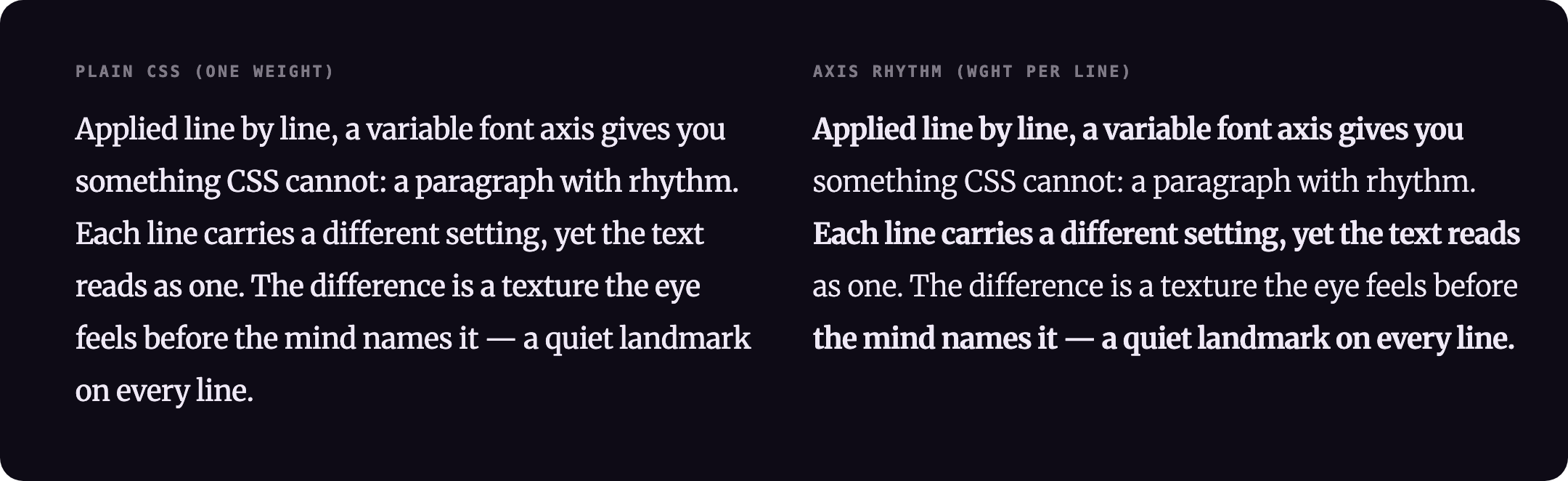
The algorithm detects visual lines by measuring word span positions with getBoundingClientRect(), then wraps each line in a <span> with its own font-variation-settings. The injected value overrides only the target axis — all other axes set on the parent element are preserved by reading and patching the computed fontVariationSettings string before writing. Runs on mount and on every resize via ResizeObserver. Re-runs when fonts finish loading (document.fonts.ready). The effect is skipped entirely if prefers-reduced-motion: reduce is set.
Line break safety: Each run starts from the original HTML, detects lines at the element's natural layout, then locks them with white-space: nowrap. Word breaks never change as a result of the axis variation.
Width overflow: Applying different axis values per line alters character widths, so lines may grow wider or narrower than the container. linePreservation: 'none' (default) is appropriate for display or headline type where the axis range is large and overflow is intentional. For body text — or any context where line edges must stay flush — use linePreservation: 'spacing' (adjusts letter-spacing to compensate) or 'scale' (GPU scaleX transform).
The linePreservation pass measures each line's natural width before applying the axis value, then applies axis and measures again. The delta becomes either a letter-spacing correction ('spacing') or a scaleX transform ('scale') per line.
- Runtime: any browser with variable-font and
font-variation-settingssupport (all current evergreen browsers). The effect is purely visual and degrades to plain text everywhere else. - React is optional. It is declared as an optional peer dependency — install it only if you use the
AxisRhythmTextcomponent oruseAxisRhythmhook. The vanillaapplyAxisRhythm/startAxisRhythmentry points have no React dependency. - Zero runtime dependencies, ~4.8 kB gzipped (ESM).
@chenglou/pretextandsyllableare optional peers, pulled in only forlineDetection: 'canvas'andsource: 'syllable-density'respectively. - SSR / first paint: line spans are computed in the browser from measured layout, so server-rendered markup ships as a plain paragraph and the rhythm appears after hydration and
document.fonts.ready. Expect a brief flash of unstyled (un-rhythmed) text on first load; pair it withfont-display: swap/block. Server-side stable spans are on the roadmap (see Future improvements). - Accessibility: the effect is skipped entirely when
prefers-reduced-motion: reduceis set, and line wrapping never alters the DOM text, so screen readers and copy-paste see the original content.
package.json at the repo root lists next as a devDependency. This is a Vercel detection workaround — not a real dependency of the npm package. Vercel's build system inspects the root package.json to detect the framework; without next present it falls back to a static build and skips the Next.js pipeline, breaking the /site subdirectory deploy.
The package itself has zero runtime dependencies. Do not remove this entry.
- Multi-axis variation — cycle more than one axis simultaneously per line (e.g. alternate both
wdthandwghtindependently) - SSR hydration — generate stable line spans on the server to eliminate the flash-of-unstyled-text on first paint
- Smooth re-layout — animate axis values on resize instead of snapping, for a less jarring transition when viewport width changes
Current version: 1.1.17