Scripts
Scripts make it possible to apply a succession of operations to one or more datasets.
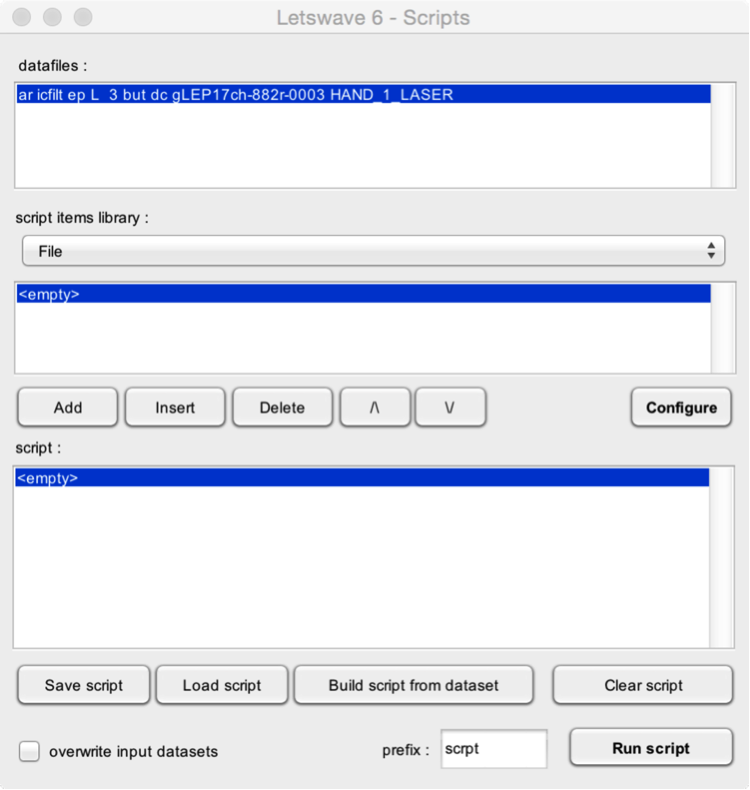
- Datafiles. The datasets that onto which the operations will be performed.
The first step is to add functions to your script. This can be done using the Add, Insert, Delete, Up and Down buttons:
-
Script items library. This listbox contains all the categories of scriptable functions. When you choose a given category, the lower listbox displays all available functions for that category.
-
Add. Add the selected function to the script.
-
Insert. Add the selected function to the script, at the currently selected position.
-
Delete. Delete the selected function from the script.
-
Up and Down. Move the selected function up or down in the list.
The next step is to configure each function. This can be done by selecting each function of the script, and clicking the Configure button.
- Save script. Save the script as a script file.
- Load script. Load a script file.
- Build script from dataset. If you have already processed a dataset, you can create a script using the history of that dataset. The script will include all the functions and configuration that have been applied to the dataset.
- Clear script. Clear the script.
- Run script. Run the script.