This project is a microservices-based application composed of several services, each responsible for a specific functionality. The services communicate with each other using Kafka as a messaging broker, and they are containerized using Docker. The application also uses Zookeeper for managing the Kafka brokers and relies on MySQL and PostgreSQL for data persistence.
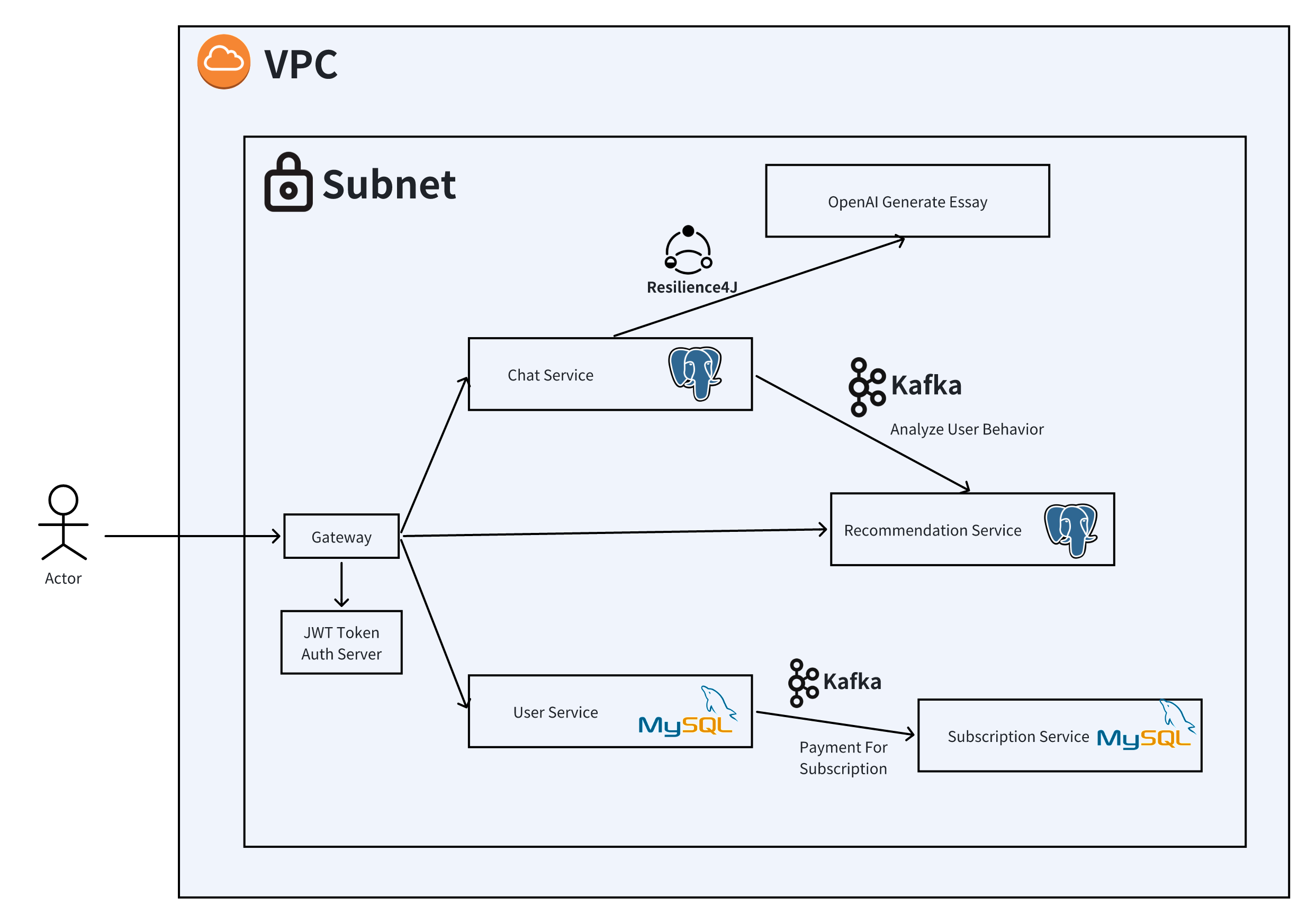
-
Install Docker and Docker Compose: Ensure that you have Docker and Docker Compose installed on your machine.
-
Import OpenAI API key to to env variables.
-
Build and Start the Services: Navigate to the directory containing the
docker-compose.ymlfile and run the following command:docker-compose up --build
This command will build the Docker images for the services and start them.
Once the services are up and running, you can access the gateway at http://localhost:8080.
Each service requires certain environment variables for configuration:
SPRING_PROFILES_ACTIVE: Spring profile to use.SPRING_DATASOURCE_URL: URL to connect to PostgreSQL.SPRING_DATASOURCE_USERNAME: Username for PostgreSQL.SPRING_DATASOURCE_PASSWORD: Password for PostgreSQL.SPRING_KAFKA_BOOTSTRAP_SERVERS: Kafka broker address.
SPRING_PROFILES_ACTIVE: Spring profile to use.SPRING_DATASOURCE_URL: URL to connect to MySQL.SPRING_DATASOURCE_USERNAME: Username for MySQL.SPRING_DATASOURCE_PASSWORD: Password for MySQL.SPRING_KAFKA_BOOTSTRAP_SERVERS: Kafka broker address.
STRIPE_API_KEY: API key for Stripe payment processing.
SPRING_PROFILES_ACTIVE: Spring profile to use.- Service URIs to route requests.
To stop the running services, press Ctrl + C in the terminal where the services are running or execute:
docker-compose downIf you wish to remove the containers along with the volumes, use:
docker-compose down -vdocker-compose logs <service-name>