Releases: QoderAI/changelog
Team Knowledge Engine and Voice Input Upgrades

Features
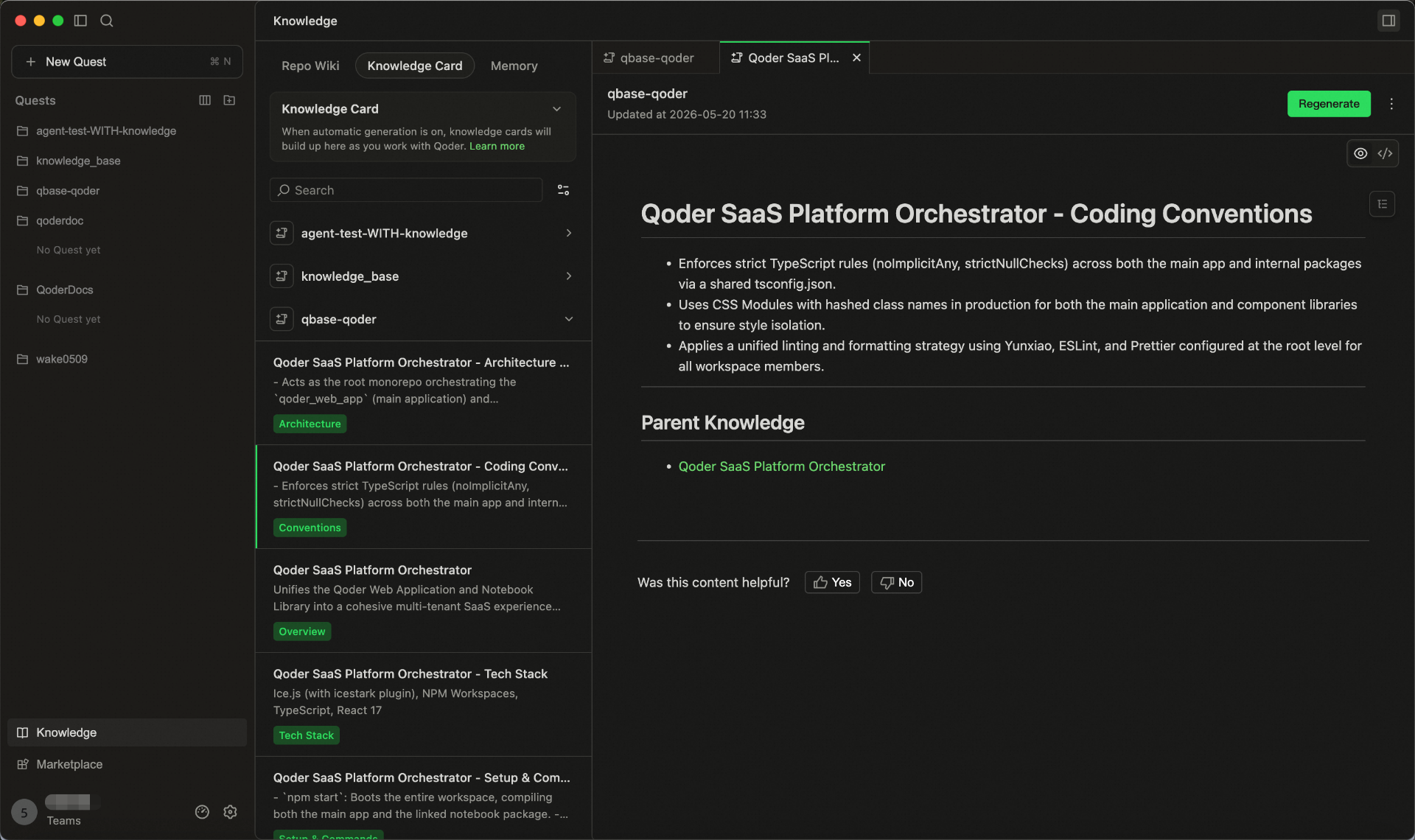
- Team Shared Knowledge Engine is now live
- Bring User Memory, RepoWiki, and Knowledge Cards into one shared system.
- Enter /knowledge in the chat box to update knowledge anytime.
- Knowledge is stored in the cloud, maintained by the team, and used by Agents in real time.
- Smart Polishing for Voice Input: Automatically refines colloquial speech after transcription, making your input clearer and more natural for higher-quality interactions with Agent.
Improvements
- Optimized generation and update performance of RepoWiki and knowledge cards in large repositories.
- Improved knowledge hit efficiency in code change scenarios.
- Improved the performance and experience of Agent Mode in Quest Window.
- Streamlined the knowledge usage workflow, reducing the effort required to supplement project background information.
Support for Using Dev Container in SSH Remote
Features
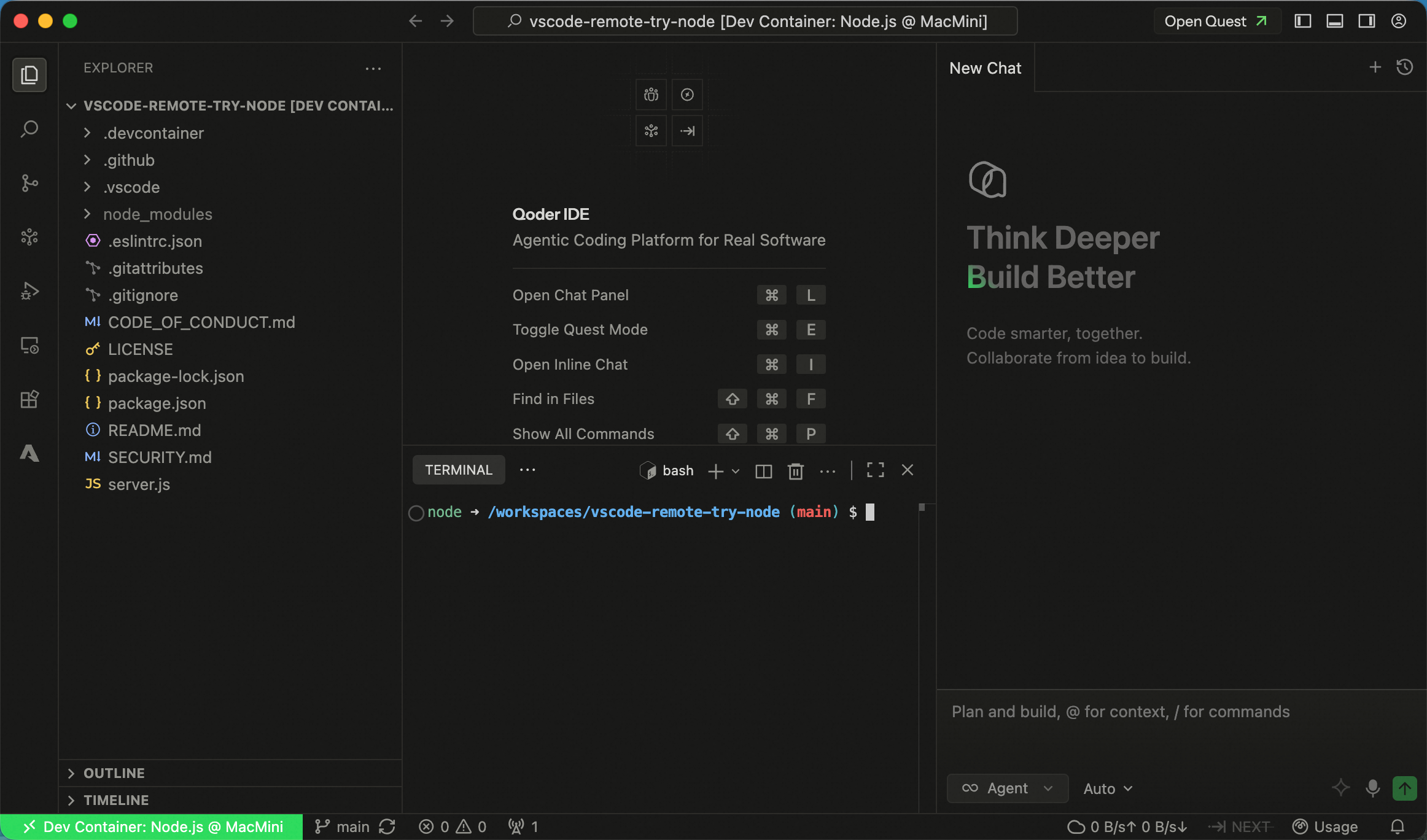
- Support for using Dev Container in SSH Remote: Added Dev Container support for SSH Remote environments, along with the ability to attach to any Docker container, improving flexibility and consistency of remote development setups.
Improvements
- More keyboard shortcut options are now available for App Window Snapshot, configurable in Settings → Integration → App Window Snapshot.
- Added a clearer entry point to sub-agent settings in the Experts model selector in the Quest Window, helping users configure sub-agents more quickly.
- Optimized the experience for handling long history sessions, maintaining more stable and smoother interactions in ultra-long context scenarios.
Better Quest Multitasking, plus Customizable Expert Agent Models
Features
-
Custom Tiled Layout for Quest Window: Split the Quest window into multiple panes to handle several Quest tasks at once, with less tab switching.
-
New "My Quests" Dashboard: Track all your tasks in one centralized view, monitoring progress across statuses to stay on top of your workload.
-
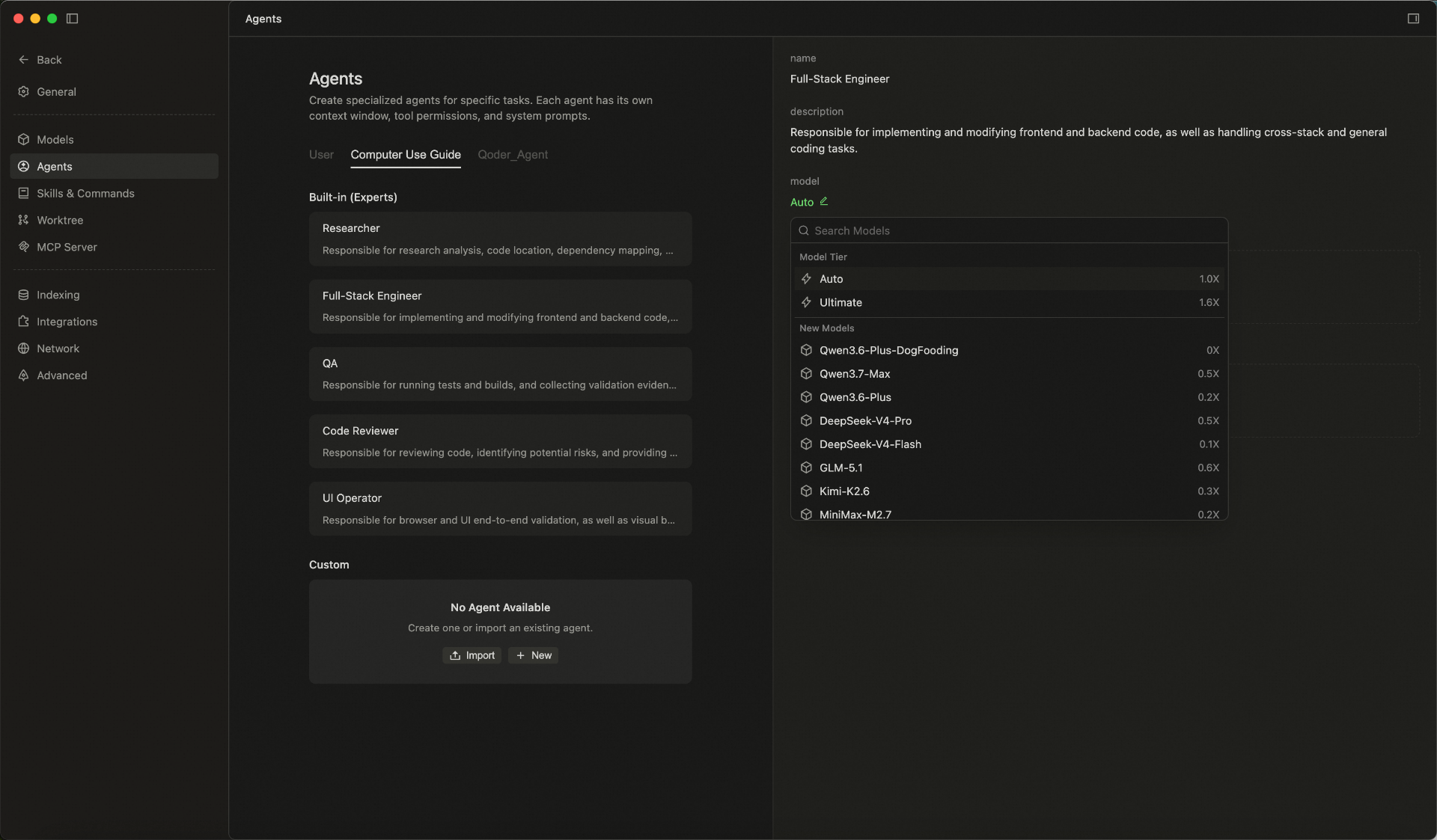
Custom Models for Experts: Customize the models used by Expert agents in Expert Mode, choosing from built-in or custom models to fit different scenarios.
- Code Review capability enhanced: Run /ultra review for deeper analysis and higher-quality suggestions, helping you spot potential issues faster and improve your implementation.
Improvements
- Optimized preview display effect of cards in conversation flow, making key information clearer to view.
- Optimized knowledge engine retrieval and intervention strategies before generation, improving answer relevance and hit effectiveness.
- Optimized retrieval agent memory writing logic, reducing interference from duplicate content on conversation results.
- Optimized memory agent intent recognition, retrieval recall and reflection effects, improving long-term conversation quality.
- Optimized session storage capabilities, enhancing historical content management and session continuity experience.
New App Window Snapshot
Feature
- Capture the current window with a double press:Double-press the Command (⌘) key to quickly capture a screenshot of the frontmost app window and use it as context for the agent, helping it understand what you're viewing faster. Currently available on macOS only.
Improvements
- Performance Optimization of Knowledge Engine Generation
Added Support for Computer Use Capability
Features
- Computer Use Capability Supported on Mac: Once authorized, Agent can invoke computer operation capabilities on macOS, operate apps in the background, and complete more complex automation tasks.
Improvements
- Relaxed file type restrictions for input box drag-and-drop, reduced file format limitations for smoother operations.
- Optimized execution methods for multiple Hooks, supporting concurrent processing to improve overall response efficiency.
- Enhanced knowledge retrieval effectiveness, helping tasks more accurately hit relevant knowledge content during the process.
- Improved LSP tool capabilities, supporting third-party package calls to enhance code retrieval and comprehension completeness.
Knowledge Engine Optimization
Improvements
- Optimize the overall capabilities of the knowledge engine to improve the experience of knowledge retrieval, comprehension, and result presentation;
- Refine the details after the knowledge engine's release to enhance stability and usability in daily operations;
- Enhance the quality of responses based on knowledge content, reduce interference from irrelevant information, and improve result relevance.
Bug Fixes
- Fix potential layout misalignment issues in Markdown preview
Model Selector Feature Enhancement
Features
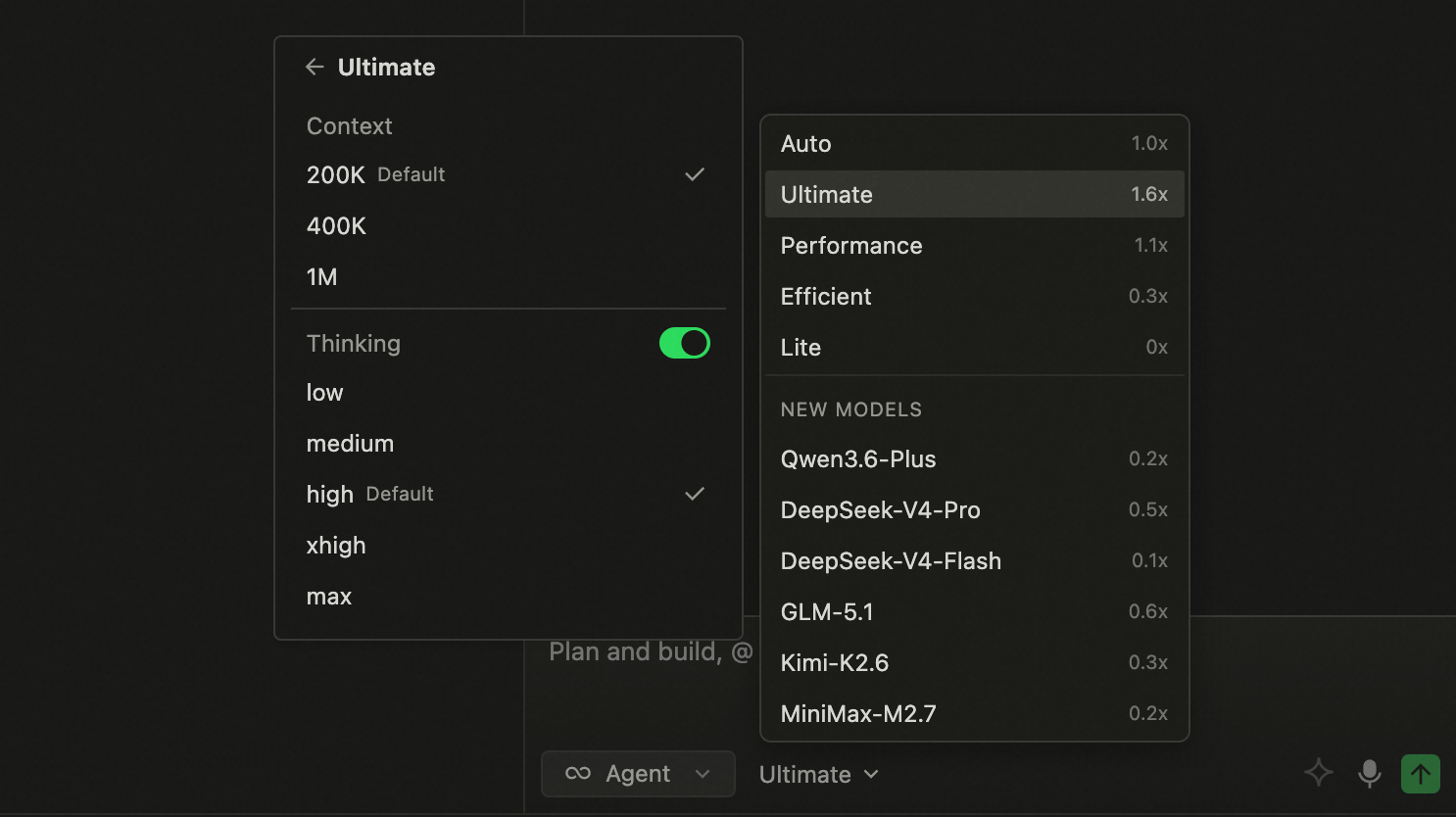
- Model Selector: Support for adjusting Context and Thinking Effort parameters.
Improvements
- Improved behavior recommendation generation strategy for better accuracy.
Quest mode now supports WSL connections.
Features
- Added support for WSL connections in Quest mode.
Improvements
- Improved code review performance in Quest mode.
Fixes
- Fixed an issue where Do Not Disturb mode was enabled by default in Quest mode.
- Fixed an issue with incorrect background rendering in editor WebViews.
- Fixed an intermittent issue where context buttons in the input box were not displayed.
Introducing Qoder 1.0
Since the first release in August 2025, Qoder has shipped more than 60 production releases in just nine months. Each one has been part of an ongoing exploration of a single question: how AI can truly transform software development.
From initial code completion, to Agentic Chat, to Quest mode, and then to Experts mode—we have been validating one judgment all along: AI is evolving from "assisting you to write code" to "delivering complete software outcomes on their behalf." Qoder 1.0 is our milestone response to that shift.
Qoder 1.0, evolving from AI IDE to autonomous development desktop.
Highlights
-
New Quest Window & Refreshed Editor
- Quest upgrades from IDE mode to standalone window, becoming the command center for Agent First workflow
- Editor window completely upgraded, delivering smoother human-machine collaborative coding experience
-
Cross-Project Multi-Task Parallel Processing
- Supports multiple Workspaces running different project agent tasks simultaneously
- Unified panel tracks global activities in real-time, automatically generates delivery checklist upon task completion
-
Team Shared Knowledge Engine
- Unified user memory, Repo Wiki, and knowledge cards for team-wide management and reuse
- Cloud-based team knowledge, collaboratively maintained and continuously used by agents (Currently in Private Preview)
-
Multi-Agent Expert Team Collaboration
- Five types of experts: planning, research, coding, review, and testing officially join Quest, completing end-to-end delivery in pipeline mode
- Supports custom experts—configure domain knowledge, skills and tools, creating dedicated Agent teams tailored to business scenarios
Other Features
-
Knowledge Management: Provides more centralized knowledge access in Quest, helping users efficiently accumulate, organize and call content assets.
-
Marketplace Entry Launch: New Marketplace module added, convenient for users to discover, obtain and manage more extension capabilities.
-
New /Canvas Visualization Generation Capability: Supports generating interactive Canvas views through /canvas trigger, making content organization, report presentation and analysis more intuitive.
Improvements
- Settings configuration more centralized, consolidating common settings into configuration center, reducing scattered search costs and improving personalized adjustment efficiency.
- RepoWiki adds update strategy settings, supporting enabling or disabling auto-update in settings, making knowledge content update methods more aligned with personal preferences.
- Optimized client-server reconnection path, reducing connection interruption impact on continuous usage experience.
- Improved session and command trigger path stability, reducing operation interruptions caused by exceptions.
- Optimized Quest configuration center module organization, making core capability entry clearer.