This repository contains the public Soundless Android app codebase.
Maintainer: Daniel Alejandro Coll - danielalejandro.coll@urv.cat
Requirements:
- A developer account on Fitbit.
- All services configured in Google Cloud.
More information here.
- Soundless collects health data (sleep status, heart rate, etc) from wearables, whereas sound data comes from phone microphone.
- Sound collection works in a foreground, started, bound service.
- Soundless does not perform sound classification (labelling...).
- Recording information is separated into Metadata and Measurements.
- Metadata objects are created at the beginning of the recording.
- 10-second time windows are summarized into average Measurements that are sent to the API implemented in Firebase Cloud Functions.
- Authentication to Fitbit is a standard PKCE process implemented by scratch using Fitbit reference guides.
- Heart Rate is obtained from Fitbit's Intraday API. (Obtained approval)
- Sleep is obtained from Fitbit's Sleep API.
- Application design: Single Activity, MVI-MVVM architecture. Tools: Jetpack Navigation, Hilt Dependency Injection, Room, Retrofit, KotlinX serialization.
Soundless uses several services within Firebase and Google Cloud Platform.
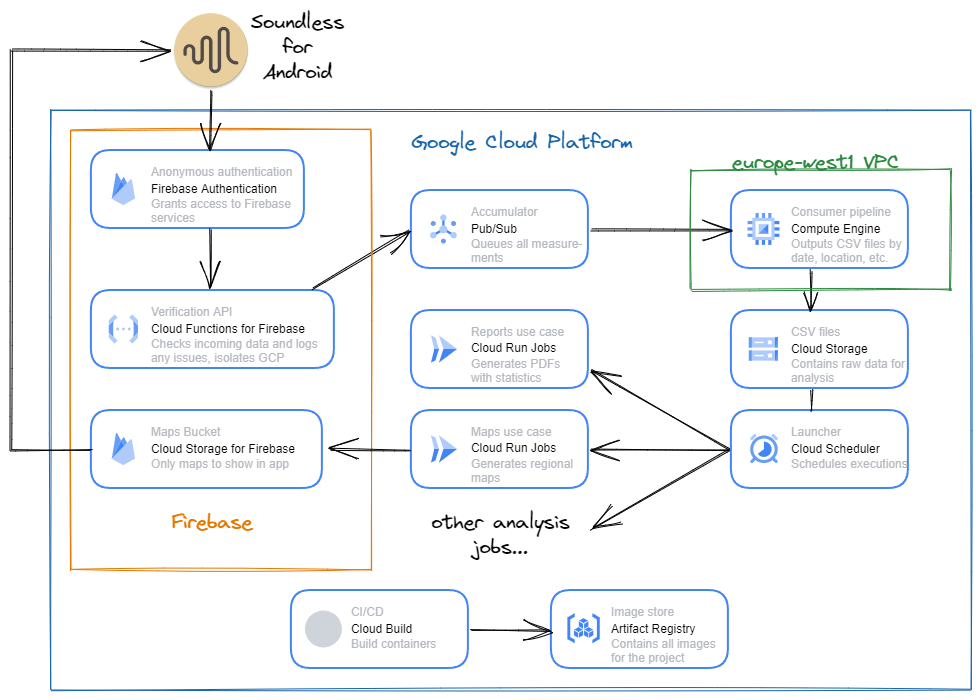
- Android Studio installed on your machine
- Firebase project set up with the necessary services
Follow the instructions to import an existing project into Android Studio:
- Open Android Studio
- Select "Open an Existing Project"
- Navigate to the soundless-public-app directory and click "OK"
- Set up Firebase for the Soundless app following the Firebase Android setup guide
- Download the
google-services.jsonfile from your Firebase project console - Place the
google-services.jsonfile in the app/ directory of the project
- Connect a physical device or set up an emulator
- Follow the guide to run apps on Android devices
- Click the "Run" button in Android Studio, or use Shift+F10
We welcome support in the following tasks:
- Improve the sound collection mechanisms and apply A-weighting filters for dB measurements.
- Find smart ways to introduce sound classification.
- Improve design and UX, especially in the Fitbit authentication and pairing process.