High-performance GPU-driven rendering engine built around a fully data-oriented architecture, designed to scale to millions of entities in real-time.
Synapse Engine is a research-oriented real-time rendering engine focusing on eliminating CPU bottlenecks and maximizing GPU utilization through a fully compute-driven pipeline.
The system integrates a segmented data-oriented ECS with a hierarchical GPU culling architecture, modern mesh shader support, and an advanced virtualized shadow map system for directional, spot, and point lights (supporting both CPU and GPU-driven paths). The engine now utilizes an MVI architecture for its tooling and features a robust cross-platform build system using xmake for Windows and Linux.
 Synapse Engine running with the integrated ImGui editor, showcasing the MVI architecture.
- GPU-driven rendering: Indirect draw and compute-based visibility.
- Hierarchical culling in Compute Shaders: CPU-generated static chunks and GPU-generated Morton chunks, executing a Chunk → Model → Mesh pipeline, followed by Task Shader Meshlet culling.
- Template-based Custom ECS Registry: Natively handles static, dynamic, and stream entities per component with O(1) access.
- Full Bindless Vulkan: Utilizing a bindless architecture and the most modern Vulkan extensions.
- Hybrid Pipeline: Simultaneous support for traditional and modern Mesh Shader rendering paths.
- Lighting & Materials: PBR rendering with an advanced, virtualized shadow map simulation.
The architecture is built to handle extreme entity counts without CPU bottlenecks, leveraging the segmented ECS and indirect draw calls.
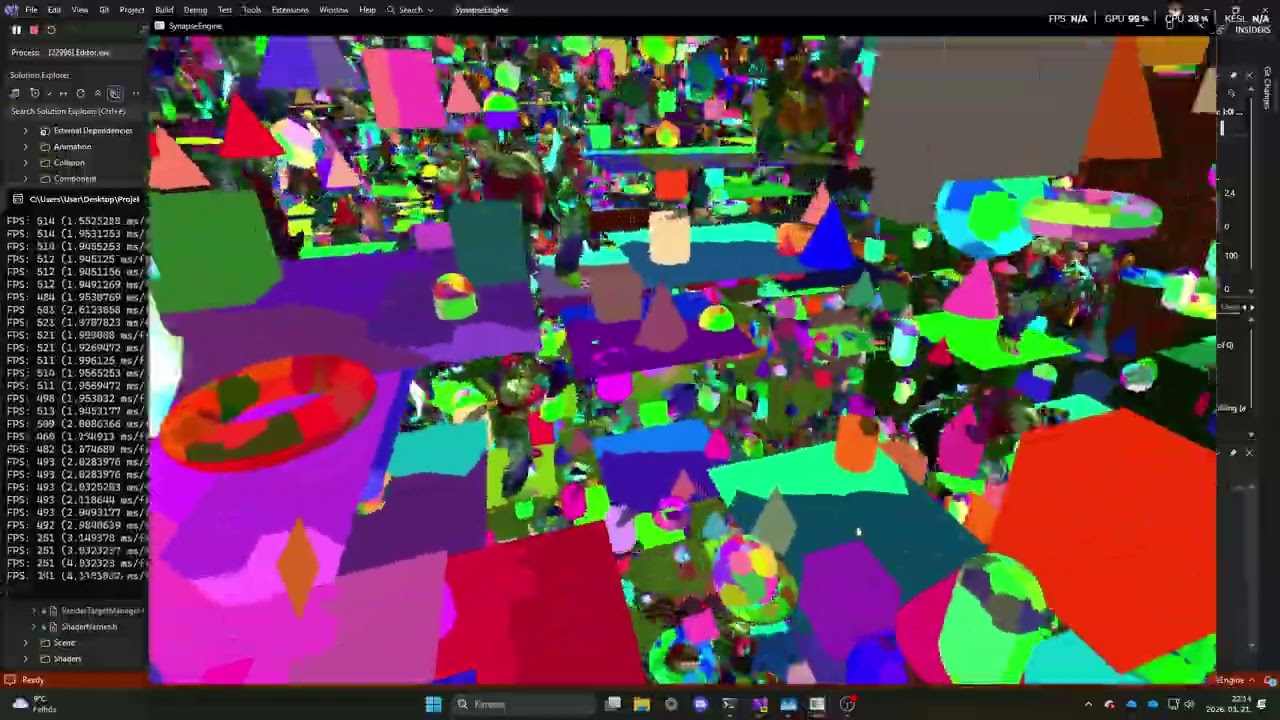
Exterior Overview: A wide shot demonstrating over a million uniquely colored and scaled primitives rendered in real-time.

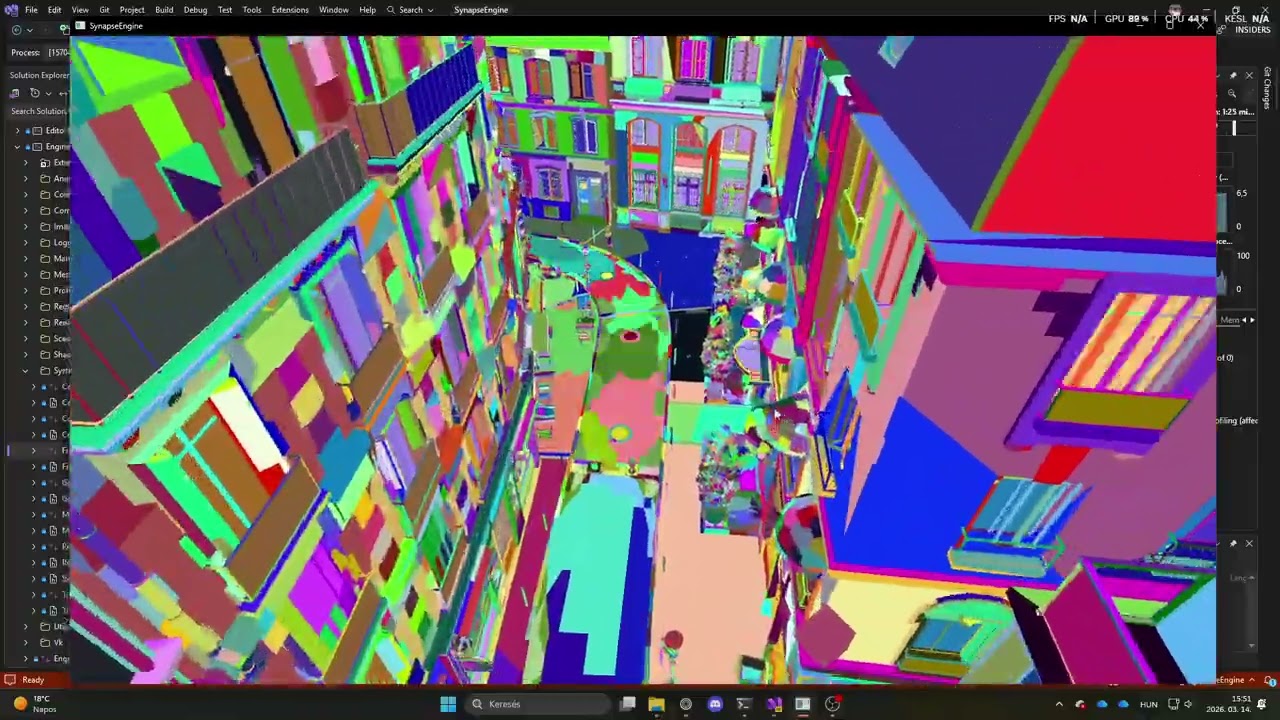
Interior Perspective: Navigating through dense geometry clusters within an architectural environment.

Performance Demonstration: Watch the engine fluidly handle 1,000,000 static objects and dynamic animations while maintaining exceptionally low frame times.
This video demonstrates the real-time generation and transition of meshlets in the highly detailed NVIDIA Bistro environment, showcasing dynamic level-of-detail scaling directly on the GPU.
The engine implements an advanced Forward+ rendering path featuring dynamic, Hi-Z based variable tile sizing. Tiles are dynamically split into clusters based on depth information to optimize light culling.
 Dynamic tile and cluster visualization based on Hi-Z data.
 Light cluster heatmap in a highly populated scene.
Deferred rendering is fully supported alongside the Forward+ pipeline. Light volumes are accurately represented during the lighting pass.
 1000+ Light simulation (No Bloom)
Synapse Engine employs a fully virtualized shadow map architecture backed by a unified 4K texture atlas. Shadows can be toggled between CPU-driven and full GPU-driven pipelines at runtime. All geometries belonging to a specific light are batch-rendered efficiently.
Directional light shadow cascades are allocated directly into the main atlas. The pipeline utilizes the full Chunk → Model → Mesh → Meshlet culling hierarchy to only render the necessary shadow casters into the cascade regions.


Omnidirectional shadows are mapped by allocating 3x2 chunks for the cube faces and projecting them flattened into the virtual 4K shadow map. This drastically reduces the overhead of traditional cubemap rendering.


Similar to the other light types, each spot light manages its own localized atlas region within the virtualized shadow map.


The engine utilizes a multi-stage culling approach to ensure minimal waste of GPU resources. The culling pipeline can be dynamically switched between CPU-driven and full GPU-driven modes at runtime.
The macro-level culling operates on spatial chunks. Static entities are grouped into CPU-generated chunks, while dynamic entities utilize GPU-generated Morton chunks.
 Visualization of active spatial chunks.
Culling is executed in highly parallel compute shaders. Passing entities trigger indirect draw dispatches.
- Model Culling: Coarse filtering of entire objects.
- Mesh Culling: Finer filtering at the sub-mesh level.
- Meshlet Culling: Executed in the Task Shader for the ultimate granular visibility check.
-
Frustum Culling: Geometry completely outside the camera's view is discarded before reaching the rasterizer.

-
Occlusion Culling: Objects hidden behind other opaque structures are efficiently culled using Hi-Z occlusion tests, drastically reducing overdraw.

-
Cone Culling: Back-facing meshlets and geometry clusters are efficiently rejected early in the pipeline using normal cone tests, further reducing the number of processed primitives.


This scene highlights the integration of complex, high-poly geometry alongside thousands of dynamic, emissive primitives. It demonstrates the flexibility of the bindless resource system handling various mesh types simultaneously.


The engine features comprehensive visual debugging capabilities to inspect the internal state of the scene and the rendering pipeline in real-time. This includes the ability to toggle wireframe rendering down to the granular meshlet level, as well as visualizing various bounding volumes and colliders.
 Wireframe and bounding volume visualization at the meshlet level.
 Debug rendering of light colliders and spatial bounds.
The architecture and performance characteristics of the engine are described in detail in the accompanying paper:
High-Performance GPU-Driven Rendering and Hierarchical Culling Architecture
Read the full Research Paper (PDF)
This project has also been presented in multiple internal and academic contexts.
- Handles 1,000,000+ entities in real-time
- GPU-driven culling reduces CPU cost to near-zero
- Mesh shader pipeline achieves up to ~2x speedup compared to traditional pipelines
- Near-linear scaling across modern GPU architectures
We use xmake for seamless cross-platform building on Windows and Linux.
Unless stated otherwise, all
xmakecommands should be executed from theSynapseEnginedirectory (the repository root), where thexmake.luafile is located.
You can install xmake using PowerShell via winget or Chocolatey.
winget install xmake

# or

choco install xmakeClone the repository along with its submodules.
git clone --recursive https://github.com/TamasPetii/SynapseEngine.gitIf the repository has already been cloned, initialize or update the submodules:
git submodule update --init --recursivecd External/vcpkg
.\bootstrap-vcpkg.bat
cd ..\..Install the Xmake extension for Visual Studio Code.
The extension provides:
- Xmake Explorer
- Target Editor
- Build Mode selector (Debug / Release / Dist / Performance)
- Build & Run buttons

Generate a native Visual Studio solution:
xmake project -k vsxmake -m "debug,release,dist,performance" .Generate a CMakeLists.txt for traditional CMake workflows:
xmake project -k cmake -m "debug,release,dist,performance" .Important
SynapseEngine requires GCC 14. Both vcpkg and the engine must be built using the exact same compiler (
gcc-14/g++-14) to guarantee ABI compatibility and consistent standard library behavior.
sudo apt-get update

sudo apt-get install -y \
    gcc-14 \
    g++-14 \
    libx11-dev \
    libxcursor-dev \
    libxrandr-dev \
    libxinerama-dev \
    libxi-dev \
    libgl1-mesa-dev \
    libxxxf86vm-dev \
    libwayland-dev \
libxkbcommon-devcurl -fsSL https://xmake.io/shget.text | bash
source ~/.xmake/profilegit clone --recursive https://github.com/TamasPetii/SynapseEngine.git
cd SynapseEngineEnsure that both vcpkg and SynapseEngine use GCC 14.
export CC=gcc-14
export CXX=g++-14cd External/vcpkg
./bootstrap-vcpkg.sh
cd ../..Configure the project using the GCC 14 toolchain and build it.
xmake f -p linux -a x64 -m release --cc=gcc-14 --cxx=g++-14 -y

xmake
The Visual Studio Code Xmake extension works on Linux exactly the same way as on Windows, providing a seamless graphical workflow for configuring, building, and running the engine.
- This is a research and architecture-focused engine
- Not intended as a plug-and-play game engine
- Designed to explore modern high-performance rendering techniques
SynapseEngine is dual-licensed:
- GNU Affero General Public License v3.0 (AGPLv3) for open-source and non-commercial use
- Commercial license available for proprietary/commercial usage
If you want to use SynapseEngine in a closed-source product, commercial game, proprietary engine, or commercial environment without AGPL obligations, you must obtain a commercial license.
For commercial licensing inquiries: