Command-Line Utility for Adding Colors to Batch Files. Made using VS and C++.
- This project is disclaimer. find the orginal project at CodeProject
Image:
{XX}: colors coded as two hexadecimal digits. E.g., {0A} light green color{\n \t}: color information as understandable text. E.g., {light red on black}{\n \t}: New line character - Tab character.{\u0000}: Unicode character code.{{: escape character '{'.{#}: restore initial colors.
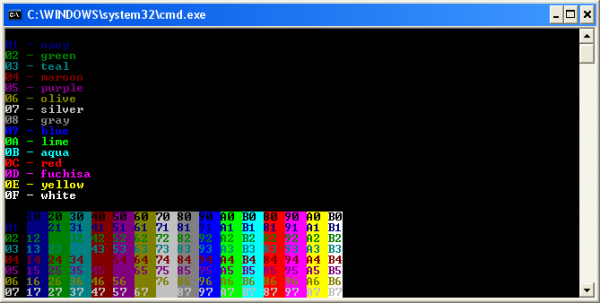
Available colors:
0= black1= navy2= green3= teal4= maroon5= purple6= olive7= silver8= gray9= blueA= limeB= aquaC= redD= fuchsiaE= yellowF= white
@echo off
cecho {0C}This line is red on black{#}
REM Print ASCII char 0x07 (beep)
cecho {\u07 \u07}
cecho This {black on blue}word{#} is black on a blue background