


EasyDB is a user-friendly database utility that wraps Sqlite in an easy-to-use JavaScript API. What makes EasyDB so easy you ask? Well, you get all ot the great functionality of a Sqlite database without having to know or write SQL!
EasyDB is a wrapper utility that provides simple javascript functions for performing SQL commands like CREATE, SELECT, UPDATE, and DELETE without even having to write a single line of SQL.
npm i -S sqlite
This will create a database file called database.sqlite in your projects root directory.
// db-connection.js

import EasyDB from 'easy-db';

const db = new EasyDB();
db.connect();

export default db;
You can then use your database instance by importing it.
import db from './db-connection.js';All Queries are asyncronous and can be handled in two different ways.
db.select({ table: 'Products' })
  .then(res => {
    // do somthing with response
  })
.catch(err => console.log(err));const result = await db.select({ table: 'Products' });As mentioned above, EasyDB's API allow you to run SQL commands like CREATE, SELECT, UPDATE, and DELETE.
Creates a new database table.
Parameters:
- table
String - columns
Object
Returns:
Object- created
Number
- created
const response = await db.createTable('Products', {
  categoryId: 'number',
  name: 'string',
  description: 'string',
  price: 'float',
});

// Returns => { "created": 1 }
SQL generated by the above example.
CREATE TABLE Products (
  id INTEGER PRIMARY KEY,
  categoryId INTEGER,
  name VARCHAR,
  description VARCHAR,
  price REAL
)
Data Types
- string - The value is a text string
- number - The value is a integer (whole number)
- float - The value is a floating point (decimal)
- blob - The value is a blob of data, stored exactly as it was input
Selects one or more records from a database table.
Parameters:
- Options
Object- table
String - columns
String - filters
StringOptional
- table
Returns:
Object- data
Array|Object
- data
// Returns all records with all columns
const response = await db.select({ table: 'Products' })

// Returns all records with only specified columns
const response = await db.select({
  table: 'Products',
  columns: 'categoryId, name, price',
})

const response = await db.select({
  table: 'Products',
  filters: 'categoryId = 100, price < 100.00',
})
SQL generated by the above examples.
SELECT *
FROM Products;

SELECT categoryId, name, price
FROM Products;

SELECT *
FROM Products
WHERE categoryId = 100 AND price < 100.00;Inserts one or more records into a database table.
Parameters:
- Options
Object- table
String - records
Array|Object
- table
Returns:
Object- insertedIds
Array
- insertedIds
// Inserts a single record
const response = await db.insert({
  table: 'Products',
  records: {
    categoryId: 100,
    name: 'iPad Pro - 12.9 inch - 256 GB',
    description: 'First generation 12.9 inch iPad Pro',
    price: 1149.99,
  },
});

// Returns => { insertedIds: [32445] }

// Inserts multiple records
const response = await db.insert({
  table: 'Products',
  records: [
    {
      categoryId: 100,
      name: 'iPad Pro - 12.9 inch - 256 GB',
      description: 'First generation 12.9 inch iPad Pro',
      price: 1149.99,
    },
    {
      categoryId: 100,
      name: 'Sony DVD Player',
      description: 'Used Sony DBD Player. Good condition.',
      price: 49.99,
    },
  ]
});

// Returns => { insertedIds: [32445, 45656] }
SQL generated by above example.
INSERT INTO Products (
  categoryId,
  name,
  description,
  price
)
VALUES (
  100,
  'iPad Pro - 12.9 inch - 256 GB'
  'First generation 12.9 inch iPad Pro',
  1149.99
);Updates one or more records in a database table.
Parameters:
- Options
Object- table
String - updates
Array|Object - filters
StringOptional
- table
Returns:
Object- changes
Number
- changes
// Updates a single record
const response = await db.update({
  table: 'Products',
  updates: {
    id: 33545,
    price: 1049.99,
  },
});

// Returns => { "changes": 1 }

// Updates multiple records
const response = await db.update({
  table: 'Products',
  updates: [
    {
      id: 33545,
      price: 1049.99,
    },
    {
      id: 34556,
      price: 35.99,
    },
  ],
});

// Updates all records that match the filter criteria
const response = await db.update({
  table: 'Products',
  updates: { status: 'out of stock' },
  filters: `inventoryQuantity = 0`,
});
SQL generated by above examples.
UPDATE Products SET price = 1049.99 WHERE id = 33545;

UPDATE Products SET price = 1049.99 WHERE id = 33545;
UPDATE Products SET price = 35.99 WHERE id = 34556;

UPDATE Products
SET status = 'out of stock'
WHERE inventoryQuantity = 0;Deletes one or more records from a database table.
Parameters:
- Options
Object- table
String - ids
ArrayOptional - filters
ObjectOptional
- table
Returns:
Object- deleted
Number
- deleted
// Deletes a single record from a table
const response = await db.delete({
  table: 'Products',
  ids: 68282,
});

// Returns => { "deleted": 1 }

//  Deletes multiple records from a table
const response = await db.delete({
  table: 'Products',
  ids: [68282, 33559, 26657],
});

// Returns => { "deleted": 3 }

// you can also delete records based on specific filters
const response = await db.delete({
  table: 'Products',
  filters: `status = 'discontinued'`,
});

// Returns => { "deleted": 3 }
SQL generated by above example.
DELETE FROM Products
WHERE id = 68282;

DELETE FROM Products
WHERE status = 'discontinued';Creates a object combining the data from all tables in your database.
For example, if our database has two tables, Users & Products, we can run db.combineAllTables to combine all of the data from those two tables into one JSON object.
const megastate = await db.combineAllTables();{"Users":[{"id":12696,"name":"Samuel Jackson","email":"s.jackson@gmail.com"},{"id":19767,"name":"Steve Wilson","email":"s.wilson@gmail.com"},{"id":49329,"name":"Brett Small","email":"bsmall@yahoo.com"},{"id":51342,"name":"Sam Small","email":"sam.small@gmail.com"},{"id":55553,"name":"Bill Johnson","email":"bill_johnson@gmail.com"},{"id":57417,"name":"Greg Smith","email":"bsmith@gmail.com"},{"id":65495,"name":"Bill Johnson","email":"bill_johnson@gmail.com"},{"id":66725,"name":"Paul Black","email":"p.black@gmail.com"},{"id":95385,"name":"Bill Johnson","email":"bill_johnson@gmail.com"},{"id":98693,"name":"Bill Johnson","email":"bill_johnson@gmail.com"}],"Products":[{"id":33236,"categoryId":200,"name":"Tennis Ball Set","description":"4 tennis balls","price":7.99}]}Sometimes it is neccessary to drop old tables. To prevent accidental table drops, a CLI is available to assist you with dropping tables.
In your package.json
{
  "scripts": {
    "drop": "node ./easy-db/cli"
  }
}In a terminal window
npm run drop
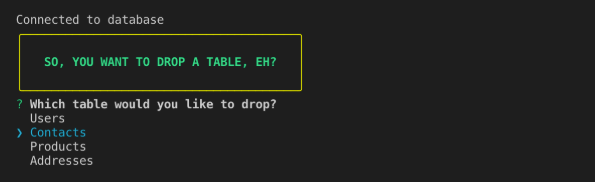
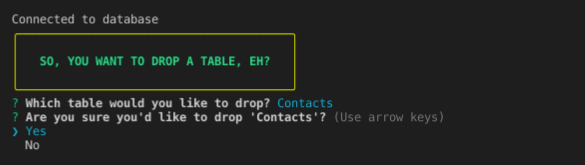
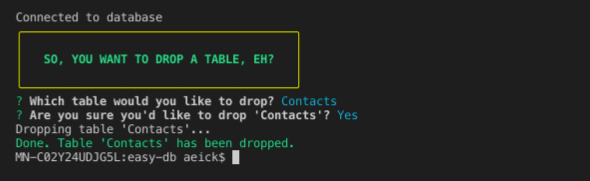
The CLI will provide you with prompts to drop a table.
After you have select the table you want to drop and confirmed your selection, the CLI will execute the DROP TABLE command. Once finished, you will recieve confirmation from the CLI that the table has been dropped.
The following example demonstrate how EasyDB can be integrated into a Node.js and GraphQL application.
// typedefs.js

export default `
  type Query {
    products: [Product]
    product(id: Int): Product
  }
  type Mutation {
    insertProduct(
      body: [InsertProductInput]
    ): Status
    updateProduct(
      body: [UpdateProductInput]
    ): Status
    deleteProduct(
      ids: [Int]
    ): Status
    deleteDiscontinuedProducts: Status
  }
  type Product {
    id: Int
    categoryId: Int
    name: String
    price: Int
    description: String
  }
  type Status {
    insertedIds: [Int]
    deleted: Int
    changes: Int
    err: Error
  }
  type Error {
    message: String
  }
  input InsertProductInput {
    categoryId: Int!
    name: String!
    price: Int!
    description: String!
  }
  input UpdateProductInput {
    id: Int
    categoryId: Int
    name: String
    price: Int
    description: String
  }
`;
// db-connection.js
import EasyDB from 'easy-db';
const db = new EasyDB();
db.connect();
export default db;// resolvers.js
import db from './db-connection';
const procucts = async () => {
const { data, err } = await db.select({
table: 'Products',
columns: 'categoryId, name, price'
});
if (err) {
throw new Error(err);
}
return data;
};
const product = async ({ id }) => {
const { data, err } = await db.select({
table: 'Products',
filters: `id = ${id}`,
});
if (err) {
throw new Error(err);
}
return data;
};
const insertProduct = async ({ records }) => {
const { insertedIds, err } = await db.insert({
table: 'Products',
records,
});
if (err) {
throw new Error(err);
}
return { insertedIds };
};
const updateProduct = async ({ records }) => {
const { changes, err } = await db.update({
table: 'Products',
records,
});
if (err) {
throw new Error(err);
}
return { changes };
};
const deleteProduct = async ({ ids }) => {
const { deleted, err } = await db.delete({
table: 'Products',
ids,
});
if (err) {
throw new Error(err);
}
return { deleted };
};
const deleteDiscontinuedProducts = async () => {
const { deleted, err } = await db.delete({
table: 'Products',
filters: `status = 'discountinued'`,
});
if (err) {
throw new Error(err);
}
return { deleted };
};
export {
procucts,
procuct,
insertProduct,
updateProduct,
deleteProduct,
};// server.js
import express from 'express';
import cors from 'cors';
import express_graphql from 'express-graphql';
import { buildSchema } from 'graphql';
import typedefs from './typedefs';
import * as rootValue from './resolvers';
const app = express();
const port = process.env.PORT || 3000;
const env = process.env.NODE_ENV;
const schema = buildSchema(typedefs);
app.use('/graphql', cors(), express_graphql({
schema,
rootValue,
graphiql: env === 'development',
}));
app.listen(port, () => {
console.log(`App listening on port ${port}`);
});