



Deploy and manage compliant tokens from Claude, Cursor, or any AI agent — by typing a sentence.
Built on Bitbond TokenTool — 8,300+ deployments, CertiK-audited contracts, compliance built in.
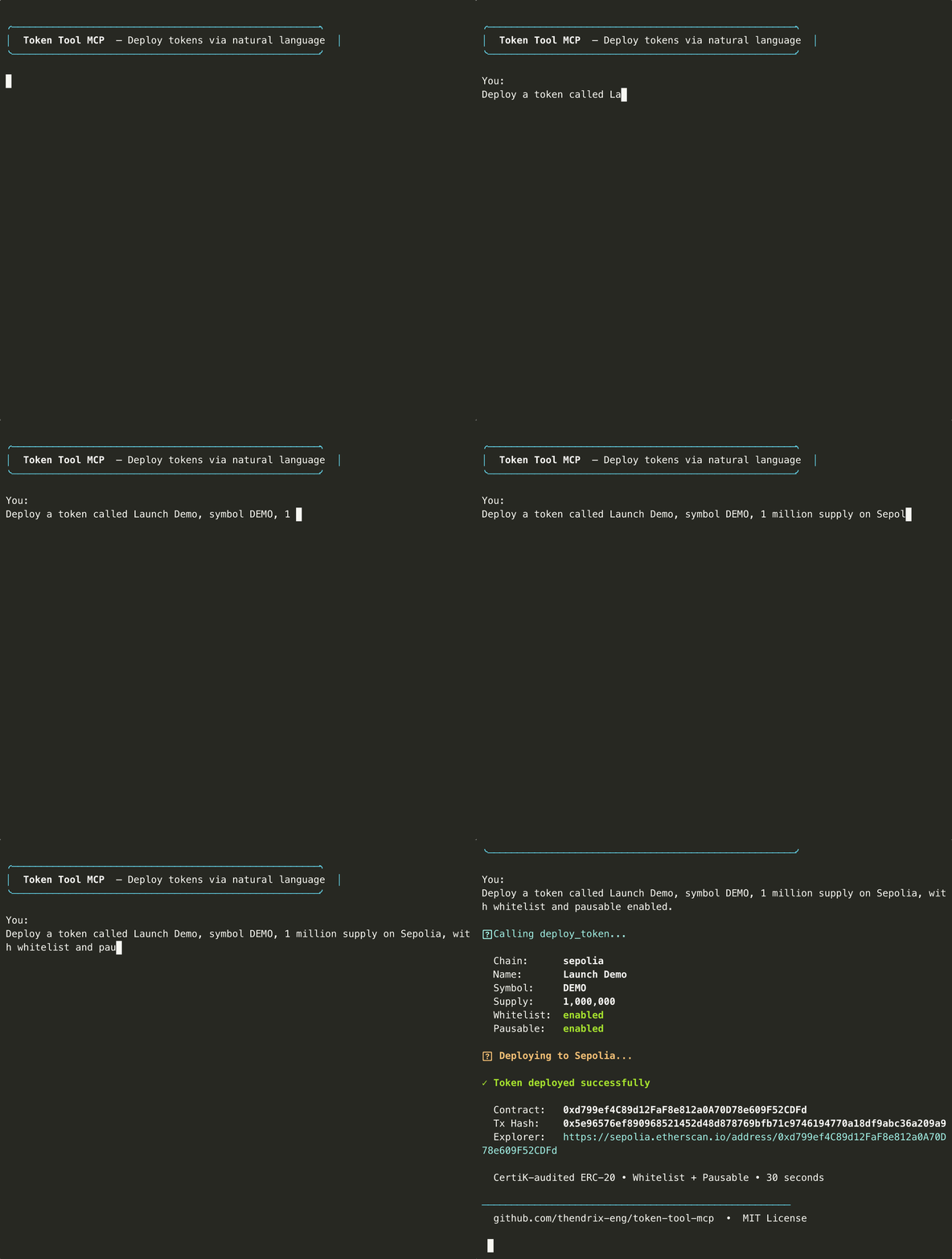
"Deploy a token called Green Bond A, 1M supply on Base, with whitelist and pausable."
→ CertiK-audited ERC-20 deployed on-chain in ~30 seconds. Contract address returned. No Solidity required.
Add to ~/.claude/claude_desktop_config.json:
{
  "mcpServers": {
    "token-tool": {
      "command": "npx",
      "args": ["-y", "token-tool-mcp"],
      "env": {
        "BITBOND_PRIVATE_KEY": "0x..."
      }
    }
  }
}→ One-click install for Cursor
Or add manually to .cursor/mcp.json:
{
  "mcpServers": {
    "token-tool": {
      "command": "npx",
      "args": ["-y", "token-tool-mcp"],
      "env": {
        "BITBOND_PRIVATE_KEY": "0x..."
      }
    }
  }
}→ One-click install for VS Code
Or add to .vscode/mcp.json in your workspace:
{
  "servers": {
    "token-tool": {
      "command": "npx",
      "args": ["-y", "token-tool-mcp"],
      "env": {
        "BITBOND_PRIVATE_KEY": "0x..."
      }
    }
  }
}claude mcp add token-tool -- npx -y token-tool-mcpThen set your key in the environment: export BITBOND_PRIVATE_KEY=0x...
Once connected, try these:
| Prompt | What happens |
|---|---|
| "Deploy a governance token called DAO Vote, 10M supply on Polygon, mintable and burnable" | Deploys an audited ERC-20 with mint + burn enabled |
| "Estimate the cost to deploy on Arbitrum vs Base" | Returns gas + fee estimates for both chains |
| "Mint 500K more tokens to 0x1234..." | Mints to target address, confirms tx |
| "Pause all transfers on contract 0xabcd..." | Activates the emergency stop |
| "Show me everything I've deployed" | Lists all tokens from local registry |
| "Deploy an RWA security token on Ethereum with whitelist, force transfer, and document URI linking to the prospectus" | Full compliance token with investor restrictions and legal doc reference |
17 tools across the full token lifecycle:
| Tool | Description |
|---|---|
deploy_token |
Deploy a CertiK-audited ERC-20 with optional compliance features |
estimate_cost |
Quote deployment cost (gas + fee) before committing funds |
list_chains |
List all 12 supported networks with chain IDs and aliases |
get_token_info |
Live on-chain token state — name, symbol, supply, paused status, owner |
list_deployed_tokens |
Full local deployment registry |
mint_tokens |
Mint additional supply to any address |
burn_tokens |
Permanently destroy tokens |
pause_token |
Emergency stop — halt all transfers immediately |
unpause_token |
Resume transfers after a pause |
transfer_tokens |
Send tokens to any address |
get_wallet_info |
Deployer wallet address and native balance |
add_to_whitelist |
Add addresses to token whitelist (batch supported) |
remove_from_whitelist |
Remove addresses from token whitelist |
get_whitelist |
View whitelist status and all whitelisted addresses |
add_to_blacklist |
Block an address from token interactions |
remove_from_blacklist |
Unblock a previously blacklisted address |
get_compliance_status |
Check whitelist and blacklist configuration for a token |
EVM (8): Ethereum · Polygon · BNB Chain · Arbitrum · Base · Optimism · Avalanche · Peaq
Non-EVM (2): Solana (SPL tokens) · Stellar (Stellar assets)
Testnets (5): Sepolia · Base Sepolia · BNB Testnet · Solana Devnet · Stellar Testnet
Human-friendly aliases work everywhere: eth, polygon, bnb, arb, base, op, avax, peaq, sol, stellar
Optional flags on every deployment — the features institutional issuers and RWA platforms need:
| Feature | Flag | What it does |
|---|---|---|
| Whitelist | --whitelist |
Only approved addresses can hold or receive tokens |
| Blacklist | --blacklist |
Block specific addresses from any interaction |
| Pausable | --pausable |
Owner can freeze all transfers instantly |
| Force Transfer | --force-transfer |
Owner can move tokens between addresses (regulatory recovery) |
| Document URI | --document-uri |
Attach a prospectus, term sheet, or legal document on-chain |
| Max Supply Cap | --max-supply |
Hard ceiling on total supply, enforced at the contract level |
You (natural language) → MCP Client (Claude/Cursor/VS Code) → TokenTool MCP Server (local)
    → Bitbond TokenTool API → Smart contract factory → On-chain deployment
- You type a prompt in your MCP client
- The client calls the appropriate tool on the local MCP server (stdio transport — nothing leaves your machine until step 3)
- The MCP server constructs a deployment transaction and submits it to Bitbond's TokenTool smart contract factory on the target chain
- The factory deploys a CertiK-audited ERC-20 contract with your parameters
- The contract address and transaction hash are returned to your MCP client
Your private key signs transactions locally. It is read from an environment variable, never passed as an argument, and never transmitted to Bitbond or any third party. The MCP server itself is stateless — the only local state is an optional deployment registry at data/registry.json.
TokenTool MCP also works as a standalone CLI for scripts, CI/CD, and non-MCP agents:
# List all supported chains
token-tool chains

# Estimate cost before deploying
token-tool cost --chain base

# Deploy a token
token-tool deploy \
  --chain base \
  --name "My Token" \
  --symbol MTK \
  --supply 1000000 \
  --mintable \
  --pausable

# Post-deployment management
token-tool mint --chain base --address 0x... --to 0x... --amount 500000
token-tool burn --chain base --address 0x... --amount 10000
token-tool pause --chain base --address 0x...
token-tool info --chain base --address 0x...

# View your deployment history
token-tool registry
All commands output structured JSON. Install globally with npm install -g token-tool-mcp to use token-tool directly.
| Flag | Description |
|---|---|
--chain |
Target network (see aliases above) |
--name |
Token name |
--symbol |
Token symbol |
--supply |
Initial supply (human-readable, e.g. 1000000) |
--decimals |
Decimal places (default: 18) |
--mintable |
Enable minting after deployment |
--burnable |
Enable burning |
--pausable |
Enable pause/unpause |
--whitelist |
Enable whitelist-only transfers |
--blacklist |
Enable address blacklisting |
--force-transfer |
Enable owner-initiated forced transfers |
--document-uri |
Attach a document URL on-chain |
--max-supply |
Hard cap on total token supply |
--owner |
Token owner address (defaults to deployer) |
- Private key stays local. Read from
BITBOND_PRIVATE_KEYenv var only — never passed as a CLI argument, never logged, never transmitted - stdio transport. The MCP server communicates with your client locally. No network listener, no open ports
- CertiK-audited contracts. You're deploying battle-tested smart contracts, not generated Solidity
- Testnet by default. We recommend starting on Sepolia or Base Sepolia — it's free and functionally identical to mainnet
- Human-in-the-loop. For mainnet deployments ($299 each), enable confirmation prompts in your MCP client before executing transactions
| Environment | Cost |
|---|---|
| Testnet (Sepolia, Base Sepolia, BNB Testnet) | Gas only (~free) |
| Mainnet (all production chains) | $299 flat fee per deployment + gas |
The $299 fee is Bitbond's standard TokenTool pricing — the same whether you deploy via the web UI, the API, or this MCP server. It's paid in the chain's native token (ETH, MATIC, BNB, etc.) at the time of deployment. No subscription, no API key, no per-call charges.
token-tool-mcp/
├── src/
│   ├── index.js          ← MCP server (stdio transport)
│   ├── cli.js            ← CLI interface
│   ├── tokenTool.js      ← Core engine (shared by CLI + MCP)
│   ├── chains.js         ← Network registry + aliases
│   ├── solana.js         ← SPL token adapter
│   └── stellar.js        ← Stellar asset adapter
├── data/
│   └── registry.json     ← Local deployment history
├── SKILL.md              ← OpenClaw agent skill descriptor
├── CHANGELOG.md
└── README.md
Bitbond TokenTool is one of the most widely used token deployment platforms in Web3:
- 8,300+ tokens deployed across production networks
- CertiK-audited smart contracts — audit report
- Used by enterprises, DAOs, and developers in 50+ countries
- Live since 2020, maintained by Bitbond GmbH (Berlin)
TokenTool MCP wraps this same production infrastructure for AI agents.
git clone https://github.com/thendrix-eng/token-tool-mcp
cd token-tool-mcp
npm install
node src/index.js   # start MCP server
node src/cli.js     # run CLI
Issues and PRs welcome.
MIT — Bitbond GmbH