In an era of rapid information growth, we generate content across multiple platforms faster than we can organize it. Thought Mapper is a powerful tool designed to solve this problem by automatically ingesting, analyzing, and structuring your digital footprint into a unified, interconnected knowledge graph.
This project transforms your scattered content from X (Twitter), Medium, and YouTube into a personal Zettelkasten within Obsidian. By using AI to assign relevant topics to every piece of content, it provides a unique way to visualize, connect, and rediscover your own thoughts and ideas over time.
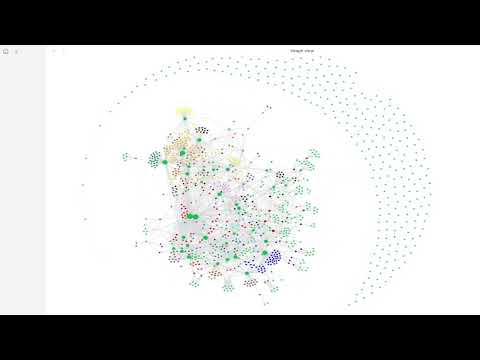
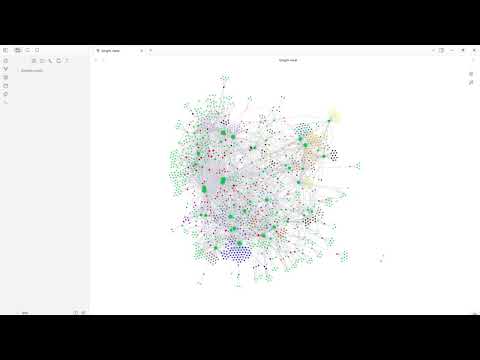
Project Status: Complete. The script successfully ingests data from multiple sources and generates a fully-functional, platform-aware Obsidian vault.
You will need to provide the source files for the content you want to map.
- For X (Twitter):
- Request your archive from your X "Settings".
- Find the
tweets.jsfile inside thedatasubfolder. - Place
tweets.jsin the root of the project folder.
- For Medium:
- Create a text file named
articles.txt. - Copy and paste your article summaries into this file. The script is designed to parse the specific format used during development.
- Place
articles.txtin the root of the project folder.
- Create a text file named
- For YouTube:
- The project includes a separate script to fetch your video data automatically using the YouTube Data API.
- Clone the Repository:
git clone https://github.com/cbarkinozer/thought-mapper.git cd thought-mapper - Install Dependencies:
pip install -r requirements.txt
- Define Your Topics: Create a file named
topics.txtand list all the categories you want to sort your content into, with one topic per line. This is the "brain" of the categorization. - Set Up API Key (for YouTube):
- Follow a guide to get a "YouTube Data API v3" key from the Google Cloud Console.
- Create a file named
.envin the project root. - Add your key to the file like this:
YOUTUBE_API_KEY=AIzaSy...your...key...
The process is in two parts.
-
First, fetch your YouTube data:
python fetch_youtube_data.py
This will create a
youtube_videos.jsonfile in your project folder. -
Now, generate your vault:
python app.py
This script will process all your data sources (
tweets.js,articles.txt,youtube_videos.json) and generate a complete Obsidian vault in a new folder namedobsidian_vault.
- Open the Obsidian application.
- Click "Open folder as vault" and select the
obsidian_vaultfolder. - Open the Graph View to see a visual map of your thoughts.
- Go to Graph View -> Groups to color-code your notes by topic (e.g.,
tag:#ArtificialIntelligence).
The script transforms your raw, multi-platform content into a connected knowledge graph through a unified pipeline.
-
Multi-Source Ingestion: The pipeline begins by running dedicated parsers for each data source (
tweets.js,articles.txt,youtube_videos.json). Each parser cleans the data and transforms it into a standard format, noting the original platform. -
Guided Categorization (Zero-Shot Classification): This is the core of the AI. Instead of guessing themes, the system uses a powerful Sentence Transformer model (
all-MiniLM-L6-v2) to perform semantic search. It converts every piece of your content and every user-defined topic fromtopics.txtinto numerical vectors. Then, for each content item, it finds the most semantically similar topics and assigns them. This "human-in-the-loop" approach ensures high accuracy and meaningful categories. -
Zettelkasten Generation: In the final stage, the script builds your Obsidian vault:
- Note Creation: Every tweet, article, or video becomes a single Markdown file.
- Rich Metadata: Each note's YAML frontmatter includes its creation date, original
sourcelink, and theplatformit came from (X, Medium, or YouTube). - Structural Links: The assigned topics are added as both
[[wikilinks]]for structural navigation and as#tagsin the note body, making them instantly available for filtering and color-coding in Obsidian's Graph View.
This project provides a solid foundation. Future versions could include:
- User Interface (UX): The highest priority is to build a simple web interface using Streamlit or Flask. This would allow users to upload their files and manage topics without using the command line.
- Deeper AI Analysis:
- Automated Summaries: Use a Large Language Model (LLM) to write a summary for each major topic hub.
- Semantic Note Linking: Re-implement logic to find and create links between individual notes that are highly similar, creating a denser, more interconnected graph.
- Expanded Data Sources: Create new parsers to ingest data from other sources like Goodreads, Pocket, RSS feeds, or local document folders.
- Deployment: Containerize the application with Docker and deploy it as a public web service, allowing anyone to map their own digital footprint.