A Material-Design-inspired theme pack for KDE Plasma 6
Polished for KDE Plasma 6.3.6 on Debian 13.4 "Trixie"





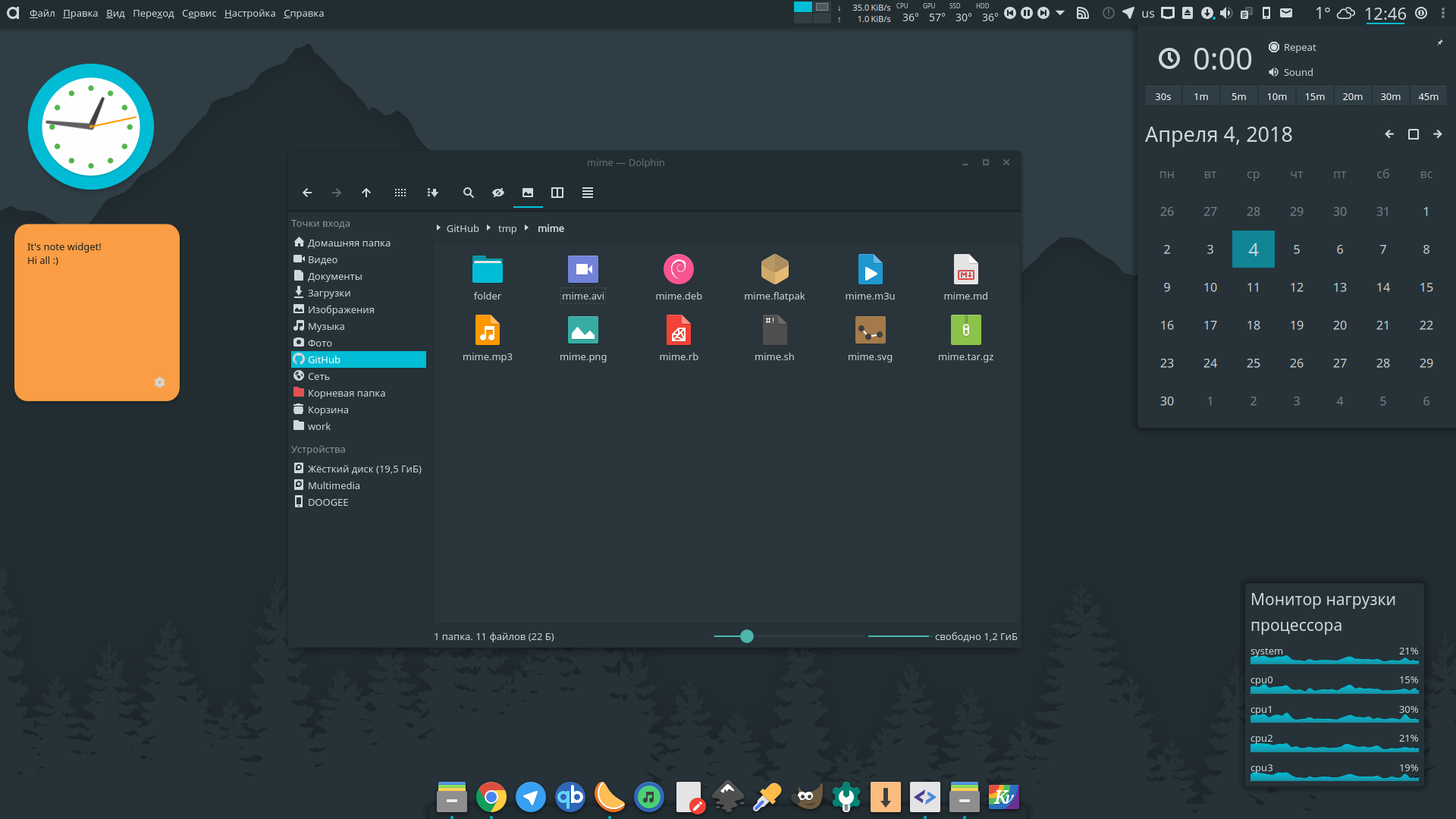
Engine: Kvantum · Kvantum theme: Adapta Nokto · Aurorae decoration: Adapta · Plasma theme: Adapta · Icons: Papirus-Adapta-Nokto · File manager: Dolphin
Adapta KDE is a cohesive Plasma theme pack inspired by Google's Material Design, originally ported from the (now-frozen) Adapta GTK theme. This fork keeps the KDE side actively maintained on the Qt 6 / Plasma 6 / KDE Frameworks 6 stack.
The pack ships everything needed for a consistent desktop experience:
| Aurorae decoration | KDecoration2/3-compatible window borders |
| Color schemes | Adapta (light) & Adapta Nokto (dark), with Plasma 6 Header sets |
| Konsole profiles | Matching terminal palettes |
| Kvantum themes | Rich widget styling for Qt 6 apps via qt6-style-kvantum |
| Plasma desktop theme | Panels, tray, widgets, tooltips |
| Look-and-Feel package | Global theme with a Qt 6 splash screen |
| Wallpaper | Signature Adapta teal wallpaper |
| Yakuake skins | Adapta and Adapta Nokto drop-down terminal skins |
The theme was audited end-to-end for Plasma 6 / KF6. Notable updates:
- KPackage manifests — every package now ships a
metadata.json(KPluginMetaData schema) alongside the legacymetadata.desktopfor back-compat with older tooling. - Qt 6 splash — dropped the removed
QtGraphicalEffects 1.0import, moved to unversionedQtQuickimports, fixed the splashsourceSizebinding. - Plasma 6 color sets — added
[Colors:Header]and[Colors:Header][Inactive]sets plus an explicitaccentColorso the scheme plays nicely with the new header-styled headerbars and the accent system. - Screen-locker seeding — the Look-and-Feel
defaultsnow also seedskscreenlockerrcso the locker matches the desktop theme on first apply. - SPDX license tags — metadata now uses
GPL-3.0-onlyandCC-BY-SA-4.0. - Install tooling — Plasma 6 cache paths are cleared on install; the Makefile
prints a
kbuildsycoca6 --noincrementalhint after copy.
# 1. Install runtime dependencies
sudo apt update
sudo apt install --no-install-recommends \
    qt6-style-kvantum kvantum \
    plasma-workspace plasma-desktop kwin-x11 \
    konsole yakuake \
    papirus-icon-theme breeze-cursor-theme

# 2. Install Adapta KDE
wget -qO- https://raw.githubusercontent.com/digitalxs/adapta-kde/master/install.sh | shgit clone https://github.com/digitalxs/adapta-kde.git
cd adapta-kde
sudo make install # system-wide, into /usr/share
# or
make install PREFIX=~/.local # per-user, into ~/.local/share
kbuildsycoca6 --noincremental # refresh the KF6 service cachewget -qO- https://raw.githubusercontent.com/digitalxs/adapta-kde/master/install.sh | uninstall=true sh
# or
sudo make uninstallThird-party packages are maintained outside this repo. Please contact the respective maintainer for specific issues.
Once installed, open System Settings → Appearance → Global Theme and pick Adapta. This applies the Plasma theme, color scheme, Aurorae decoration, splash screen and cursor in one go.
For the best result:
- Widget style — run
kvantummanager, select Adapta or Adapta Nokto, then in System Settings → Colors & Themes → Application Style pick kvantum (or kvantum-dark). - Icons — set Papirus-Adapta / Papirus-Adapta-Nokto.
- Fonts — System Settings → Fonts → Noto Sans for title, menu and toolbar.
- Toolbars — icon size 16 px, no text.
- Terminal — Konsole → Settings → Profiles → Color Scheme → Adapta / Adapta Nokto. Yakuake users: Settings → Skin → adapta / adapta-nokto.
Disable window buttons and the titlebar to reclaim vertical space. Edit the installed aurorae rc file:
$EDITOR /usr/share/aurorae/themes/Adapta/Adaptarcand set:
[Layout]
ButtonHeight=0
ButtonWidth=0
TitleHeight=0
TitleEdgeTop=0The theme doesn't show up in System Settings
After the first install, KF6 needs to rebuild its service cache:
kbuildsycoca6 --noincremental
kquitapp6 plasmashell && kstart plasmashell
Log out and back in if System Settings still doesn't see the theme.
Aurorae borders render as a solid block (proprietary GPU drivers)
On some NVIDIA proprietary setups, Aurorae SVG compositing is broken. Workarounds: disable window shadows in the Adaptarc file, or switch the compositor backend from OpenGL to XRender in System Settings → Display → Compositor.
See issue #21 for history.
Qt 5 apps ignore the theme
Plasma 6 runs on Qt 6. If you still launch Qt 5 apps (Latte Dock, older KDE
apps), install qt5-style-kvantum alongside qt6-style-kvantum and set
QT_STYLE_OVERRIDE=kvantum in your shell profile.
Splash screen doesn't appear / white flash on login
The 2026 release rewrote the splash for Qt 6. If you upgraded from a Plasma 5 theme install, clear the cached QML:
rm -rf ~/.cache/plasmashell/qmlcache/*and log out / back in.
If Adapta KDE improves your desktop, consider supporting continued development:

Adapta KDE is the work of many contributors. The 2026 Plasma 6 / Debian 13.4 port is maintained by:
- Luis Miguel P. Freitas — maintainer of the 2026 edition, Plasma 6 port
- DigitalXS — sponsoring company of the ongoing Plasma 6 effort — https://digitalxs.ca
Original and upstream credits:
- Alexey Varfolomeev (
varlesh) — original Adapta KDE port - Tsu Jan — original
KvAdaptaKvantum theme this pack builds upon - Papirus Development Team — founding maintainers of the KDE port
- The Adapta GTK project — source of the visual language
See each subdirectory's AUTHORS file for per-component attributions.
Bug reports, fixes and distro packaging are welcome — open an issue or pull request at https://github.com/digitalxs/adapta-kde.
If you package Adapta KDE for a distribution not listed above, please open a PR adding it to the "Other distributions" table.
Released under the GNU GPL v3 (color schemes under CC-BY-SA 4.0).
See LICENSE for the full text.