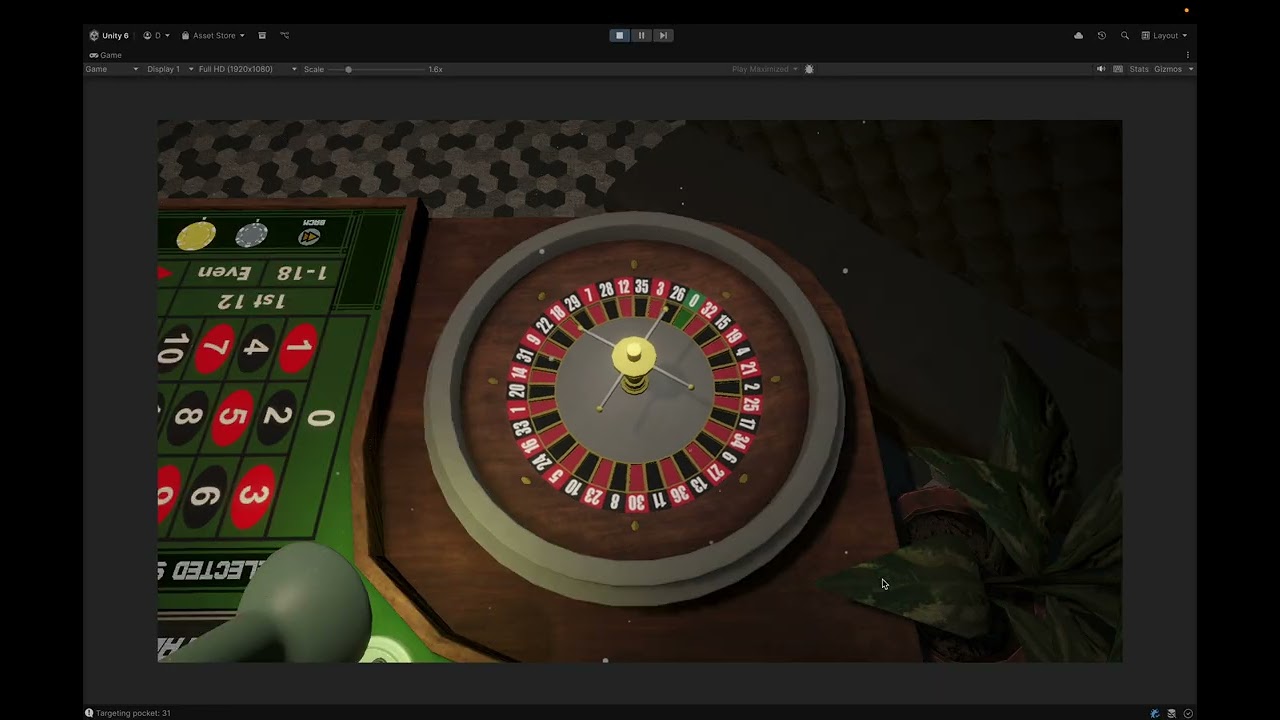
- Select a Chip: Click on one of the chip denominations at the bottom of the screen. The selected chip will be highlighted.
- Place Chip on Table: Click on any of the designated betting spots on the roulette table. This includes individual numbers, dozens, columns, red/black, etc.
- Stacking Chips: You can click multiple times on the same spot to stack chips and increase the bet amount.
- Player Balance: Your current balance is displayed in the bottom-right corner and will update automatically as you place bets.
- Once you are satisfied with your bets, press the "Spin" button on the right to start the roulette wheel.
- Once the spin is initiated, no more bets can be placed.
The prototype includes a special mode for testing specific outcomes.
- Enable Deterministic Mode: Check the "Deterministic" toggle at the top of the screen.
- Select Outcome: An input field will become active. Enter the number (0-36) you want the ball to land on.
- Spin: Press the "Spin" button. The ball will now land on the number you selected.
This project leverages several common design patterns to create a structured, scalable, and maintainable codebase.
- Description: The Service Locator pattern provides a central registry for services (dependencies), allowing different parts of the application to get references to services without needing a direct link.
- Implementation: The
DI/ServiceLocator.csclass is a static class that holds a dictionary of service interfaces and their concrete implementations. TheGameInitializer.csscript is responsible for creating instances of all services (e.g.,BettingManager,AudioManager) and registering them with theServiceLocatorat the start of the game. Other classes then callServiceLocator.Get<IMyService>()to retrieve dependencies.
- Description: The Observer pattern allows objects to subscribe to and receive notifications about events happening in other objects, without the objects having to be tightly coupled.
- Implementation: C#
eventandActiondelegates are used extensively. For example:IBettingManager.OnBetsCleared: UI elements subscribe to this event to know when to clear chip visuals from the board.IWheelController.OnSpinComplete: TheGameManagersubscribes to this to know when the wheel has finished spinning, triggering the payout sequence.IStatisticService.SpinRecorded: TheStatisticsUIsubscribes to this to update the displayed stats after each spin.
- Description: This pattern is used to reuse objects that are expensive to create, such as GameObjects. Instead of destroying objects, they are returned to a "pool" to be reused later.
- Implementation: The generic
PoolService<T>class implements the core pooling logic. TheChipManageruses this service to manage pools for each type of chip visual. When a chip is placed, it's taken from the pool (Get()), and when bets are cleared, the chip visuals are returned to the pool (Return()) instead of being destroyed.
- Description: The State pattern allows an object to alter its behavior when its internal state changes.
- Implementation: The
GameManageruses aGameStateenum (Betting,Spinning,Payout). While not a formal implementation with separate classes for each state, theChangeStatemethod and the logic withinGameManagerthat checks_currentStateeffectively mimic this pattern. For example, theSpinButtonPressed()method only works if the state isGameState.Betting.
- Description: The Strategy pattern defines a family of algorithms, encapsulates each one, and makes them interchangeable.
- Implementation: The static
BetRulesclass acts as a provider for different betting strategies or rules. TheGetPayout(BetType)andGetBetNumbers(BetType)methods return different values or number sets based on theBetTypeenum provided. This decouples the payout and win-checking logic from the objects that need this information.
- Description: A common Unity-specific pattern where
ScriptableObjects are used to create data assets that exist outside of scenes, making it easy to manage and edit configuration data. - Implementation:
ChipDatabaseSO: Holds a list of all available chip types, their values, sprites, and prefabs.SoundDatabaseSO: Contains a list of all audio clips, mapping them by a string key for easy access by theAudioManager.
- Service Locator vs. Dependency Injection: The current Service Locator pattern, while effective, can hide dependencies and make unit testing more difficult. A future improvement would be to replace it with a true Dependency Injection framework like VContainer or Zenject, which makes dependencies explicit.
async voidMethods: Some methods (e.g., inGameManager,WheelController) useasync void. This should generally be avoided in favor ofasync Taskto improve error handling and task composition.async voidshould primarily be reserved for top-level event handlers.- Complex Logic in
BettingManager.RestoreState: The logic for restoring chip visuals on the board is complex and involves nested loops. This could be refactored for better performance and readability, perhaps by using a dictionary to map bet types and numbers to their corresponding UI spots.
- Back-Revert Button: Add a button to allow players to revert their last bet action. I have plan to implement via command pattern.
- Expanded Bet Types: Implement more complex roulette bets like double zero (American Roulette). I will have plan to add this but finding competible assets is a challenge.
- UI/UX Polish: Add more animations, visual feedback, and refined graphics.
- Refactor
GameManager: TheGameManagercurrently has many responsibilities. It could be broken down further, with game state logic potentially being handled by a hierarchical Finite State Machine.