
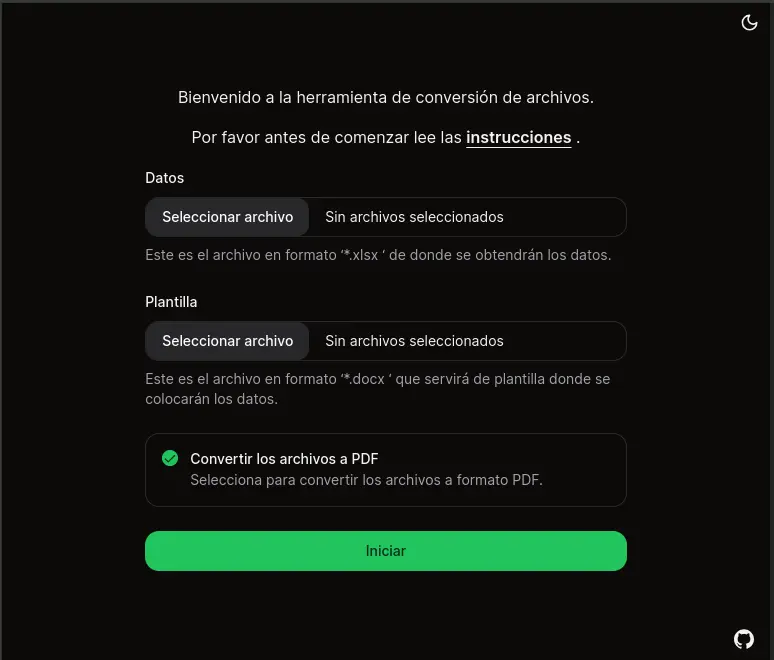
This web application, developed with Next.js and Typescript, allows users to upload an XLSX file and a DOCX template, merge the data from the XLSX file into the DOCX template, and then download the result as either a DOCX or PDF file. The application utilizes Gotenberg, an API for document-to-PDF conversion, hosted in a Docker container on a server.
-
XLSX File Upload: Upload the XLSX file containing the data. Data will be extracted from the first sheet of the file. The first row of this sheet will be used as column names (keys), and each subsequent row will represent a data set corresponding to those keys (values).
-
DOCX Template Upload: Upload the DOCX file that will serve as the template. Ensure that placeholders for the data are labeled with
{{}}in the Word document. -
Download Options: After merging the data into the DOCX template, you can choose to download the resulting document as either a DOCX file or a PDF file.
https://excel2docx-template2pdf.vercel.app
git clone https://github.com/fernandobouchet/excel2docxTemplate2pdf
cd excel2docxTemplate2pdf
npm install
npm run dev
Open http://localhost:3000 with your browser to see the result.
You can start editing the code. The page auto-updates as you edit the file.