
Postgram is a self-hosted knowledge store for humans and agents. It gives you a single place to store memories, notes, people, projects, and tasks, then retrieve them over REST, MCP, and a CLI with semantic search and API-key-based access control.
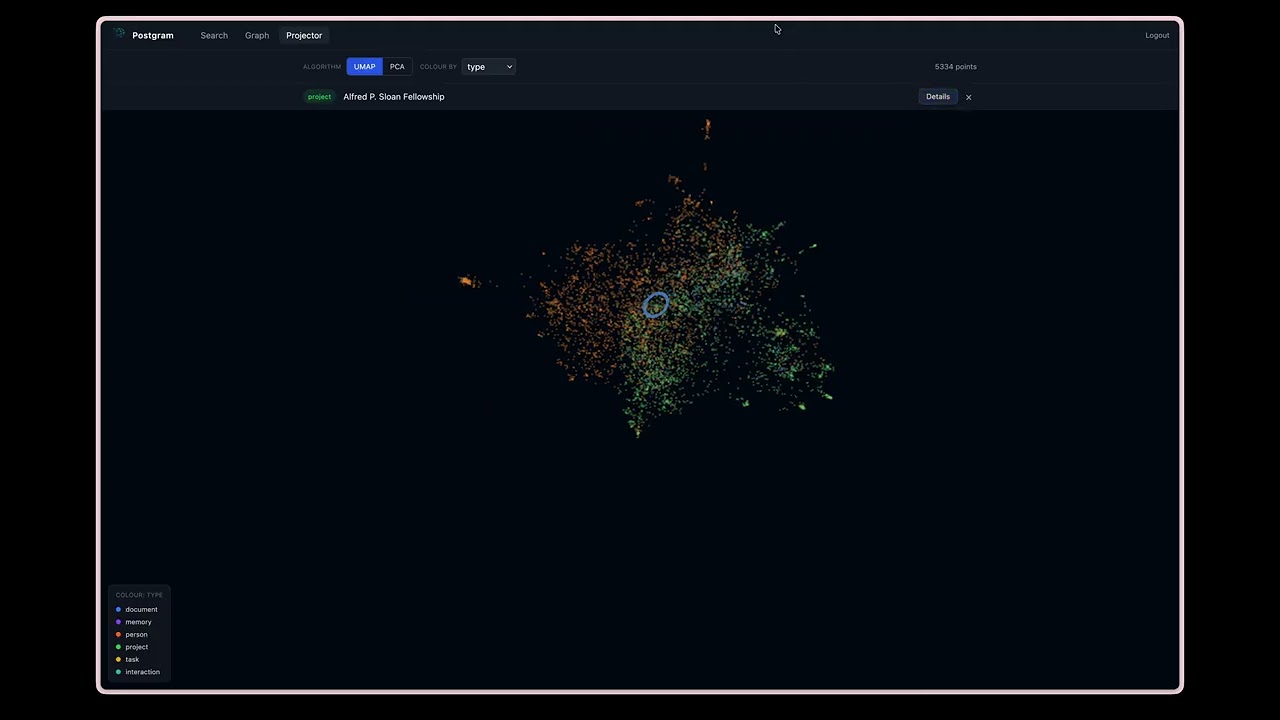
Watch the demo |

Search across memories, documents, people, projects, and tasks |
Postgram is a personal-scale knowledge backend built for:
- human operators who want a searchable external memory
- agent workflows that need durable shared context across sessions
- local or single-VM deployments where simplicity matters more than massive scale
It is not a general SaaS platform. It is designed for one user or one small team running their own instance.
Postgram provides:
- durable storage for typed entities:
memory,person,project,task,interaction,document - hybrid BM25 + vector search with async enrichment and BM25-only fallback
- knowledge graph with typed directional edges between entities
- LLM-powered relationship extraction (OpenAI, Anthropic, or Ollama)
- document sync from local markdown repos via manifest comparison
- scoped API-key authentication and visibility restrictions
- a REST API for application and automation access
- an MCP SSE endpoint for agent-native tool access
- a CLI (
pgm) for humans and agents - a container-local admin CLI (
pgm-admin) - Talon SQLite migration tooling
- encrypted backup support
- append-only audit logging for mutating and privileged operations
Postgram is a TypeScript Node.js application built around a service layer.
Main components:
- PostgreSQL +
pgvectorfor persistence and vector search - Hono for the HTTP server
- MCP over SSE for agent-facing tool access
- CLI/admin CLIs built with Commander
- background enrichment worker for chunking, embeddings, and LLM extraction
High-level flow:
- a client stores or updates an entity
- the entity is written immediately
- enrichment runs asynchronously: chunking, embedding, and optionally LLM extraction
- chunks and embeddings are produced in the background
- edges are created from extracted relationships (if extraction is enabled)
- search queries use hybrid BM25 + vector scoring, with optional graph expansion
Store structured knowledge objects with:
type(memory, person, project, task, interaction, document)contenttagsvisibility(personal, work, shared)status- arbitrary JSON metadata
Postgram supports two roles for memory entities:
durable_memory: long-term memory future agents should trust, such as decisions, preferences, constraints, root causes, and completed-work summaries.session_context: working context for resuming recent conversations. Session context is scoped to the calling client, embedded for semantic recall, and skipped by graph extraction.
Use session context for "where were we in this thread?" Use durable memory for "what should future agents remember as true?"
CLI users can write session context with pgm memory session-context and search
it with pgm search --memory-role session_context.
Operators can groom stale session context with pgm-admin memory groom.
Use --client-id <client-id> for one client or --all-clients to batch over
every session-context scope. --all-clients keeps each client scope separate;
it is operational batching, not cross-client consolidation.
--older-than <duration> defaults to 7d and accepts values like 30m,
4h, 7d, or 0d. --dry-run previews eligible memories without calling
the LLM. Grooming has no default candidate cap; pass --limit <n> when you
want to process a bounded batch.
--mode archive --yes archives eligible working context directly.
--mode promote --yes uses the configured extraction LLM to decide whether
each session-context memory should be promoted; promoted memories are distilled
into new durable_memory entities, the source context is archived, and
provenance is recorded with metadata.promoted_to plus a promoted_to edge.
Authenticated users and agents can self-groom only their own client-scoped session context:
pgm memory groom --dry-run --older-than 7d
pgm memory groom --older-than 14d --topic postgram --tag session-context --yes
The normal CLI derives scope from PGM_API_KEY; it does not accept
--client-id, --all-clients, or promotion mode. Archive requires --yes.
Optional filters are --topic, --session-id, and repeatable --tag.
MCP clients can use the groom_session_context tool with the same self scope:
{
  "mode": "dry_run",
  "older_than": "7d",
  "topic": "postgram",
  "session_id": "optional-session-id",
  "tags": ["session-context"]
}
MCP mode is dry_run or archive; promotion remains admin-only.
For scheduled maintenance, run grooming from the host that has access to the
Postgram container. This cron example assesses eligible session context for all
client scopes every three days at 03:17 and appends JSON output to a log. Cron
does not provide a TTY, so use docker compose exec -T:
17 3 */3 * * cd /path/to/postgram && docker compose exec -T mcp-server pgm-admin --json memory groom --all-clients --older-than 7d --mode promote --yes >> /var/log/postgram-memory-groom.log 2>&1Use --mode archive --yes instead if you want to archive eligible working
context without LLM-assisted promotion. Run the same command with --dry-run
first to verify the eligible set.
Operators can also review durable memory quality without mutating the durable claim itself:
pgm-admin memory groom-durable --dry-run --older-than 30d
pgm-admin memory groom-durable --mode mark --yes --older-than 30d
Durable grooming selects active durable_memory rows, including legacy memory
rows with no metadata.memory_role, and classifies them as keep,
needs_grooming, archive, or superseded. Mark mode writes
metadata.durable_grooming with the outcome, reason, review timestamp, and any
LLM suggestions. It does not rewrite content, change status, archive rows, or
merge duplicates.
To actually clean the marked rows, apply the grooming labels:
pgm-admin memory apply-durable-grooming --dry-run
pgm-admin memory apply-durable-grooming --yes
Apply mode defaults to auto: needs_grooming memories are rewritten from the
stored suggestion or the configured extraction LLM, while archive and
superseded memories are archived. Rewrites clear stale chunks and re-queue
embedding enrichment. Use --mode rewrite or --mode archive, plus
--status, --topic, --tag, --visibility, or --limit, to narrow the
batch.
Entities with content are persisted first and enriched later. Each entity
tracks enrichment_status: pending, completed, or failed. Failed
entities are retried up to 3 times with a 5-minute backoff.
Search blends vector cosine similarity (60%) with BM25 keyword ranking (40%) transparently. When the embedding service is unavailable, search falls back to BM25-only mode. Results include:
- ranked results with blended scores
- similarity scores
- recency-adjusted scores
- matching chunk text
- optional 1-hop graph neighbors (
expand_graphparameter)
Entities can be connected by typed directional edges:
- relation types:
involves,assigned_to,part_of,blocked_by,mentioned_in,related_to, or any custom type - edges have a confidence score (1.0 for manual, LLM-assigned for extracted)
- graph traversal via
expandwith configurable depth (1-3 hops) - duplicate edge prevention via
UNIQUE(source_id, target_id, relation) - edges are created manually via
link/unlinkor automatically by the LLM extraction pipeline

When enabled, the enrichment worker extracts relationships from entity content using an LLM. Extracted entity names are matched against existing entities and edges are created automatically.
Supported providers:
| Provider | Model default | Env vars required |
|---|---|---|
| OpenAI | gpt-4o-mini |
OPENAI_API_KEY |
| Anthropic | claude-haiku-4-5-20251001 |
ANTHROPIC_API_KEY |
| Ollama | llama3.2 |
OLLAMA_BASE_URL (default: http://localhost:11434) |

Sync local directories of markdown files into postgram:
pgm sync ~/Documents/personal-notes
pgm sync ~/Documents/cf-notes --repo cf-notes --quiet
The CLI walks the directory for .md files, computes SHA-256 hashes, and sends
a full manifest to the server. The server diffs against stored state and
creates, updates, or archives document entities. Supports --dry-run and cron
scheduling.
API keys can be restricted by:
- scopes:
read,write,delete,sync - allowed entity types
- allowed visibility levels
Tasks are first-class entities with convenience operations for:
- create (with GTD context and due dates)
- list (filtered by status and context)
- update
- complete (with completion timestamp)
The same service layer is exposed through:
- REST API
- MCP SSE endpoint
pgmCLIpgm-adminCLI (./bin/pgmadmin)- Browser extensions for Chrome and
Firefox — one-click web clipper
that captures the current page or text selection via the REST API.
Build with
npm run -w @ivotoby/postgram-browser-extension-chrome package(or the Firefox equivalent); install unpacked from the per-package README.
src/
  auth/            API key validation and auth middleware
  cli/             CLI for humans/agents and admin CLI
  db/              Pool and migrations
  migrate-talon/   Talon import path
  services/        Business logic (entities, search, edges, sync, extraction)
  transport/       REST and MCP adapters
  types/           Shared types
  util/            Errors, audit, logging

packages/
  browser-extension-chrome/   Chromium web clipper (MV3)
  browser-extension-firefox/  Firefox web clipper (MV3)

tests/
  contract/        REST and MCP contract tests
  integration/     Service and CLI integration tests
  unit/            Pure logic tests
- Node.js 22+
- Docker + Docker Compose
- OpenAI API key (for embeddings)
gpg(for encrypted backups)
Optional:
- Anthropic API key (for LLM extraction)
- Ollama (for local LLM extraction)
npm installcp .env.example .envSet:
POSTGRES_PASSWORD=postgram
OPENAI_API_KEY=<your-openai-key>
LOG_LEVEL=info
PORT=3100docker compose up -d --buildThe default compose setup exposes only the app on 127.0.0.1:3100. PostgreSQL
stays on the internal Docker network.
curl http://127.0.0.1:3100/healthExpected:
status: "ok"postgres: "connected"
| Variable | Required | Default | Description |
|---|---|---|---|
DATABASE_URL |
yes | Full Postgres connection string | |
OPENAI_API_KEY |
conditional | Required when EMBEDDING_PROVIDER=openai OR (EXTRACTION_ENABLED=true AND EXTRACTION_PROVIDER=openai). Optional otherwise. |
|
PORT |
no | 3100 |
HTTP/MCP server port |
OAUTH_ENABLED |
no | false |
Enable OAuth authorization-code, PKCE, and Dynamic Client Registration routes for native remote MCP connectors. |
PUBLIC_BASE_URL |
conditional | Public HTTPS origin for OAuth metadata and callback URLs. Required when OAUTH_ENABLED=true. Example: https://postgram.example.com. |
|
LOG_LEVEL |
no | info |
pino log level |
ENRICHMENT_POLL_INTERVAL_MS |
no | 1000 |
Enrichment worker poll interval |
| Variable | Required | Default | Description |
|---|---|---|---|
EMBEDDING_PROVIDER |
no | openai |
openai or ollama |
EMBEDDING_MODEL |
no | per-provider | Defaults: text-embedding-3-small (openai, 1536 dims), bge-m3 (ollama, 1024 dims) |
EMBEDDING_DIMENSIONS |
no | per-provider | Must match the active embedding_models row. Run ./bin/pgm-admin embeddings migrate --target-dimensions <N> --yes to change. |
EMBEDDING_BASE_URL |
when provider=ollama | falls back to OLLAMA_BASE_URL |
Embedding host. Independent from LLM-extraction host so embeddings and inference can target different machines. |
EMBEDDING_API_KEY |
no | Optional bearer token for EMBEDDING_BASE_URL. |
When Postgram runs in Docker and Ollama runs directly on the Docker host, use http://host.docker.internal:11434 for EMBEDDING_BASE_URL; localhost inside the container points at the Postgram container, not the host machine.
See specs/002-local-embeddings/quickstart.md for a walkthrough of fresh-install-on-Ollama and migrating from OpenAI.
| Variable | Required | Default | Description |
|---|---|---|---|
EXTRACTION_ENABLED |
no | false |
Enable LLM relationship extraction |
EXTRACTION_MEMORY_MODE |
no | embed_only |
Controls graph extraction for type=memory: embed_only keeps all memories searchable through embeddings without graph/entity extraction; extract_durable extracts only durable_memory; extract_all extracts both durable and session-context memories. |
EXTRACTION_PROVIDER |
no | openai |
LLM provider: openai, anthropic, ollama, or openai-compatible |
EXTRACTION_MODEL |
no | per-provider | Model name (defaults: gpt-4o-mini for OpenAI, claude-haiku-4-5-20251001 for Anthropic, llama3.2 for Ollama, gpt-4o-mini for OpenAI-compatible) |
EXTRACTION_BASE_URL |
when provider=openai-compatible | Base URL for OpenAI-compatible chat-completions APIs, including any /v1 path. Postgram appends /chat/completions. Example: http://host.docker.internal:8000/v1. |
|
EXTRACTION_API_KEY |
no | Optional bearer token for EXTRACTION_BASE_URL. |
|
EXTRACTION_AUTO_CREATE_ENTITIES |
no | false |
When true, extraction creates stub entities for referenced targets that don't yet exist (e.g. a person named in a document gets a person entity automatically). Tagged auto-created; metadata records the originating document. |
EXTRACTION_AUTO_CREATE_TYPES |
no | person,project,interaction |
Comma-separated list of entity types eligible for auto-creation. document, task, memory are intentionally excluded from the default to keep those user-authored. |
EXTRACTION_AUTO_CREATE_MIN_CONFIDENCE |
no | 0.7 |
Minimum per-extraction confidence (0–1) required to auto-create an entity. Raise to cut noise, lower for a denser graph. |
ANTHROPIC_API_KEY |
when provider=anthropic | Anthropic API key | |
OLLAMA_BASE_URL |
no | http://localhost:11434 |
Ollama server URL |
EXTRACTION_REASONING_EFFORT |
no | unset | minimal | low | medium | high. Forwarded as reasoning_effort to OpenAI and Ollama for reasoning models (o-series, gpt-5, gpt-oss). When set, overrides the implicit minimal that EXTRACTION_DISABLE_THINKING=true sends to OpenAI. |
LLM_REQUEST_TIMEOUT_MS |
no | 120000 |
Hard cap per LLM call in milliseconds. Bump this when running slow local models (e.g. gpt-oss:120b-cloud). |
EXTRACTION_SEMANTIC_NEIGHBORS_ENABLED |
no | false |
Enable semantic neighbor linking (see below). |
EXTRACTION_SEMANTIC_NEIGHBORS_MAX |
no | 10 |
Maximum number of neighbor edges to create per entity. |
EXTRACTION_SEMANTIC_NEIGHBORS_MIN_SIMILARITY |
no | 0.65 |
Minimum cosine similarity (0–1) for an entity to qualify as a neighbor. Raise to reduce noise; lower if you're finding too few neighbors. The right value depends on your embedding model's similarity distribution — use ./bin/pgm-admin link-neighbors --dry-run to inspect actual scores before tuning. |
Semantic neighbor linking: the LLM extraction pass only finds entities that
are explicitly named in the source content. It misses entities that are
thematically related but not cited by name — a weekly kickoff meeting about the
same initiative, a wiki page covering the same strategy, a decision memo about
the same project. When EXTRACTION_SEMANTIC_NEIGHBORS_ENABLED=true, a second
pass runs after LLM extraction that queries the knowledge store for entities
whose stored chunk embeddings are cosine-similar to the source entity's own
embeddings, and links them with related_to. No extra LLM or embedding API
calls are needed — the source entity's chunks are already stored by the
enrichment step that runs before extraction. Edges created by this pass carry
source = 'semantic-neighbor' so they are distinguishable from LLM-extracted
edges. Entities already linked by the LLM pass are excluded to avoid a weaker
related_to edge shadowing a stronger-typed edge for the same pair.
Backfilling and maintaining neighbor edges: the ./bin/pgm-admin link-neighbors
command runs the semantic neighbor pass directly — no LLM calls, no extraction
queue, just cosine similarity over stored chunks. Use it to backfill an
existing graph or as a recurring maintenance job after new entities are added.
# Backfill all enriched entities (safe to re-run — edges are upserted).
./bin/pgm-admin link-neighbors --all

# Only documents:
./bin/pgm-admin link-neighbors --type document

# Single entity:
./bin/pgm-admin link-neighbors --id <uuid>

# Preview what would be linked and at what similarity — no edges created:
./bin/pgm-admin link-neighbors --id <uuid> --dry-run
./bin/pgm-admin link-neighbors --all --dry-run

# Tune the similarity threshold or edge cap:
./bin/pgm-admin link-neighbors --all --min-similarity 0.75 --max-neighbors 5

# Process in bounded batches (oldest-first):
./bin/pgm-admin link-neighbors --all --limit 500
Use --dry-run to inspect actual cosine similarity scores before committing edges — especially useful when tuning --min-similarity for a new embedding model. The output shows each entity and its candidate neighbors with their raw similarity scores.
If you also want to re-run LLM extraction at the same time (e.g. after enabling
EXTRACTION_SEMANTIC_NEIGHBORS_ENABLED=true), use reextract instead — the
worker runs both the LLM pass and the neighbor pass together:
./bin/pgm-admin reextract --allNote: --clean-edges on reextract only removes edges with
source='llm-extraction' — it does not touch semantic-neighbor edges. For a
full clean slate:
DELETE FROM edges WHERE source = 'semantic-neighbor';Scheduling as a recurring maintenance job: because link-neighbors is
cheap (no LLM calls) and idempotent (edges are upserted, not duplicated), it
works well as a weekly cron job that keeps the neighbor graph fresh as new
entities are added. Example cron entry running every Sunday at 02:00:
0 2 * * 0 DATABASE_URL=... pgm-admin link-neighbors --allOr with Docker Compose:
docker compose exec server pgm-admin link-neighbors --allAuto-created entities: when EXTRACTION_AUTO_CREATE_ENTITIES=true,
entities that didn't exist before a document mentioned them are inserted
with content = the extracted name, tags including auto-created, and
metadata.auto_created_by = 'llm-extraction' plus
metadata.source_entity_id pointing at the document that caused the
creation. They enter the normal embedding queue so they become
searchable, but they are deliberately excluded from the extraction
queue — their only content is a bare name, so asking the LLM "what
does Alice relate to?" with no context would just free-associate new
stubs in a loop. To review or clean them up:
pgm list --tags auto-created --type person
# or wholesale prune:
docker compose exec postgres psql -U postgram -d postgram -c \
"DELETE FROM entities WHERE 'auto-created' = ANY(tags);"| Variable | Required | Description |
|---|---|---|
PGM_API_URL |
yes | Server URL |
PGM_API_KEY |
yes | API key for authentication |
| Variable | Required | Description |
|---|---|---|
DATABASE_URL |
yes | Direct DB connection for admin operations |
| Variable | Required | Description |
|---|---|---|
DATABASE_URL or PGM_DATABASE_URL |
yes | Database connection |
PGM_BACKUP_PASSPHRASE |
when using --encrypt |
GPG encryption passphrase |
Pull from GitHub Container Registry:
docker pull ghcr.io/ivo-toby/postgram:latestImages are multi-arch (linux/amd64, linux/arm64). Tags available:
latest— most recent build ofmainmain— same aslatest, explicit branch namesha-<short>— pinned to a specific commitv<major>.<minor>.<patch>— semver tags when a release is cut
The docker-compose.yml in this repo builds locally by default; to use the
pre-built image instead, replace build: . with image: ghcr.io/ivo-toby/postgram:latest
for the mcp-server service.
npm run devProduction-style local run:
npm run build
npm start
The server exposes:
- REST API at
http://127.0.0.1:3100/api - MCP endpoint at
http://127.0.0.1:3100/mcp - Health endpoint at
http://127.0.0.1:3100/health
Create an API key (using the bin/pgm wrapper; see Admin CLI below for details):
./bin/pgm-admin key create \
  --name local \
  --scopes read,write,delete \
  --visibility personal,work,shared \
  --json
Export it for CLI use:
export PGM_API_URL=http://127.0.0.1:3100
export PGM_API_KEY='<plaintext-key>'POST /api/entities— store entityGET /api/entities/:id— recall entityPATCH /api/entities/:id— update entityDELETE /api/entities/:id— soft-delete entityGET /api/entities— list entities
POST /api/search— hybrid BM25+vector search (supportsexpand_graph)
REST routes always return full JSON responses. Compact and TOON output are transport-layer conveniences for MCP and the CLI only.
POST /api/tasks— create taskGET /api/tasks— list tasksPATCH /api/tasks/:id— update taskPOST /api/tasks/:id/complete— complete task
POST /api/sync/diff— diff local manifest against server; returns paths to upload and deletePOST /api/sync/upload— upload a batch of file contentsPOST /api/sync/finalize— archive orphans and restore stale matchesPOST /api/sync— single-shot push (retained for MCP and small syncs)GET /api/sync/status/:repo— get sync status
pgm sync uses the three-phase protocol (diff → batched upload → finalize)
so large repos don't send a single oversized payload. Each upload batch is
capped at ~50 files or ~4 MB, whichever comes first.
POST /api/edges— create edgeDELETE /api/edges/:id— delete edgeGET /api/entities/:id/edges— list edges for entityGET /api/entities/:id/graph— expand graph neighborhood
-
GET /api/queue— enrichment + extraction queue status. Pass?include_failures=true(optionally&failure_limit=N, default 20, max 100) to also receive the most recent failed entities with their error messages, e.g.:{ "embedding": { "pending": 0, "completed": 120, "failed": 0, "retry_eligible": 0, "oldest_pending_secs": null }, "extraction": { "pending": 2, "completed": 98, "failed": 3 }, "failures": [ { "id": "…", "type": "document", "kind": "extraction", "error": "llm context exceeded", "path": "notes/long.md", "updatedAt": "2026-04-22T10:12:33Z" } ] }
All /api/* routes require Authorization: Bearer <api-key>.
MCP is served over Streamable HTTP at:
http://127.0.0.1:3100/mcp
Exposed tools:
store,recall,search,update,deletetask_create,task_list,task_update,task_completesync_push,sync_statuslink,unlink,expand
The MCP tool behavior is intentionally aligned with the REST surface, but token-heavy outputs default to compact agent-friendly responses:
- write acknowledgements (
store,store_session_context,update, task writes,link) return compact ids/status/version instead of echoing full metadata and timestamps search,task_list, andexpandreturn compact rows/graph payloads by default- pass
full_response: trueto get the full REST-shaped payload - pass
toon: trueon list-like tools (search,task_list,expand) to receive compact TOON text from the MCP layer
The underlying API remains JSON; compacting and TOON happen only in MCP/CLI handlers.
Claude Code can continue to connect with the existing static bearer API key
flow. Claude Desktop, Claude Web, and mobile use the Connectors UI for remote
MCP servers, where arbitrary static headers are not available. Enable OAuth so
those clients can register and connect without mcp-remote:
OAUTH_ENABLED=true
PUBLIC_BASE_URL=https://postgram.example.com
Add ${PUBLIC_BASE_URL}/mcp as the connector URL in Claude. Claude discovers
/.well-known/oauth-protected-resource/mcp, registers itself through
/oauth/register, opens /oauth/authorize, and receives OAuth tokens from
/oauth/token.
The authorize page asks for an existing Postgram API key once. Tokens issued
from that approval inherit the API key's scopes, client_id, allowed entity
types, and allowed visibility. If the source API key is revoked, OAuth access
and refresh tokens derived from it stop working. Existing Authorization: Bearer <api-key> clients and /mcp?apiKey=... keep working unchanged.
npm install -g @ivotoby/postgram-cliThen configure once:
export PGM_API_URL=http://<postgram-host>:3100
export PGM_API_KEY=<your-api-key>
# or persist them in ~/.pgmrc as JSON: { "api_url": "...", "api_key": "..." }From the repo root, invoke the TypeScript entrypoint directly — no build step needed, and it picks up local changes immediately:
npx tsx cli/src/pgm.ts <command>
# e.g.
npx tsx cli/src/pgm.ts sync ~/Documents/personal-notes --repo personal-notespgm store "decided to use pgvector" --type memory --tags decisions
pgm search "database decisions"
pgm search "database decisions" --type memory # filter by entity type
pgm search "who worked on embeddings" --expand-graph # include graph neighbours
pgm search "database decisions" --json # compact JSON for agents
pgm search "database decisions" --json --full-response # full API-shaped JSON
pgm search "database decisions" --toon # compact TOON output
pgm list --json # compact JSON rows
pgm list --json --full-response # full API-shaped rows
pgm list --toon # compact TOON rows
pgm expand <id> --json # compact graph JSON
pgm expand <id> --toon # compact TOON graph
pgm recall <id>
pgm list --type memory
pgm update <id> --content "updated text" --version 1
pgm delete <id>pgm task add "set up monitoring" --context @focus-work --status next
pgm task list --status next
pgm task update <id> --status waiting --version 1
pgm task complete <id> --version 2pgm sync ~/Documents/personal-notes
pgm sync ~/Documents/cf-notes --repo cf-notes --dry-run
pgm sync ~/Documents/personal-notes --quiet # for cronpgm link <source-id> <target-id> --relation involves
pgm expand <entity-id> --depth 2
pgm unlink <edge-id>pgm backup --encrypt --output /tmp/postgram-backups/The easy way — use the bin/pgm wrapper shipped in the repo. It runs
pgm-admin via docker exec when the container is up, and falls back to
docker compose run --rm when it isn't (useful for first-boot migrations
or when the startup dimension gate is refusing to boot):
./bin/pgm-admin <command> [args...]For cron or other non-interactive automation, call Docker with -T so it does
not try to allocate a TTY:
docker compose exec -T mcp-server pgm-admin <command>Examples:
./bin/pgm-admin key create --name local --scopes read,write,delete --visibility personal,work,shared
./bin/pgm-admin stats
./bin/pgm-admin embeddings migrate --target-dimensions 1024 --dry-run
./bin/pgm-admin embeddings migrate --target-dimensions 1024 --yes
Shell alias for daily use (add to ~/.bashrc or ~/.zshrc on your docker
host):
alias pgm-admin='/var/lib/docker/configs/postgram/bin/pgm-admin'
# then just: pgm-admin stats
Override with env if your service/container names differ:
PGM_SERVICE=mcp-server PGM_CONTAINER=postgram-mcp-server-1 ./bin/pgm-admin statsDirect equivalent without the wrapper (for reference):
docker compose exec -T mcp-server pgm-admin <command>
# or, when the container is down:
docker compose run --rm mcp-server pgm-admin <command>
Main commands:
-
key create,key list,key revoke -
audit— query audit logs -
model list,model set-active -
reembed --all— mark entities for re-embedding (optionally--type <type>; pair with--model <id>to switch the active embedding model in the same transaction) -
reextract --all— resetextraction_status = 'pending'and clear any storedextraction_errorso the worker retries extraction (e.g. after switching to a better LLM). Key flags:--type <type>— scope to a specific entity type--only-failed— only re-queue entities whose extraction previously failed--no-edges-only— only re-queue entities that have no LLM-extracted edges; useful for targeted maintenance without re-processing entities that already linked correctly (combine with--type documentto catch large documents that silently produced no edges)--clean-edges— delete existingsource='llm-extraction'edges for the in-scope entities before re-queuing, giving a clean-slate redo rather than appending alongside old edges--limit <n>— cap how many entities are queued (oldest-first)
User-created edges (
source != 'llm-extraction') are never touched. -
improve-graph— queue entities for re-extraction with an optional per-run model/provider override stored on the row. The worker uses the override instead of the env-configured default, then clears it on success. Existing edges are kept by default (no wipe) — overlapping edges have their confidence overwritten by the new run. Key flags:--all,--type <type>,--id <uuid>— scope what to queue--model <name>— e.g.claude-sonnet-4-6; stored per-row--provider <name>—openai | anthropic | ollama | openai-compatible; stored per-row--no-edges-only— only queue entities with no LLM-extracted edges--clean-edges— wipe existing LLM edges before queueing--limit <n>— cap the queue size
Typical maintenance run targeting gaps without paying for the full graph:
pgm-admin improve-graph --type document --no-edges-only --provider ollama --model <model>
-
prune-edges --below <threshold>— delete edges withconfidencebelow the threshold. Scoped tosource='llm-extraction'by default; pass--source anyto include all, or--source <name>for a specific one. Supports--relation <name>and--dry-runfor a safe preview. -
validate-edges— run an LLM-as-judge quality pass. For eachsource='llm-extraction'edge (configurable via--source), asks the configured extraction LLM whether the relationship is supported by the source content; removes edges it judges invalid or below--min-confidence(default0.4). Trackslast_validated_atin edge metadata and skips edges validated within--skip-validated-days(default7) — run as a maintenance cron without redoing work. Flags:--limit <n>(default 100),--force,--dry-run. RequiresEXTRACTION_ENABLED=trueand the usualEXTRACTION_PROVIDER/EXTRACTION_MODELenv vars; costs ≈ one LLM call per edge. -
sql "<statement>"— execute a raw SQL statement against the database. Accepts a positional argument or reads from stdin for multi-line queries. SELECT results are printed tab-separated (or as JSON with--json); DML commands print the affected row count.pgm-admin sql "SELECT id, type, extraction_status FROM entities LIMIT 5" pgm-admin sql --json "SELECT COUNT(*) FROM edges WHERE source = 'llm-extraction'" # pipe multi-line SQL from a file cat fix.sql | pgm-admin sql
-
stats— entity counts, chunk count, DB size -
embeddings migrate— switch embedding dimensions (seespecs/002-local-embeddings/quickstart.md)
The knowledge graph builds up over time as LLM extraction links entities
together. Occasionally edges go missing (e.g. after a provider change, a
max_tokens limit being hit, or a model outage) or need refreshing. The admin
CLI has tools to handle this without re-processing the entire graph.
Entities that completed extraction but produced no edges are the primary signal of a silent failure:
pgm-admin sql "
  SELECT id, char_length(content) AS chars, created_at
  FROM entities
  WHERE type = 'document'
    AND extraction_status = 'completed'
    AND NOT EXISTS (
      SELECT 1 FROM edges WHERE source_id = id AND source = 'llm-extraction'
    )
  ORDER BY chars DESC
  LIMIT 20
"Re-queue only the entities with no edges. Existing edges on other entities are untouched:
# Using the default extraction model
pgm-admin reextract --type document --no-edges-only

# Using a local Ollama model (zero API cost)
pgm-admin improve-graph --type document --no-edges-only --provider ollama --model <model>When you want to redo everything (e.g. after switching to a better model):
# Wipe and redo — gives a clean slate
pgm-admin reextract --all --clean-edges

# Or scope to documents only
pgm-admin reextract --type document --clean-edgesRemove low-confidence edges left behind by older or weaker models:
pgm-admin prune-edges --below 0.5 --dry-run   # preview
pgm-admin prune-edges --below 0.5 # applyRun an LLM-as-judge pass to remove edges not supported by the source content:
pgm-admin validate-edges --dry-run --limit 200
pgm-admin validate-edges --limit 200pgm queue # via pgm CLI
pgm-admin sql "SELECT extraction_status, COUNT(*) FROM entities GROUP BY 1"docker cp /path/to/talon.sqlite postgram-mcp-server-1:/tmp/talon.sqlite
docker compose exec -T mcp-server \
node dist/migrate-talon/index.js /tmp/talon.sqlite \
--api-base-url http://127.0.0.1:3100 \
--api-key "$PGM_API_KEY"Useful flags: --dry-run, --thread <id>, --batch-size <n>, --skip-embeddings
npm test            # all tests
npm run lint        # eslint
npm run build       # typecheck
npm run test:coverage
Targeted suites:
npx vitest run tests/unit/
npx vitest run tests/integration/
npx vitest run tests/contract/Implemented phases:
- Phase 1 MVP: Entity CRUD, hybrid search, API key auth, enrichment worker, REST + MCP + CLI, Talon migration, backup, audit logging
- Phase 1 Enhancements: BM25+vector hybrid search, enrichment retry with
backoff,
pgm-admin reembed,pgm list, startup validation - Phase 2 Document Sync: Push-based markdown sync with SHA-256 change detection,
pgm syncCLI, REST + MCP sync tools - Phase 3 Knowledge Graph: Edges table,
link/unlink/expandtools, LLM extraction pipeline (OpenAI/Anthropic/Ollama), graph-enhanced search
- Postgram is optimized for personal/small-team scale
- Embeddings default to OpenAI (
text-embedding-3-small) but can run fully locally via Ollama — setEMBEDDING_PROVIDER=ollama - LLM extraction is optional and disabled by default
- Backup encryption requires
gpg
A portable Claude Code skill for using pgm from your own agent lives in
skill/postgram/SKILL.md. Copy the skill/postgram/
directory into your own project's .claude/skills/ (or your user-level
~/.claude/skills/) and the agent will know when to invoke pgm store,
pgm search, pgm link, etc. It assumes the CLI is on PATH and
PGM_API_URL + PGM_API_KEY are set. The skill file is deliberately not
under .claude/ in this repo so you can decide where to put it.
To get the most out of Postgram across sessions, add Postgram-aware guidance to
your global ~/.claude/CLAUDE.md. A ready-to-use template is provided at
templates/CLAUDE.md — it covers when to search (with
type filters), when to use expand_graph, when to store, when to link, and
general principles. Copy the relevant sections into your own CLAUDE.md and
Claude will proactively use the MCP tools to persist and recall knowledge
without being asked.
For coding agents that should avoid broad knowledge-work behavior, use
templates/AGENTS.coding.md or templates/CLAUDE.coding.md. It narrows Postgram
usage to session-context memory and durable development memory only.
The CLI package publishes to npm as
@ivotoby/postgram-cli
on every merge to main, driven by semantic-release
v25 and conventional commits scoped to cli (e.g. feat(cli): ...).
Non-CLI-scoped commits don't bump the CLI version. Workflow:
.github/workflows/release-cli.yml.
Publishing uses an npm Automation token stored as the NPM_TOKEN
repository secret. The --provenance flag is passed at publish time so every
release gets a Sigstore-signed provenance attestation regardless.
First-time setup:
- On npmjs.com: Avatar → Access Tokens → Generate New Token → Automation
- GitHub repo: Settings → Secrets and variables → Actions → New repository secret
→ name
NPM_TOKEN, value: the token from step 1 - Subsequent publishes happen automatically from the workflow.
The server's Docker image publishes to
ghcr.io/ivo-toby/postgram on every merge to main and on semver tag
pushes (multi-arch amd64 + arm64). Workflow:
.github/workflows/docker.yml. Uses the
built-in GITHUB_TOKEN; no extra secret required, but repo packages:write
permission must be enabled.