
AiEconLab gives AI-assisted economics projects a research-team structure. Instead of asking one chat to be PI, RA, theorist, referee, and replicator at once, AEL gives each role a separate persona, workspace boundary, and set of responsibilities.
curl -fsSL https://raw.githubusercontent.com/izhiwen/AiEconLab/main/install.sh | bash
cd MyPaperProject
ael install
ael                              # then chat with your research team in plain English / Chinese
The first command installs the ael CLI. Inside a paper or replication
project, ael install sets up the economics research team for your local AI
runtime. Just running ael after that opens a chat with PI (your project
manager) — describe what you need in plain language and PI dispatches to
the right specialist (advisor, writer, RA, referee, etc.).
If you've never used Claude Code, Codex, or OpenCode before, do these three things first (in this order). It'll save you an hour.
Pick ONE to start (you can add more later):
- Claude Code (recommended for most researchers) — install from claude.com/download. Comes with Claude Pro; no separate API key needed.
- Codex — OpenAI's CLI. Requires a paid OpenAI account.
- OpenCode — open source, runs local or remote models.
Confirm the agent works on its own first (open it, ask "hi") before adding AEL on top.
Open the macOS Terminal app (or Linux / Windows terminal), paste this one line, and press Enter:
curl -fsSL https://raw.githubusercontent.com/izhiwen/AiEconLab/main/install.sh | bashIf it says "command not added to PATH," follow the one-line fix it prints. This is a one-time setup per machine.
Make a folder for a paper (or use an existing one), then:
cd MyPaperProject       # the folder where your paper lives
ael install             # auto-detects your AI agent (once per project)
ael                     # opens a chat with your team — type in plain language
You'll be in chat with PI (your project manager). Tell it what you want: "I'm starting a paper on X, what should I think about first?" → PI hands it to Advisor. "Draft an introduction for the identification strategy" → PI dispatches to Writer. You stay in one window; PI orchestrates.
- "Do I need an API key?" Not if you already have Claude Pro or ChatGPT Plus desktop. Only needed for batch / unattended runs.
- "Will it touch my real paper files?" No — read-only by default. Each role gets its own isolated workspace under the project's hidden team directory.
- "How do I undo the install?" Run
ael uninstall --yes; add--purgeinside one project to also remove that project's hidden team state. - "Is my data uploaded anywhere?" No. All local. Roles log inside your project, never to a server.
- "It says
NEEDS_FIX— what now?" Runael doctor --fix. The most common fix is rerunningael installto refresh the adapter. If you're still stuck, open a GitHub issue with the doctor output.

AEL is built for applied economists who use AI assistants across long paper projects: data cleaning, Stata regressions, Python merges, identification debates, literature positioning, seminar revisions, replication packages, and referee responses.
It gives you:
- Advisor for strategic second opinions on framing, identification risk, and publication tradeoffs.
- PI for scoping tasks, dispatching roles, integrating results, and keeping the project coherent.
- Theorist for identification strategy, mechanisms, instruments, and model logic.
- RA-Stata for Stata analysis, regression tables, robustness checks, and
reproducible
.doworkflows. - RA-Python for data cleaning, scraping, matching, GIS, and Python pipelines.
- Referee for pre-submission critique before a draft leaves the team.
- Replicator for clean-room reruns and replication-package failures.
- PM for deadlines, scope, blockers, and milestone discipline.
There are also specialist roles for literature review, writing, econometrics, LLM-as-measurement validation, reproducibility engineering, historical sources, IRB/sensitive-data review, visualization, computation, survey experiments, degrees-of-freedom auditing, R&R strategy, job talks, and coauthor coordination.
-
Switch roles in plain language. Mid-session, say "you are PI", "take the referee role", or "switch to RA-Stata" and the agent responds as that role, with that role's research memory loaded. No CLI command. Works in Codex, Claude Code, and OpenCode interactive mode.
-
Intent-aware guardrails when PI delegates. Before PI hands off anything risky to an RA — deleting files, modifying live data, publishing changes — the coordinator understands what you're actually asking for, not just the words you typed. Rephrasing or putting things in quotes can't slip a destructive command through. Especially useful when replication scripts touch shared archives or paper drafts.
-
Parallel review and QA for fast PI → RA → Referee cycles. Review and QA steps run side by side, and each role's workspace stays warm between tasks. A typical robustness-table iteration lands in ~8-10 min instead of ~15-20, same quality bar. AEL inherits this from the underlying AiPlus.
Install the CLI:
curl -fsSL https://raw.githubusercontent.com/izhiwen/AiEconLab/main/install.sh | bashIf the installer says the target directory is not on PATH, add it:
export PATH="$HOME/.local/bin:$PATH"Then install AEL into a project:
cd MyPaperProject
ael install
By default AEL picks an available runtime in this order: Codex, Claude Code, OpenCode. You can choose explicitly:
ael install codex
ael install claude-code
ael install opencode
Verify the project setup:
ael status
ael doctorTalk to the Advisor:
ael talk advisor "Is this identification strategy credible enough for a top-field submission?"Route work through the PI:
ael route pi "scope the next robustness table and dispatch the right RA"Talk to implementation roles when the task is already clear:
ael talk ra-stata "Sketch the Stata plan for the main IV table."
ael talk ra-python "Plan the merge checks for the county-level panel."
ael talk referee "Give me the harsh pre-submission read of this abstract."
Bring in an expert:
ael invite llm-measurement
ael talk llm-measurement "Review my text-as-data validation plan."One long-lived AI chat tends to blur responsibilities. The same assistant that debugged a Stata loop starts drafting prose with code-shaped habits. The same assistant that helped frame the intro becomes too invested to act like a skeptical referee.
AEL keeps those jobs separate:
- RA memories stay focused on data, variables, and code decisions.
- Theorist and Referee critiques do not get diluted by execution context.
- PI owns integration instead of letting parallel work collide silently.
- Replicator gets a clean-room mandate rather than sharing the builder's assumptions.
The result is not "more agents" for its own sake. It is a project structure that matches how serious research teams already work.
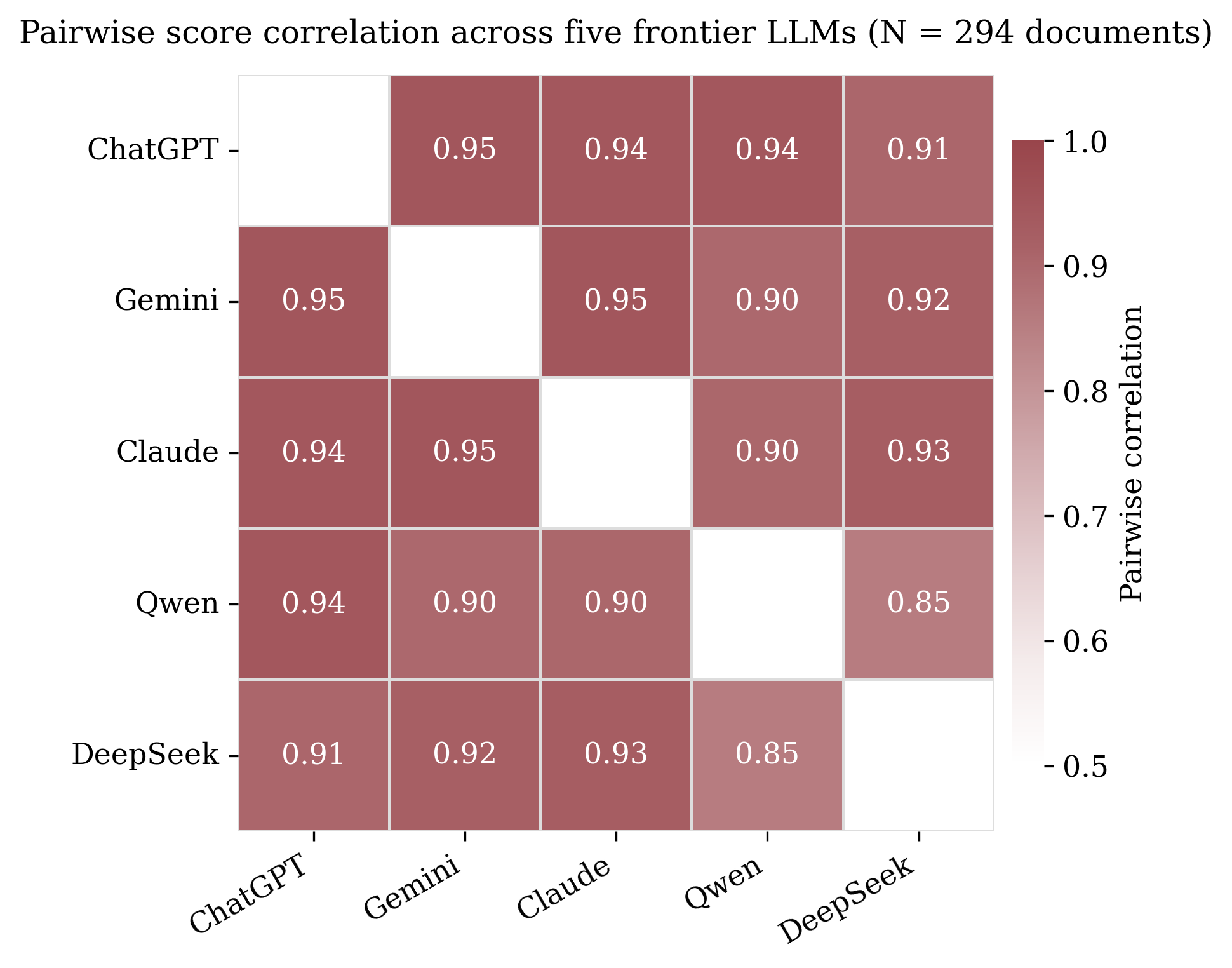
AEL includes an LLM-as-measurement specialist for projects that use language models to score archival text, survey responses, open-ended documents, or other unstructured sources. This role focuses on validation design: multi-model agreement, held-out human labels, inter-rater statistics, prompt-version stability, and measurement-error implications for the empirical result.
Companion example: Multi-LLM-Validation-Demo.
AEL stays local to your project. It does not:
- upload project files, memory, or transcripts
- run as a background daemon
- store restricted-data paths or secrets in role personas
- modify unrelated projects
- auto-approve Owner-gated actions such as journal submission, public posting, referee-response sending, data sharing, or authorship changes
The CLI installs project files under local project state and uses your selected runtime to answer as the requested role.
For maintainers:
git submodule update --init --recursive
scripts/build-ael.sh --package
The release workflow publishes platform tarballs and SHA256 sidecars for the installer.
AEL is built on the AiPlus agent substrate; the supported user-facing product
surface is the ael CLI and this repository.
Apache-2.0. See LICENSE.