


Nitro-powered geolocation for modern React Native apps
A native iOS/Android geolocation module for React Native 0.75+ apps using the
New Architecture and Nitro Modules. Start by replacing
@react-native-community/geolocation
with /compat, then move to a typed Modern API when you are ready.
The current release line adds web support for Modern and /compat foreground
geolocation plus a native Background Location API for tracking, geofencing,
storage recovery, Headless JS, and HTTP sync.
- 🎯 Simple functional API — Direct function calls, no complex abstractions
- ⚡ JSI-powered performance — Direct native calls without Bridge overhead
- 🔁 Compat API — Drop-in compatible with the core native community API
- 🧹 Automatic cleanup — No manual subscription management
- 📱 Consistent behavior across iOS and Android
- 🛠️ DevTools Plugin — Mock locations with interactive map (Rozenite)
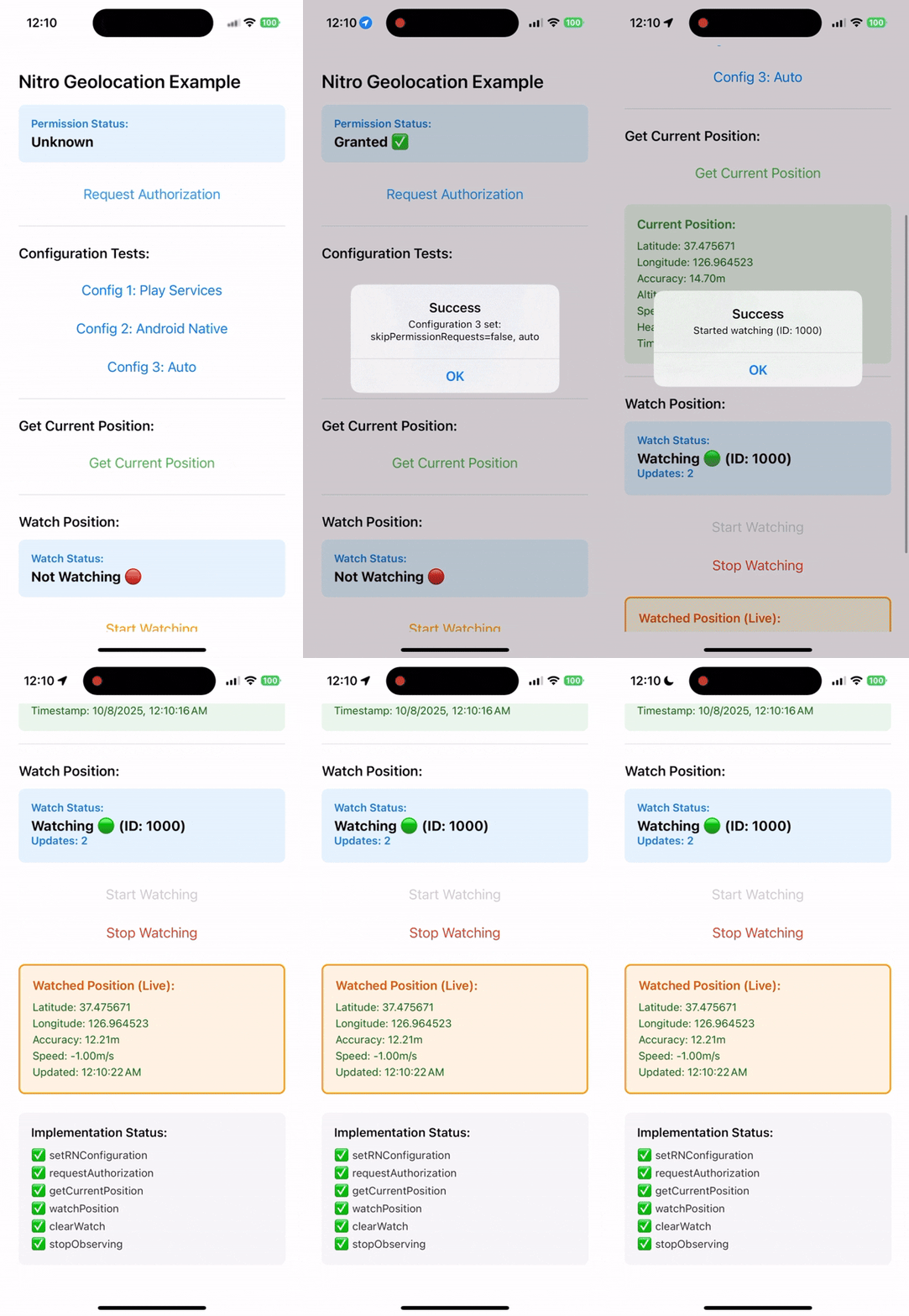
Full documentation available at: 👉 https://react-native-nitro-geolocation.pages.dev
| Use case | Recommendation |
|---|---|
| Bare React Native 0.75+ app with New Architecture/Nitro enabled | Use Nitro Geolocation |
Migrating from @react-native-community/geolocation |
Start with /compat |
| New Architecture / Nitro-based app | Recommended |
| Expo development build or custom native build | Supported with native setup |
| Expo managed app without native rebuild | Use expo-location |
| Web support required | Use the Modern API root import or /compat callback API |
| Full background tracking / geofencing | Use react-native-nitro-geolocation/background |
Web support is available for the Modern API root import and the /compat
subpath. Browser builds resolve both entries to implementations backed by
navigator.geolocation and do not load Nitro native bindings. Background
location remains native-only.
React Native Nitro Geolocation provides three public API surfaces to fit your needs:
Simple functional API with direct calls and a single hook for tracking:
import {
  setConfiguration,
  requestPermission,
  getCurrentPosition,
} from "react-native-nitro-geolocation";

setConfiguration({
  authorizationLevel: "whenInUse",
  locationProvider: "auto",
});

const status = await requestPermission();

if (status === "granted") {
  const position = await getCurrentPosition({
    accuracy: { android: "high", ios: "best" },
    timeout: 15_000,
  });
}
See the Modern API guide for watches, geocoding, heading, cached reads, Android settings, and iOS accuracy authorization.
Drop-in compatible with the core native
@react-native-community/geolocation API:
import Geolocation from "react-native-nitro-geolocation/compat";

Geolocation.getCurrentPosition(
  (position) => console.log(position),
  (error) => console.error(error),
  { enableHighAccuracy: true }
);

const watchId = Geolocation.watchPosition((position) => console.log(position));
Geolocation.clearWatch(watchId);
The /compat subpath covers the core native community API, including
setRNConfiguration, requestAuthorization, getCurrentPosition,
watchPosition, clearWatch, and stopObserving. It also has a browser entry
for callback-style foreground geolocation. See the
Compat API guide
for the full compatibility matrix and option notes.
Native background tracking, geofencing, activity events, Android Headless JS, HTTP sync, and stored event recovery should use the explicit background subpath.
Background location is native-only. Browser builds expose unsupported stubs so web bundles can still import shared code safely. Start with the Background Location guide for permissions, start/stop, geofencing, storage recovery, and native sync.
# Install Nitro core and Geolocation module
yarn add react-native-nitro-modules react-native-nitro-geolocation

# or using npm
npm install react-native-nitro-modules react-native-nitro-geolocation
Rebuild your native app:
cd ios && pod installAdd permissions to your Info.plist:
<key>NSLocationWhenInUseUsageDescription</key>
<string>This app requires access to your location while it's in use.</string>
<key>NSLocationAlwaysAndWhenInUseUsageDescription</key>
<string>This app requires access to your location at all times.</string>
For background tracking, also enable the location background mode in
UIBackgroundModes.
Add permissions to AndroidManifest.xml:
<uses-permission android:name="android.permission.ACCESS_FINE_LOCATION" />
<uses-permission android:name="android.permission.ACCESS_COARSE_LOCATION" />
Optional (for background):
<uses-permission android:name="android.permission.ACCESS_BACKGROUND_LOCATION" />Full background tracking uses a foreground service on Android. Add the full
permission set from the Android background setup guide when using
react-native-nitro-geolocation/background, including Android 13+
POST_NOTIFICATIONS for the tracking notification.
Use the Rozenite DevTools plugin to mock locations during development with an interactive map. It works with the Modern API root import.
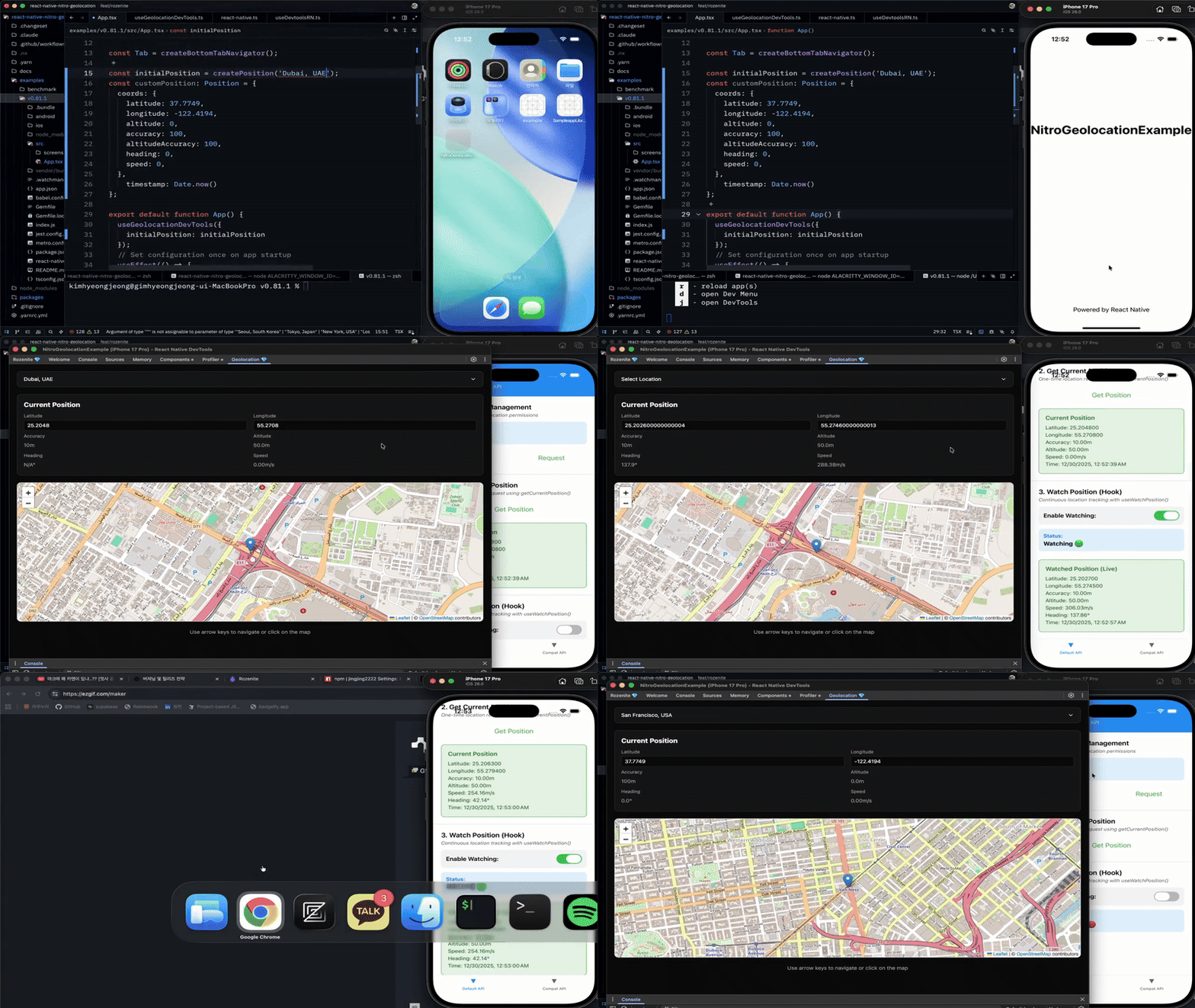
yarn add @react-native-nitro-geolocation/rozenite-pluginimport {
createPosition,
useGeolocationDevTools,
} from "@react-native-nitro-geolocation/rozenite-plugin";
function App() {
useGeolocationDevTools({
initialPosition: createPosition("Seoul, South Korea"),
});
return <RootNavigator />;
}The plugin requires Rozenite DevTools in your app. See the DevTools Plugin guide for setup, presets, troubleshooting, and the demo.
Use the docs site for the detailed flows:
- Quick Start - install, set native permissions, and read your first location.
- Modern API - accuracy presets, watches, Android settings, cached reads, geocoding, heading, and iOS accuracy authorization.
- Compat API - callback compatibility and web behavior.
- Background Location - native background tracking, geofencing, storage recovery, Headless JS, and HTTP sync.
- Migration Assistance - choose the community or service migration path.
- Expo Development Builds - use the package in Expo custom native builds.
- DevTools Plugin - mock locations during development.
- Introduction
- Quick Start Guide
- Modern API Reference
- Compat API Reference
- Migration Skills
- Community Migration
- Service Migration
- Expo Development Build Guide
- DevTools Plugin Guide
- Why Nitro Module?
- Benchmark Results
MIT License.