In the modern day, internet browsers are increasingly advertising their privacy-preserving features, with browsers such as Brave touting themselves as being "on a mission to protect your privacy online." Our project aims to investigate popular browsers' evasiveness against cross-site tracking. We also aim to answer how well some of these tools prevent a website from recognizing returning users to their site, how strong certain identifiers like cookies can be, and what the best combination of privacy and browser settings are to preserve a user's privacy.
We first needed a way to measure a feature's privacy, which is a qualitative measure. We selected Evercookie, created by Samy Kamkar in 2010. Evercookie Evercookie's goal is "to identify a client even after they've removed standard cookies" by "produc[ing] extremely persistent cookies in a browser" Evercookie is able to persist even after manually deleting cookies. It accomplishes this by storing the cookie using as many mechanisms as possible, and if it is able to recover the cookie from one mechanism, it restores the cookie to all other mechanisms that were previously deleted (if there are any).
Evercookie (originally) supported 17 mechanisms. There are simpler mechanisms such as standard HTTP cookies (which Evercookie calls cookieData), and more sophisticated ones such as HTML5 IndexedDB (idbData). Some mechanisms have since been deprecated, such as Flash Local Shared Objects (lsoData), as most major browsers ended Flash support in 2021. A similar situation applies to the two Java mechanisms, as the Java Applet API was deprecated in 2017. We also encountered issues with mechanisms requiring a backend server, so we decided not to test those either. Lastly, the CSS history knocking mechanism is noted to be "network intensive," and crashed the browsers we tested, so we skipped this mechanism as well.
Below is a table (adapted from the Evercookie Github) of the mechanisms used by Evercookie, and their relation to this project:
| Name | Long Name | Used | Reason |
|---|---|---|---|
cookieData |
Standard HTTP cookies | ✔️ | |
lsoData |
Flash local shared objects | ❌ | Deprecated |
slData |
Silverlight isolated storage | ❌ | IE not tested |
| N/A | CSS history knocking | ❌ | Buggy |
pngData |
Force-cached PNGs | ❌ | Backend server required |
etagData |
HTTP ETags | ❌ | Backend server required |
cacheData |
Web cache | ❌ | Backend server required |
| N/A | HTTP Strict Transport Security (HSTS) pinning | ❌ | Buggy |
windowData |
window.name caching | ✔️ | |
userData |
IE userData storage | ❌ | IE not tested |
sessionData |
HTML5 session storage | ✔️ | |
localData |
HTML5 local storage | ✔️ | |
globalData |
HTML5 global storage | ❌ | Deprecated |
dbData |
HTML5 database storage | ✔️ | |
idbData |
HTML5 IndexedDB | ✔️ | |
| N/A | Java JNLP PersistenceService | ❌ | Deprecated |
| N/A | Java CVE-2013-0422 exploit | ❌ | Deprecated |
We tested all the following browsers on a Windows 10 machine:
- Chrome 112.0.5615.122
- Firefox 112.0.1
- Edge 112.0.1722.48
- Brave 1.50.121
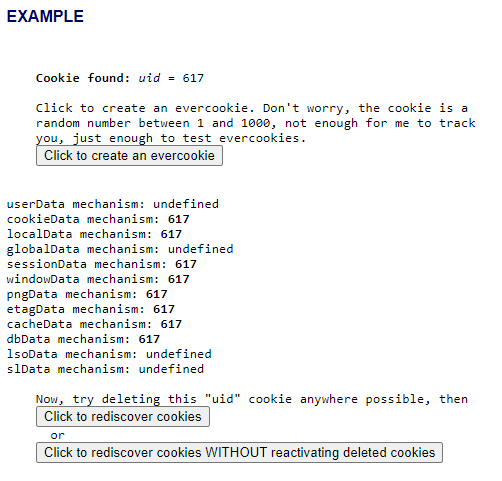
We also needed a way to test how well each Evercookie mechanisms persists. We ended up using a slightly-modified fork of Evercookie's demo website, as it supported Evercookie creation and allowed us to specifically see which mechanisms persisted after each test. We had to modify it to skip all the mechanisms we did not test, and we also had to change the functionality such that cookies are not restored for every new visit to the page. If the site reads the Evercookie from any mechanism, it will attempt to restore it to all available mechanisms, which is undesirable in our case since we want to see what exact mechanisms persisted. From here all the data we needed could be retrieved client-side. Below is what the demo site looks like:
The steps to reproduce the study are as follows:
- Spin up Docker container and Nginx server
sudo docker compose up -d # docker-compose.yaml must be in CWD
- Open browser, turn on any privacy features to test
- Visit website endpoint & create the Evercookie
- If testing on same machine go to http://localhost:8000
- Leave webpage, see what mechanisms persisted
- Close browser, see what mechanisms persisted
- Repeat for different browsers and features
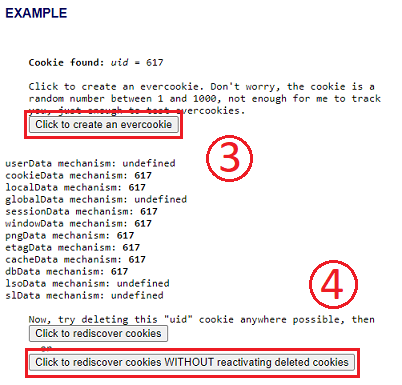
Steps 3 and 4 are labeled in the picture accordingly. Steps 5 and 6 both repeat clicking the button labeled (4).
From there, comparisons between browsers and privacy features can be made by looking at which mechanisms persisted in the different options versus which got properly removed.
A similar study has been conducted by Jonathan Schmidt of the University of Erlangen-Nuremberg. They tested the persistence of Evercookies on mostly macOS machines by "delet[ing] all cookies with the standard tool the browsers offer and examine if the evercookie can be restored." Their study differs in that we test on Windows 10, and instead of manually deleting cookies (e.g., via the inspect element tool), we tested whether the browsers themselves delete the cookies after a page leave and exit. Their study found persistence only in the idbData mechanism with Firefox on macOS.
Below are the results of testing on each browser:
| Browser | cookieData |
localData |
sessionData |
windowData |
lsoData |
slData |
dbData |
idbData |
|---|---|---|---|---|---|---|---|---|
| Tor Browser (initial) | ✔️ | ✔️ | ✔️ | ✔️ | ❌ | ❌ | ❌ | ❌ |
| Tor Browser (after tab leave) | ✔️ | ✔️ | ❌ | ❌ | ❌ | ❌ | ❌ | ❌ |
| Tor Browser (after browser exit) | ❌ | ❌ | ❌ | ❌ | ❌ | ❌ | ❌ | ❌ |
| Chrome (initial) | ❌ | ✔️ | ✔️ | ✔️ | ❌ | ❌ | ✔️ | ✔️ |
| Chrome (after tab leave) | ❌ | ✔️ | ❌ | ❌ | ❌ | ❌ | ✔️ | ✔️ |
| Chrome (after browser exit) | ❌ | ✔️ | ❌ | ❌ | ❌ | ❌ | ✔️ | ✔️ |
| Chrome incognito (initial) | ❌ | ✔️ | ✔️ | ✔️ | ❌ | ❌ | ✔️ | ✔️ |
| Chrome incognito (after tab leave) | ❌ | ✔️ | ❌ | ❌ | ❌ | ❌ | ✔️ | ✔️ |
| Chrome incognito (after browser exit) | ❌ | ❌ | ❌ | ❌ | ❌ | ❌ | ❌ | ❌ |
| Firefox (initial) | ✔️ | ✔️ | ✔️ | ✔️ | ❌ | ❌ | ❌ | ✔️ |
| Firefox (after tab leave) | ✔️ | ✔️ | ❌ | ❌ | ❌ | ❌ | ❌ | ✔️ |
| Firefox (after browser exit) | ✔️ | ✔️ | ❌ | ❌ | ❌ | ❌ | ❌ | ✔️ |
| Firefox incognito (initial) | ✔️ | ✔️ | ✔️ | ✔️ | ❌ | ❌ | ❌ | ❌ |
| Firefox incognito (after tab leave) | ✔️ | ✔️ | ❌ | ❌ | ❌ | ❌ | ❌ | ❌ |
| Firefox incognito (after browser exit) | ❌ | ❌ | ❌ | ❌ | ❌ | ❌ | ❌ | ❌ |
| Edge (initial) | ❌ | ✔️ | ✔️ | ✔️ | ❌ | ❌ | ✔️ | ✔️ |
| Edge (after tab leave) | ❌ | ✔️ | ❌ | ❌ | ❌ | ❌ | ✔️ | ✔️ |
| Edge (after browser exit) | ❌ | ✔️ | ❌ | ❌ | ❌ | ❌ | ✔️ | ✔️ |
| Edge incognito (initial) | ❌ | ✔️ | ✔️ | ✔️ | ❌ | ❌ | ✔️ | ✔️ |
| Edge incognito (after tab leave) | ❌ | ✔️ | ❌ | ❌ | ❌ | ❌ | ✔️ | ✔️ |
| Edge incognito (after browser exit) | ❌ | ❌ | ❌ | ❌ | ❌ | ❌ | ❌ | ❌ |
| Brave (initial) | ❌ | ✔️ | ✔️ | ✔️ | ❌ | ❌ | ✔️ | ✔️ |
| Brave (after tab leave) | ❌ | ✔️ | ✔️ | ✔️ | ❌ | ❌ | ✔️ | ✔️ |
| Brave (after browser exit) | ❌ | ✔️ | ❌ | ❌ | ❌ | ❌ | ✔️ | ✔️ |
| Brave incognito (initial) | ❌ | ✔️ | ✔️ | ✔️ | ❌ | ❌ | ✔️ | ✔️ |
| Brave incognito (after tab leave) | ❌ | ❌ | ❌ | ❌ | ❌ | ❌ | ✔️ | ✔️ |
| Brave incognito (after browser exit) | ❌ | ❌ | ❌ | ❌ | ❌ | ❌ | ✔️ | ✔️ |
Most of the vanilla browsers, or browsers without any additional privacy feature or setting, performed functionally the same across the board: they failed to delete cookies on both page leave and browser close.
An interesting note here is that session and window mechanisms do get deleted on a page leave or on closing the browser. We suspect this is due to how these mechanisms are stored: through an open instance of a tab on the browser. Once the tab is closed, these mechanisms that store the cookie data get deleted.
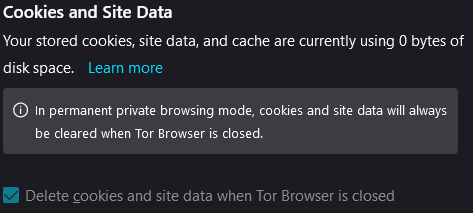
While most vanilla browsers did not delete cookies on closing it, there is one exception: Tor Browser. Tor Browser was the only browser that, with default settings, deleted the Evercookie successfully through closing its browser. Upon further inspection, it was found that Tor Browser actually has a setting that allows the user to be able to choose whether or not cookies should be deleted on browser close.
Brave, which is built on Chrome, performed similarly to Chrome. The vanilla (non-incognito) version actually performed worse than Chrome, preserving sessionData and windowData on tab close. We hypothesize Brave caches tab closes and restores all cookies when the site is revisited, including session cookies. More testing is needed to see how long before Brave no longer restores these session cookies. Brave performed slightly better than Chrome in incognito mode, clearing the localData mechanism on tab close, whereas Chrome preserves it.
For incognito (besides Tor Browser since there was no incognito mode available), we found that the results of the browsers were the same across the board. In contrast to vanilla browsers, every browser in incognito mode was able to delete Evercookie on browser close. However, they all similarly failed to stop any mechanisms on page leave besides the session and window data mechanisms. In the table for Chrome incognito (after browser exit) no mechanisms persisted, indicating that Evercookie was successfully deleted upon browser close.
Interestingly enough, Tor Browser performed identical to Incognito Firefox. Upon further inspection, we found that Tor Browser is actually built on top of Firefox, so the performance similarities makes sense. It is essentially running a customized version of Firefox in incognito mode, but reaps the benefits of using a Tor network to protect against other privacy attacks (e.g., by hiding the user's IP address from the site).
In order to expand the project beyond just browsers, we decided to test common privacy extensions a user might add to their browser. We choose these extensions based on what was found to be popular on the Internet or the top search result in extension download stores.
Privacy Badger: a privacy extension maintained by the EFF that learns to identify and block trackers based on browser history. We tested this extension on both Chrome and Firefox.
Cookie Remover: an extension that deletes cookies manually through a click of a button. This is a Chrome-only extension.
Cookie Autodelete: an extension that deletes cookies automatically. This is also a Chrome-only extension.
Ghostery: a privacy extension that blocks common trackers. We tested this extension on both Chrome and Firefox.
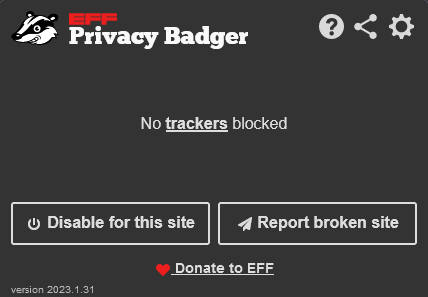
Privacy Badger: We found that Privacy Badger does not block Evercookie, nor does it block any of its various persistence mechanisms. We believe this occurs because Privacy Badger has to learn through browser history, by identifying scripts that run on many different sites (as they would likely be cross-site tracking scripts), but we were using it fresh without any training. It is possible that if Privacy Badger visited sites that also had Evercookie, it would learn to properly block it.
Cookie Remover: Cookie Remover was able to delete the localData and sessionData mechanisms.
Cookie Autodelete: In contrast to Cookie Remove, Cookie Autodelete failed to delete any of the persistence mechanisms at all, whether ran automatically or manually.
Ghostery: We found that Ghostery prevented Evercookie from being set in the first place using its malicious script detection software. Thus, since Evercookie is never set, none of the persistence mechanisms work as well.
From the general results, our consensus for the privacy extensions is that Ghostery performed well ahead of the rest being that it was able to stop Evercookie in its entirety. However, further testing may be required to properly judge the rest of the extensions, especially in regards to Privacy Badger.
The safest way based on the results of the study to keep oneself private is to use a privacy extension like Ghostery that prevents a cookie from being set in the first place.
However, more rigorous testing must be done, especially with regard to obfuscated JS code, as that may be a way to circumvent Ghostery's detection. Extensions like Ghostery that rely on an arbitrary guess of whether the underlying JavaScript in the page is malicious could intefere with functionalities of non-malicious scripts, and thus affect the user's smooth experience in the process.
As such, if a user does not want to deal with potential blocking of safe JavaScript, using an incognito browser OR Tor Browser should get rid of persistent cookies like Evercookie fairly easily. The only catch is that the user MUST close the browser or Evercookie will continue to persist using its many mechanisms.
It's also important to note this study, and Evercookie's use in general, is a study of the worse case scenario. Most cookies that are set on webpages are not going to be as persistent as Evercookie. However, we believe it's good to look at the severity of what might happen in the case that a person does want to develop a persistent cookie, and for far more malicious purposes in the future.
There are some interesting extensions that could be drawn from this study in the future:
For one, some of the working mechanisms of Evercookie did not work with the Docker setup. It is very possible that the missing mechanisms could have greatly swayed the results of this study, so it would be important in the future to setup environments where these mechanisms could be properly tested. Additionally in regards to the mechanisms, another extension might be to stress test each of the mechanisms individually, finding the risks and solutions to each. This could prove useful as privacy techniques could take into account each of these mechanisms and prevent them from persisting if solutions were found to each one.
An further extension could be made by creating an Evercookie that DOES track data. Samy Kamkar stated while creating Evercookie that it has no capability of tracking a user's information and that it only has relevance on the specific showcase website. Creating an Evercookie that did have the capability to track a user's information could prove to be useful as it would prove that it is possible to make an Evercookie that tracks information, drawing more attention to the potential privacy risks it creates.