A Model Context Protocol (MCP) server providing network diagnostic tools for AI agents. Designed to offload heavy network analysis to the server and return structured, actionable data optimized for LLM consumption.


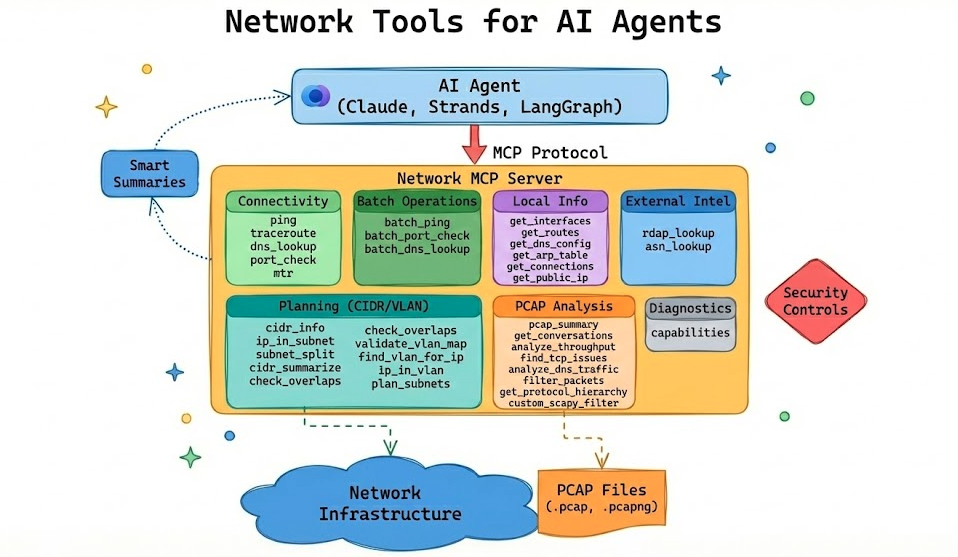
- Connectivity Testing: ping, traceroute, DNS lookups, port checks, MTR
- Batch Operations: Test multiple hosts/ports concurrently
- Local Network Info: Get interfaces, routes, DNS config, ARP table, connections (cross-platform)
- Pcap Analysis: Analyze packet captures with scapy (no tshark required)
- Custom Filters: Execute scapy filter expressions for advanced queries (AST-validated)
- Security Controls: Configurable allowlist/blocklist for target validation (enforced on connectivity tools)
- PCAP Path Guardrails: Restrict which directories the server is allowed to read captures from
- Smart Summaries: Returns human-readable summaries plus structured data
pip install network-mcpOr install from source:
git clone https://github.com/labeveryday/network-mcp.git
cd network-mcp
pip install -e .Run the MCP server:
network-mcpOr with Python:
python -m network_mcp.serverRecommended first run (helps agents decide what’s safe/available on this host):
- Check capabilities: call
capabilitiesto see installed binaries (likemtr), active security policy, and PCAP path guardrails. - Decide on policy: if you need to loosen/tighten target validation or PCAP access, set env vars before launching.
- Run unit tests by default:
pytestskips integration tests unless you opt in (see Development).
| Tool | Description |
|---|---|
capabilities |
Report runtime capabilities (installed binaries like mtr, active security policy, pcap path guardrails) so agents can plan tool usage |
Designed for Tier 1 / Tier 2 NOC workflows. These tools are pure (no network calls, deterministic outputs) and safe to use for planning and validation.
| Tool | Description |
|---|---|
cidr_info |
CIDR primitives (IPv4/IPv6): network, usable range, mask/wildcard, counts |
ip_in_subnet |
Check whether an IP is in a subnet and whether it’s a usable host address |
subnet_split |
Split a CIDR into equal-size child subnets (by new prefix or power-of-two count) |
cidr_summarize |
Collapse/aggregate CIDRs into summarized routes (IPv4/IPv6 handled separately) |
check_overlaps |
Find overlaps/containment conflicts between CIDRs |
validate_vlan_map |
Validate a 1-subnet-per-VLAN map and surface overlaps |
find_vlan_for_ip |
Find which VLAN matches an IP from a provided VLAN map (Tier 1 “where does this belong?”) |
ip_in_vlan |
Check if an IP belongs to a VLAN; if not, provide a best-guess VLAN match (when unique) |
plan_subnets |
Allocate VLAN subnets from a parent IPv4 block (deterministic) |
Input examples
- VLAN map (both formats accepted):
{
  "10": "192.168.10.0/24",
  "20": { "cidr": "192.168.20.0/24", "name": "Voice" }
}plan_subnetsrequirements (aliases supported:hostsandprefix):
[
  { "vlan_id": 10, "name": "Users", "hosts": 120 },
  { "vlan_id": 20, "name": "Voice", "hosts": 60 },
  { "vlan_id": 30, "name": "Printers", "prefix": 26 }
]| Tool | Description |
|---|---|
rdap_lookup |
WHOIS-style lookup using RDAP for domains and IPs |
asn_lookup |
Origin ASN lookup for an IP (BGP origin intel) |
| Tool | Description |
|---|---|
ping |
ICMP ping with latency statistics and packet loss |
traceroute |
Path analysis showing each hop with latency |
dns_lookup |
DNS resolution (A, AAAA, MX, TXT, etc.) and reverse lookups |
port_check |
TCP port connectivity test with banner grabbing |
mtr |
Combined traceroute + ping with per-hop statistics |
| Tool | Description |
|---|---|
batch_ping |
Ping multiple hosts concurrently |
batch_port_check |
Check multiple ports on a single host |
batch_dns_lookup |
Resolve multiple hostnames in parallel |
Cross-platform tools that work on Linux, macOS, and Windows.
| Tool | Description |
|---|---|
get_interfaces |
List network interfaces with IPs, MACs, and status |
get_routes |
Get routing table with default gateway |
get_dns_config |
Get configured DNS servers and search domains |
get_arp_table |
Get ARP cache (IP to MAC mappings) |
get_connections |
List active TCP/UDP connections |
get_public_ip |
Get public/external IP address as seen from the internet |
| Tool | Description |
|---|---|
pcap_summary |
High-level capture stats: packets, duration, protocols, top talkers |
get_conversations |
Network flows/conversations between endpoints |
analyze_throughput |
Observed throughput (Mbps) per conversation/flow, including dominant direction and duration |
find_tcp_issues |
Detect retransmissions, resets, zero windows, dup ACKs |
analyze_dns_traffic |
DNS queries, failures, slow responses |
filter_packets |
Extract packets by IP, port, or protocol |
get_protocol_hierarchy |
Protocol breakdown by packets and bytes |
custom_scapy_filter |
Execute custom scapy filter expressions |
Add to ~/Library/Application Support/Claude/claude_desktop_config.json (macOS) or %APPDATA%\Claude\claude_desktop_config.json (Windows):
{
  "mcpServers": {
    "network-tools": {
      "command": ["network-mcp"]
    }
  }
}Add to your MCP settings:
{
  "mcpServers": {
    "network-tools": {
      "command": ["network-mcp"]
    }
  }
}If you installed with uv:
{
  "mcpServers": {
    "network-tools": {
      "command": "uv",
      "args": ["run", "--directory", "/path/to/network-mcp", "network-mcp"]
    }
  }
}{
"success": true,
"target": "google.com",
"resolved_ip": "142.250.80.46",
"packets_sent": 4,
"packets_received": 4,
"packet_loss_percent": 0.0,
"min_latency_ms": 11.2,
"avg_latency_ms": 12.8,
"max_latency_ms": 15.1,
"summary": "google.com is reachable. 4/4 packets received, avg latency 12.8ms"
}{
"success": true,
"total_targets": 3,
"successful": 3,
"failed": 0,
"results": [
{"target": "8.8.8.8", "success": true, "avg_latency_ms": 12.5},
{"target": "1.1.1.1", "success": true, "avg_latency_ms": 8.2},
{"target": "google.com", "success": true, "avg_latency_ms": 15.1}
],
"summary": "Batch ping: 3/3 targets reachable"
}{
"success": true,
"file_path": "/tmp/capture.pcap",
"total_tcp_packets": 15234,
"issues": [
{
"issue_type": "retransmission",
"count": 47,
"severity": "medium",
"recommendation": "Retransmissions indicate packet loss. Check for network congestion."
}
],
"has_issues": true,
"summary": "TCP issues detected in 15234 packets: 47 retransmissions"
}{
"success": true,
"file_path": "/tmp/capture.pcap",
"total_packets_scanned": 100000,
"conversations_analyzed": 87,
"top_n": 3,
"sort_by": "mbps_total",
"conversations": [
{
"src_ip": "10.0.0.10",
"src_port": 51544,
"dst_ip": "93.184.216.34",
"dst_port": 443,
"protocol": "TCP",
"packets_total": 1240,
"bytes_total": 18423333,
"duration_seconds": 9.84,
"start_time": 1734567890.01,
"end_time": 1734567899.85,
"packets_forward": 820,
"bytes_forward": 17600000,
"packets_reverse": 420,
"bytes_reverse": 823333,
"mbps_forward": 14.308,
"mbps_reverse": 0.669,
"mbps_total": 14.977,
"direction": "10.0.0.10:51544 -> 93.184.216.34:443"
}
],
"summary": "Throughput analysis: 87 conversations from 100000 packets. Top flow 10.0.0.10:51544 -> 93.184.216.34:443 at ~14.977 Mbps over 9.84s"
}{
"success": true,
"interfaces": [
{
"name": "en0",
"status": "up",
"mac_address": "00:11:22:33:44:55",
"ipv4_addresses": ["192.168.1.100"],
"ipv6_addresses": ["fe80::1"],
"netmask": "255.255.255.0",
"mtu": 1500
}
],
"default_interface": "en0",
"summary": "Found 5 interfaces (3 up). Primary: en0"
}{
"success": true,
"public_ip": "203.0.113.42",
"service_used": "ipify.org",
"summary": "Public IP: 203.0.113.42 (via ipify.org)"
}{
"success": true,
"query": "1.1.1.1",
"query_type": "ip",
"rdap_url": "https://rdap.org/ip/1.1.1.1",
"handle": "NET-1-1-1-0-1",
"country": "AU",
"start_address": "1.1.1.0",
"end_address": "1.1.1.255",
"summary": "RDAP 1.1.1.1: 1.1.1.0–1.1.1.255 (AU), handle NET-1-1-1-0-1"
}{
"success": true,
"ip": "1.1.1.1",
"asn": "13335",
"prefix": "1.1.1.0/24",
"country": "AU",
"registry": "apnic",
"allocated": "2011-08-11",
"as_name": "CLOUDFLARENET",
"summary": "1.1.1.1 originates from AS13335 (CLOUDFLARENET), prefix 1.1.1.0/24"
}Create config.yaml in your working directory or ~/.network-mcp/config.yaml:
security:
  # Only allow these targets (glob patterns, CIDR ranges)
  allowed_targets:
    - "*.company.com"
    - "10.0.0.0/8"
    - "192.168.0.0/16"

  # Block these targets
  blocked_targets:
    - "*.gov"
    - "localhost"
    - "127.0.0.0/8"

  # Block private IPs
  block_private: false

  # Block cloud metadata endpoints (AWS, GCP, etc.)
  block_cloud_metadata: true

pcap:
  max_packets: 100000
  allow_custom_filters: true
  # Restrict which directories the server is allowed to read pcaps from.
  # (Paths are resolved before checking.)
  allowed_paths:
    - "."
    - "~/Documents"
    - "/tmp"
Environment variables:
NETWORK_MCP_ALLOWED_TARGETS="*.company.com,10.0.0.0/8"
NETWORK_MCP_BLOCKED_TARGETS="*.gov,localhost"
NETWORK_MCP_BLOCK_PRIVATE="true"
NETWORK_MCP_MAX_PACKETS="50000"
NETWORK_MCP_PCAP_ALLOWED_PATHS=".,~/Documents,/tmp"Token Efficiency: LLMs have context limits. The server does heavy processing (parsing 100k packets) and returns concise summaries instead of raw data.
Better Reasoning: LLMs excel at deciding what to investigate, not parsing raw output. Structured data leads to better decisions.
Consistency: Server-side processing is deterministic. You don't rely on the LLM to correctly interpret traceroute output every time.
The examples/ directory contains working examples using Strands Agents:
| Example | Description |
|---|---|
ollama_agent.py |
Interactive chat agent using Ollama (local models) |
incident-demo/ |
Self-contained demo: AI diagnoses network outages with voice alerts |
eval_agent.py |
Evaluate how well models use the network tools |
Quick start:
cd examples
pip install strands-agents strands-agents-tools 'strands-agents[ollama]'
python ollama_agent.py
See examples/README.md for full documentation.
# Clone and install dev dependencies
git clone https://github.com/labeveryday/network-mcp.git
cd network-mcp
pip install -e ".[dev]"

# Run unit tests (integration tests are skipped by default)
pytest

# Run integration tests (requires system tools and/or network access)
pytest -m integration

# Run linting
ruff check .network-mcp/
├── src/network_mcp/
│ ├── __init__.py
│ ├── server.py # FastMCP server
│ ├── config.py # Configuration and security
│ ├── tools/
│ │ ├── connectivity.py # ping, traceroute, dns, port_check, mtr, batch ops
│ │ ├── local.py # local network info (interfaces, routes, etc.)
│ │ └── pcap.py # pcap analysis tools
│ └── models/
│ └── responses.py # Pydantic response models
├── tests/
├── pyproject.toml
└── README.md
- Python 3.10+
- System tools:
ping,traceroute(standard on most systems) - Optional:
mtrfor the MTR tool
MIT License - see LICENSE file for details.