


TargetJS is a JavaScript UI framework that replaces the "State → Render" model with "State → Transition → Render". It also lets code order directly define the UI sequence. It unifies UI, animations, API calls, event handling, and state into self-contained "Targets" that stack together like Lego pieces using Code-Ordered Reactivity.
It can be used as a full-featured framework or as a lightweight library alongside other frameworks. It is also a highly performant web framework, as shown in the framework benchmark.
UI frameworks model the final result, not transition
Traditional frameworks model the UI as a function of state: change state, re-render the UI. When state changes from A → B, the UI immediately jumps to B. The framework doesn’t naturally represent the journey from A → B. But modern, rich user experiences are more like: A → transition → B.
TargetJS treats state as a destination. Values are not only assigned. They can be approached over time through configurable steps. This makes transitions a native part of state change. TargetJS also delivers CSS-level transition efficiency.
Fragmentation across multiple mental models
In many applications, state, animation, events, loading, timing, and callbacks are all handled through separate concepts or APIs. This creates glue code and a mental split between them.
TargetJS unifies them under one concept and one model. Methods and fields are unified and both become reactive units with their own state, lifecycle, timing, execution conditions, looping, and callbacks. This shifts fields from passive values to active participants, reducing boilerplate and keeping application logic consolidated.
UI sequences are difficult to trace in code
UIs often follow sequences like this:
Click → animate button → fetch data → render results → animate items → highlight one item
In traditional code, that sequence is often scattered across different places such as event handlers, effects, promises, and callbacks.
TargetJS code order and target reactivity allow the implementation to more closely mirror the actual UI sequence.
With its compact style, TargetJS makes the journey from A → B explicit and efficient, with significantly less code than traditional frameworks.
- Unified State: One single state. Transitions are state too.
- UI as Sequence: Code describes the UI story from top to bottom, just like the user experiences the interaction: "When this finishes, do that."
- Ultra-Compact: Minimal code, with no coordination variables.
- Zero Boilerplate Async: Targets handle waiting for nested asynchronous operations automatically.
- Animation by Default: High-performance animations are baked into the logic.
1. Install
npm install targetj2. Example
This creates the following sequential sequence: appear → bounce → move → turn red → log. Notice how the code follows the UI sequence. There is only one state, and the animation transitions are part of that state.
import { App } from "targetj";

App({
  width: 100,
  height: 100,
  backgroundColor: "blue",

  // Starts immediately: bounce in.
  scale: { value: [0.5, 1.2, 1], steps: 24, interval: 12 },

  // Waits for scale to finish, then moves right.
  x$$: { value: [0, 180], steps: 40, interval: 8 },

  // Waits for x to finish, then turns red.
  backgroundColor$$: { value: "crimson", steps: 30, interval: 8 },

  // Waits for the color change to finish.
  done$$() {
    console.log("Sequence complete");
  }
}).mount("#app");In TargetJS, targets are the fundamental unit of behavior instead of methods. Methods and properties both are internally transformed into targets that the framework schedules and executes.
A target can:
- execute a method
- hold a value
- move toward a new value over time
- pause while moving toward a value
- wait for previous targets to complete
- react when previous targets update
- fetch data
- respond to events
- create children
- run callbacks
- control its own lifecycle
This lets UI code follow the same order as the user experience.
A target can also be defined as an object with optional controls that manage its lifecycle and execution.
| Property | Description |
|---|---|
value |
The data or function that determines the target's state. |
steps |
Turns a value change into an animation. |
interval |
Delay (ms) between steps or executions. |
cycles |
Number of times the target repeats. |
loop |
Controls repetition, either actively for continuous execution or passively when the value changes. |
active |
Boolean property controlling when value is executed. |
enabledOn |
Determines whether the target is enabled for execution. |
pauseOn |
Pauses execution while the target is in progress. |
easing |
Predefined easing function controlling how values update over steps. |
onComplete |
Callback triggered when this target (and its children) finishes. |
onValueChange |
Callback triggered when the target emits a new value. |
on<PropertyName>Step |
Callback triggered on every step of a specific property. |
Target names can include special symbols that define when they execute. This provides a compact alternative to implementing the same behavior with callbacks.
| Symbol | Name | Behavior |
|---|---|---|
name |
Standard | Runs immediately in the order it appears. |
name$ |
Reactive | Runs every time the previous sibling target updates. Equivalent to using on<PropertyName>Step() or onValueChange() to activate the next target . |
name$$ |
Deferred | Runs only after the entire preceding target chain, including children, animations, and API calls, completes. Equivalent to using onComplete() to activate the next target. |
_name |
Inactive | Does not run automatically. Trigger it manually with .activateTarget(). Equivalent to { active: false }. |
Let’s see how TargetJS handles a complex interaction that would usually require 50+ lines of React/CSS. The example demonstrates how to run four asynchronous operations in a strict sequence. In other words, each step has to wait for all the previous ones to complete.
One object defines a UI element without separate HTML/CSS. Static targets map directly to DOM styles/attributes. You can still use CSS if wanted.

<div id="likeButton"></div>import { App } from "targetj";
App({
width: 220,
height: 60,
lineHeight: 60,
textAlign: "center",
borderRadius: 10,
html: "♡ Like",
// Runs immediately on mount
scale: { value: [1.2, 1], steps: 12, interval: 12 },
backgroundColor: { value: ["#ffe8ec", "#f5f5f5"], steps: 12, interval: 12 }
}).mount("#likeButton");We move the animation into an onClick and add a deferred heart animation.
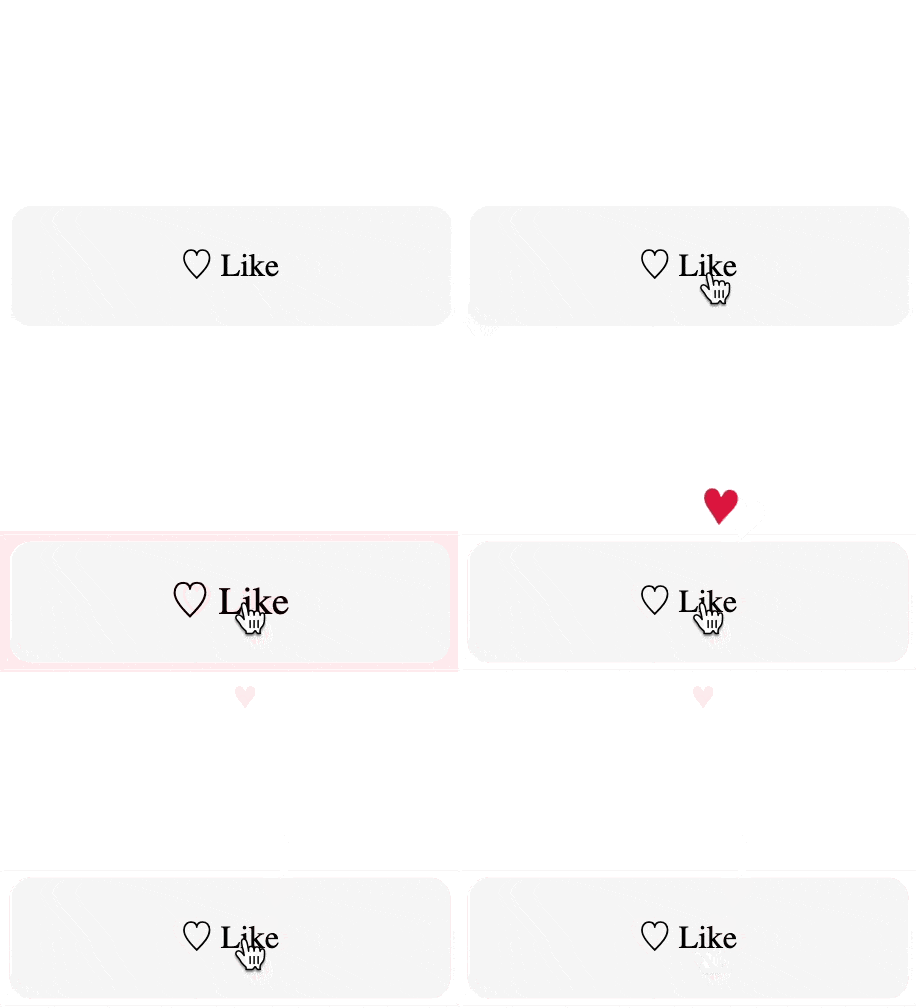
<div id="likeButton"></div>import { App } from "targetj";
App({
width: 220, height: 60, lineHeight: 60, textAlign: "center",
borderRadius: 10, backgroundColor: "#f5f5f5",
cursor: "pointer", userSelect: "none",
html: "♡ Like",
onClick() {
this.setTarget('scale', { value: [1.2, 1], steps: 8, interval: 12 });
this.setTarget('backgroundColor', { value: [ '#ffe8ec', '#f5f5f5' ], steps: 12, interval: 12 });
},
heart$$: { // Wait for the button animation to finish, THEN add and animate the heart.
html: "♥", color: "crimson", fontSize: 20,
fly() {
const cx = (this.parent.getWidth() - this.getWidth()) / 2;
this.setTarget('x', { value: [cx, cx + 22, cx - 16, cx + 10, cx ], steps: 50, cycles: 2 }); // Repeat it twice
this.setTarget('y', { value: [0, -120], steps: 400 });
}
}
}).mount("#likeButton");We handle UI, two animations, a POST request, and a cleanup.
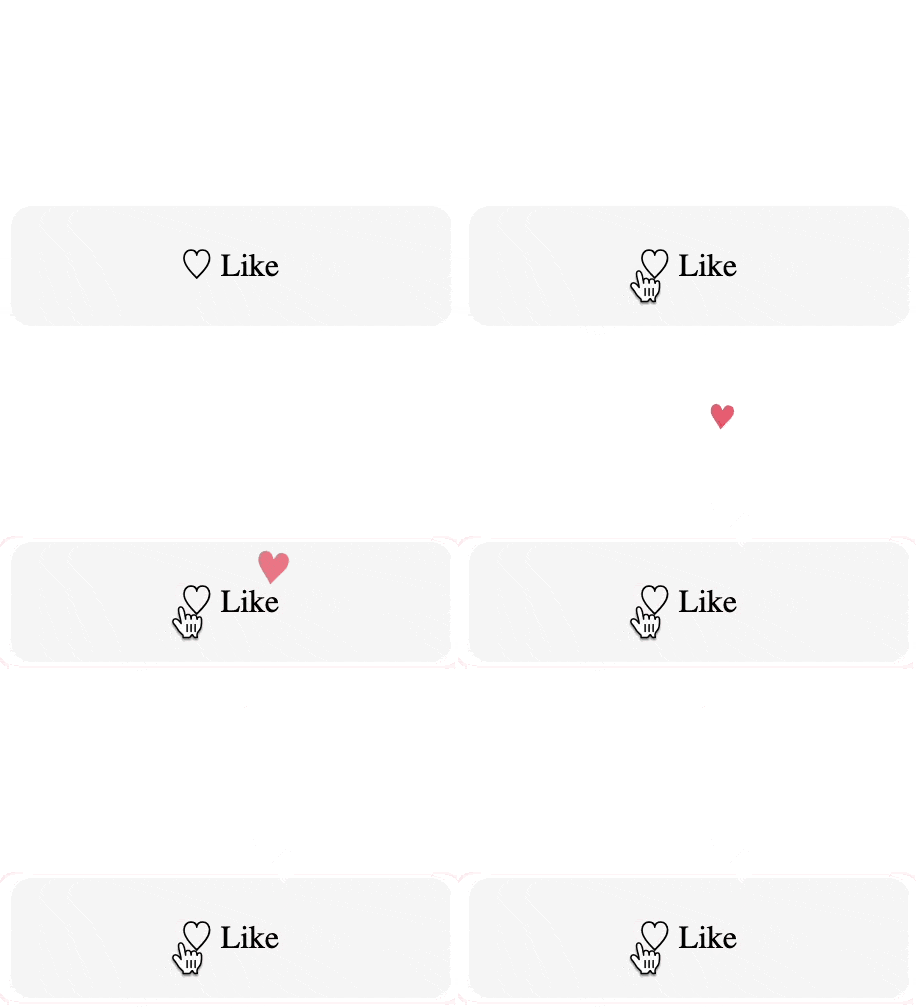
<div id="likeButton"></div>import { App } from "targetj";
App({
width: 220, height: 60, lineHeight: 60, textAlign: "center",
borderRadius: 10, backgroundColor: "#f5f5f5", cursor: "pointer", userSelect: "none",
role: "button", tabIndex: 0,
html: "♡ Like",
onClick() {
this.setTarget('scale', { value: [1.2, 1], steps: 8, interval: 12 });
this.setTarget('backgroundColor', { value: [ '#ffe8ec', '#f5f5f5' ], steps: 12, interval: 12 });
},
heart$$: {
html: "♥", color: "crimson", fontSize: 20,
fly() {
const cx = (this.parent.getWidth() - this.getWidth()) / 2;
this.setTarget('x', { value: [cx, cx + 22, cx - 16, cx + 10, cx ], steps: 50, cycles: 2 }); // Repeat it twice
this.setTarget('y', { value: [0, -120], steps: 400 });
}
},
fetch$$: { method: "POST", id: 123, url: "/api/like" }, // Wait for the heart to finish, THEN fetch
removeHearts$$() { this.removeChildren(); }, // Wait for fetch to finish, THEN cleanup
onKey(e) { if (e.key === "Enter") this.activateTarget("onClick"); }
}).mount("#likeButton");Each target has its own state and lifecycle. Targets execute automatically in the order they are written. $$ defers execution until all prior sibling targets (including their children) are fully complete. Animations, API calls, event handling, and child creation are all treated uniformly as targets. Complex asynchronous flows can be structured by organizing work into parent and child targets. In addition, targets provide built-in capabilities such as onComplete callbacks, pauseOn, enabledOn, looping with delays, and more. This also makes the code more compact, as it avoids using extra variables to track progress and reduces the need for loops and conditional statements.
- 📦 Alternative Installation Via CDN
- Using TargetJS as a Library
- Deeper Examples:
- Special Target Names
- How to Debug in TargetJS
- Documentation
- License
- Contact
- 💖 Support TargetJS
Add the following <script> tag to your HTML to load TargetJS from a CDN:
<script src="https://unpkg.com/targetj@latest/dist/targetjs.js"></script>This exposes TargetJS on window, so you can initialize your app with TargetJS.App(...).
Ensure your code runs after the DOM is ready (use
defer, place your script at the bottom of the<body>, or wrap it in aDOMContentLoadedlistener).
<div id='redbox'></div>

<script>
    TargetJS.App({
        backgroundColor: 'red',
        width: { value: [100, 250, 100], steps: 20 },
        height: { value: [100, 250, 100], steps: 20 }
    }).mount('#redbox');
</script>TargetJS can also be used as a "no-code" library. Elements with tg- attributes are discovered and activated automatically.
<div
   tg-background="red"
   tg-width="{ value: [100, 250, 100], steps: 20 }"
   tg-height="{ value: [100, 250, 100], steps: 20 }">
</div>TargetJS can run inside an existing app mounted into a DOM element managed by another framework.
import React, { useLayoutEffect, useRef } from "react";
import { App as TApp } from "targetj";

export default function TargetIsland() {
  const hostRef = useRef(null);

  useLayoutEffect(() => {
    const el = hostRef.current;
    if (!el) return;

    TApp({
      width: { value: [100, 500], steps: 100 },
      height: 200,
      backgroundColor: "purple",
      onClick() { console.log("click"); }
    }).mount(el);

    return () => {
      TApp.unmount();
    };
  }, []);

  return <div ref={hostRef} style={{ width: 100, height: 200, overflow: "hidden" }} />;
}This example shows how TargetJS models a UI workflow directly in code order: Click → animate button → fetch users → remove old results → add new results → pause → highlight one result
The fetch target is initially set to active: false, which means it waits for an explicit trigger. When the user clicks, the fetch target is activated. TargetJS understands that fetching data is an asynchronous operation.
The $$ postfix means that a target waits for the preceding sibling targets to complete before running. In this example, removeChildren$$ waits for fetch to complete before it begins. addChildren$$ begins after both fetch and removeChildren$$ are completed.
Notice how fetch, removeChildren$$, and addChildren$$ appear in the same order as the UI sequence. The code is organized around the experience itself.
Lastly, pause$$ adds a short pause before highlighting the first user with an animation. setTarget is an imperative way to implement targets within methods.
import { App } from "targetj";

App({
    searchButton: {
        element: 'button',
        type: 'button',
        y: 20, x: 20,
        width: 220, height: 60, lineHeight: 60,
        borderRadius: 10, border: 0, backgroundColor: '#f5f5f5',
        cursor: 'pointer', textAlign: 'center',
        html: 'Search',
        onClick() {
            this.setTarget('scale', {value: [1, 1.15, 1], steps: 8, interval: 12 });
            this.setTarget('backgroundColor', {value: [ '#ffe8ec', '#f5f5f5' ], steps: 12, interval: 12});
            this.parent.getChild('users').activateTarget('fetch', { reset: true });
        }
    },
    users: {
        y: 90,
        x: 20,
        gap: 10,
        containerOverflowMode: 'always',
        fetch: {
            active: false,
            value: 'https://targetjs.io/api/randomUsers'
        },
        removeChildren$$() {
            this.removeChildren();
        },
        addChildren$$: {
            cycles() { return this.val('fetch').length; },
            value(i) {
                const user = this.val('fetch')[i];
                return {
                    width: 360,
                    backgroundColor: "#fafafa",
                    scale: {value: {list: [0.8, 1]}, steps: 14},
                    boxShadow: "0 6px 16px rgba(0,0,0,.08)",
                    containerOverflowMode: 'always',
                     userName: {
                        padding: 10,
                        height: 30,
                        fontWeight: 600,
                        opacity: { value: [0, 1], steps: 50 },
                        html() { return user.name; }
                    },
                    userEmail: {
                        padding: 10,
                        opacity: { value: [0, 0.7], steps: 50 },
                        html() { return user.email; }
                    }
                };
            }
        },
        pause$$: { interval: 150 },
        highlightOne$$() {
            const user = this.getChild(0);
            user.setTarget('backgroundColor', { value: ['#fff7cc', '#fff1a8'], steps: 14 });
            user.setTarget('scale', { value: [1, 1.04, 1], steps: 14 });
            user.setTarget('boxShadow', '0 10px 24px rgba(0,0,0,.14)');
        }
    }
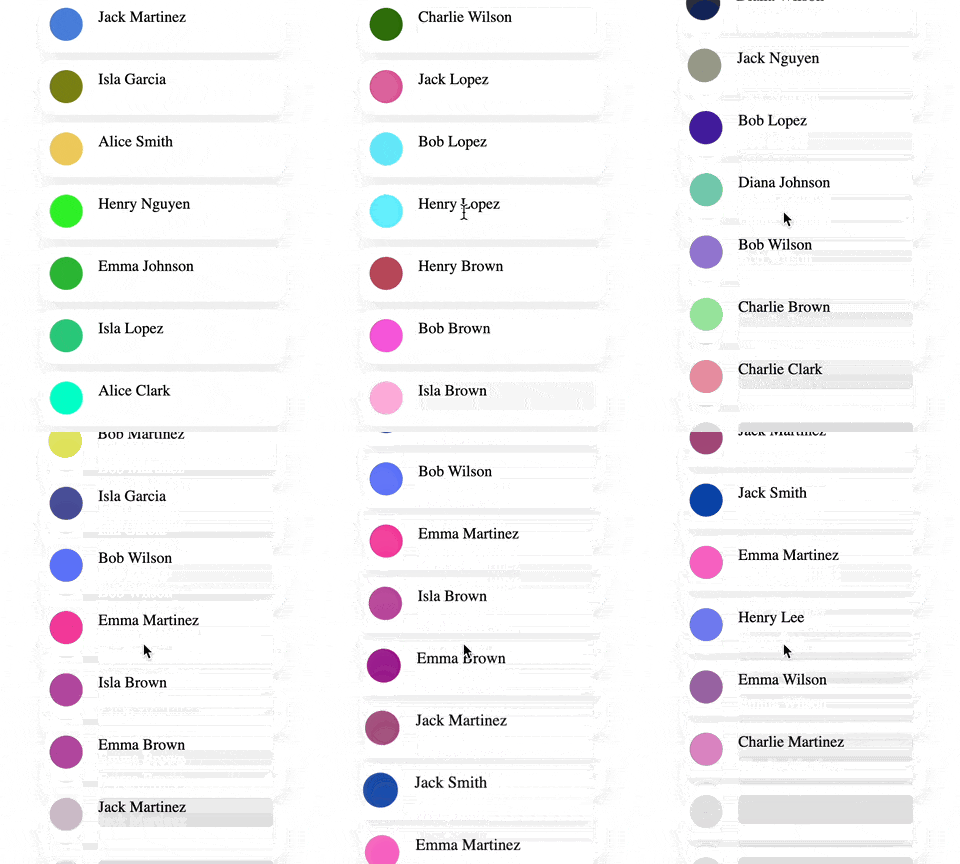
}).mount('#app');In this advanced example, we implement an infinite-scrolling application.
-
addChildrenis a special target that adds multiple items to the container’s children each time it executes. TheonVisibleChildrenChangeevent detects changes in the visible children and activatesaddChildrento insert new items and fill any gaps. -
photoanduserNameeach add adivelement inside every item, serving as placeholders for the photo and user name. -
pause$$delays the execution of all targets that follow it by 300 ms. It also haspauseOn: 'hidden', which means the delay is paused if the item becomes invisible, such as when the user scrolls down quickly. This also puts all following$$targets on hold, sofetch$$will not execute until the item becomes visible again. -
fetch$$retrieves the user’s details. -
reveal$$executes afterfetch$$, revealing the user name and populating the photo with a random color. -
waveexecutes when all visible children have completed their targets or when scrolling ends, giving each user item a coordinated animation.
TargetJS employs a tree-like structure to track visible branches, optimizing scroller performance.
<div id="userList"></div>import { App, getEvents, getScreenWidth, getScreenHeight } from "targetj";
App({
preventDefault: true,
width: 300,
height() { return getScreenHeight(); },
x() { return (getScreenWidth() - this.getWidth()) / 2; },
containerOverflowMode: "always",
canDeleteDom: false,
overflow: 'scroll',
onWindowScroll: true,
addChildren: {
value() {
return Array.from({length: 10}, (_, i) => ({
height: 56,
width() { return this.parent.getWidth() - 30; },
bottomMargin: 8,
borderRadius: 12,
backgroundColor: 'white',
boxShadow: "0 8px 20px rgba(0,0,0,0.08)",
pause: {
interval() { return getEvents().isWindowScrolling() ? 600 : 0; },
pauseOn: 'hidden'
},
photo$$: {
x: 10,
y: 10,
width:34,
height:34,
borderRadius: '50%',
backgroundColor: '#ddd'
},
userName$$: {
x: 60,
y: 10,
width: 180,
height: 30,
overflow: 'hidden',
borderRadius: 5,
backgroundColor: '#ddd'
},
pause$$: {
interval: 300,
pauseOn: 'hidden'
},
fetch$$: "https://targetjs.io/api/randomUser",
reveal$$() {
const userName = this.getChild('userName$$');
userName.setTarget('html', this.val('fetch$$').name);
userName.setTarget('backgroundColor', { value: 'white', steps: 20 });
this.getChild('photo$$').setTarget('backgroundColor', { value: '#' + Math.random().toString(16).slice(-6), steps: 20 });
}
}));
},
onVisibleComplete() {
if (!getEvents().isWindowScrolling()) {
this.activateTarget('wave');
}
}
},
onWindowScrollTopEnd() {
if (this.isTargetVisibleTreeComplete('addChildren')) {
this.activateTarget('wave');
}
},
wave: {
active: false,
interval: 30,
cycles() { return this.visibleChildren.length; },
value(i) {
const child = this.visibleChildren[i];
if (child) {
child.setTarget("scale", { value: [1, 1.06, 1], steps: 18 });
child.setTarget("opacity", { value: [1, 0.7, 1], steps: 18 });
}
}
},
onVisibleChildrenChange() {
if (!this.visibleChildren.length) {
return this.activateTarget("addChildren");
}
const scrollTop = this.$dom?.getScrollTop() ?? 0;
const lastY = this.getLastChild().getY() - scrollTop - 500;
if (lastY <= this.getHeight()) {
this.activateTarget("addChildren");
}
}
}).mount("#userList");Some target names have built-in meaning and interact directly with the DOM, layout system, or browser events.
Because these behaviors are expressed as targets, they still participate in the same execution system and dependency flows as any other target.
Styles
These targets update CSS properties and transforms:
width,heightopacityx,y,zrotate,rotateX,rotateY,rotateZscalebackgroundColor,color
These can be animated simply by adding steps.
Structure
These targets define the structure of the interface:
childrenoraddChildren– adds new children each time the target executeshtml– inner HTML content, often simple textelement– specify the DOM element type (e.g.,div,canvas)
Events
These targets respond to browser events:
onClickonScrollonKeyonResizeonEnter/onLeaveonVisibleChildrenChange
TargetJS provides built-in debugging tools:
TargetJS.tApp.stop(); // Stop the application.
TargetJS.tApp.start(); // Restart the application
TargetJS.tApp.throttle = 0; // Slow down execution (milliseconds between cycles)
TargetJS.tApp.debugLevel = 1; // Log cycle execution- Use
t(id)in the browser console to find an object by its element id. - Use
t(id).bug()to inspect all the vital properties. - Use
t(id).logTree()to inspect the UI structure.
Explore the potential of TargetJS and dive into our interactive documentation at www.targetjs.io.
Distributed under the MIT License. See LICENSE for more information.
Ahmad Wasfi - wasfi2@gmail.com
If you would like to show some appreciation:
- ⭐ Star this repo on GitHub to show your support!
- 🐛 Report issues & suggest features.
- 📢 Share TargetJS with your network.