





Split large XML files into smaller, version-control–friendly pieces—then reassemble them when needed. Output as XML, JSON, JSON5, or YAML.
Useful for cleaner diffs, easier collaboration, and workflows like Salesforce metadata.
Native Rust: Core logic is in the xml-disassembler crate; this package provides Node.js bindings via Neon.
- Quick start
- Features
- Install
- Disassembling
- Disassembly strategies
- Multi-level disassembly
- Reassembling
- Ignore file
- Logging
- Implementation
- Use case
- Contributing
- License
import {
  DisassembleXMLFileHandler,
  ReassembleXMLFileHandler,
} from "xml-disassembler";

// Disassemble: one XML → many small files
const disassemble = new DisassembleXMLFileHandler();
await disassemble.disassemble({
  filePath: "path/to/YourFile.permissionset-meta.xml",
  uniqueIdElements:
    "application,apexClass,name,flow,object,recordType,tab,field",
  format: "json",
  strategy: "unique-id",
});

// Reassemble: many small files → one XML
const reassemble = new ReassembleXMLFileHandler();
await reassemble.reassemble({
  filePath: "path/to/YourFile",
  fileExtension: "permissionset-meta.xml",
});- Disassemble – Break XML into smaller components (by unique ID or by tag).
- Reassemble – Rebuild the original XML from disassembled output.
- Multiple formats – Output (and reassemble from) XML, JSON, JSON5, or YAML.
- Strategies –
unique-id(one file per nested element) orgrouped-by-tag(one file per tag). - Ignore rules – Exclude paths via a
.xmldisassemblerignorefile (same style as.gitignore). - Logging – Uses env_logger; set
RUST_LOGfor verbosity (e.g.RUST_LOG=debug). - Salesforce-friendly – Fits metadata and similar XML-heavy workflows.
Reassembly preserves element content and structure.
npm install xml-disassemblerimport { DisassembleXMLFileHandler } from "xml-disassembler";
const handler = new DisassembleXMLFileHandler();
await handler.disassemble({
filePath: "test/baselines/general",
uniqueIdElements:
"application,apexClass,name,externalDataSource,flow,object,apexPage,recordType,tab,field",
prePurge: true,
postPurge: true,
ignorePath: ".xmldisassemblerignore",
format: "json",
strategy: "unique-id",
});| Option | Description |
|---|---|
filePath |
Path to the XML file or directory to disassemble. |
uniqueIdElements |
Comma-separated element names used to derive filenames for nested elements. |
multiLevel |
Optional. Multi-level spec: file_pattern:root_to_strip:unique_id_elements. See Multi-level disassembly. |
splitTags |
Optional. With strategy: "grouped-by-tag": split or group nested tags. See Split tags. |
prePurge |
Remove existing disassembly output before running (default: false). |
postPurge |
Remove the source XML after disassembly (default: false). |
ignorePath |
Path to the ignore file (default: .xmldisassemblerignore). |
format |
Output format: xml, json, json5, yaml. |
strategy |
unique-id or grouped-by-tag. |
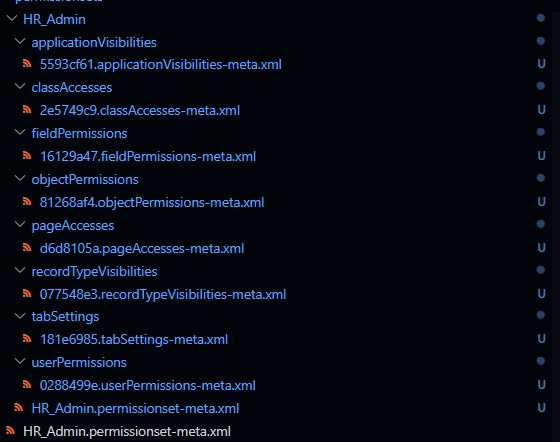
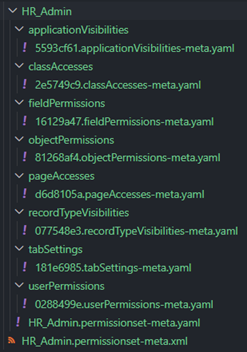
Each nested element is written to its own file, named by a unique identifier (or a SHA-256 hash if no UID is available). Leaf content stays in a file named after the original XML.
Best for fine-grained diffs and version control.
Example layouts
| Format | UID-based layout | Hash-based layout |
|---|---|---|
| XML | 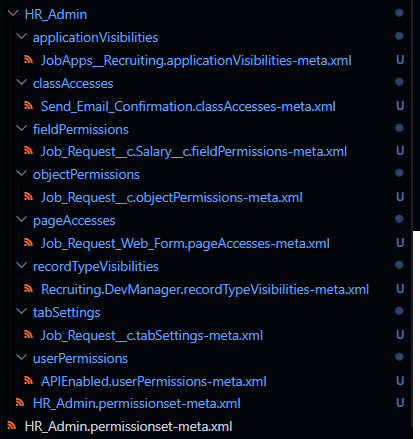 |
 |
| YAML | 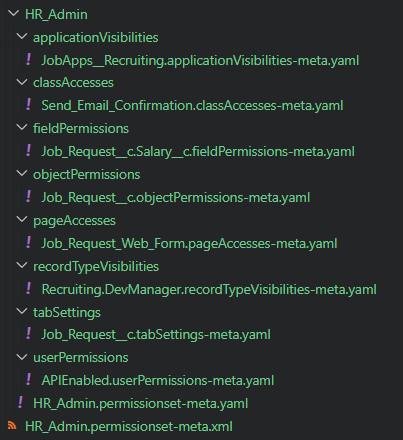 |
 |
| JSON | 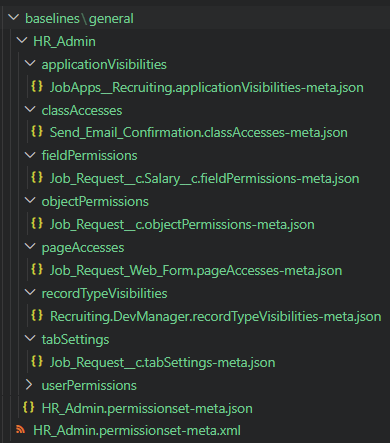 |
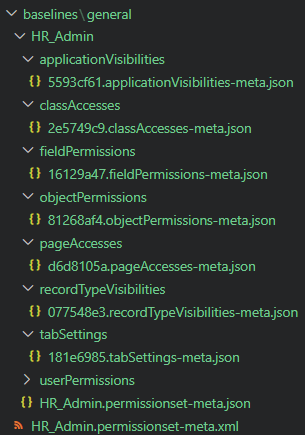 |
| JSON5 | 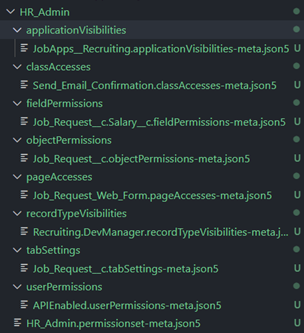 |
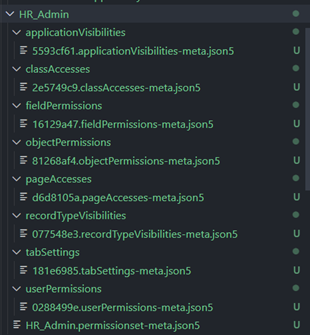 |
All nested elements with the same tag go into one file per tag. Leaf content stays in the base file named after the original XML.
Best for fewer files and quick inspection.
await handler.disassemble({
  filePath: "my.xml",
  strategy: "grouped-by-tag",
  format: "yaml",
});
Reassembly preserves element content and structure.
With strategy: "grouped-by-tag", you can optionally split or group specific nested tags into subdirectories instead of a single file per tag. Useful for permission sets and similar metadata: e.g. one file per objectPermissions under objectPermissions/, and fieldPermissions grouped by object under fieldPermissions/.
Spec: Comma-separated rules. Each rule is tag:mode:field or tag:path:mode:field (path defaults to tag). mode is split (one file per array item, filename from field) or group (group array items by field, one file per group).
// Permission set: objectPermissions → one file per object; fieldPermissions → one file per field value
await handler.disassemble({
  filePath: "fixtures/split-tags/HR_Admin.permissionset-meta.xml",
  strategy: "grouped-by-tag",
  splitTags: "objectPermissions:split:object,fieldPermissions:group:field",
  format: "xml",
});
Creates HR_Admin/ with e.g. objectPermissions/Job_Request__c.objectPermissions-meta.xml, objectPermissions/Account.objectPermissions-meta.xml, fieldPermissions/<fieldValue>.fieldPermissions-meta.xml, plus the main HR_Admin.permissionset-meta.xml with the rest. Reassembly requires no changes: the existing reassemble command merges subdirs and files back into one XML.
Example layouts
| Format | Layout |
|---|---|
| XML | 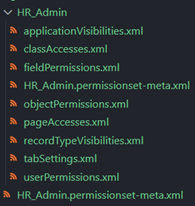 |
| YAML | 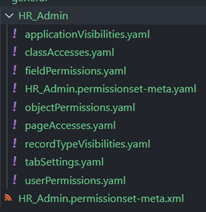 |
| JSON | 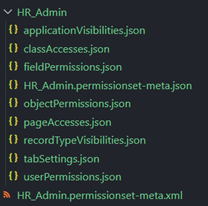 |
| JSON5 | 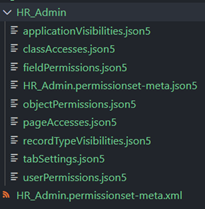 |
For XML with nested repeatable blocks (e.g. programProcesses inside LoyaltyProgramSetup), you can disassemble in one call and reassemble in one call. Pass a multi-level spec so the tool further splits matching files and later merges them in the right order.
Spec format: file_pattern:root_to_strip:unique_id_elements
Example: programProcesses:programProcesses:parameterName,ruleName — for files whose name contains programProcesses, strip the programProcesses root and disassemble by parameterName and ruleName.
import {
  DisassembleXMLFileHandler,
  ReassembleXMLFileHandler,
} from "xml-disassembler";

const disassemble = new DisassembleXMLFileHandler();
await disassemble.disassemble({
  filePath: "Cloud_Kicks_Inner_Circle.loyaltyProgramSetup-meta.xml",
  uniqueIdElements: "fullName,name,processName",
  multiLevel: "programProcesses:programProcesses:parameterName,ruleName",
  postPurge: true,
});

const reassemble = new ReassembleXMLFileHandler();
await reassemble.reassemble({
  filePath: "Cloud_Kicks_Inner_Circle",
  fileExtension: "loyaltyProgramSetup-meta.xml",
  postPurge: true,
});| Option | Description |
|---|---|
multiLevel |
Optional. file_pattern:root_to_strip:unique_id_elements for nested split. |
A .multi_level.json config is written in the disassembly root so reassembly knows how to merge inner levels first, then the top level. No extra options are needed for reassembly.
Caveat: Multi-level reassembly removes disassembled directories after reassembling each level, even when you do not pass postPurge. This is required so the next level can merge the reassembled XML files. Use version control (e.g. Git) to recover the tree if needed, or run reassembly only in a pipeline where these changes can be discarded.
import { ReassembleXMLFileHandler } from "xml-disassembler";

const handler = new ReassembleXMLFileHandler();
await handler.reassemble({
  filePath: "test/baselines/general/HR_Admin",
  fileExtension: "permissionset-meta.xml",
  postPurge: true,
});| Option | Description |
|---|---|
filePath |
Directory that contains the disassembled files (e.g. HR_Admin/). |
fileExtension |
Suffix for the rebuilt XML file (e.g. permissionset-meta.xml). Default: .xml. |
postPurge |
Remove disassembled files after a successful reassembly (default: false). |
Exclude files or directories from disassembly using an ignore file (default: .xmldisassemblerignore). Syntax is the same as .gitignore (e.g. patterns, **/, negation).
Example:
# Skip these paths
**/secret.xml
**/generated/
The Rust crate uses env_logger. Set RUST_LOG to control verbosity (e.g. RUST_LOG=debug).
The core logic is implemented in Rust (xml-disassembler) and exposed to Node.js via Neon. Building from source requires Rust and Node.js.
For a Salesforce CLI integration example, see sf-decomposer.
See CONTRIBUTING.md for code style, PR process, and coverage expectations.
This project is based on a template by Allan Oricil; the original template code is under the ISC license. The xml-disassembler code is under the MIT license.