Getting Started
- Install the latest .NET Core version (1.0.0-preview2-1-003177 at time of writing).
- Verify by running the command
dotnet --versionin a command prompt.
- Verify by running the command
- Clone the project from this GitHub repo and open it in Visual Studio 2015.
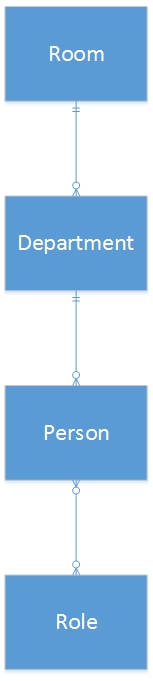
The following ER diagram describes the object relationships for this project:
- Begin by creating models which will be used to generate the database.
- These models are to be added to
Dal / Models. TheRoommodel has been partially created for you.
- These models are to be added to
When you get to the Person and Role relationsip, notice that it is a many-to-many relationship. This means that a Person can have many Roles, and a Role can have many People, which requires an additional model in order to maintain the relationship between the two models. See the docs to learn how to do this. You will have to modify the BusinessProContext.cs class in the Dal layer of the project.
- Also note that when querying an entity from the database with related entities, such as a room with its departments, the departments are not automatically loaded with the
Find()call. see here for a tutorial on how to load the related entities.
Open a command prompt in the Dal directory of the project and run the following commands:
dotnet ef --startup-project ../Web migrations add migration_v1
dotnet ef --startup-project ../Web database update
- a CRUD page for each entity (Room, Department, Person, Role)