


An MCP (Model Context Protocol) server that enables AI assistants to search through your conversation history.
⭐ If this tool helps you, please star the repo!
Built with: Model Context Protocol • Vector Search • Semantic Retrieval
A short demo showing how an AI assistant retrieves context from past conversations using MCP tools instead of replaying the entire chat history.
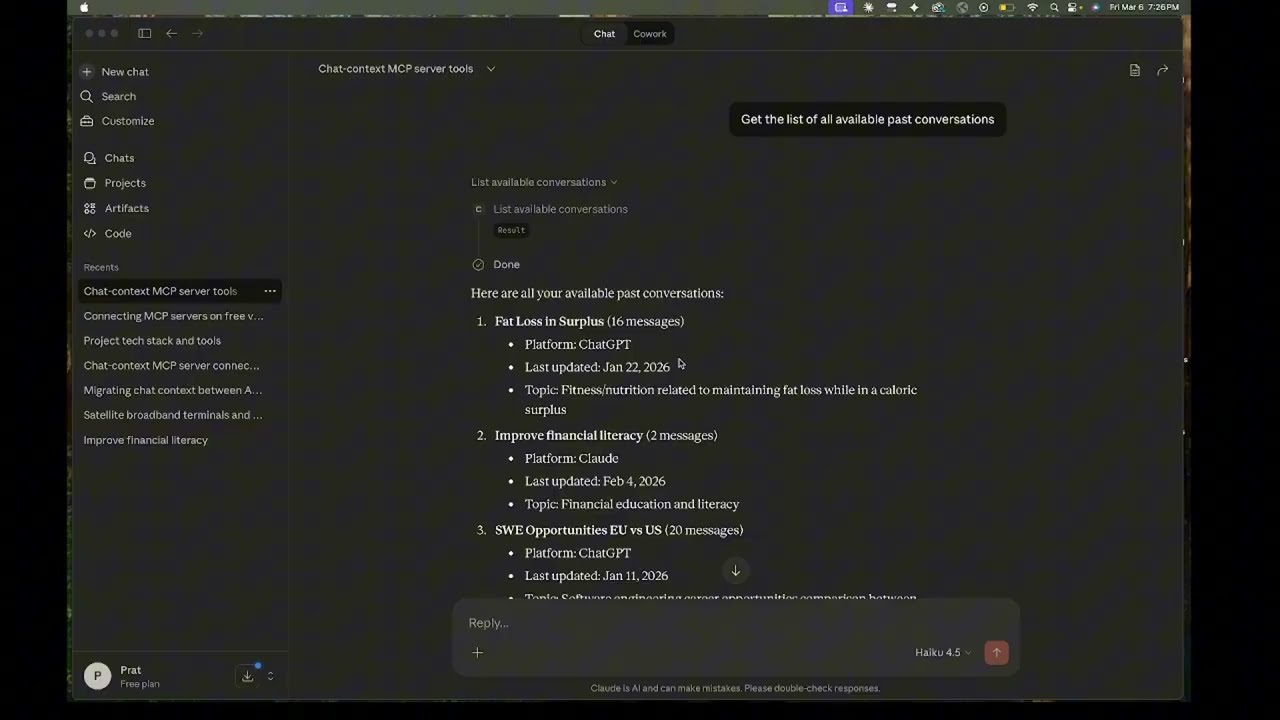
Click the image to watch the demo video.
- Use Cases
- Features
- Prerequisites
- Installation
- Configuration
- Usage
- MCP Server Configuration
- Cost Breakdown
- Current Limitations
- Project Structure
- Search Quality
Use a capable but cheaper model for extensive planning, then switch to a more powerful model for coding:
-
Planning Phase: Use ChatGPT or Claude free tier to:
- Explore tradeoffs
- Make architecture decisions
- Discuss implementation approaches
- Iterate on requirements
-
Coding Phase: Use any Coding Agent like Claude Code or Cline that can be connected to MCP Servers and let them gather context as they need
The Benefit: Spend your "expensive" tokens only on code generation, not on re-reading 50 messages of architectural debate.
Context rot is when AI assistants become less effective in very long conversations. As chats grow longer (hundreds of messages), you may notice:
- Responses becoming slower or less accurate
- Contradictory suggestions as it struggles to process everything
- The AI "forgetting" important details from earlier in the conversation
The Benefit: The AI works with a clean slate but can still reference your entire conversation history on-demand through semantic search.
Modern LLMs are stateless; they don't "remember" past messages. Instead, the entire chat history is resent to the model with every new prompt. As a conversation grows, even a tiny 10-word prompt can consume thousands of tokens in "background" context.
- The Problem: In long threads, you are paying (in money or rate limits) for the same 5,000+ tokens over and over again with every single message you send even if the message is a single line question.
The Benefit: Instead of sending 5,000 tokens of history with every prompt, your AI assistant only retrieves the specific ~200 tokens relevant to your current question. This significantly reduces latency and preserves your rate limits/API credits.
Continue conversations across different AI platforms without losing context or re-explaining everything.
- You hit message limits on one platform and want to continue elsewhere
- You want to use different AI tools for different parts of a project
- One platform has features you need that another doesn't
The Benefit: Hit a message limit on Claude? Export, ingest, and keep the momentum going in ChatGPT or a local IDE agent without copy-pasting summaries.
Maintain a searchable knowledge base across multiple conversations.
The Benefit: Search across frontend, backend, and DevOps threads simultaneously. Use the deprecate_message tool to ensure the AI never retrieves an outdated architectural decision.
- Multi-platform support: Claude and ChatGPT conversation exports
- Semantic search: Allows AI Assistants to find relevant messages using natural language queries
- Topic filtering: Narrow searches to specific subjects
- Conversation management: Add, update, and remove conversations to manage ChromaDB space usage
- Cross-platform: Works with Claude, Cline, and other platforms that support MCP
| Tool | Description |
|---|---|
search_conversations |
Search through past conversations semantically |
search_by_topic |
Search filtered by a specific topic |
list_available_conversations |
See what conversations are available |
get_conversation_topics |
Get topics associated with a conversation |
deprecate_message |
Mark a message as outdated/superseded |
- MMR (Maximal Marginal Relevance): Returns diverse results instead of 5 variations of the same point
- Recency-aware clustering: Collapses similar messages from the same discussion, keeping the most recent thus making sure only the final decision of a back and forth decision making is used
- Deprecation support: Provides the AI Assistant with a tool to mark documents as deprecated to maintain the relevancy of the context
- Python 3.10+ (3.12 recommended)
- OpenAI API key (Get one here)
- Conversation exports from Claude or ChatGPT
- Claude or another MCP-compatible client like CLine
- Optional: OpenRouter API key (for topic extraction)
# Clone the repository
git clone https://github.com/pmg5408/chat-context.git
cd chat-context

# Create virtual environment
python -m venv venv
source venv/bin/activate  # On Windows: venv\Scripts\activate

# Install dependencies
pip install -r requirements.txt

# Create .env file with your API keys
echo "OPENAI_API_KEY=your_key_here" > .env
echo "OPENROUTER_API_KEY=your_key_here" >> .env # Optional, for topic extractionClaude: Go to Settings → Export data → Download
ChatGPT: Go to Settings → Export data → Download
Place the conversations.json files in the appropriate directories:
data/
  exports/
    claude/
      conversations.json
    chatgpt/
      conversations.json
Edit ~/Library/Application Support/Claude/claude_desktop_config.json:
{
  "mcpServers": {
    "chat-history": {
      "command": "/path/to/chat-context/venv/bin/python",
      "args": ["-m", "src.mcp_server.server"],
      "cwd": "/path/to/chat-context",
      "env": {
        "PYTHONPATH": "/path/to/chat-context",
        "OPENAI_API_KEY": "YOUR_API_KEY",
        "OPENROUTER_API_KEY": "YOUR_API_KEY"
      }
    }
  }
}Edit %APPDATA%\Claude\claude_desktop_config.json:
{
  "mcpServers": {
    "chat-history": {
      "command": "C:\\path\\to\\chat-context\\venv\\Scripts\\python.exe",
      "args": ["-m", "src.mcp_server.server"],
      "cwd": "C:\\path\\to\\chat-context",
      "env": {
        "PYTHONPATH": "C:\\path\\to\\chat-context",
        "OPENAI_API_KEY": "YOUR_API_KEY",
        "OPENROUTER_API_KEY": "YOUR_API_KEY"
      }
    }
  }
}{
"mcpServers": {
"chat-history": {
"disabled": false,
"timeout": 300,
"type": "stdio",
"command": "/Users/pratham/Desktop/chat-context/venv/bin/python",
"args": [
"-m",
"src.mcp_server.server"
],
"cwd": "/Users/pratham/Desktop/chat-context"
}
}
}The server uses standard MCP over stdio. Any MCP-compatible client can connect:
- Point the client to
python -m src.mcp_server.server - Set working directory to project root
- Ensure environment variables are set (via .env file)
Edit config.yaml to customize behavior:
# Embedding settings (REQUIRED)
embedding:
  provider: openai
  openai:
    model: text-embedding-3-small  # ~$0.02 per 1M tokens

# Storage paths (REQUIRED)
storage:
  chroma_db_path: ./data/chroma_db
  collections_metadata: ./data/collections.yaml

# Export file paths (REQUIRED)
exports:
  claude: ./data/exports/claude/conversations.json
chatgpt: ./data/exports/chatgpt/conversations.json# Topic extraction (OPTIONAL - Better search filtering)
topic_extraction:
enabled: false # Set to true to enable (+$0.05 per conversation)
provider: openrouter
openrouter:
model: google/gemma-3-27b-it# Add a conversation to the database
python -m src.cli add claude "My conversation title"
python -m src.cli add chatgpt "Another conversation"
# Update an existing conversation (new messages only)
python -m src.cli update claude "My conversation title"
# Remove a conversation
python -m src.cli remove "My conversation title"
# List all conversations
python -m src.cli listUsing OpenAI embeddings (text-embedding-3-small):
- Ingestion: ~$0.02 per 100-message conversation
- Search: ~$0.0001 per query (negligible)
- Topic extraction (optional): ~$0.05 per conversation with cheap SLMs
Example: 10 conversations × 100 messages = $0.20 one-time + ~free ongoing searches
All costs are one-time during ingestion. Searching your existing database is essentially free.
- No Cursor support yet (planned)
- Single user only (not designed for multi-user/sharing)
- ChromaDB only (no other vector DB options yet)
- Manual exports (no auto-sync from Claude/ChatGPT)
- Topic extraction requires external API (OpenRouter or similar)
chat-context/
├── config.yaml              # Main configuration
├── requirements.txt         # Python dependencies
├── src/
│   ├── cli.py              # Command-line interface
│   ├── config.py           # Configuration loader
│   ├── orchestrator.py     # Ingestion orchestration
│   ├── parsers/
│   │   ├── claude.py       # Claude export parser
│   │   └── chatgpt.py      # ChatGPT export parser
│   ├── embedders/
│   │   ├── openai_embedder.py    # OpenAI embeddings
│   │   └── local_embedder.py     # Local embeddings
│   ├── storage/
│   │   └── chroma_store.py # ChromaDB operations + MMR + clustering
│   ├── topic_extractor/
│   │   └── openrouter_extractor.py  # SLM-based topic extraction
│   └── mcp_server/
│       └── server.py       # MCP server implementation
├── data/
│   ├── exports/            # Conversation exports
│   ├── chroma_db/          # Vector database
│   └── collections.yaml    # Conversation metadata
├── docs/
│   └── SEARCH_QUALITY_MECHANISMS.md  # Detailed search documentation
└── tests/
    └── test_chroma_store.py
The search pipeline applies multiple stages to ensure high-quality results:
- Document deduplication: Each message stored once (main document) with topic aliases
- MMR reranking: Balances relevance vs diversity
- Recency clustering: Collapses same-thread messages, keeps most recent
- Deprecation filtering: Excludes outdated messages
See docs/SEARCH_QUALITY_MECHANISMS.md for detailed documentation.
When enabled, uses a cheap SLM via OpenRouter to:
- Identify main topics in the conversation
- Tag each message with relevant topics
- Enable topic-filtered searches
This costs a few cents per conversation with free/cheap models like Gemma.
- Cursor support for local IDE conversations
- Code snippet extraction and specialized search
- Role-based filtering (user vs assistant messages)
- Conversation summarization
- Cross-conversation topic graph
- Proactive context injection at conversation start
- Auto-sync with Claude/ChatGPT (if APIs become available)
MIT License - see LICENSE file for details.
⭐ Found this useful? Star the repo to show support!