


vkShade is a ReShade-compatible Vulkan post-processing layer, written from the ground up to be a powerful, modern, and maintainable solution for improving visuals in games and other Vulkan applications on Linux.
Caution
This software may trigger bans from anti-cheat. Use it with multiplayer games at your own risk.
This project is still in the PRE-ALPHA phase of development - meaning it works, but it's really just a proof-of-concept right now. Over time, I intend to bring it up to speed as the de facto post-processing layer for Vulkan applications on Linux.
- ReShade FX integration (see Limitations)
- Interactive GUI overlay with mouse support
- Cross-platform input (Wayland, Xlib, XCB)
- Modern C++ RAII wrappers around the Vulkan C API
- Configuration system
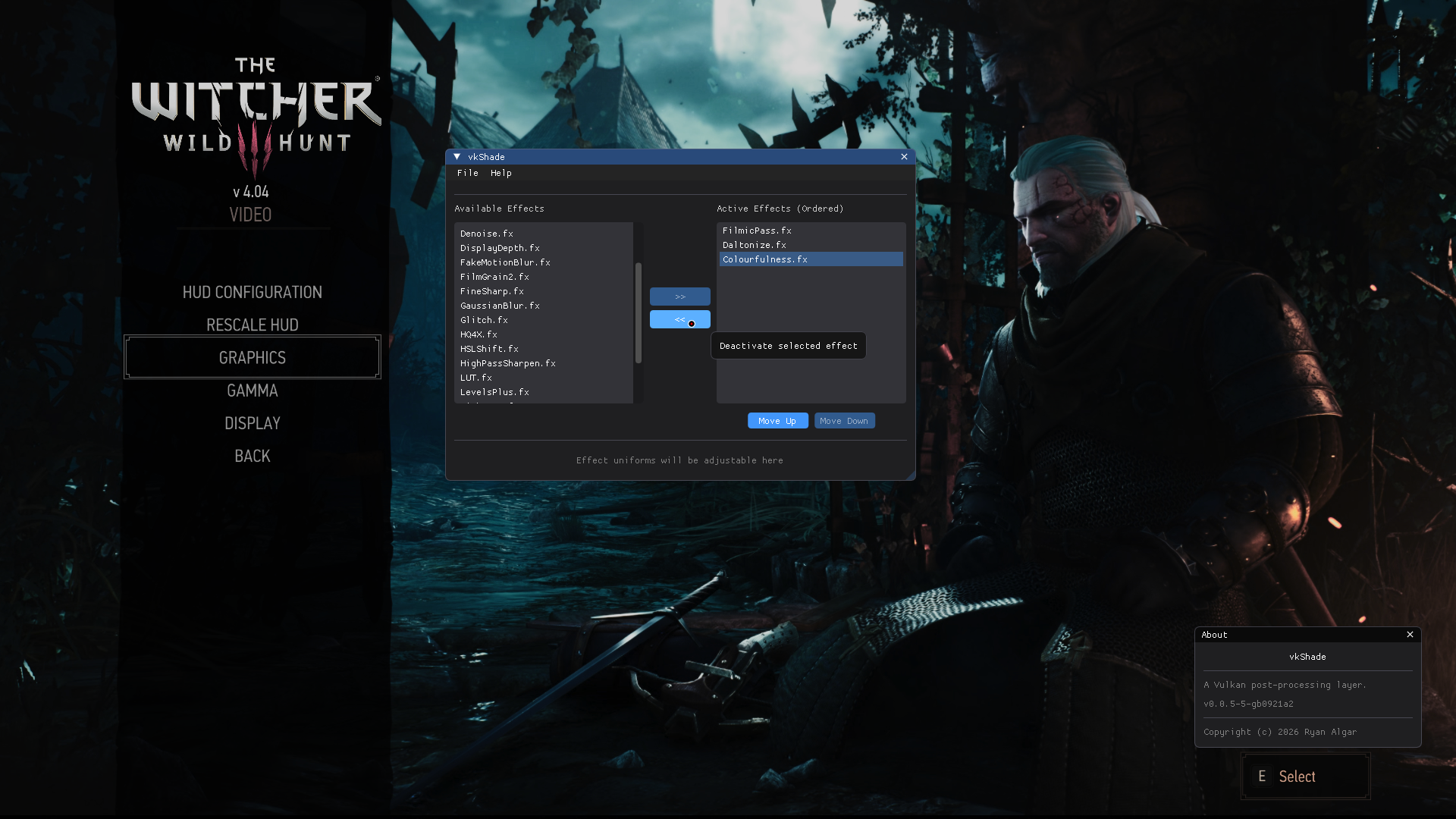
vkShade overlay running in-game (click to enlarge)
Some ReShade effects do not work properly yet. For example:
- Effects relying on the depth buffer
- Effects with multiple techniques
- Possibly more...
- Chain together multiple effects
- Configuration system
- Application-level (global) options
- Per-game presets using ReShade's INI format
- Basic GUI overlay (browse/apply effects and save/load config)
- ReShade FX integration
- Basic ReShade FX support
- Full support for ReShade's time-based runtime uniforms
- Stub support for ReShade's other runtime uniforms
- Image and sampler reflection
- Support for effects with multiple passes
- Pipeline state reflection (stencil and blending)
- Various fixes and improvements
- Uniform reflection in the GUI and config system
- Support for effects with multiple techniques
- Full support for ReShade's input-based runtime uniforms
- Full support for ReShade's overlay-based runtime uniforms
- Hot-reloadable effects
- Depth buffer access
- Community effect repository
- Performance profiling tools
vkShade has packages available in the following repositories:

If vkShade is not packaged for your distro, you can build it from source.
vkShade provides a full-featured and easy to use build system, which will build and install the layer in your user's home directory. It can also uninstall the layer, should you decide that you don't want to use it anymore.
NOTE: You should prefer using distro-provided packages, if available.
Before building, you will need:
- GCC >= 12
- X11 development files (
libx11,libxcb) - Wayland development files (
wayland-client) - xkbcommon development files (
libxkbcommon) - SPIR-V Headers
- Vulkan Headers
- Vulkan Utility Libraries
- GNU Make
- Meson
- Ninja
-
Clone the repository, and change directory into it.
git clone https://github.com/ralgar/vkShade.git cd vkShade -
Checkout the latest tagged release.
git checkout <version> -
Using the included
Makefile, build and install vkShade.make install -
(Optional): Build and install the 32 bit version.
make install-lib32
To uninstall, simply run make uninstall, or make uninstall-lib32.
Enable vkShade by setting the environment variable.
When using the terminal or an application (.desktop) file, execute:
ENABLE_VKSHADE=1 yourgame
With Lutris, follow these steps below:
- Right click on a game, and press
configure. - Go to the
System optionstab and scroll down toEnvironment variables. - Press on
Add, and addENABLE_VKSHADEunderKey, and add1underValue.
With Steam, edit your game's launch options and add:
ENABLE_VKSHADE=1 %command%
The configuration file is searched for in the following locations (in order):
- A file set with the environment variable
VKSHADE_CONFIG_FILE=/path/to/vkShade.ini - A file named
vkShade.iniin the working directory of the game $XDG_CONFIG_HOME/vkShade/vkShade.inior~/.config/vkShade/vkShade.ini$XDG_DATA_HOME/vkShade/vkShade.inior~/.local/share/vkShade/vkShade.ini/etc/vkShade.ini/etc/vkShade/vkShade.ini/usr/share/vkShade/vkShade.ini
Tip
The default/example configuration file can be found in this repo at
config/vkShade.ini and will be installed at either
$XDG_DATA_HOME/vkShade/vkShade.ini for a user-level installation or at
/usr/share/vkShade/vkShade.ini for a system-wide installation.
To use ReShade effects, you need to configure the search paths. For example:
[ReShade]
EffectSearchPaths = /opt/reshade/shaders,/opt/reshade/shaders/SweetFX
TextureSearchPaths = /opt/reshade/textures,/opt/reshade/textures/SweetFXKeybinds are now configurable under the [Input] section in vkShade.ini
(single keys only for now). You can set custom keybinds by using the
action name and the enum name of the key (src/input/key_codes.hpp):
[Input]
ToggleEffects = KEY_INSERT
ToggleGui = KEY_HOME
Tip
If you don't set any keybinds, vkShade will use the defaults:
INSERTto toggle the effectsHOMEto toggle the in-game GUI overlay
Note
When interacting with the in-game GUI, only the mouse is supported currently.
The log output level can be set with the VKSHADE_LOG_LEVEL environment var,
e.g. VKSHADE_LOG_LEVEL=debug. Possible values are:
trace, debug, info, warn, error, critical, and off.
By default the logger outputs to stderr, a file can be set as the output using
the VKSHADE_LOG_FILE env var, e.g. VKSHADE_LOG_FILE="vkShade.log".
Does vkShade work with DXVK and VKD3D?
Yes. It should work with anything that uses the Vulkan API. If you find that vkShade doesn't work with a Vulkan application, please open an issue.
Will vkShade get me banned?
Quite possibly. Other software with similar functionality have been known to trigger bans, so it is likely that vkShade will as well. It is strongly recommended that you only use vkShade with single-player games.
Will there be an OpenGL version?
No, however you can probably use Zink (OpenGL to Vulkan translation) and use vkShade that way.
Copyright (c) 2026 Ryan Algar (ralgar/vkShade)
BSD 2-clause License (see LICENSE or BSD 2-clause)
