




Know what's in your files before you open them.
A one-shot, read-only observation pass — not a file watcher. Point it at a directory, get one deterministic JSON manifest of what's inside, before you ingest it.
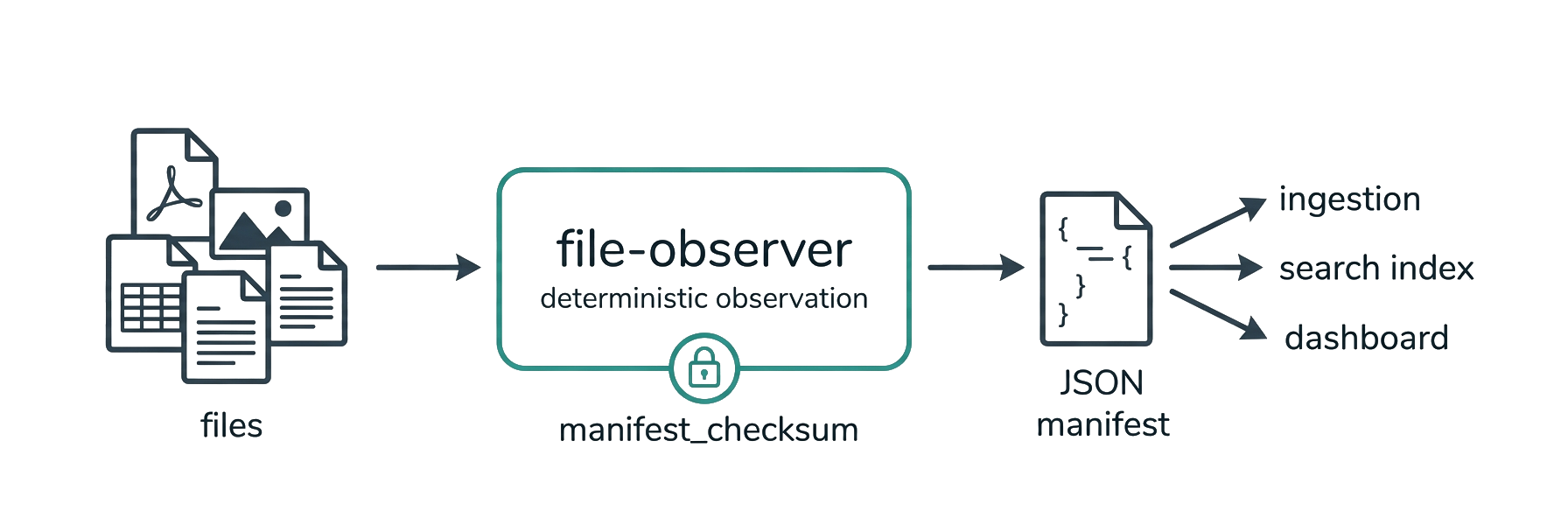
File Observer makes a single read-only pass over a directory and tells you exactly what's inside — file types, metadata, conversation patterns, author fingerprints, structural signals — all in one deterministic JSON manifest. You run it on demand; it doesn't stay resident or watch for changes. It reads everything. It changes nothing.
(If you already know Apache Tika: think a deterministic Tika built for pipelines.)
pip install file-observer
fo ./your-project --specialists
Scanned 4,366 files (3,526 text, 840 binary) in 31 directories.
1,163 supported (336 with specialist metadata). 3,203 unsupported extensions.
Quality: 676 clean, 3,690 degraded. 4 safety flags, 2 polyglots.
Vectors: author_aggregate found 64 distinct authors across 114 files.
chatlog matched 22 files. reference_tokens ran on 806 files (2,164 URLs,
382 paths, 262 @mentions). filename_patterns matched 84 of 4366 files.
Largest directories: tika-parsers (2,037), tika-pipes (459), tika-core (440).
That's the human-readable summary. The full manifest is structured JSON — here's a truncated file object so you can see the data contract before you install:
{
  "schema_version": "1.16",
  "context": { "scanner_version": "1.28.1", "logic_version": "1.14.1", "...": "…" },
  "files": [
    {
      "path": "docs/report.pdf",
      "mime_type": "application/pdf",
      "checksum_sha256": "9f86d081884c7d65…",
      "is_binary": true,
      "requires_specialist_tool": true,
      "specialist_tool": "pdf_extraction",
      "safety_flags": ["has_javascript"],
      "signal_provenance": {
        "requires_specialist_tool": { "layer": "derived", "method": "specialist_tools_registry", "trigger": "extension_match" }
      },
      "...": "…"
    }
  ],
  "vectors_collected": [
    { "vector_id": "chatlog", "method_version": 9, "identity_digest": "a3f1c2…", "...": "…" }
  ],
  "manifest_checksum": "7d2bafef…",
  "manifest_signature": { "algorithm": "hmac-sha256", "key_id": "default", "value": "…" }
}
Every derived field carries a signal_provenance entry; every vector an identity_digest; the whole manifest a checksum and optional HMAC signature.
New here? Walk through the tutorial (first scan → pipeline integration) or run the examples — self-contained, one per concept.
| Package | file-observer |
| CLI | file-observer or fo (shorthand) |
| Version | 1.28.1 |
| Schema | 1.16 |
| Python | >= 3.12 (tested on Linux, macOS, Windows) |
| License | AGPL-3.0 (commercial license available) |
| Tests | 1000+ (run pytest for the exact count) + a 49,879-file / 13-tree shakedown — ran clean (zero fatal errors), see "Validated at scale" below |
Your pipeline needs to know what it's processing before it processes it. File Observer is the observation layer that sits at the front of any document pipeline — ingestion, classification, OCR, embedding, audit. It tells the pipeline what's coming without touching the files. (Need to react to filesystem changes as they happen? That's a watcher like watchdog or watchfiles — a different tool.)
- Deterministic. Same files + same config = identical manifest, every time. Cross-environment variance is explained, never hidden.
- Auditable. Every derived field has a provenance trace — which method, which trigger, which inputs. Nothing is a black box.
- Honest.
nullmeans "not observed within bounds," not "not present." Safety flags are observations, not assessments. The scanner records; the consumer interprets. - Verified. Cryptographic identity digests on every vector. HMAC-signed manifests. Chain-of-custody across incremental scans.
| Tier | Runs for | What it extracts |
|---|---|---|
| Universal | Every file | Identity, checksum, MIME, file signatures, polyglot detection, routing flags |
| Baseline | Text files | Encoding, preview, tags, frontmatter, chatlog detection, reference tokens, filename patterns |
| Structural | Text files | Title, headings, CSV headers, JSON/YAML/XML/TOML keys, technology hints |
| Specialist | Supported formats (opt-in) | PDF pages, image dimensions + capture EXIF, video container/capture metadata, audio tags + properties, email envelopes, spreadsheet / document / presentation structure |
Supported specialist formats:
- Documents —
.pdf,.docx,.doc,.odt,.rtf - Spreadsheets —
.xlsx,.xls,.ods - Presentations —
.pptx,.ppt,.odp - Images —
.png,.jpg/.jpeg,.heic/.heif/.avif,.tiff/.tif,.jp2(dimensions; + EXIF capture metadata on JPEG/HEIC/HEIF/AVIF/TIFF —.png/.jp2are dimensions only) - Video —
.mp4,.mov,.m4v(codec/duration/dimensions + QuickTime capture device & GPS-presence) - Audio —
.mp3(ID3 tags + format/bitrate/duration) - Email —
.msg,.eml - Chatlog —
.jsonl(content-detected)
| Vector | What it finds |
|---|---|
| chatlog | Conversation patterns — turns, speakers (per-speaker counts/alternation), section markers. Detects prose transcripts and conversational JSON/JSONL across common schemas (role/from/speaker + text/value/content). Works on .txt, .md, .jsonl, .json. |
| reference_tokens | @mentions, wiki links, code blocks, URLs, emails, file paths, ticket numbers |
| author_aggregate | Cross-format author normalization. Spots template defaults vs real humans. (WHO authored.) |
| provenance | Production provenance — normalized toolchains (producer/creator via a closed table), production_years, and digitization (born_digital / scanned / ocr_detected / unknown). Cross-format: PDF + OOXML app.xml. (WHAT-TOOL / WHEN / digitization.) |
| filename_patterns | Date prefixes, version markers, numbered revisions, template names, UUIDs, copy suffixes |
Each vector carries an identity digest (SHA-256). Same digest = same rules + same tuning = same output. Always. (These are observation vectors — named, fingerprinted observations — not embedding vectors for a vector database.)
- Safety flags — detects JavaScript in PDFs, macros in DOCX, OLE objects in RTF, external entities in XML
- Manifest checksum — SHA-256 over the canonical manifest
- HMAC signatures — optional signed manifests for audit chains
- Delta scanning — diff two manifests from separate runs to see added/modified/removed files. Snapshot-to-snapshot, not live change events.
- Per-directory summary — corpus shape visible at a glance
- Duplicate detection — files grouped by identical content checksum (
quality.duplicate_clusters); surfaces redundant copies for migration/dedup - Per-specialist stats — attempted/succeeded/failed per specialist tool, so extraction quality is visible, not implied
pip install file-observer

# Optional: specialist format support
pip install "file-observer[all]"       # every optional specialist (one line — recommended)
pip install "file-observer[msg]"       # .msg/.doc/.xls/.ppt (OLE2 formats)
pip install "file-observer[security]"  # Hardened XML parsing
pip install "file-observer[dev]"       # Full dev environment
No install at all — run it straight from PyPI with uv or pipx:
uvx file-observer ./project --stdout | jq '.quality'     # uv: zero-install, cached
pipx run file-observer ./project --stdout                # pipx: same idea
Docker — no Python needed; scan a mounted directory, manifest to stdout:
# mount the directory to scan read-only at /data; capture the manifest OUTSIDE it
docker run --rm -v "/path/to/scan:/data:ro" ghcr.io/russalo/file-observer > manifest.json
# pass your own args (default is `--stdout .`):
docker run --rm -v "/path/to/scan:/data:ro" ghcr.io/russalo/file-observer /data --specialists --stdout
The image bundles libmagic + all optional specialists. (Builds from the Dockerfile; published to GHCR on each release.) Mount your data read-only and keep the output file outside the scanned tree, so a manifest you redirect into the same folder isn't picked up by a later scan.
GitHub Action — scan a repo in CI and capture the manifest as an artifact:
- uses: russalo/file-observer@v1.28.1     # pin a release tag
  id: scan
  with:
    path: .                                # directory to scan (default ".")
    args: --specialists                    # extra CLI args (default "--specialists")
    output: file-observer-manifest.json    # where to write the manifest
- uses: actions/upload-artifact@v4
  with:
    name: file-observer-manifest
    path: ${{ steps.scan.outputs.manifest-path }}
The action installs file-observer[all] into an isolated venv (it doesn't touch your workflow's Python) and writes the manifest via --stdout. Output: manifest-path. Diff it against a baseline, gate a job on quality/safety_flags with jq, or just archive it for audit.
Optional: libmagic sharpens content-based MIME detection. As of v1.3 it's no longer required — without it (Windows, minimal containers) File Observer falls back to a built-in pure-Python content sniff for common binary formats (archives, images, data, media), then extension-based inference. Install it for the widest coverage:
sudo apt install libmagic1    # Debian/Ubuntu
brew install libmagic         # macOS
pip install python-magic-bin # Windows (or rely on the pure-Python fallback)# Quick scan
fo ./project
# Manifest straight to stdout — pipe-friendly (no file written)
fo ./project --stdout | jq '.quality'
# Deep scan with specialist metadata
fo ./project --specialists
# Named profile with JSONL output
fo ./project --profile deep_extract --format jsonl
# Delta scan against a previous manifest, signed
fo ./project --previous-manifest ./last.json --signing-key-file ./keyfrom pathlib import Path
from file_observer import scan, scan_to_json, manifest_to_json
manifest = scan("./documents") # one call, sane defaults
manifest = scan("./documents", specialists=True) # opt-in format extraction
json_str = scan_to_json("./documents") # straight to a JSON string
# (the explicit Scanner(...)/ScannerConfig(...) path stays available for full control)
# Human-readable summary
print(manifest.summary)
# Find conversation logs
for f in manifest.files:
if f.is_chatlog and f.specialist_metadata:
chat = f.specialist_metadata["chatlog"]
print(f"{f.path}: {chat['turn_count']} turns, {chat['speaker_labels']}")
# Triage via quality block
q = manifest.quality
print(f"{q.clean_files}/{q.total_files} clean, {q.safety_flags} safety flags")
# Write manifest
Path("manifest.json").write_text(manifest_to_json(manifest))Every scan also produces a standalone Markdown report (report_v{version}_{timestamp}.md) — readable in any browser, shareable, no JSON parsing required.
Point File Observer at an incoming document folder before your ingestor touches it. Know which files need OCR, which have specialist metadata, which are mislabeled, and which carry safety flags — before processing begins.
Scanning AI conversation logs, knowledge bases, and document corpora? File Observer detects chatlog patterns in .txt, .md, and .jsonl files, counts turns and speakers, and surfaces reference tokens (URLs, @mentions, code blocks) across thousands of files. Built for the datasets that train and evaluate language models.
Every field has a provenance trace. Every vector has a cryptographic identity digest. Manifests can be HMAC-signed with chain-of-custody across incremental scans. When the auditor asks "how do you know this file contains X?" — the manifest answers.
Run File Observer against an Obsidian vault, a Confluence export, or a shared drive. The per-directory summary shows corpus shape instantly. Reference tokens reveal link density, cross-references, and structural patterns. Author aggregation spots template defaults vs real contributors.
Moving files between systems? File Observer gives you checksums, MIME analysis, format signatures, and polyglot detection for every file. Delta scanning tracks what changed between runs. Filename patterns catch copy suffixes, numbered revisions, and UUID-named files.
Safety flags surface JavaScript in PDFs, macros in DOCX files, OLE objects in RTF, and external entities in XML — without opening or executing anything. Surface them to your security pipeline, where your own policy decides quarantine or triage. The flags are structural observations, not verdicts — expect false positives and negatives, and tune your own thresholds.
fo ./corpus --specialists
  |
  +-- Universal tier     Every file: checksum, MIME, signatures, routing
  +-- Baseline tier      Text files: encoding, preview, tags, chatlog detection
  +-- Structural tier    Text files: title, headings, keys, technology hints
  +-- Specialist tier    Format-specific: PDF, images, video, audio, email, spreadsheets, documents, presentations
  +-- Vector pass        chatlog, reference_tokens, filename_patterns (per-file)
  +-- Corpus vectors     author_aggregate (after all files processed)
  +-- Summary            Human-readable paragraph + per-directory breakdown
  |
  +-- Output: manifest.json + report.md
One file failure never halts the scan. Errors are captured per-file, per-stage. The manifest is always complete.
| Profile | Baseline | Specialists | Use case |
|---|---|---|---|
fast_sort |
8KB | Off | Quick triage, file routing |
general |
64KB | Off | Standard observation |
deep_extract |
1MB | On | Full metadata extraction |
Per-extension overrides let you give specific formats more budget:
fo ./docs --specialists --extension-override .pdf:specialist_budget=524288File Observer has run cleanly — zero fatal errors — across 12 real-world corpora totaling 28,756 files. (This measures robustness, not extraction accuracy; precision/recall benchmarks are planned.)
| Corpus | Files | What it tested |
|---|---|---|
| Apache Tika | 4,366 | 152 document specialists, 69 PDFs, 57 spreadsheets, 13 emails |
| OBS Studio | 5,201 | Large C/C++ project, 91 filename patterns |
| AutoGPT | 3,945 | AI platform, 1,612 @mentions; chatlog FP-hardening validation (raw detections cut sharply by v1.2.x) |
| FastAPI | 3,002 | Documentation-heavy Python, chatlog tuning validation |
| OpenPreserve | 753 | Adversarial format samples, 285 PDFs |
| Claude Code logs | 125 | Real AI conversation transcripts, JSONL chatlog detection |
| Flask, tmux, self-scan | 11K+ | Diverse code repos |
| Document | What it covers |
|---|---|
| Tutorial | Guided tour from first scan to pipeline integration — start here |
| Examples | Runnable, self-contained examples, one per concept |
| SCHEMA.md | The complete output surface (generated by --schema) |
| HISTORY.md | Every version from v0.1 to the current release, with specs and compliance reports |
| PUBLIC_CONTRACT.md | Consumer stability commitments — what you can rely on |
| LIMITATIONS.md | What File Observer deliberately doesn't do |
| CONVENTIONS.md | Internal naming, versioning, and tracking |
| v1.28.0 RFC Specification | Current release spec — --stdout: write the manifest to stdout (no file), pipe-friendly for Docker/pipelines (file-observer . --stdout | jq). Output routing only; manifest byte-identical (LOGIC + SCHEMA unchanged). v1.0.0 RFC remains the binding schema-freeze contract. |
| v1.27.0 RFC Specification | JSON Schema artifact — JSON Schema artifact: a committed, generated docs/manifest.schema.json (draft 2020-12) for any-language manifest validation/codegen, emitted by --schema --schema-format json-schema. Describes the manifest; LOGIC + SCHEMA unchanged. v1.0.0 RFC remains the binding schema-freeze contract. |
| v1.26.0 RFC Specification | One-call public API (scan / scan_to_json): from file_observer import scan; m = scan("./folder"). Python-surface ergonomics only; the manifest is byte-identical (LOGIC + SCHEMA unchanged). |
| v1.25.0 RFC Specification | Audio & legacy presentation extraction (Candidate B, phase 2): .mp3 (new audio namespace — ID3 tags + format/bitrate/duration) + legacy .ppt (OLE2 title/author/application/slide_count, extends presentation) (SCHEMA 1.16). |
| v1.24.0 RFC Specification | Office & media extraction (Candidate B, phase 1): OOXML/ODF office (.pptx/.odp/.odt/.ods) + .jp2/.tiff dimension & EXIF extraction; new presentation namespace (SCHEMA 1.15). |
| v1.20.0 RFC Specification | Prior — video.creation_date_qt (the Apple QuickTime creationdate key, capture moment + timezone). |
| v1.19.0 RFC Specification | Prior — human-readable surfaces refresh (scan summary + --schema --format summary prose). |
| v1.18.0 RFC Specification | Prior — video capture device + GPS-presence (Apple QuickTime keys). |
| v1.17.0 RFC Specification | Prior — video container metadata (codec/duration/dims/creation_date). |
| v1.16.0 RFC Specification | Prior — image capture-metadata (EXIF for JPEG & HEIC, GPS-presence → geotagged). |
| v1.15.0 RFC Specification | Prior — cross-platform hardening (CI OS matrix + HEIC/HEIF/AVIF detection). |
Scanner(source_dir: Path, config: ScannerConfig | None = None)
Scanner.scan() -> ScanManifestScannerConfig(
enable_specialists=False, # Enable format-specific extraction
preview_max_chars=1000, # Content preview length
sample_size=8192, # Binary detection sample
baseline_max_bytes=65536, # Text decode limit
specialist_budget=131072, # OOXML read budget
format="json", # "json" or "jsonl"
exclude_hidden=False, # Skip dot-files
ignore_file=None, # Path to .scannerignore
previous_manifest=None, # Delta scan reference
signing_key=None, # HMAC signing key
)manifest_to_json(manifest) # Pretty-printed JSON
manifest_to_jsonl(manifest) # NDJSON streaming format
manifest_to_markdown(manifest) # Human-readable reportScanManifest— top-level: context, stats, quality, vectors_collected, summary, files[]FileRecord— per-file: path, mime, checksum, encoding, specialist_metadata, reference_tokens, filename_patterns, safety_flags, signal_provenance, errorsScanContext— environment fingerprint: versions, platform, dependenciesVectorRecord— vector identity, digest, scope, applied count, summary
We welcome contributions. See CONTRIBUTING.md for the full guide.
Quick version:
- Fork and clone
pip install -e ".[dev]"and run tests- Sign the CLA on your first PR
- One concern per PR, tests required, determinism preserved
File Observer is dual-licensed:
- Open source under AGPL-3.0 — use freely, contribute back
- Commercial license available for cases where AGPL terms don't fit
The AGPL is fine — no commercial license needed — for:
- Internal use: running File Observer inside your own organization, including on private servers, with no obligation to publish anything.
- Personal projects, research, and evaluation.
- Open-source projects that are themselves AGPL-compatible.
You likely want a commercial license if you:
- Embed File Observer in a proprietary product you distribute without releasing that product's source under the AGPL.
- Offer it over a network as a service (SaaS). The AGPL's network clause (§13) means that if users interact with a modified version over a network, you must offer them its complete corresponding source. A commercial license removes that obligation.
- Distribute File Observer (or a derivative) to third parties without the AGPL's source-disclosure requirements.
In short: AGPL obligations are triggered by distribution and by network use of modified versions, not by private internal use. If you're unsure whether your use triggers them, that's exactly what a commercial license resolves.
Contact russalo@russalo.com for commercial terms.
This is a plain-language summary, not legal advice or a substitute for the license text. Where this summary and the license differ, the license governs.
Apache® and Apache Tika™ are trademarks of the Apache Software Foundation. The Unix file command is referenced descriptively. File Observer is an independent project and is not affiliated with, endorsed by, or sponsored by the Apache Software Foundation; any reference to Apache Tika is comparative only.
Built by Russalo. The scanner records. The consumer interprets. The identity digest makes the recording auditable.