Convert scattered Slack threads, emails, meeting notes, and uploaded files into structured, export-ready BRDs — automatically.










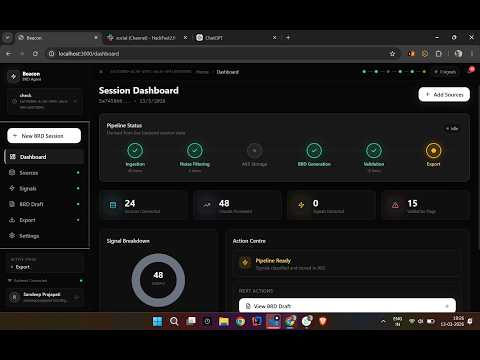
Click to watch working prototype
- What is Beacon?
- The Problem It Solves
- How Users Benefit
- Complete User Flow
- System Architecture
- Frontend Architecture
- Backend Processing Pipeline
- AI Classification Engine
- Multi-Agent BRD Generation
- Database & Persistence Model
- API Reference
- Frontend Route Map
- Tech Stack
- Repository Structure
- Local Development Setup
- Environment Variables
- Deployment
- Team
Beacon is a full-stack AI platform that automates Business Requirements Document creation. It ingests raw project data from multiple sources, intelligently filters noise, extracts meaningful signals, and runs a multi-agent LLM pipeline to produce a structured, professional BRD — all reviewable and exportable from a modern web UI.
Core modules:
| Module | Responsibility |
|---|---|
frontend/ |
Next.js 14 app — auth, sessions, ingestion UI, BRD review, collaboration, export |
backend/api/ |
FastAPI server — REST endpoints, orchestration, streaming |
backend/Noise filter module/ |
Two-phase classifier — heuristics + Groq LLM batch |
backend/brd_module/ |
Multi-agent BRD pipeline, validator, exporter, HITL versioning |
backend/Integration Module/ |
Slack OAuth + Gmail connectors |
Modern product teams scatter requirements across multiple channels:
Slack threads  ──┐
Email chains   ──┤
Meeting notes  ──┼──→  🔥 Requirements Lost,
File uploads   ──┤       Contradicted, or Forgotten
Verbal calls   ──┘
Without Beacon:
- BRD writing takes days of manual synthesis
- Critical decisions buried in thread history
- Conflicting requirements go undetected until late in development
- Traceability to the original source is lost
- Team collaboration on requirements is disjointed
With Beacon:
- Raw data ingested in minutes
- Noise automatically suppressed (system alerts, scheduling, chatter)
- Every signal traced back to its source + speaker
- Seven BRD sections generated in parallel by specialized AI agents
- Contradictions and gaps flagged before hand-off
- Exported in
.md,.html, or.docxfor any stakeholder
- Stop spending hours writing requirements from scratch
- Get a structured first draft in under 10 minutes after ingestion
- Share the board with stakeholders using invite links
- Lock sections once reviewed so edits do not overwrite approved content
- Functional requirements are extracted and deduplicated automatically
- Timeline references are identified from message history
- Contradiction flags warn when decisions conflict with requirements before sprint planning
- Human-in-the-loop editing lets you refine AI output section by section
- Validation flags call out gaps ("Insufficient data — requires stakeholder clarification")
- Export polished DOCX for formal hand-off to clients
- Role-based board sharing — invite teammates as Viewer or Editor
- Session history preserves all ingestion runs and BRD versions
- Versioned section ledger tracks every human edit
flowchart TD
    A([Open Beacon]) --> B{Have Account?}
    B -- No --> C[Register with Email]
    B -- Yes --> D[Login]
    C --> E[Firebase Auth Creates User]
    D --> E
    E --> F[Session Cookie Set\nfirebase-session]
    F --> G([Dashboard Loads])
    G --> H{Existing BRD Session?}
    H -- Yes --> I[Select Session]
    H -- No --> J[Create New Session\nPOST /sessions/]
    I --> K([Ingestion Page])
    J --> K
    K --> L{Source Type}
    L -- File Upload --> M[Upload .txt / .csv / .docx\nPOST /ingest/upload]
    L -- Demo Dataset --> N[Run Enron Email Demo\nPOST /ingest/demo Streaming]
    L -- Slack --> O[Connect Slack OAuth\nGET /integrations/slack/auth/start]
    L -- Manual JSON --> P[POST /ingest/data]
    M --> Q[Backend: Classify Chunks\nHeuristics + LLM]
    N --> Q
    O --> R[Select Channels] --> S[Ingest Messages\nPOST /ingest] --> Q
    P --> Q
    Q --> T[Chunks Stored in AKS\nclassified_chunks table]
    T --> U([Signals Page])
    U --> V[Review Active Signals]
    U --> W[Review Suppressed Noise]
    W --> X{Restore?}
    X -- Yes --> Y[POST /chunks/id/restore]
    Y --> V
    V --> Z([Generate BRD])
    Z --> AA[POST /brd/generate]
    AA --> AB[Snapshot Created]
    AB --> AC[7 Agents Run in Parallel\nThreadPoolExecutor]
    AC --> AD[Sections Stored in DB]
    AD --> AE[Validator Runs\nGap + Contradiction Check]
    AE --> AF([BRD Review Page])
    AF --> AG[Read Section Cards]
    AF --> AH[Review Validation Flags]
    AH --> AI{Flag Type}
    AI -- Gap --> AJ[Section needs more data]
    AI -- Contradiction --> AK[Conflict between req and decision]
    AG --> AL{Edit Section?}
    AL -- Yes --> AM[PUT /brd/sections/name\nHuman Edit Stored]
    AL -- Lock --> AN[Section locked for future re-runs]
    AF --> AO([Export Page])
    AO --> AP{Format}
    AP -- Markdown --> AQ[.md File Download]
    AP -- HTML --> AR[Styled .html Download]
    AP -- DOCX --> AS[.docx Word Document]
    AF --> AT([Share Board])
    AT --> AU[Firestore: Create Invite Token]
    AU --> AV[Share Link Sent to Teammate]
    AV --> AW[Teammate Joins as Viewer/Editor]
graph TB
    subgraph Browser["User Browser"]
        UI[Next.js 14 App]
    end

    subgraph Vercel["Vercel Edge Network"]
        FE[Next.js Frontend\nApp Router + API Routes]
        MW[Middleware\nRoute Protection]
    end

    subgraph Render["Render / Docker Container"]
        API[FastAPI Server\nuvicorn port 8000]
        NF[Noise Filter Module\nclassifier.py]
        BRD_MOD[BRD Module\nbrd_pipeline.py]
        VAL[Validator\nvalidator.py]
        EXP[Exporter\nexporter.py]
        HITL[HITL Ledger\nversioned_ledger.py]
        SLACK[Slack Integration\nOAuth router]
    end

    subgraph Firebase["Firebase"]
        AUTH[Firebase Auth\nEmail + Session Cookies]
        FS[(Firestore\nBoards / Members / Invites)]
    end

    subgraph DB["Database"]
        PG[(PostgreSQL\nPrimary AKS Store)]
        SQ[(SQLite\nLocal Fallback)]
    end

    subgraph LLM["Groq Cloud"]
        GROQ[llama-3.1-8b-instant\nClassification + Generation]
    end

    UI --> FE
    FE --> MW
    MW --> AUTH
    FE --> API
    FE --> FS
    API --> NF
    API --> BRD_MOD
    API --> SLACK
    BRD_MOD --> VAL
    BRD_MOD --> EXP
    BRD_MOD --> HITL
    NF --> GROQ
    BRD_MOD --> GROQ
    NF --> PG
    NF --> SQ
    BRD_MOD --> PG
    BRD_MOD --> SQ
| Layer | What It Owns |
|---|---|
| Next.js Frontend | UI rendering, authenticated routing, state management, collaboration UX |
| Next.js API Routes | Firebase session cookie management, server-only Firebase Admin calls |
| FastAPI Backend | All data processing, classification, generation, validation, export |
| Firebase Auth | User identity, JWT tokens, session cookies |
| Firebase Firestore | Board objects, member roles, invite tokens |
| PostgreSQL / SQLite | All AKS data — chunks, snapshots, sections, validation flags |
| Groq LLM | Email/text classification and all 7 BRD section agents |
flowchart TD
    subgraph Router["Next.js App Router"]
        LP["/ Landing Page"]
        LG["/login"]
        RG["/register"]
        DB["/dashboard"]
        IG["/ingestion"]
        SG["/signals"]
        BRD_P["/brd — BRD Editor"]
        EX["/export"]
        PF["/profile — Integrations"]
        INV["/invite/token — Board Join"]
    end

    subgraph Auth["Auth Layer"]
        AC[AuthContext\nFirebase Auth state]
        MC[middleware.ts\nRoute guard via session cookie]
        SR["/api/auth/session\nSet + Clear cookie"]
    end

    subgraph State["Zustand State Management"]
        BS[useBRDStore\nSections, flags, session_id]
    end

    subgraph Clients["External Clients"]
        AC2[apiClient.ts\nAll FastAPI calls]
        FC[Firestore SDK\nBoards, members, invites]
    end

    LP --> LG
    LP --> RG
    LG --> SR
    RG --> SR
    SR --> AC
    AC --> MC
    MC -->|Authenticated| DB
    DB --> IG
    DB --> SG
    DB --> BRD_P
    BRD_P --> EX
    DB --> PF
    BS --> AC2
    BS --> FC
    DB --> BS
    IG --> BS
    SG --> BS
    BRD_P --> BS
| File | Purpose |
|---|---|
src/middleware.ts |
Cookie-based route protection for all protected pages |
src/lib/firebase.ts |
Firebase client SDK initialisation |
src/lib/firebaseAdmin.ts |
Server-only Firebase Admin SDK (API routes only) |
src/lib/apiClient.ts |
Typed fetch wrappers for every FastAPI endpoint |
src/contexts/AuthContext.tsx |
Global Firebase auth state provider |
src/store/useBRDStore.ts |
Zustand store — session, sections, chunks, flags |
src/components/workspace/AgentOrchestrator.tsx |
BRD generation UI + SSE stream consumer |
src/components/workspace/IngestionPanel.tsx |
File upload, demo ingest, log stream |
src/components/workspace/BRDEditor.tsx |
Section cards, human editing, lock control |
sequenceDiagram
    participant UI as Next.js Frontend
    participant API as FastAPI
    participant NF as Noise Filter
    participant BRD as BRD Pipeline
    participant VAL as Validator
    participant DB as AKS Database
    participant LLM as Groq LLM

    Note over UI,DB: INGESTION
    UI->>API: POST /sessions/
    API-->>UI: session_id uuid

    UI->>API: POST /sessions/id/ingest/upload
    API->>NF: classify_chunks(chunk_dicts)
    NF->>NF: Phase 1 Heuristic + Domain Gate (8 threads)
    NF->>LLM: Phase 2 Batch classify (batch=10, 2 concurrent)
    LLM-->>NF: labels + confidence + reasoning
    NF->>DB: store_chunks(classified)
    API-->>UI: chunk_count

    Note over UI,DB: SIGNAL REVIEW
    UI->>API: GET /sessions/id/chunks
    API->>DB: get_active_signals(session_id)
    DB-->>API: active chunk list
    API-->>UI: chunks + count

    UI->>API: POST /sessions/id/chunks/chunk_id/restore
    API->>DB: restore_noise_item(chunk_id)
    API-->>UI: restored message

    Note over UI,DB: BRD GENERATION
    UI->>API: POST /sessions/id/brd/generate
    API->>BRD: run_brd_generation(session_id)
    BRD->>DB: create_snapshot with active chunk_ids
    BRD->>LLM: 6 section agents in parallel (ThreadPoolExecutor)
    LLM-->>BRD: section content x6
    BRD->>LLM: executive_summary agent (after others complete)
    LLM-->>BRD: executive summary
    BRD->>DB: store_brd_section x7
    API->>VAL: validate_brd(session_id)
    VAL->>LLM: Semantic contradiction check (req vs decisions)
    LLM-->>VAL: has_contradiction + description
    VAL->>DB: store_validation_flag xN
    API-->>UI: snapshot_id + completed

    Note over UI,DB: EXPORT
    UI->>API: GET /sessions/id/brd/export?format=docx
    API->>DB: get_latest_brd_sections
    API->>API: compile and render
    API-->>UI: file bytes attachment
The noise filter runs a two-phase parallel pipeline before any chunk reaches the AKS.
flowchart TD
    IN[Raw Text Chunks from ingestion] --> H1

    subgraph Phase1["Phase 1 — Heuristic Gate (8 threads, CPU-bound)"]
        H1{System mail?\nOut-of-office?\nMeeting invite?}
        H1 -- Match --> NS[Label NOISE\nConfidence 1.0\nSkip LLM]
        H1 -- No match --> DG{Domain Gate\nProject keywords?}
        DG -- timeline or decision keywords --> DL[Pre-label candidate]
        DG -- no signal keywords --> UN[Unresolved — LLM queue]
    end

    subgraph Phase2["Phase 2 — LLM Batch (batch=10, 2 concurrent)"]
        UN --> BP[Build classification prompt]
        DL --> BP
        BP --> GQ[Groq API\nllama-3.1-8b-instant]
        GQ --> PR[Parse JSON response\nlabel + confidence + reasoning]
        PR --> CV{Confidence}
        CV -- ">= 0.90" --> AA[Auto-accept\nflagged_for_review false]
        CV -- "0.70 – 0.89" --> AF[Accept and flag for review]
        CV -- "< 0.70" --> FN[Force NOISE\nflagged_for_review true]
    end

    NS --> OUT[ClassifiedChunk objects]
    AA --> OUT
    AF --> OUT
    FN --> OUT
    OUT --> DB[(AKS classified_chunks)]
Signal Labels:
| Label | Meaning |
|---|---|
requirement |
Functional or non-functional product requirement |
decision |
Architectural or product decision made |
stakeholder_feedback |
Explicit feedback or request from a stakeholder |
timeline_reference |
Deadline, milestone, or phase reference |
noise |
System email, scheduling, chatter, irrelevant content |
flowchart LR
    SN[Snapshot Created\nchunk_ids frozen] --> OR

    subgraph OR["Orchestrator — ThreadPoolExecutor (6 parallel workers)"]
        A1[functional_requirements_agent]
        A2[stakeholder_analysis_agent]
        A3[timeline_agent]
        A4[decisions_agent]
        A5[assumptions_agent]
        A6[success_metrics_agent]
    end

    OR -->|All 6 complete| A7[executive_summary_agent\nreads all 6 sections]

    A1 --> DB[(brd_sections)]
    A2 --> DB
    A3 --> DB
    A4 --> DB
    A5 --> DB
    A6 --> DB
    A7 --> DB

    DB --> VL[validator.py\nGap + Contradiction check]
    VL --> FL[(brd_validation_flags)]

    DB --> EX[exporter.py]
    EX --> MD[.md export]
    EX --> HTML[.html export]
    EX --> DOCX[.docx export]
Section agents and their signal inputs:
| Agent | Signal Labels Consumed |
|---|---|
| Functional Requirements | requirement |
| Stakeholder Analysis | stakeholder_feedback, requirement |
| Timeline | timeline_reference, decision |
| Decisions | decision |
| Assumptions | all labels |
| Success Metrics | requirement, stakeholder_feedback |
| Executive Summary | output of all 6 other sections |
Lock behavior: If a section has been human-edited and locked via
PUT /brd/sections/{name}, the agent skips re-generation and returns the locked content — preserving approved decisions across re-runs.
erDiagram
    classified_chunks {
        UUID chunk_id PK
        VARCHAR session_id
        VARCHAR source_ref
        VARCHAR label
        BOOLEAN suppressed
        BOOLEAN manually_restored
        BOOLEAN flagged_for_review
        TIMESTAMP created_at
        JSONB data
    }

    brd_snapshots {
        UUID snapshot_id PK
        VARCHAR session_id
        TIMESTAMP created_at
        JSONB chunk_ids
    }

    brd_sections {
        UUID section_id PK
        VARCHAR session_id
        UUID snapshot_id FK
        VARCHAR section_name
        INTEGER version_number
        TEXT content
        JSONB source_chunk_ids
        BOOLEAN is_locked
        BOOLEAN human_edited
        TIMESTAMP generated_at
        JSONB data
    }

    brd_validation_flags {
        UUID flag_id PK
        VARCHAR session_id
        VARCHAR section_name
        VARCHAR flag_type
        TEXT description
        VARCHAR severity
        BOOLEAN auto_resolvable
        TIMESTAMP created_at
    }

    brd_snapshots ||--o{ brd_sections : "snapshot_id"
    classified_chunks }o--o{ brd_snapshots : "included in chunk_ids"
    brd_sections ||--o{ brd_validation_flags : "flagged per section"
Firestore collections (frontend collaboration):
boards/{boardId}
  └── members/{uid}          ← role: owner | editor | viewer
users/{uid}
  └── boards/{boardId}       ← reverse index for dashboard listing
invites/{token}              ← boardId + role + expiry (24h TTL)
| Method | Endpoint | Description |
|---|---|---|
POST |
/sessions/ |
Create a new BRD session, returns session_id |
GET |
/sessions/{id} |
Get session status |
| Method | Endpoint | Description |
|---|---|---|
POST |
/sessions/{id}/ingest/data |
Ingest raw JSON chunks |
POST |
/sessions/{id}/ingest/upload |
Upload a file |
POST |
/sessions/{id}/ingest/demo?limit=80 |
Stream-ingest Enron email demo dataset |
| Method | Endpoint | Description |
|---|---|---|
GET |
/sessions/{id}/chunks?status=signal|noise|all |
List classified chunks |
POST |
/sessions/{id}/chunks/{chunk_id}/restore |
Restore suppressed chunk to active |
| Method | Endpoint | Description |
|---|---|---|
POST |
/sessions/{id}/brd/generate |
Synchronous generation — returns when all 7 sections stored |
GET |
/sessions/{id}/brd/generate/stream |
SSE streaming with real-time agent progress |
GET |
/sessions/{id}/brd/ |
Get latest BRD sections + meta + validation flags |
PUT |
/sessions/{id}/brd/sections/{section_name} |
Update or lock a section with human content |
GET |
/sessions/{id}/brd/export?format=markdown|html|docx |
Download BRD in chosen format |
| Method | Endpoint | Description |
|---|---|---|
POST |
/sessions/{id}/hitl/prompt |
Submit ad-hoc prompt to refine a section |
| Method | Endpoint | Description |
|---|---|---|
GET |
/integrations/slack/auth/start |
Start Slack OAuth flow |
GET |
/integrations/slack/auth/callback |
OAuth callback redirect from Slack |
GET |
/integrations/slack/status |
Check connection status |
POST |
/integrations/slack/disconnect |
Disconnect Slack |
GET |
/integrations/slack/channels |
List accessible channels |
POST |
/integrations/slack/ingest |
Ingest messages from selected channels |
Interactive Swagger UI available at
/docson the running backend.
| Route | Auth Required | Description |
|---|---|---|
/ |
Public | Landing page |
/login |
Public | Email/password login |
/register |
Public | Account registration |
/dashboard |
Protected | Session list + board overview |
/ingestion |
Protected | Data ingestion — upload, demo, Slack |
/signals |
Protected | Signal review — active and suppressed |
/brd |
Protected | BRD editor — sections, flags, editing |
/export |
Protected | Export as .md, .html, .docx |
/profile |
Protected | Integrations (Slack, Gmail) and settings |
/invite/[token] |
Public | Join a shared board via invite link |
/agents |
Protected | Agent orchestrator view |
/analytics |
Protected | Conflict detection and traceability |
/editor |
Protected | Full BRD editor view |
| Technology | Version | Role |
|---|---|---|
| Next.js | 14 (App Router) | Full-stack React framework |
| TypeScript | 5 | Type safety across all components |
| Tailwind CSS | 3 | Utility-first styling |
| Framer Motion | 11 | Animations and transitions |
| Zustand | 5 | Client-side state management |
| Firebase | 12 client + 13 admin | Auth and Firestore |
| Lucide React | 0.300 | Icon library |
| Radix UI | — | Accessible headless components |
| Technology | Version | Role |
|---|---|---|
| FastAPI | ≥ 0.100 | REST API framework |
| Uvicorn | ≥ 0.22 | ASGI server |
| Groq Python SDK | ≥ 0.4 | LLM inference (llama-3.1-8b-instant) |
| psycopg2-binary | ≥ 2.9 | PostgreSQL driver |
| python-docx | ≥ 0.8.11 | DOCX export |
| WeasyPrint | ≥ 60 | HTML-to-PDF export (requires system libs) |
| slack-sdk | ≥ 3.21 | Slack OAuth and API |
| pydantic | ≥ 2.0 | Request and response validation |
| python-dotenv | ≥ 1.0 | Environment variable loading |
Beacon/
├── README.md                    ← This file
├── DEPLOY-GUIDE.md              ← Full deployment guide
├── CONTRIBUTING.md
├── start-dev.ps1                ← Local dev launcher (Windows)
│
├── backend/
│   ├── Dockerfile               ← Docker image for Render
│   ├── requirements.txt
│   ├── SETUP.md
│   ├── api/
│   │   ├── main.py              ← FastAPI app + CORS + router registration
│   │   └── routers/
│   │       ├── sessions.py      ← Session CRUD
│   │       ├── ingest.py        ← File upload + demo dataset
│   │       ├── review.py        ← Chunk listing + restore
│   │       ├── brd.py           ← BRD generation, export, SSE stream
│   │       ├── hitl.py          ← Human-in-the-loop prompt
│   │       └── slack.py         ← Slack OAuth + channel ingest
│   ├── brd_module/
│   │   ├── brd_pipeline.py      ← Multi-agent orchestrator (7 agents)
│   │   ├── validator.py         ← Gap + contradiction validation
│   │   ├── exporter.py          ← md / html / docx export
│   │   ├── storage.py           ← AKS DB (PG + SQLite fallback)
│   │   ├── schema.py            ← Pydantic models
│   │   └── hitl/
│   │       ├── versioned_ledger.py  ← Section lock + version history
│   │       └── orchestrator.py      ← Ad-hoc prompt handler
│   ├── Noise filter module/
│   │   ├── classifier.py        ← Two-phase classification engine
│   │   ├── prompts.py           ← LLM prompt templates
│   │   ├── schema.py
│   │   └── storage.py
│   └── Integration Module/
│       ├── gmail.py
│       ├── slack_auth.py
│       └── routes/
│
└── frontend/
    ├── next.config.mjs
    ├── package.json
    ├── tailwind.config.ts
    └── src/
        ├── middleware.ts        ← Route protection
        ├── app/                 ← App Router pages
        ├── components/
        │   ├── workspace/       ← IngestionPanel, BRDEditor, AgentOrchestrator
        │   ├── layout/          ← DashboardShell, Navbar
        │   └── ui/              ← Radix + custom UI primitives
        ├── contexts/
        │   └── AuthContext.tsx
        ├── lib/
        │   ├── apiClient.ts     ← Typed FastAPI client
        │   ├── firebase.ts      ← Client SDK
        │   └── firebaseAdmin.ts ← Server-only Admin SDK
        └── store/
            └── useBRDStore.ts   ← Zustand store
- Node.js 18+
- Python 3.9+
- PostgreSQL (optional — SQLite fallback activates automatically when Postgres is unreachable)
- mkcert — only needed for Slack OAuth on localhost (HTTPS required)
git clone https://github.com/simplysandeepp/Beacon.git
cd Beaconcd backend
python -m venv .venv
# Windows
.venv\Scripts\activate
# Linux / Mac
source .venv/bin/activate
pip install -r requirements.txtCreate backend/.env:
GROQ_API_KEY=gsk_your_groq_key
GROQ_CLOUD_API=gsk_your_groq_key

DB_HOST=localhost
DB_PORT=5432
DB_NAME=beacon_aks
DB_USER=postgres
DB_PASS=yourpassword

BACKEND_PUBLIC_URL=http://localhost:8000
FRONTEND_URL=http://localhost:3000

# Optional — leave blank to disable Slack integration locally
SLACK_CLIENT_ID=
SLACK_CLIENT_SECRET=
Start:
# Plain HTTP (recommended for local dev)
uvicorn api.main:app --reload --port 8000cd frontend
npm installCreate frontend/.env.local:
NEXT_PUBLIC_API_URL=http://localhost:8000

NEXT_PUBLIC_FIREBASE_API_KEY=your_key
NEXT_PUBLIC_FIREBASE_AUTH_DOMAIN=your_project.firebaseapp.com
NEXT_PUBLIC_FIREBASE_PROJECT_ID=your_project
NEXT_PUBLIC_FIREBASE_STORAGE_BUCKET=your_project.appspot.com
NEXT_PUBLIC_FIREBASE_MESSAGING_SENDER_ID=123456789
NEXT_PUBLIC_FIREBASE_APP_ID=1:123456789:web:abc123

FIREBASE_ADMIN_PROJECT_ID=your_project
FIREBASE_ADMIN_CLIENT_EMAIL=firebase-adminsdk@your_project.iam.gserviceaccount.com
FIREBASE_ADMIN_PRIVATE_KEY="-----BEGIN PRIVATE KEY-----\n...\n-----END PRIVATE KEY-----\n"
Start:
npm run dev.\start-dev.ps1Opens backend and frontend in separate terminal windows.
| Variable | Required | Description |
|---|---|---|
GROQ_API_KEY |
Yes | Groq API key for LLM calls |
GROQ_CLOUD_API |
Yes | Alias used by noise filter and BRD modules |
DB_HOST |
Yes | PostgreSQL host |
DB_PORT |
Yes | PostgreSQL port (default 5432) |
DB_NAME |
Yes | Database name |
DB_USER |
Yes | Database user |
DB_PASS |
Yes | Database password |
BACKEND_PUBLIC_URL |
Yes (prod) | Used to build Slack OAuth redirect URI |
FRONTEND_URL |
Yes (prod) | Used to redirect after Slack OAuth completes |
SLACK_CLIENT_ID |
Optional | Slack app client ID |
SLACK_CLIENT_SECRET |
Optional | Slack app client secret |
SLACK_REDIRECT_URI |
Optional | Auto-derived from BACKEND_PUBLIC_URL if omitted |
DEMO_CACHE_SESSION_ID |
Optional | Session with pre-classified demo chunks for instant demo |
| Variable | Required | Description |
|---|---|---|
NEXT_PUBLIC_API_URL |
Yes | Backend base URL (e.g. https://beacon-api.onrender.com) |
NEXT_PUBLIC_FIREBASE_API_KEY |
Yes | Firebase client config |
NEXT_PUBLIC_FIREBASE_AUTH_DOMAIN |
Yes | Firebase client config |
NEXT_PUBLIC_FIREBASE_PROJECT_ID |
Yes | Firebase client config |
NEXT_PUBLIC_FIREBASE_STORAGE_BUCKET |
Yes | Firebase client config |
NEXT_PUBLIC_FIREBASE_MESSAGING_SENDER_ID |
Yes | Firebase client config |
NEXT_PUBLIC_FIREBASE_APP_ID |
Yes | Firebase client config |
FIREBASE_ADMIN_PROJECT_ID |
Yes | Firebase Admin SDK — server-only |
FIREBASE_ADMIN_CLIENT_EMAIL |
Yes | Firebase Admin SDK service account email |
FIREBASE_ADMIN_PRIVATE_KEY |
Yes | RSA private key — escape newlines as \n |
See the full step-by-step guide in DEPLOY-GUIDE.md — covers Vercel, Render, Firebase, Slack OAuth, and Postgres provisioning with exact field values.
Quick summary:
- Frontend → Vercel — Root Directory:
frontend. Add all env vars in the Vercel dashboard. SetNEXT_PUBLIC_API_URLto your Render URL after the backend is live. - Backend → Render — Docker deploy from
backend/. Add Groq, DB, and URL env vars. Use Render Postgres add-on or Supabase/Neon for the database.
| Name | Role | GitHub |
|---|---|---|
| Sandeep Prajapati | Team Lead | @simplysandeepp |
| Kurian Jose | Team Member | @KurianJose7586 |
| Preet Biswas | Team Member | @preetbiswas12 |
| Aryan Singh | Team Member | @DevAryanSin |
Built with love for HackFest 2.0