Week 4
There are a lot of different types of databases, but for the sake of long reads and time I'm gonna be naming some of the ones I know, and that would be usable for this project.
These databases are categorized by a set of tables where data gets fit into a pre-defined category. The table consists of rows and columns where the column has an entry for data for a specific category and rows contains instance for that data defined according to the category. The Structured Query Language (SQL) is the standard user and application program interface for a relational database.
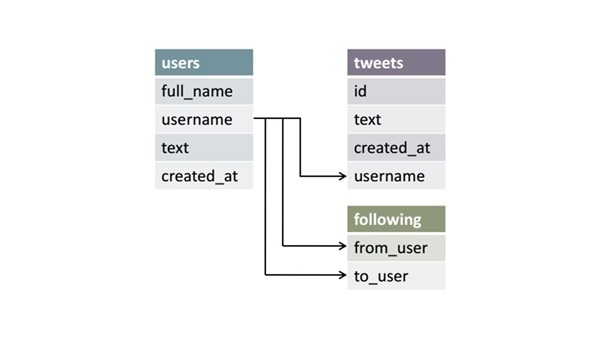
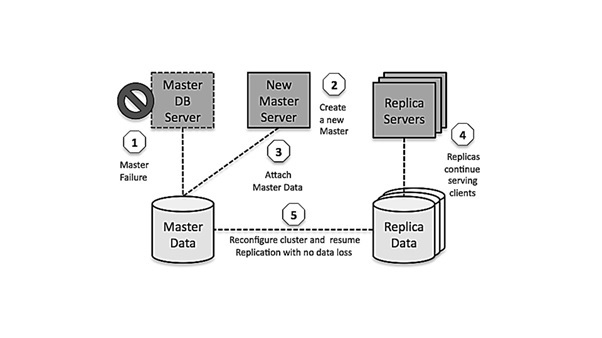
Now a day, data has been specifically getting stored over clouds also known as a virtual environment, either in a hybrid cloud, public or private cloud. A cloud database is a database that has been optimized or built for such a virtualized environment. There are various benefits of a cloud database, some of which are the ability to pay for storage capacity and bandwidth on a per-user basis, and they provide scalability on demand, along with high availability.
This is more or less what Mongo Atlas is.
These are used for large sets of distributed data. There are some big data performance issues which are effectively handled by relational databases, such kind of issues are easily managed by NoSQL databases. There are very efficient in analyzing large size unstructured data that may be stored at multiple virtual servers of the cloud.
This is what I'm momenteraly using in Mongo Atlas. This is an unstructured database.
Data is collected and stored on personal computers which is small and easily manageable. The data is generally used by the same department of an organization and is accessed by a small group of people.
This can also be used for prototyping, until you actually need a database that can be used by bigger groups of users.
I decided to use MongoDB Atlas, since it's always available because it's a cloud service and the choice for prototyping is totally free. I got to say, in the end it was fairly easy to connect and get data send to the database.
const mongoose = require('mongoose');

require('dotenv').config();

// DATA BASE CONNECTION
const uri = process.env.DB_URI;
mongoose.connect(uri, {
    useNewUrlParser: true,
    useUnifiedTopology: true
}).then(() => {
    console.log('MongoDB connected...');
});

// SCHEMA MAKING FOR DB || TESTING
const Schema = mongoose.Schema;

const favGamesSchema = new Schema({
    title: String,
    body: String,
    date: {
        type: String,
        default: Date.now()
    }
})

// MODEL || TESTING
const favGames = mongoose.model('FavGames', favGamesSchema);

// SAVING DATA TO DATABASE || TEST
const data = {
    title: 'Favorite game 1#',
    body: 'Overwatch'
}

// .save SAVING METHOD || TEST
const newFavGames = new favGames(data);

newFavGames.save((err) => {
    if (err) {
        console.log("Something went wrong saving the data...");
    } else {
        console.log("Data has been succesfully saved!");
    }
})Now it's time to make users be able to store data in the server and then the server to display this data.
I found this post on stackoverflow of someone asking for help on how to post data in a json with mongoose to MongoDB Atlas. Although I did not follow the exact steps someone gave in the answers, it was an excellent guideline to know in which direction I had to start, and which steps I had to take. So from here on it was a step-by-step process of really reading into what the different errors meant.
In the end I ended up with this piece of code:
// SCHEMA MAKING FOR DB
const Schema = mongoose.Schema;

const favGamesSchema = new Schema({
    titleGame1: String,
    titleGame2: String,
    titleGame3: String,
    date: {
        type: String,
        default: Date.now()
    }
})

// MODEL
const favGames = mongoose.model('FavGames', favGamesSchema);

// POST FAVORITE GAME
app.post('/', function(req, res) {
    // sanity check
    let testGame = req.body;

    // Describe what value correspons in which key
    let gameData = {
        titleGame1: req.body.titleGame1,
        titleGame2: req.body.titleGame2,
        titleGame3: req.body.titleGame3
    }
    // Define a new model
    const newFavGames = new favGames(gameData);

    // use .save function to send data to db
    newFavGames.save((err) => {
        if (err) {
            console.log('Could not save games')
            res.status(400).send('Games were not saved')
            return;
        } else {
            console.log('Games succesfully saved')
            res.send("Your games were succesfully uploaded to the database")
        }
    })
})After looking around for a small bit of time, I decided to just go with ESlint. Everywhere I looked and if I google NodeJS lint, I got as first result ESlint. Also since I'm using Visual Studio Code there's an extension for using the linter like a build-in function.

It was really easy to get it working. Just install the extension. Then run npm install -g eslint, then run eslint --init and then it's working. Very nice.
For testing purposes I was looking for a npm package that makes Date.now() give a visibly understandable date back. I looked at two different packages. These were called dateformat and date-format. Very creative naming. In the end I choose the latter. Because the use of it was a lot easier and more understandable.


This URL is going to be based around what features I think I need to have to get the jobstory working as I intend to.
- Be able to save your favorite games on the server
- Saving games, ties this information to a user on the server
- Saved games are going to be rendered on the site
- Ability to change your favorite games
- Communication with the video games API, so users can look up their favorite games
- Matching mechanism to match different users based on their games
- Ability to upload pictures onto the database
- Matching mechanism not only working on favorite games, but also human features
- Possibility to add games yourself to the database if they aren't findable through API
- Add videos of your favorite plays that you've made
- Connectivity to gaming platforms (like Steam, Epic Games, Battle.net, etc)
- Calendar to make gaming dates together
- Voice chat connectivity
- A social feed of what potential matches are sharing