Colors every Hyper window based on the project folder its active tab is in. Open five Hyper windows against five different projects and you can tell them apart at a glance.
Groups sessions by project root (the nearest .git walked up from cwd, or the raw cwd if no git repo is found), then assigns each project a random color from a curated 12-slot palette for the current Hyper run. The plugin prefers palette slots that aren't already taken by other open projects, so the first 12 distinct projects you open in one Hyper session are guaranteed to get 12 distinct colors. Restart Hyper and colors reshuffle. Shells that emit OSC 7 retint live when you cd between projects.
The plugin paints, in the active project's color:
- a thin border around the window
- a colored top line in the tab bar
- a subtle gradient tint on the active tab's background
- an optional uppercase color-name label in the top-right corner (off by default; opt in with
showBadge: true)
The color signal lives on the window, not on individual tabs. Inside a window with multiple tabs, switching to a tab in a different project retints the whole window; switching between same-project tabs leaves the color unchanged. If cwd resolution ever fails entirely, the plugin falls back to the session UID so the window still gets a color.
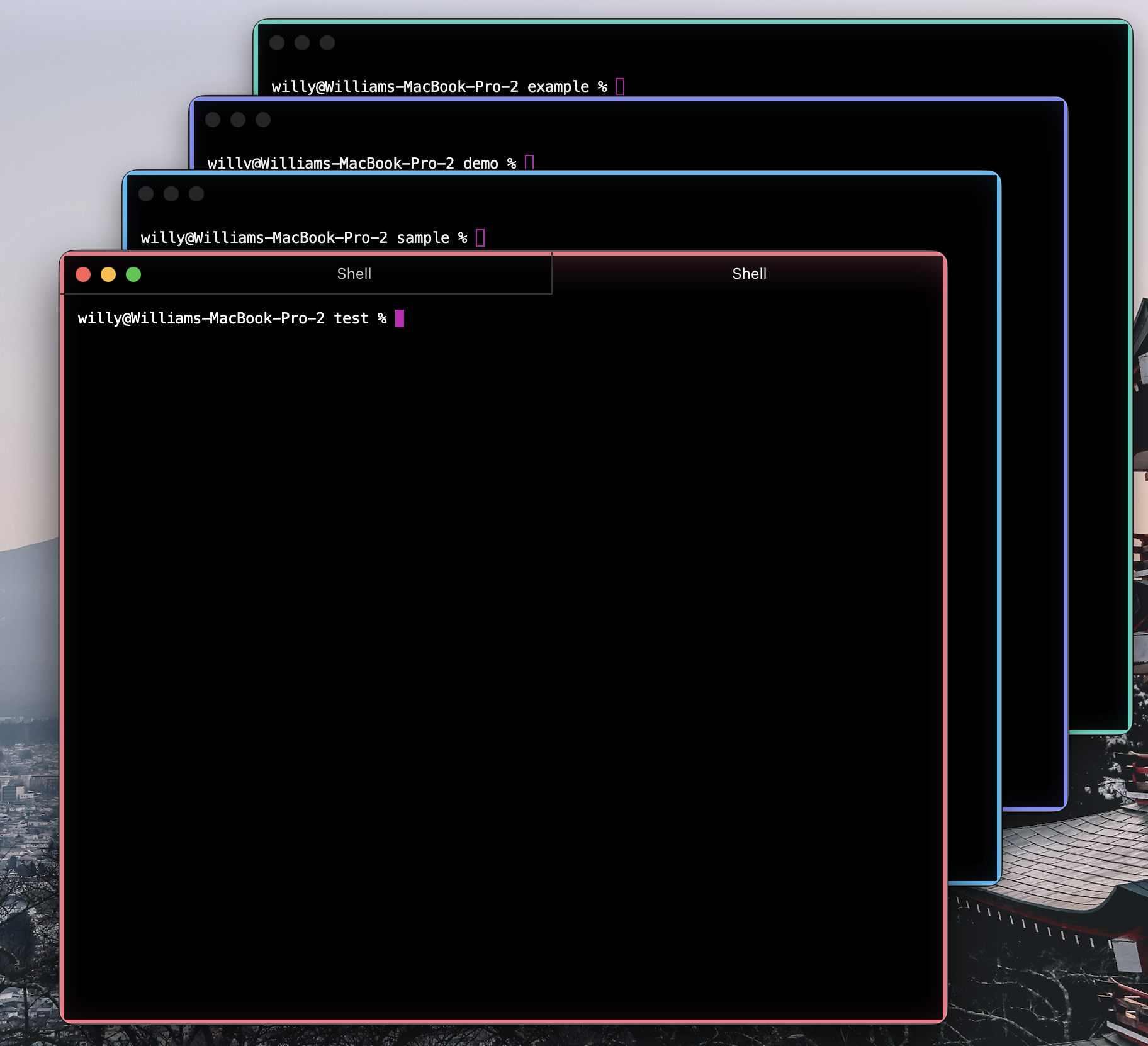
Four Hyper windows open against four different projects — each gets its own border color, so a glance at the screen tells you which terminal belongs to which codebase.
hyper i hyper-windowtint
hyper i adds the plugin to the plugins array in ~/.hyper.js and installs
it. Restart Hyper afterward.
If you prefer to edit ~/.hyper.js by hand:
module.exports = {
  config: {
    // ...your existing config
  },
  plugins: ['hyper-windowtint'],
};Hyper supports local plugins out of the box. Drop this folder into:
~/.hyper_plugins/local/hyper-windowtint
Then in ~/.hyper.js:
module.exports = {
  config: {
    // ...your existing config
  },
  plugins: [],
  localPlugins: ['hyper-windowtint'],
};
Restart Hyper (or Cmd+Shift+R to reload the renderer).
All options live under config.windowTint in ~/.hyper.js:
module.exports = {
  config: {
    windowTint: {
      borderWidth: '3px',      // CSS string
      showBadge: false,        // optional uppercase color-name label in the corner (default off)
      glow: true,              // inner glow effect on the window border
      palette: [               // optional — override the default palette
        { name: 'red',   hex: '#ef4444' },
        { name: 'green', hex: '#22c55e' },
        { name: 'blue',  hex: '#3b82f6' },
      ],
    },
  },
  localPlugins: ['hyper-windowtint'],
};
Palette entries must include both a non-empty name and a 6- or 8-digit hex color. Invalid entries are ignored; if none are valid, the default palette is used.
Main process:
decorateSessionOptions(options)runs when a new session is about to be spawned. The plugin schedules async cwd resolution throughrealpath, walks upward looking for a.gitdirectory or file (if found, that path is the project group; otherwise the raw cwd is the group), and assigns the group a random seed for the current Hyper main-process lifetime. Seed assignment prefers palette indices not already used by other open projects so the first 12 distinct projects get 12 distinct colors. Cachescwd → project root,project root → seed, anduid → seed(with a short expiry).onWindow(win)wrapswin.rpc.emitso that immediately before Hyper's own'session add'IPC reaches the renderer, the plugin emits a'windowtint:session-seed'event with{uid, seed}. This avoids a uid→project color flicker on session creation. The wrap is idempotent per window, and reload-stable state onwin.rpclets the persistent wrapper consume seeds from the newest plugin module after hot reloads.onUnloadclears the caches and restores the originalwin.rpc.emit.
Renderer process:
decorateTermregisters an OSC 7 handler on each tab's xterm instance. When a shell reports a new cwd, the renderer asks the main process for that cwd's current project-group seed and retints.decorateConfiginjects CSS that styles.hyper_main(window border + glow), the tab bar's top line, and the active tab's background gradient using CSS custom properties (--tint-color,--tint-glow,--tint-tab-bg,--tint-name).- A
window.rpc.on('windowtint:session-seed', ...)listener (installed lazily by the middleware and removed on renderer unload) cachesuid → seed. If a seed arrives after the session has already been tinted, the active session retints immediately. - Redux middleware listens for
SESSION_ADDandSESSION_SET_ACTIVE, looks up the cached seed by uid (falls back to the uid itself), maps it to the palette, and writes the resulting color to the root element's CSS variables.
Color assignment is intentionally not permanent. The grouping rules are:
- Sessions whose cwd resolves to the same project root (nearest
.git, or the raw cwd if there's no repo) share a color for the current Hyper run. - The window's visible color follows whichever tab is currently active. Switching active tab to a different project retints the window; switching to a same-project tab leaves it alone.
- After restarting Hyper, projects can receive different colors.
- If Hyper does not provide a cwd, the plugin falls back to the session UID.
Live retinting after cd requires OSC 7 cwd reporting from the shell. Many modern prompts/shell integrations already emit it; if yours does not, the color is set when a tab is created and stays put until you switch active tabs or restart Hyper.
The plugin uses two custom Hyper RPC event names internally: windowtint:session-seed and windowtint:cwd-change. This depends on Hyper's current runtime RPC passthrough for arbitrary event names.
Add one of the snippets below if cd-ing inside a tab does not retint it. Most
modern prompts (Starship, Powerlevel10k, fish ≥ 3, recent macOS zsh,
Warp/iTerm integrations) already emit OSC 7, so try it first before adding
anything.
Add to ~/.zshrc:
_osc7_cwd() {
  local host="${HOST:-localhost}"
  printf '\e]7;file://%s%s\e\\' "$host" "$PWD"
}
autoload -Uz add-zsh-hook
add-zsh-hook chpwd _osc7_cwd
add-zsh-hook precmd _osc7_cwdAdd to ~/.bashrc:
_osc7_cwd() {
  printf '\e]7;file://%s%s\e\\' "${HOSTNAME:-localhost}" "$PWD"
}
PROMPT_COMMAND='_osc7_cwd;'"${PROMPT_COMMAND:-}"Add to ~/.config/fish/config.fish:
function osc7_cwd --on-variable PWD
    printf '\e]7;file://%s%s\e\\' (hostname) "$PWD"
end
osc7_cwd- Per-tab outlines for inactive tabs. Today the color signal is window-level (whichever tab is active). The original plan was to also outline each tab in the tab bar with its own project color, but Hyper 3.x's Tab component drops most plugin-injected props, so it would need a renderer-side DOM observer approach. Deferred until that's worth building.
- Optional color labels. Expose the current in-memory project group color so helper scripts can find matching windows without making the assignment permanent.
- Admin/sudo override. Force red for elevated shells (steal this from
hyperborder'sadminBorderColors). - OKLCH-spaced palette generator for any N colors with guaranteed perceptual distinctness.
- Tests. Pure-function tests for
hashToIndex,parseOsc7Cwd,readUserConfig, andwithAlpha.
MIT