From installation to your first automated code review in under 5 minutes. Everything you need to start using GStack Intelligence as your AI engineering team.
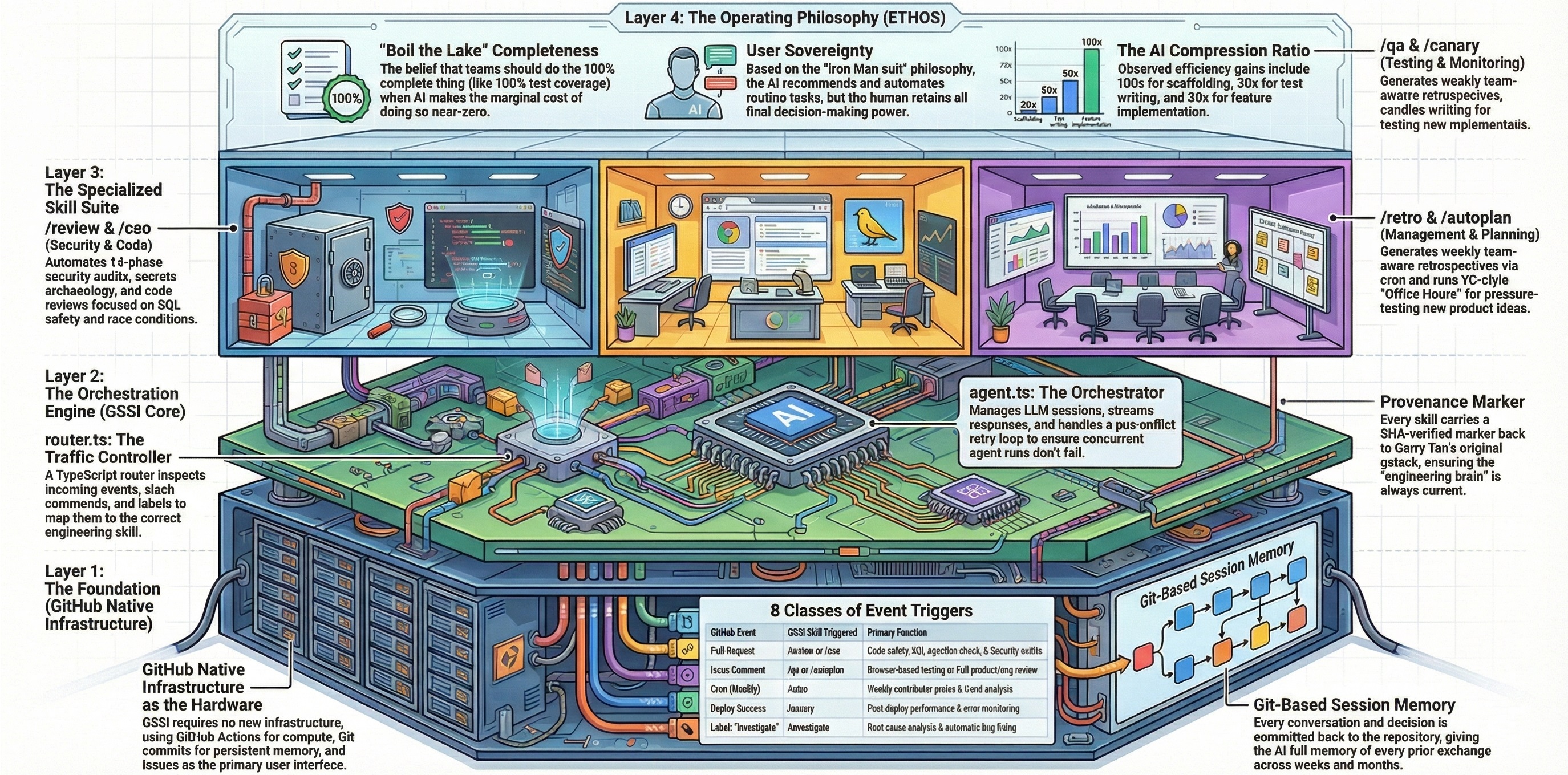
GStack Intelligence turns any GitHub repository into an AI engineering team. Twenty-six specialized AI skills — code review, security audit, QA testing, design systems, developer experience, performance benchmarking, planning, shipping, retrospectives, and more — all triggered by the natural events of software development through a single GitHub Actions workflow file.
No CLI. No desktop app. No subscription. Just GitHub.
The skills encode the engineering practices of Garry Tan, CEO of Y Combinator, into executable AI workflows. Every pull request is reviewed. Every deployment is monitored. Every Friday, a retrospective runs. The same engineering rigor that Y Combinator's best companies follow, automated and available to every repository.
Copy .github/workflows/github-gstack-intelligence-agent.yml into your repository's .github/workflows/ directory.
Add OPENAI_API_KEY as a repository secret:
Settings → Secrets and variables → Actions → New repository secret
Any supported LLM provider works, but OpenAI GPT 5.4 is pre-configured for quick start.
Go to Actions → github-gstack-intelligence-agent → Run workflow and click "Run workflow."
The installer copies the agent framework files into your repository. Subsequent runs perform upgrades without overwriting your configuration.
That's it. Open an issue — the agent will reply.
Open a new issue with any question about your codebase:
"How does authentication work in this project?"
The agent reads your codebase and answers. This is the conversational baseline — it works on any issue without a slash command.
Open a pull request. The /review skill triggers automatically. Within minutes, you'll see a structured code review comment analyzing your diff for SQL injection, race conditions, LLM trust boundaries, and more.
Open an issue and comment:
/qa https://your-app-url.com
The agent launches a real browser, navigates your app, clicks every button, fills every form, checks every console error — and fixes what it finds.
Commands fall into five categories:
| Command | How to Trigger | What It Does |
|---|---|---|
/office-hours |
Issue + office-hours label |
Product diagnostic with YC-style forcing questions |
| Command | How to Trigger | What It Does |
|---|---|---|
/autoplan |
Comment on issue | Full CEO + Design + Eng review pipeline |
/plan-ceo-review |
Comment on issue | Strategy and scope review |
/plan-design-review |
Comment on issue | UI/UX completeness review |
/plan-eng-review |
Comment on issue | Architecture and test coverage review |
/design-consultation |
Issue + design-consultation label |
Full design system builder |
| Command | How to Trigger | What It Does |
|---|---|---|
/review |
Automatic on every PR | Structured code review |
/cso |
PR + security-audit label |
Security audit |
/design-review |
PR + design-review label |
Visual design audit with fixes |
/investigate |
Issue + investigate label |
Root-cause debugging |
| Command | How to Trigger | What It Does |
|---|---|---|
/qa |
Comment /qa [url] on issue |
QA testing with automated fixes |
/qa-only |
Comment /qa-only [url] on issue |
QA testing, report only |
/ship |
Comment /ship on issue |
Automated merge, test, version, PR |
/document-release |
Automatic on release | Documentation sync |
| Command | How to Trigger | What It Does |
|---|---|---|
/retro |
Scheduled (Fridays) or comment | Weekly engineering retrospective |
/benchmark |
Scheduled (daily) or comment | Performance regression detection |
/canary |
Automatic on deployment | Post-deploy monitoring |
- Open an issue describing the feature
- Add the
office-hourslabel - Answer the diagnostic questions
- Comment
/autoplanfor full review - Create a branch and implement
- Open a PR (auto-reviewed)
- Comment
/qa https://staging-url.com - Comment
/ship
- Open a pull request —
/reviewruns automatically - Fix auto-fixed items, decide on ASK items
- Add
security-auditlabel if the PR touches auth, payments, or user data - Comment
/shipwhen ready
- Open an issue describing the bug with error messages and stack traces
- Add the
investigatelabel - The agent investigates with the 4-phase methodology
- Review the fix and regression test
- Comment
/shipto ship the fix
- Enable
/retroin config.json — get weekly retrospectives - Enable
/benchmark— get daily performance tracking - Run
/qa-onlyon your production URL — get a quality baseline - Use the data to prioritize improvements
All skills are configured in .github-gstack-intelligence/config.json:
{
  "skills": {
    "review": { "enabled": true, "trigger": "pull_request" },
    "qa": { "enabled": true, "trigger": "issue_comment" },
    "retro": { "enabled": false, "trigger": "schedule" }
  }
}- Set
"enabled": falseto disable any skill - Scheduled skills (
/retro,/benchmark) are disabled by default — enable them when ready - Label-gated skills (
/cso,/design-review,/investigate, etc.) only trigger when the specified label is present
The AI model is configured in .pi/settings.json.
Only repository collaborators with admin, maintain, or write permissions can trigger commands. This prevents unauthorized users from consuming LLM credits on public repositories.
Bot-loop prevention is enabled by default — the agent won't respond to its own comments.
When you trigger a command:
- GitHub fires a webhook → the Actions workflow starts
- The router (
router.ts) inspects the event type, slash command, and labels - The router selects a skill — the structured AI prompt for that command
- The agent (
agent.ts) builds context: issue body, comments, conversation history - The LLM processes the skill with full codebase access via bash, read, write, grep, glob tools
- The result is posted as a comment on the issue or PR
- The conversation is committed to Git for persistent memory across sessions
Every interaction is traceable. Every decision is auditable. Every result is stored in Git.
- Write clear issue descriptions. The agent is only as good as the context you provide.
- Use labels, not just commands. Labels like
investigate,office-hours,security-audit, anddesign-consultationauto-trigger the right skill when you open an issue. - Follow The Method. Discovery → Planning → Implementation → Shipping → Operations. The sequence matters.
- Enable scheduled skills.
/retroand/benchmarkprovide continuous improvement data that compounds over time. - Trust but verify. Review auto-fixes before merging. The agent finds real issues, but you make the final decision.
- Use
/autoplanfor significant features. The full CEO + Design + Engineering review catches issues that individual reviews miss. - Read the deep guides. The Method and Workflows explain how to use the system at its full potential.
- Check that the workflow file is in
.github/workflows/ - Verify the
OPENAI_API_KEYsecret is set - Confirm you have
writepermission on the repository - Check the Actions tab for workflow run status
- The agent runs inside GitHub Actions — it has access to the checked-out repository
- Make sure your code is committed and pushed
- Edit
.pi/settings.jsonto change the model - Update
config.jsondefaults if needed - Any OpenAI-compatible API works
- Go to Actions → github-gstack-intelligence-agent → Run workflow
- The installer upgrades lifecycle, skills, and package files while preserving your config
- Command Reference — Detailed documentation for all 26 commands
- The Method — The complete methodology for software development excellence
- Workflows — Step-by-step recipes for common scenarios
- ETHOS — The builder principles behind every skill