Skip to content

Latest commit


History

History
182 lines (140 loc) · 13.4 KB

File metadata and controls

182 lines (140 loc) · 13.4 KB

GStack Intelligence — Command Reference

GStack Intelligence

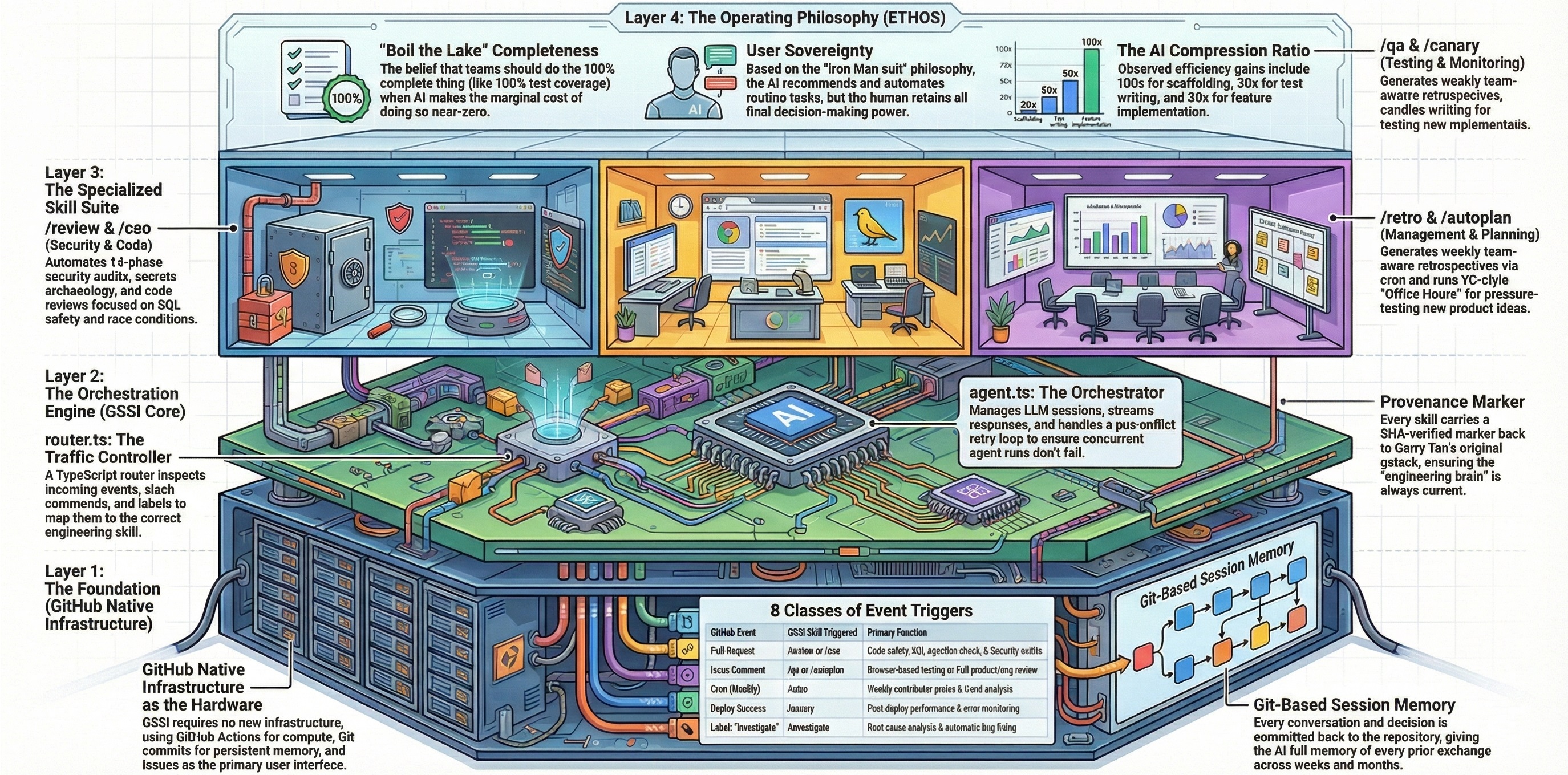
GitHub GStack Intelligence ships twenty-six AI skills that run as GitHub Actions workflows. Each skill is an AI specialist triggered by GitHub events — pull requests, issue comments, labels, releases, schedules, and deployments.

This directory is the single source of truth for command documentation. Click any command below to see the full reference.


Quick Reference

Command Summary Trigger Browser Default
/review PR code review — SQL injection, race conditions, trust boundaries Automatic on PR No ✅ Enabled
/cso Chief Security Officer audit — secrets, supply chain, OWASP, STRIDE PR + security-audit label No ✅ Enabled
/investigate Systematic root-cause debugging with 4-phase methodology Issue + investigate label No ✅ Enabled
/qa QA testing with automated fixes and before/after evidence /qa [url] comment Yes ✅ Enabled
/qa-only QA testing — report only, no code changes /qa-only [url] comment Yes ✅ Enabled
/design-review Visual design audit with iterative fixes PR + design-review label Yes ✅ Enabled
/design-consultation Full design system builder — typography, color, layout Issue + design-consultation label No ✅ Enabled
/design-html Design finalization — production-quality HTML/CSS /design-html comment Yes ✅ Enabled
/design-shotgun Rapid design exploration — multiple variant comparison /design-shotgun comment Yes ✅ Enabled
/autoplan One-command CEO + Design + Eng review pipeline /autoplan comment No ✅ Enabled
/plan-ceo-review CEO/founder plan review — scope, strategy, failure modes /plan-ceo-review comment No ✅ Enabled
/plan-eng-review Engineering plan review — architecture, data flow, tests /plan-eng-review comment No ✅ Enabled
/plan-design-review Designer plan review — hierarchy, empty states, accessibility /plan-design-review comment No ✅ Enabled
/plan-devex-review Developer experience plan review — DX scoring and personas /plan-devex-review comment No ✅ Enabled
/devex-review Live developer experience audit with DX scorecard /devex-review comment Yes ✅ Enabled
/office-hours YC office hours — startup forcing questions or builder brainstorm Issue + office-hours label No ✅ Enabled
/ship Automated ship workflow — merge, test, version bump, PR /ship comment No ✅ Enabled
/land-and-deploy Land and deploy — merge PR, CI, production verification /land-and-deploy comment Yes ✅ Enabled
/document-release Post-ship documentation update Automatic on release No ✅ Enabled
/careful Safety guardrails — warns before destructive commands /careful comment No ✅ Enabled
/guard Full safety — destructive warnings + directory-scoped edits /guard comment No ✅ Enabled
/health Code quality dashboard — composite 0–10 score with trends /health comment No ✅ Enabled
/learn Manage project learnings — review, search, prune, export /learn comment No ✅ Enabled
/retro Weekly engineering retrospective with trend tracking Scheduled (Fridays 5 PM UTC) No ❌ Disabled
/benchmark Performance regression detection with Core Web Vitals Scheduled (daily 6 AM UTC) No ❌ Disabled
/canary Post-deploy monitoring and anomaly detection Automatic on deployment Yes ❌ Disabled

Skills by Category

Code Quality & Review

Command What it does
/review Structured, checklist-driven pre-landing code review. Analyzes PR diffs for SQL injection, LLM trust boundary violations, race conditions, and conditional side effects. Auto-fixes mechanical issues, flags critical findings.
/cso Chief Security Officer audit — secrets archaeology, dependency supply chain analysis, CI/CD pipeline security, LLM/AI integration checks, and OWASP Top 10 / STRIDE threat modeling.
/investigate Root cause investigation following the Iron Law: "no fixes without root cause investigation first." Four-phase methodology with scope lock and a 3-strike rule.

QA & Design

Command What it does
/qa Systematically tests a web app like a real user — clicks everything, fills forms, checks states — finds bugs, then iteratively fixes them with atomic commits and re-verifies.
/qa-only Same testing methodology as /qa but report-only — captures screenshots and documents issues without making any code changes.
/design-review Designer's-eye QA that finds visual inconsistency, spacing issues, hierarchy problems, and AI slop patterns — then fixes them iteratively with before/after screenshots.
/design-consultation Proposes a complete design system — aesthetic, typography, color palette, layout grid, spacing scale, and motion principles. Creates a DESIGN.md as the project's design source of truth.
/design-html Design finalization — generates production-quality HTML/CSS from approved mockups, CEO plans, or design review context. Dynamic layouts, real reflow, zero dependencies.
/design-shotgun Design exploration — generates multiple AI design variants, opens a comparison board, collects structured feedback, and iterates. Visual brainstorming for any UI feature.

Planning

Command What it does
/autoplan One-command, fully-reviewed plan. Runs CEO, design, and engineering reviews sequentially with auto-decisions. Surfaces taste decisions at a final approval gate.
/plan-ceo-review CEO/founder-mode review — rethinks the problem, finds the "10-star product," challenges premises, expands scope when it creates a better product.
/plan-eng-review Engineering manager-mode review — locks in architecture, data flow, diagrams, edge cases, test coverage, and performance before code is written.
/plan-design-review Interactive designer's-eye plan review — rates each design dimension 0–10, explains what would make it a 10, then improves the plan.
/plan-devex-review Interactive developer experience plan review — explores personas, benchmarks competitors, designs magical moments, traces friction points. Three modes: DX expansion, polish, triage.
/office-hours YC office hours partner mode — Startup mode (forcing questions) or Builder mode (brainstorming). Produces a design document for downstream planning.

Developer Experience

Command What it does
/devex-review Live developer experience audit — navigates docs, tries the getting started flow, times TTHW, screenshots error messages, evaluates CLI help text. Produces a DX scorecard with evidence.

Shipping & Documentation

Command What it does
/ship Fully automated shipping — detects base branch, merges, runs tests, reviews, bumps VERSION, updates CHANGELOG, commits, pushes, and opens a PR.
/land-and-deploy Land and deploy workflow — merges the PR, waits for CI and deploy, verifies production health via canary checks. Takes over after /ship creates the PR.
/document-release Post-ship documentation update — ensures README, ARCHITECTURE, CONTRIBUTING, and CHANGELOG are accurate and up-to-date with shipped code.

Safety & Guardrails

Command What it does
/careful Safety guardrails for destructive commands — warns before rm -rf, DROP TABLE, force-push, git reset --hard, and similar operations. Override any warning.
/guard Full safety mode — combines /careful (destructive command warnings) with /freeze (directory-scoped edits). Maximum safety for production work.

Operations & Monitoring

Command What it does
/health Code quality dashboard — wraps existing project tools (type checker, linter, test runner), computes a weighted composite 0–10 score, and tracks trends over time.
/learn Manage project learnings — review, search, prune, and export what the agent has learned across sessions. Surface past patterns and decisions.
/retro Weekly engineering retrospective — analyzes commit history, work patterns, code quality metrics. Per-person breakdown with praise and growth areas.
/benchmark Performance regression detection — captures real Core Web Vitals data, compares against baselines, and tracks trends over time.
/canary Post-deploy monitoring — watches the live app for console errors, performance regressions, and page failures with periodic screenshots.

Configuration

All skills are configured in config.json. Each skill entry controls whether it is enabled and how it is triggered:

{
  "skills": {
    "review": { "enabled": true, "trigger": "pull_request" },
    "cso": { "enabled": true, "trigger": "pull_request", "labelGated": true, "label": "security-audit" },
    "retro": { "enabled": false, "trigger": "schedule", "schedule": "0 17 * * 5" }
  }
}
  • enabled — Set to false to disable a skill without removing its configuration.
  • trigger — The GitHub event type that activates the skill (pull_request, issue_comment, issue_label, schedule, release, deployment_status).
  • labelGated / label — For label-gated skills, the skill only triggers when the specified label is present.
  • schedule — Cron expression for scheduled skills. Must also be registered in the workflow file.

Global defaults (model, cost tier, max comment length) are set in the defaults section of config.json. The AI model is configured in .pi/settings.json.


Key Files

File Purpose
config.json Skill enablement, triggers, labels, and global defaults
.pi/settings.json AI model and provider configuration
skills/ Skill prompt definitions (the AI instructions for each skill)
skills/references/ Shared reference documents used by skills (checklists, templates, taxonomies)
lifecycle/router.ts Event routing — maps GitHub events to skills
lifecycle/agent.ts Agent orchestration — runs skills and posts results
lifecycle/browser.ts Playwright browser utilities for browser-dependent skills
state/ Persisted results, benchmarks, and session data

Access Control

Skills are gated by repository permissions. Only users with admin, maintain, or write permissions can trigger commands. Bot-loop prevention is enabled by default. See the access section in config.json for details.


Deep Guides

These documents explain how to use GStack Intelligence as a system — not just individual commands, but a disciplined engineering methodology.

Guide What It Covers
The Method The complete methodology for software development excellence — five phases, decision frameworks, anti-patterns, and how to measure engineering quality
Workflows Step-by-step recipes for 8 common scenarios — greenfield features, bug fixes, security sprints, design system setup, pre-launch quality blitz, and more

Getting Started Your first day with GStack Intelligence — installation, first commands, configuration, troubleshooting
ETHOS The builder principles behind every skill — Boil the Lake, Search Before Building, User Sovereignty

Getting Help

  • This file — Command index and quick reference
  • Deep guidesThe Method, Workflows, Getting Started for comprehensive usage guidance
  • Individual command pages — Click any command in the table above for full documentation
  • Skill prompts — See skills/ for the raw AI instructions behind each skill
  • Architecture — See CONTRIBUTING.md for how the system works internally

GStack Intelligence