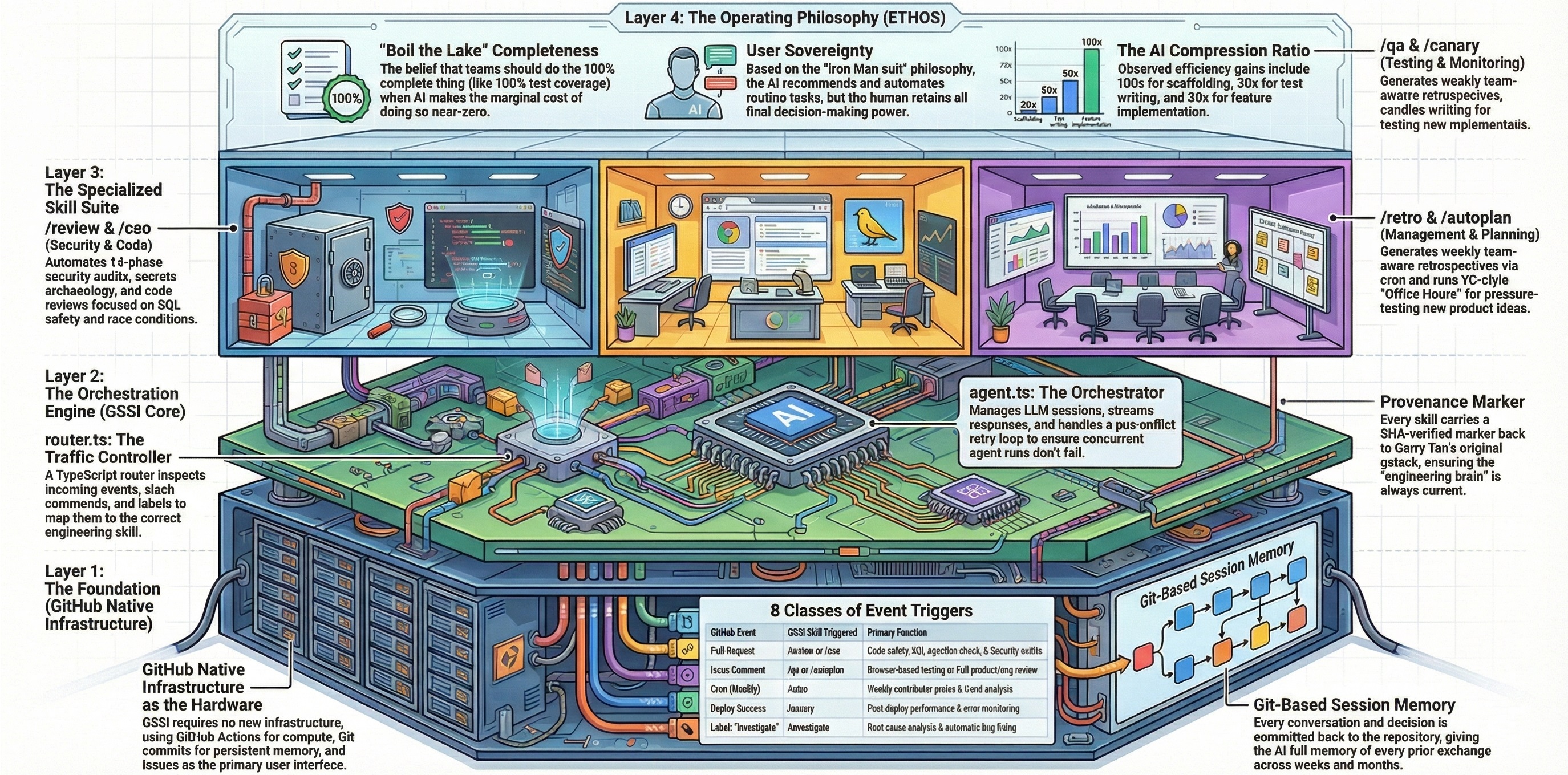
Weekly engineering retrospective analyzing commit history, work patterns, and code quality metrics with team-aware breakdowns, persistent history, and trend tracking.
| Property | Value |
|---|---|
| Trigger | Scheduled — 0 17 * * 5 (Fridays 5 PM UTC); also /retro on an issue |
| Browser Required | ❌ No |
| Default State | ❌ Disabled |
| Results Path | state/results/retro/{date}.json (repo-scoped) or state/retros/global-{date}-{n}.json (global) |
Comment on an issue:
/retro
| Command | Description |
|---|---|
/retro |
Default — last 7 days |
/retro 24h |
Last 24 hours |
/retro 14d |
Last 14 days |
/retro 30d |
Last 30 days |
/retro compare |
Compare current 7-day window vs prior 7 days |
/retro compare 14d |
Compare with explicit window size |
/retro global |
Cross-project retro across all AI coding tools (7-day default) |
/retro global 14d |
Cross-project retro with explicit window |
Time windows use midnight-aligned absolute dates for day/week units (e.g., 7d from March 18 = --since="2026-03-11T00:00:00"). Hour units use relative --since="N hours ago".
The /retro skill performs a comprehensive engineering retrospective with 14 steps:
Fetches origin and runs 12+ parallel git commands to collect: commits with stats, per-commit test/production LOC breakdown, timestamps for session detection, file hotspots, PR/MR numbers, per-author contributions, Greptile triage history, TODOS.md backlog, test file counts, regression test commits, skill usage telemetry, and eureka moments.
Produces a summary table with: commits to main, contributors, PRs merged, insertions/deletions, net LOC, test LOC ratio, version range, active days, detected sessions, LOC/session-hour, Greptile signal quality, test health, backlog health, skill usage, and eureka moments.
Includes a per-author leaderboard sorted by commits, with the current user always first (labeled "You").
Renders an hourly histogram of commit times in local timezone. Identifies peak hours, dead zones, bimodal patterns, and late-night coding clusters.
Detects work sessions using a 45-minute gap threshold between consecutive commits. Classifies sessions as:
- Deep sessions (50+ min)
- Medium sessions (20–50 min)
- Micro sessions (<20 min — single-commit fire-and-forget)
Calculates total active coding time, average session length, and LOC per hour of active time.
Categorizes commits by conventional prefix (feat/fix/refactor/test/chore/docs). Flags if fix ratio exceeds 50% — signals a "ship fast, fix fast" pattern that may indicate review gaps.
Top 10 most-changed files. Flags files changed 5+ times (churn hotspots), test vs. production file ratio, and VERSION/CHANGELOG frequency.
Buckets PRs by size: Small (<100 LOC), Medium (100–500), Large (500–1500), XL (1500+).
- Focus score: % of commits in the single most-changed top-level directory. Higher = deeper focused work.
- Ship of the week: The single highest-LOC PR in the window with context on why it matters.
For each contributor:
- Commits, LOC, insertions/deletions
- Areas of focus (top 3 directories)
- Personal commit type mix
- Session patterns and peak hours
- Test discipline (personal test LOC ratio)
- Biggest ship
The current user gets the deepest treatment with a personal "Your Week" deep-dive. Each teammate gets 2–3 sentences plus specific praise (anchored in actual commits) and one growth opportunity (framed as investment, not criticism).
AI co-authors (Co-Authored-By) are tracked as a separate "AI-assisted commits" metric.
If the window is ≥14 days, splits into weekly buckets showing trends for commits, LOC, test ratio, fix ratio, and session count per author.
Counts consecutive days with at least 1 commit, going back from today. Reports both team streak and personal streak.
Loads the most recent prior retro JSON and computes deltas for key metrics (test ratio, sessions, LOC/hour, fix ratio, commits, deep sessions). Shows a Trends vs Last Retro table with arrows.
Saves a JSON snapshot to .context/retros/{date}-{n}.json containing all computed metrics, per-author breakdowns, streaks, and a tweetable summary.
Produces the full retrospective with sections: Tweetable summary, Summary Table, Trends vs Last Retro, Time & Session Patterns, Shipping Velocity, Code Quality Signals, Test Health, Plan Completion, Focus & Highlights, Your Week, Team Breakdown, Top 3 Team Wins, 3 Things to Improve, 3 Habits for Next Week, and Week-over-Week Trends.
/retro compare computes metrics for the current window and the immediately prior same-length window, then shows a side-by-side comparison table with deltas and arrows plus a brief narrative.
/retro global performs a cross-project retrospective across all AI coding tools. It does NOT require being inside a git repo.
- Discovery — Runs
gstack-global-discoverto find all repos with recent AI coding activity - Per-repo git log — Gathers commits, timestamps, and stats from each discovered repo
- Global shipping streak — Union of commit dates across all repos, counting consecutive days
- Context switching — Tracks how many distinct repos had commits per day
- Per-tool productivity — Analyzes Claude Code, Codex, Gemini session patterns
- Shareable personal card — A screenshot-friendly block with the user's stats across all projects
- Full analysis — Per-project breakdowns, cross-project patterns, tool usage analysis, and insights
Week of Mar 1: 47 commits (3 contributors), 3.2k LOC, 38% tests, 12 PRs, peak: 10pm | Streak: 47d

## Engineering Retro: Mar 1–8, 2026

### Summary Table

| Metric           | Value                              |
|------------------|------------------------------------|
| Commits to main  | 47                                 |
| Contributors     | 3                                  |
| PRs merged       | 12                                 |
| Net LOC added    | +2,400                             |
| Test LOC ratio   | 41%                                |
| Active days      | 6                                  |
| Sessions         | 14 (5 deep, 6 medium, 3 micro)     |
| LOC/session-hour | 350                                |
| Streak           | Team: 47d · You: 32d              |

### Trends vs Last Retro

                    Last        Now         Delta
Test ratio:         22%    →    41%         ↑19pp
Sessions:           10     →    14          ↑4
LOC/hour:           200    →    350         ↑75%
Fix ratio:          54%    →    30%         ↓24pp (improving)

### Your Week
32 commits, +2.4k LOC, 41% test coverage
Peak hours: 9-11pm · 5 deep sessions averaging 55 min
Focus: browse/ (62%)
Biggest ship: PR #42 — Auth middleware rewrite (1,200 LOC)

**What you did well:**
- Shipped the entire auth middleware in 3 focused evening sessions with 45% test coverage
- Every PR under 200 LOC — disciplined decomposition

**Where to level up:**
- All commits land between 9pm-1am — sustainable pace matters for long-term code quality
In config.json:
{
  "retro": {
    "enabled": false,
    "trigger": "schedule",
    "schedule": "0 17 * * 5"
  }
}| Field | Type | Description |
|---|---|---|
enabled |
boolean |
Set to true to enable — disabled by default |
trigger |
string |
schedule for cron-based invocation; also responds to issue_comment slash commands |
schedule |
string |
Cron expression — 0 17 * * 5 = Fridays at 5 PM UTC |
| Requirement | Details |
|---|---|
| Browser | ❌ Not needed |
| Model | Default model from config (gpt-5.4) recommended |
| Permissions | admin, maintain, or write on the repository |
| Tools | Bash, Read, Write, Glob |
| Global mode | Requires gstack-global-discover binary (run bun run build in gstack directory) |
Snapshots are saved to:
.context/retros/{date}-{n}.json
Each snapshot includes: date, window, all computed metrics (commits, LOC, test ratio, sessions, peak hours, AI-assisted commits), per-author breakdowns, version range, streak days, Greptile signal data, backlog health, test health, and a tweetable summary.
Snapshots are saved to:
.github-gstack-intelligence/state/retros/global-{date}-{n}.json
Includes: per-project commits/LOC/sessions, totals across all projects, global shipping streak, context switching metrics, and per-tool session counts.
When a prior retro exists with the same window size, the skill automatically computes deltas and displays a comparison table. This enables week-over-week trend tracking for test ratio, session count, LOC/hour, fix ratio, and more.
| File | Purpose |
|---|---|
skills/retro.md |
Skill prompt definition |
config.json |
Skill enablement, trigger, and schedule configuration |
lifecycle/router.ts |
Event routing — maps schedule events and /retro slash commands |
/benchmark— Performance regression detection (complementary metrics)/document-release— Post-ship documentation updates tracked in retro/ship— Shipping workflow whose metrics feed into retro analysis